



主要使用的技术:
1、extjs2.0,整体框架
2、RemoteCheckboxGroup.js ,用于动态生成表字段(供查询结果使用)
3、Ext.ux.grid.RowActions.js,用于grid行扩展(上移下移删除等)
4、Datetime.js,用于时间选择
5、MetaGrid.js 用于动态生成查询结果列表(返回结果Grid)
6、ehcache 用于缓存自定表数据,比如表名称、字段描述、长度等固定信息
7、jxl.jar 用于查询结果输出,最后生成Excel文件
8、Java 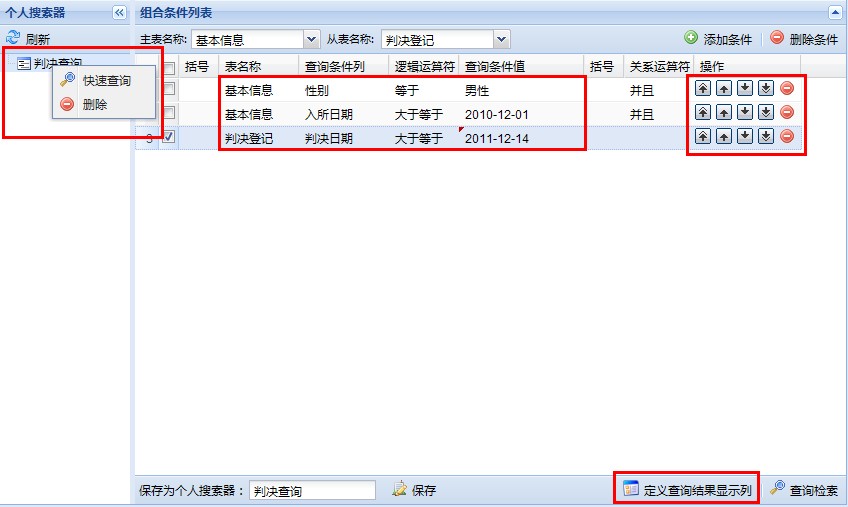

EditGridPanel主要代码如下:
{header:'括号',dataIndex:'leftbrackets',width:40,editor:new Ext.grid.GridEditor(new Ext.form.ComboBox({
store: new Ext.data.SimpleStore({
fields:['value','text'],
data: leftBracketsComboData
}),
mode: 'local',
triggerAction: 'all',
editable:false,
valueField: 'value',
displayField: 'text',
readOnly:true
// lazyInit:false,
// listeners: {
// 'focus' :
// function(){
// this.expand();
// }
// }
})),
renderer: function(value, cellmeta, record){
if(value == null || value == ""){
return "";
}
return leftBracketsComboData[value][1];
},scope:this}
,{header:'表名称',dataIndex:'tablename',width:80,editor:new Ext.grid.GridEditor(new Ext.form.ComboBox({
store: new Ext.data.SimpleStore({
fields:['value','text'],
data: baseTableData
}),
id:'baseTableNameID',
tpl: '
mode: 'local',
triggerAction: 'all',
editable:false,
valueField: 'value',
displayField: 'text',
lazyInit:false,
listeners: {
'expand':function(combo){
combo.clearValue();
combo.store.loadData(baseTableData);
}
,'select':function(){
}
,'focus' :function(){
this.expand();
}
}
})),
renderer: function(value, cellmeta, record, row, col, store){
if(value == null || value == ""){
return;
}
return record.get("tablenamestring");
}}
,{header:'查询条件列',dataIndex:'fieldname',width:90,editor:new Ext.grid.GridEditor(new Ext.form.ComboBox({
id:'fieldnameID'
,store : new Ext.data.Store({
proxy : new Ext.data.HttpProxy({url : '../SearchTableColumns/extlistKV.do'})
,reader : new Ext.data.JsonReader({}, ['name','chinese'])
,baseParams:{s_tablename:'0'}
})
,tpl: '
,valueField :'name'
,displayField :'chinese'
,mode : 'remote'
,forceSelection : true
,triggerAction : 'all'
,typeAhead : false
,selectOnFocus : true
,resizable:true
,width : 120
,lazyInit:false
,listeners: {
'focus' :
function(){
this.expand();
}
}
}
)),
renderer: function(value, cellmeta, record, row, col, store){
if(value == null || value == ""){
return "";
}
return record.get("fieldnamestring");
}}
,{header:'逻辑运算符',dataIndex:'relationsign',width:70,editor:new Ext.grid.GridEditor(new Ext.form.ComboBox({
store: new Ext.data.SimpleStore({
fields:['value','text'],
data: relationSignComboData
}),
mode: 'local',
triggerAction: 'all',
editable:false,
valueField: 'value',
displayField: 'text',
readOnly:true,
lazyInit:false,
listeners: {
'focus' :
function(){
this.expand();
}
}
})),
renderer: function(value, cellmeta, record, row, col, store){
if(value == null || value == ""){
return;
}
return relationSignComboData[value][1];
},scope:this}
,{header:'查询条件值',dataIndex:'expressvalue',width:125,editor:new Ext.grid.GridEditor(new Ext.form.TextField({ }))
, renderer: function(value, cellmeta, record, row, col, store){
if(value == null || value == ""){
return "";
}
return record.get("expressvaluestring");
}
}
,{header:'括号',dataIndex:'rightbrackets',width:40,editor:new Ext.grid.GridEditor(new Ext.form.ComboBox({
store: new Ext.data.SimpleStore({
fields:['value','text'],
data: rightBracketsComboData
}),
mode: 'local',
triggerAction: 'all',
editable:false,
valueField: 'value',
displayField: 'text',
readOnly:true,
lazyInit:false,
listeners: {
'focus' :
function(){
this.expand();
}
}
})),
renderer: function(value, cellmeta, record){
if(value == null || value == ""){
return "";
}
return rightBracketsComboData[value][1];
},scope:this}
,{header:'关系运算符',dataIndex:'operatorsign',width:70,editor:new Ext.grid.GridEditor(new Ext.form.ComboBox({
store: new Ext.data.SimpleStore({
fields:['value','text'],
data: operatorSignComboData
}),
mode: 'local',
triggerAction: 'all',
editable:false,
valueField: 'value',
displayField: 'text',
readOnly:true,
lazyInit:false,
listeners: {
'focus' :
function(){
this.expand();
}
}
})),
renderer: function(value, cellmeta, record){
if(value == null || value == ""){
return ;
}
return operatorSignComboData[value][1];
},scope:this}
,this.rowActions
]);
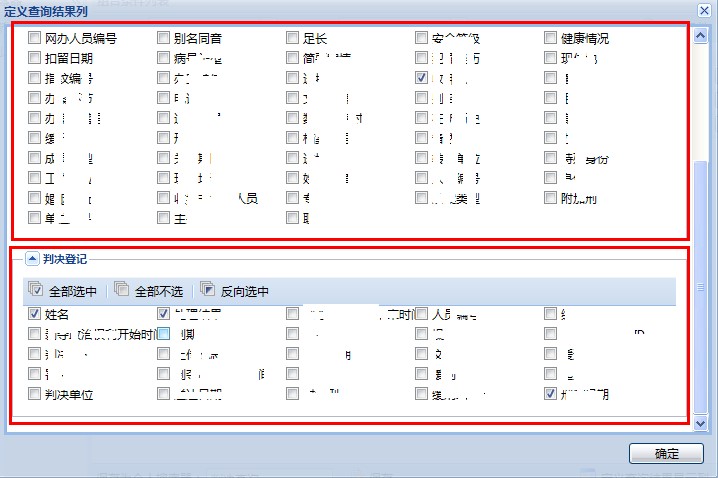
Ext.namespace('com.awd');
Ext.namespace('com.awd.advancedSearch');
com.awd.advancedSearch.tableGroup = Ext.extend(Ext.form.FormPanel, {
initComponent : function() {
Ext.apply(this, {
border : true,
buttonAlign:'right',
bodyStyle : 'padding:5px;overflow-y:scroll;border-left:1px solid #8DB2E3'
});
com.awd.advancedSearch.tableGroup.superclass.initComponent.apply(this,arguments);
}
,loadTableField:function(selectedTableColumns){
Ext.Ajax.request({
url : '../AdvancedSearch/getDisplayTables.do',
method:'post',
params:{tableNames:baseTableData.toString()},
success : function(request) {
var tables = Ext.decode(request.responseText);
var myfieldset = null;
if (this.items.length == 0) {
for (var i = 0; i myfieldset = new Ext.form.FieldSet({
title : tables[i].tableString
,collapsible : true
,autoHeight : true
,layout : 'column'
,items : [
{xtype : 'remotecheckboxgroup',
columns : 5,
url : '../SearchTableColumns/extListAsFieldDisplay.do',
baseParams : {
dir : 'ASC',
limit : '150',
s_tablename : tables[i].tableName,
selectedTableColumns:selectedTableColumns
},
reader : new Ext.data.JsonReader({
totalProperty : 'totalProperty',
root : 'list',
fields : [{name : 'fieldId'},{name : 'fieldName'},{name : 'fieldLabel'},{name : 'fieldValue'},{name : 'fieldChecked'}]
}),
fieldId : 'fieldId',
fieldName : 'fieldName',
fieldLabel : 'fieldLabel',
fieldValue : 'fieldValue',
fieldChecked : 'fieldChecked'
}]
});
this.items.add(myfieldset);
}
}else{
for (var j = 0; j this.remove(0);
}
for (var i = 0; i myfieldset = new Ext.form.FieldSet({
title : tables[i].tableString
,collapsible : true
,autoHeight : true
,layout : 'column'
,items : [
{xtype : 'remotecheckboxgroup',
columns : 5,
url : '../SearchTableColumns/extListAsFieldDisplay.do',
baseParams : {
dir : 'ASC',
limit : '150',
s_tablename : tables[i].tableName,
selectedTableColumns:selectedTableColumns
},
reader : new Ext.data.JsonReader({
totalProperty : 'totalProperty',
root : 'list',
fields : [{name : 'fieldId'},{name : 'fieldName'},{name : 'fieldLabel'},{name : 'fieldValue'},{name : 'fieldChecked'}]
}),
fieldId : 'fieldId',
fieldName : 'fieldName',
fieldLabel : 'fieldLabel',
fieldValue : 'fieldValue',
fieldChecked : 'fieldChecked'
}]
});
this.items.add(myfieldset);
}
}
this.doLayout(true);
}
,scope : this
,failure : function() {
alert('加载错误,请确认网络连接正常!');
}
});
}
});
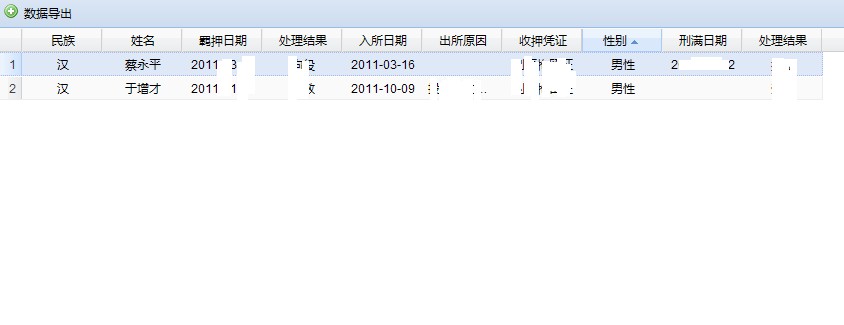
Ext.apply(Ext, {
isFirebug: (window.console && window.console.firebug)
});
Ext.ns('app');
app.getMetaGrid = function(config){
return new Ext.ux.grid.MetaGrid(Ext.apply({
baseParams: null,
/**
* @cfg {String} url Specify the url to the data object (server side
* script) from which to load data through the HttpProxy.
*/
url: '../AdvancedSearch/extSearchResultList.do?ssid='+globalQueryString("ssid"),
// url: 'meta-data.js',
renderChange: function(val){
if (val > 0) {
return '' + val + '';
} else if (val return '' + val + '';
}
return val;
},
renderCombo: function(val, metadata, record, rowIndex, colIndex, store){
var data;
/*
// the field name:
//var field = record.fields.items[colIndex].name; // unreliable since colIndex may be wrong
var field = this.colModel.getDataIndex(colIndex);
// Use the Store Manager to get a reference to the ComboBox store.
// The store that is passed as one of arguments to this renderer
// function is the grid store. We need to cross reference the data
// with the ComboBox store, not the grid store.
//Get a registered Store using the id of the Store
var storeId = field;
var comboStore = Ext.StoreMgr.lookup(storeId);
if (!comboStore) {
comboStore = new App.ComboStore(storeId);
}
var comboRecord = comboStore.getById(val);
if (comboRecord) {
data = comboRecord.data.displayField;
}
else {
data = data;//'missing data';
}
*/
// return the value that should be rendered into the grid cell
return data;
},
/**
* Date renderer function
* Renders a date
*/
renderDate: function(date){
return date ? date.dateFormat('M d, Y') : '';
},
renderDateTime: function(date){
if (!date) {
return '';
}
var now = new Date();
var d = now.clearTime(true);
var notime = date.clearTime(true).getTime();
if (notime == d.getTime()) {
return 'Today ' + date.dateFormat('g:i a');
}
d = d.add('d', -6);
if (d.getTime() return date.dateFormat('D g:i a');
}
return date.dateFormat('n/j g:i a');
},
/**
* Italic Custom renderer function
* takes val and renders it in italics
* @param {Object} val
*/
renderItalic: function(data, metadata, record, rowIndex, columnIndex, store){
return '' + data + '';
},
/**
* Percent Custom renderer function
* takes 'data' and renders it red or green with %
*/
renderPctChange: function(data, metadata, record, rowIndex, columnIndex, store){
var p = (parseFloat(data) * 100.0).toFixed(1);
var qtip = '>';
if (data >= 0) {
//meta.css = 'green-cls';
qtip = " qtip='yeah'/>";
return '';
} else if (data //meta.css = 'red-cls';
qtip = " qtip='woops'/>";
return '';
}
//css:
//.red-cls {color: red;}
//.green-cls {color: green;}
return data;
},
/**
* Red/Green Custom renderer function
* takes val and renders it red if * @param {Object} val
*/
renderPosNeg: function(data, metadata, record, rowIndex, columnIndex, store){
if (data >= 0) {
return '' + data + '';
} else if (data return '' + data + '';
}
return data;
},
/**
* Risk Custom renderer function
* Renders according to risk level
* @param {Object} val
*/
renderRisk: function(data, metadata, record, rowIndex, columnIndex, store){
switch (data) {
case "high":
metadata.css = "redcell";
return "high";//display 'high' in the cell (could be
//we could display anything here
//"High","Hi","yup"...anything
case "medium":
return "medium";
case "low":
return "low";
default:
return data;
}
},
/**
* Star Custom renderer function
* Renders a picture according to value
* @param {Object} val
*/
renderStars: function(data, metadata, record, rowIndex, columnIndex, store){
switch (data) {
case "1":
metadata.css = "stars1";
return 1;//returns text over the background image
case "2":
metadata.css = "stars2";
return;//just shows the background image
case "3":
metadata.css = "stars3";
return;
case "4":
metadata.css = "stars4";
return;
case "5":
metadata.css = "stars5";
return;
default:
return data;
}
}
,renderQtip: function(data, metadata, record, rowIndex, columnIndex, store){
metadata.attr = 'ext:qtip="' + data + '"';
return data;
}
}, config));
};
Ext.onReady(function(){
var vp = new Ext.Viewport({
layout:'fit',
items: [app.getMetaGrid({
border: false
})]
});
});
所有JS打包下载共享 advancedSearch.rar




