



本文介绍利用MNIST数据集构建多数字识别模型的过程。先通过预处理MNIST数据,拼接生成含多个数字的训练集和测试集;接着安装PaddleOCR及依赖,下载预训练模型;然后训练模型并导出;最后采样测试图片,用导出的模型进行识别测试。
☞☞☞AI 智能聊天, 问答助手, AI 智能搜索, 免费无限量使用 DeepSeek R1 模型☜☜☜

引入
- 传统的基于 MNIST 数据集的手写数字识别模型只能识别单个数字
- 但实际使用环境中,多数字识别才是更加常见的情况
- 本次就使用 MNIST 数据集,通过拼接数据的方式,实现多数字识别模型
构建数据集
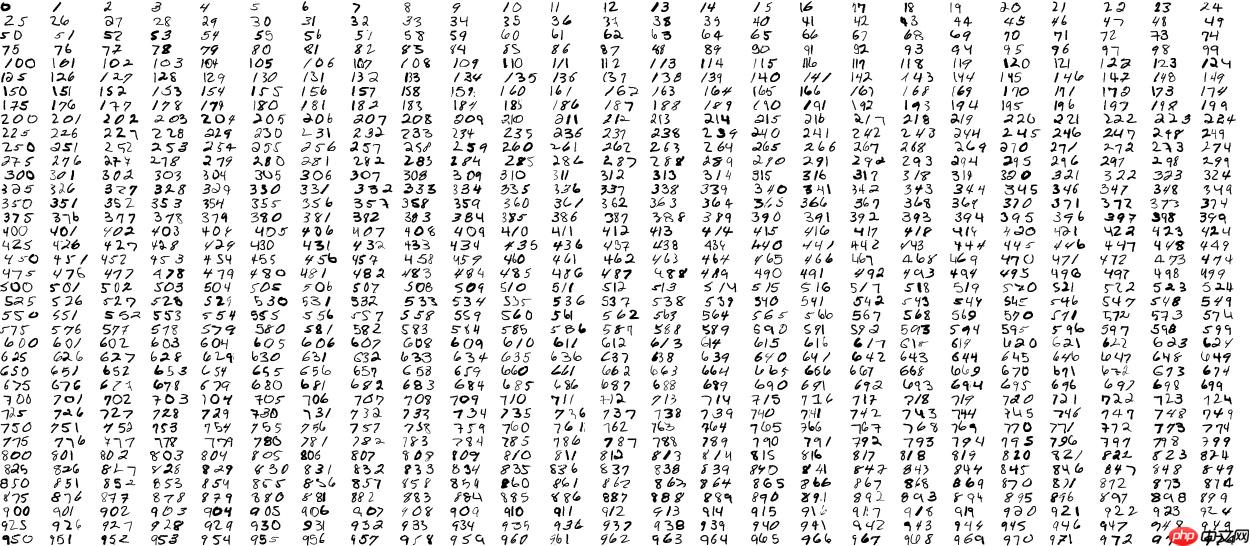
- 拼接采样数据集
In [ ]
%cd ~
!mkdir dataset
!mkdir dataset/train
!mkdir dataset/testimport cv2import randomimport numpy as npfrom tqdm import tqdmfrom paddle.vision.datasets import MNIST# 加载数据集mnist_train = MNIST(mode='train', backend='cv2')
mnist_test = MNIST(mode='test', backend='cv2')# 数据集预处理datas_train = {}for i in range(len(mnist_train)):
    sample = mnist_train[i]
    x, y = sample[0], sample[1]

    _sum = np.sum(x, axis=0)
    _where = np.where(_sum > 0)
    x = 255 - x[:, _where[0][0]: _where[0][-1]+1]    if str(y[0]) in datas_train:
        datas_train[str(y[0])].append(x)    else:
        datas_train[str(y[0])] = [x]

datas_test = {}for i in range(len(mnist_test)):
    sample = mnist_test[i]
    x, y = sample[0], sample[1]

    _sum = np.sum(x, axis=0)
    _where = np.where(_sum > 0)
    x = 255 - x[:, _where[0][0]: _where[0][-1]+1]    if str(y[0]) in datas_test:
        datas_test[str(y[0])].append(x)    else:
        datas_test[str(y[0])] = [x]# 图片拼接采样datas_train_list = []for num in tqdm(range(0, 999)):    for _ in range(1000):
        imgs = [255 - np.zeros((28, np.random.randint(10)))]        for word in str(num):
            index = np.random.randint(0, len(datas_train[word]))
            imgs.append(datas_train[word][index])
            imgs.append(255 - np.zeros((28, np.random.randint(10))))
        img = np.concatenate(imgs, 1)
        cv2.imwrite('dataset/train/%03d_%04d.jpg' % (num, _), img)
        datas_train_list.append('train/%03d_%04d.jpg\t%d\n' % (num, _, num))

datas_test_list = []for num in tqdm(range(0, 999)):    for _ in range(50):
        imgs = [255 - np.zeros((28, np.random.randint(10)))]        for word in str(num):
            index = np.random.randint(0, len(datas_test[word]))
            imgs.append(datas_test[word][index])
            imgs.append(255 - np.zeros((28, np.random.randint(10))))
        img = np.concatenate(imgs, 1)
        cv2.imwrite('dataset/test/%03d_%04d.jpg' % (num, _), img)
        datas_test_list.append('test/%03d_%04d.jpg\t%d\n' % (num, _, num))# 数据列表生成with open('dataset/train.txt', 'w') as f:    for line in datas_train_list:
        f.write(line)with open('dataset/test.txt', 'w') as f:    for line in datas_test_list:
        f.write(line)
数据样例展示
安装 PaddleOCR
In [ ]
!git clone https://gitee.com/PaddlePaddle/PaddleOCR -b release/2.1 --depth 1
安装依赖环境
In [ ]
!pip install imgaug pyclipper lmdb Levenshtein
下载预训练模型
In [ ]
%cd ~/PaddleOCR

!wget -P ./pretrain_models/ https://paddleocr.bj.bcebos.com/dygraph_v2.0/ch/ch_ppocr_mobile_v2.0_rec_pre.tar
!cd pretrain_models && tar -xf ch_ppocr_mobile_v2.0_rec_pre.tar && rm -rf ch_ppocr_mobile_v2.0_rec_pre.tar
模型训练
In [8]
%cd ~/PaddleOCR

!python tools/train.py -c ../multi_mnist.yml
模型导出
In [34]
%cd ~/PaddleOCR

!python3 tools/export_model.py \
    -c ../multi_mnist.yml -o Global.pretrained_model=../output/multi_mnist/best_accuracy \
    Global.load_static_weights=False \
    Global.save_inference_dir=../inference/multi_mnist
采样测试图片
In [45]
%cd ~/PaddleOCR
!mkdir ~/test_imgsimport cv2import randomimport numpy as npfrom tqdm import tqdmfrom paddle.vision.datasets import MNIST# 加载数据集mnist_test = MNIST(mode='test', backend='cv2')# 数据集预处理datas_test = {}for i in range(len(mnist_test)):
    sample = mnist_test[i]
    x, y = sample[0], sample[1]

    _sum = np.sum(x, axis=0)
    _where = np.where(_sum > 0)
    x = 255 - x[:, _where[0][0]: _where[0][-1]+1]    if str(y[0]) in datas_test:
        datas_test[str(y[0])].append(x)    else:
        datas_test[str(y[0])] = [x]# 图片拼接采样for num in range(0, 1000):
    imgs = [255 - np.zeros((28, np.random.randint(10)))]    for word in str(num):
        index = np.random.randint(0, len(datas_test[word]))
        imgs.append(datas_test[word][index])
        imgs.append(255 - np.zeros((28, np.random.randint(10))))
    img = np.concatenate(imgs, 1)
    cv2.imwrite('../test_imgs/%03d.jpg' % num , img)
模型测试
In [46]
%cd ~/PaddleOCR

!python tools/infer/predict_rec.py \
    --image_dir="../test_imgs" \
    --rec_model_dir="../inference/multi_mnist/" \
    --rec_image_shape="3, 28, 64" \
    --rec_char_type="ch" \
    --rec_char_dict_path="../label_list.txt"




