



本文介绍将paddlepaddle及paddlehub模型通过转换为onnx模型,再用openvino调用的方案。因paddle模型在云函数部署麻烦、存储空间大且intel cpu上预测速度不稳,而openvino可优化且支持onnx模型。文中详述环境配置,以及两种模型转换为onnx并在openvino调用的步骤,还提及相关问题与解决尝试。
☞☞☞AI 智能聊天, 问答助手, AI 智能搜索, 免费无限量使用 DeepSeek R1 模型☜☜☜
一、前言
1. 使用OpenVINO或ONNX部署的需求来源
- PaddlePaddle的模型在serverless云函数部署上较麻烦或无法在较少存储空间的环境下部署,整个PaddlePaddle太大了,除非用Paddle Lite否则根本无法放进云函数运行
- 在intel cpu的云服务器上可以看出其预测速度不是很稳定,有优化空间,OpenVINO可能可以优化这部分
- PaddleHub有很多amazing的模型,但无法在云函数部署或无法在较少存储空间的环境下部署,涉及的import包太多太大
2. OpenVINO及ONNX的当前状态
- OpenVINO 在2020.04开始就可以直接调用onnx模型了
- ONNX模型还是支持较多的PaddlePaddle的算子
- 但OpenVINO暂未直接支持Paddle模型,要用dev版来部署我也一直没跑通,环境配置较麻烦
- Paddle模型转ONNX已较成熟,且ONNX能直接被OpenVINO调用
- 转换成ONNX模型也可以较方便用在其他地方
3. 本项目方案
- 所以,综合简单方便的原则,我采用的方案是:
- 使用PaddlePaddle模型或PaddleHub模型转成ONNX模型
- OpenVINO调用ONNX模型的方案。环境既简单,也能用到OpenVINO在intel设备上的加速效果。
In [2]
!pip install -q  paddle2onnx
!pip install -q  openvino
!pip install -q onnx
!pip install -q onnxruntime
三、PaddlePaddle模型及PaddleHub模型在OpenVINO中使用
- PaddlePaddle搭建模型时通常从vision库的backbone搭起,所以本次测试使用mobilenet
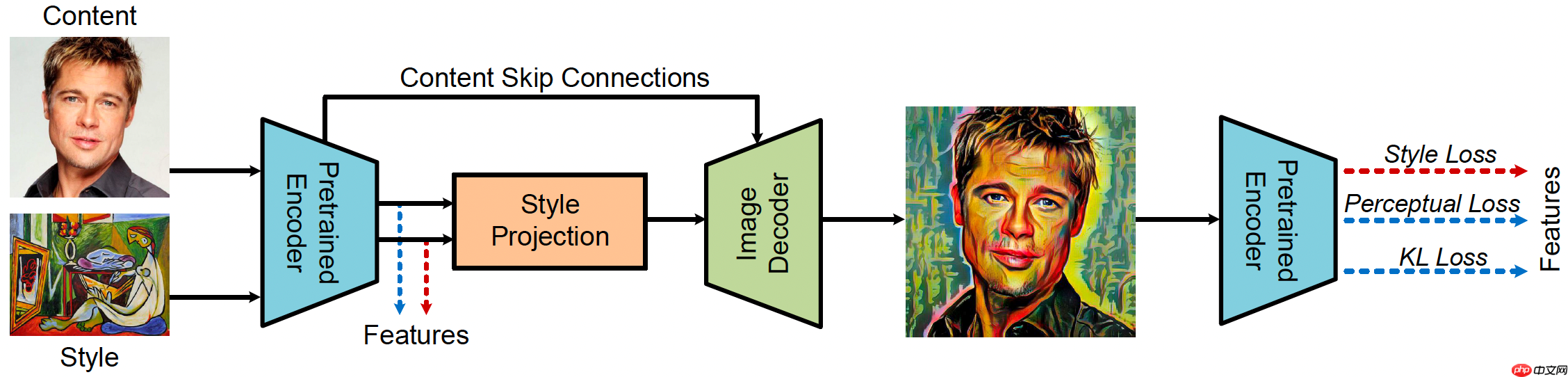
- PaddleHub中有很多amazing的模型,例如:风格迁移模型StyleProNet(PaddleHub官方介绍)
- 风格迁移模型StyleProNet有2个网络(如下图),一个是encoder,一个是decoder,我们分别对他们进行转换,转换2个ONNX模型来调用,
1 PaddlePaddle模型转成ONNX,在OpenVINO调用
- 这里仅展示动态图的,静态图也可参考另一位大大的项目Paddle2.0导出ONNX模型和推理
1.1 准备PaddlePaddle动态图模型
选用了vision库中的mobilenet V2为实例,把其设为eval模式。大家看到net的打印,看到是一层层网络结构
In [25]
import osimport timeimport paddle# 从模型代码中导入模型from paddle.vision.models import mobilenet_v2# 实例化模型net = mobilenet_v2()print(net)# 将模型设置为推理状态net.eval()
1.2 转换Paddle模型为ONNX
In [27]
# 定义输入数据input_spec = paddle.static.InputSpec(shape=[None, 3, 224, 224], dtype='float32', name='image')# ONNX模型导出# enable_onnx_checker设置为True,表示使用官方ONNX工具包来check模型的正确性,需要安装ONNX(pip install onnx)paddle.onnx.export(net, 'mobilenet_v2', input_spec=[input_spec], opset_version=12, enable_onnx_checker=True)
/opt/conda/envs/python35-paddle120-env/lib/python3.7/site-packages/paddle/fluid/dygraph/dygraph_to_static/convert_call_func.py:89: VisibleDeprecationWarning: Creating an ndarray from ragged nested sequences (which is a list-or-tuple of lists-or-tuples-or ndarrays with different lengths or shapes) is deprecated. If you meant to do this, you must specify 'dtype=object' when creating the ndarray.
  func_in_dict = func == v
/opt/conda/envs/python35-paddle120-env/lib/python3.7/site-packages/paddle/fluid/layers/math_op_patch.py:322: UserWarning: /opt/conda/envs/python35-paddle120-env/lib/python3.7/site-packages/paddle/vision/models/mobilenetv2.py:99
The behavior of expression A + B has been unified with elementwise_add(X, Y, axis=-1) from Paddle 2.0. If your code works well in the older versions but crashes in this version, try to use elementwise_add(X, Y, axis=0) instead of A + B. This transitional warning will be dropped in the future.
  op_type, op_type, EXPRESSION_MAP[method_name]))
2021-09-11 22:40:22 [INFO]	ONNX model genarated is valid.
2021-09-11 22:40:22 [INFO]	ONNX model saved in mobilenet_v2.onnx
1.3 ONNX模型测试及调用
- 误差很少,转换没问题
In [28]
# 动态图导出的ONNX模型测试import timeimport numpy as npfrom onnxruntime import InferenceSession# 加载ONNX模型sess = InferenceSession('mobilenet_v2.onnx')# 准备输入x = np.random.random((1, 3, 224, 224)).astype('float32')# 模型预测start = time.time()
ort_outs = sess.run(output_names=None, input_feed={'image': x})
end = time.time()print("Exported model has been predicted by ONNXRuntime!")print('ONNXRuntime predict time: %.04f s' % (end - start))# 对比ONNXRuntime和Paddle预测的结果paddle_outs = net(paddle.to_tensor(x))

diff = ort_outs[0] - paddle_outs.numpy()
max_abs_diff = np.fabs(diff).max()if max_abs_diff < 1e-05:    print("The difference of results between ONNXRuntime and Paddle looks good!")else:
    relative_diff = max_abs_diff / np.fabs(paddle_outs.numpy()).max()    if relative_diff < 1e-05:        print("The difference of results between ONNXRuntime and Paddle looks good!")    else:        print("The difference of results between ONNXRuntime and Paddle looks bad!")    print('relative_diff: ', relative_diff)print('max_abs_diff: ', max_abs_diff)
Exported model has been predicted by ONNXRuntime!
ONNXRuntime predict time: 0.0125 s
The difference of results between ONNXRuntime and Paddle looks good!
max_abs_diff:  3.0553338e-13
2 PaddleHub 模型在OpenVINO中使用
-
a. 步骤:
a.1 PaddleHub模型导出inference模型
a.2 inference模型转成ONNX模型
a.3 在OpenVINO调用
b. PaddleHub模型中有很多直接有 save_inference_model 方法,可以直接导出。
-
c. 本次测试模型:
c.1 分类模型,mobilenet_v3_large_imagenet_ssld
c.2 风格转换模型,stylepro_artistic
2.1 PaddleHub模型导出inference模型
- mobilenet_v3模型
In [ ]
import paddleimport paddlehub as hub# 定义输入数据input_spec = paddle.static.InputSpec(shape=[None, 3, 224, 224], dtype='float32', name='image')# ONNX模型导出#paddle.onnx.export(model, 'stylepro', input_spec=[input_spec], opset_version=12)#Source: https://www.paddlepaddle.org.cn/hublistmodel = hub.Module(name="mobilenet_v3_large_imagenet_ssld")
model.save_inference_model(dirname="mobilenet_v3_large_imagenet_ssld/",
                           model_filename="mobilenet_v3_large_imagenet_ssld/inference.pdmodel",
                           params_filename="mobilenet_v3_large_imagenet_ssld/inference.pdiparams")#paddle.onnx.export(model, 'mobilenet', input_spec=[input_spec], opset_version=11)
/opt/conda/envs/python35-paddle120-env/lib/python3.7/site-packages/matplotlib/__init__.py:107: DeprecationWarning: Using or importing the ABCs from 'collections' instead of from 'collections.abc' is deprecated, and in 3.8 it will stop working
  from collections import MutableMapping
/opt/conda/envs/python35-paddle120-env/lib/python3.7/site-packages/matplotlib/rcsetup.py:20: DeprecationWarning: Using or importing the ABCs from 'collections' instead of from 'collections.abc' is deprecated, and in 3.8 it will stop working
  from collections import Iterable, Mapping
/opt/conda/envs/python35-paddle120-env/lib/python3.7/site-packages/matplotlib/colors.py:53: DeprecationWarning: Using or importing the ABCs from 'collections' instead of from 'collections.abc' is deprecated, and in 3.8 it will stop working
  from collections import Sized
/opt/conda/envs/python35-paddle120-env/lib/python3.7/site-packages/scipy/linalg/__init__.py:217: DeprecationWarning: The module numpy.dual is deprecated.  Instead of using dual, use the functions directly from numpy or scipy.
  from numpy.dual import register_func
Download https://bj.bcebos.com/paddlehub/paddlehub_dev/mobilenet_v3_large_imagenet_ssld_1.0.0.tar.gz
[##################################################] 100.00%
Decompress /home/aistudio/.paddlehub/tmp/tmpgvkuhymh/mobilenet_v3_large_imagenet_ssld_1.0.0.tar.gz
[##################################################] 100.00%
[2021-09-11 21:26:50,522] [    INFO] - Successfully installed mobilenet_v3_large_imagenet_ssld-1.0.0
[2021-09-11 21:26:50,548] [ WARNING] - The _initialize method in HubModule will soon be deprecated, you can use the __init__() to handle the initialization of the object
- stylepro_artistic模型
In [ ]
import paddleimport paddlehub as hub# ONNX模型导出#paddle.onnx.export(model, 'stylepro', input_spec=[input_spec], opset_version=12)#Source: https://www.paddlepaddle.org.cn/hublistmodel = hub.Module(name="stylepro_artistic")
model.save_inference_model(dirname="stylepro_artistic/",
                           model_filename="stylepro_artistic/inference.pdmodel",
                           params_filename="stylepro_artistic/inference.pdiparams")#paddle.onnx.export(model, 'mobilenet', input_spec=[input_spec], opset_version=11)
Download https://bj.bcebos.com/paddlehub/paddlehub_dev/stylepro_artistic_1.0.1.tar.gz
[##################################################] 100.00%
Decompress /home/aistudio/.paddlehub/tmp/tmpc94wa04d/stylepro_artistic_1.0.1.tar.gz
[##################################################] 100.00%
[2021-09-11 21:28:03,186] [    INFO] - Successfully installed stylepro_artistic-1.0.1
[2021-09-11 21:28:03,208] [ WARNING] - The _initialize method in HubModule will soon be deprecated, you can use the __init__() to handle the initialization of the object
2.2 inference模型转onnx模型
- 尝试了inference模型直接转OpenVINO的IR模型,但环境一直没配置好,【Failed】
- 尝试了inference模型转ONNX模型,模型转成功了,onnx.checker.check_model(onnx_model)检测模型也是ok的.【Sucess】
In [6]
# stylepro_artistic 模型的encoder 与decoder!paddle2onnx \
    --model_dir stylepro_artistic/encoder \
    --model_filename inference.pdmodel \
    --params_filename inference.pdiparams \
    --save_file stylepro_artistic_encoder.onnx \
    --opset_version 12!paddle2onnx \
    --model_dir stylepro_artistic/decoder \
    --model_filename inference.pdmodel \
    --params_filename inference.pdiparams \
    --save_file stylepro_artistic_decoder.onnx \
    --opset_version 12
In [7]
# mobilenet模型!paddle2onnx \
    --model_dir mobilenet_v3_large_imagenet_ssld \
    --model_filename inference.pdmodel \
    --params_filename inference.pdiparams \
    --save_file mobilenet_v3_large_imagenet_ssld.onnx \
    --opset_version 12
查看模型

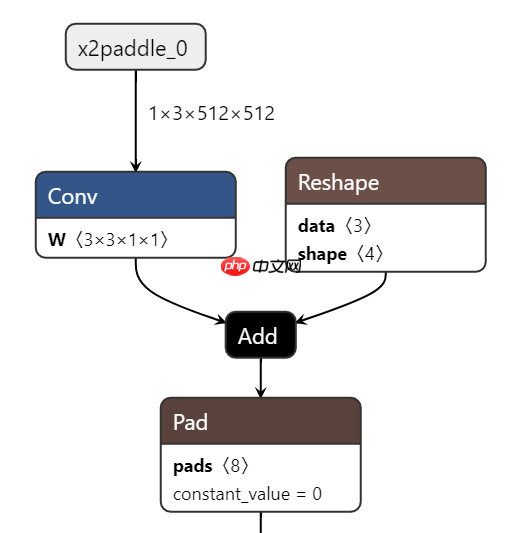
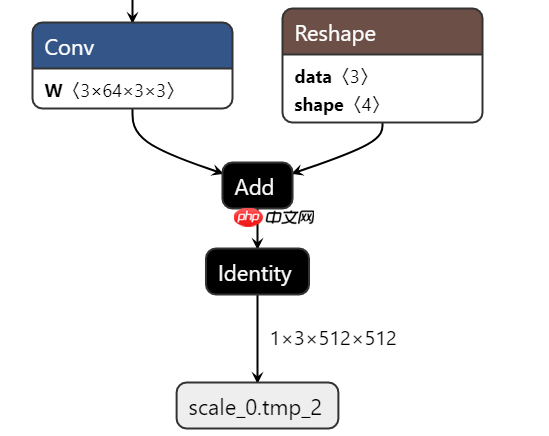
转换成功的ONNX模型可以使用Netron观看结构,看到输入输出的维度,看到整个模型结构
Netron是很方便的工具,能看几乎你能想到的所有框架的模型(tf,keras,CoreML,ONNX,PaddlePaddle....),推荐下载使用 http://www.electronjs.org/apps/netron
可以看到stylepro_artistic_encoder.onnx的输出是 512* 64* 64
- 对应地,stylepro_artistic_decoder.onnx的输入是 512* 64* 64
2.3 OpenVINO中调用
- 先尝试了ONNX中调用,尽管模型检查都没问题,但在onnxruntime.InferenceSession(onnx_file)时一直都报错nvalidArgument: [ONNXRuntimeError] : 2 : INVALID_ARGUMENT : Failed to load model with error: Unknown model file format version.暂未解决
- 尝试用OpenVINO调用,在自己服务器是成功的,在aistudio上运行,会因权限等问题报`GLIBC_2.27' not found 的错误
下方代码为PaddleHub的mobilenet模型的调用
In [ ]
import os, os.pathimport sysimport jsonimport urllib.requestimport cv2import numpy as npfrom imagenet_class_index_json import imagenet_classes #print(imagenet_classes['12']) imagenet类别index对应表from openvino.inference_engine import IENetwork, IECore, ExecutableNetworkfrom IPython.display import Imagedef image_preprocess_mobilenetv3(img_path):
    img = cv2.imread(img_path)
    img = cv2.resize(img, (224,224))
    img = np.transpose(img, [2,0,1]) / 255
    img = np.expand_dims(img, 0)
    img_mean = np.array([0.485, 0.456,0.406]).reshape((3,1,1))
    img_std = np.array([0.229, 0.224, 0.225]).reshape((3,1,1))
    img -= img_mean
    img /= img_std    return img.astype(np.float32)def top_k(result, topk=5):
    #imagenet_classes = json.loads(open("utils/imagenet_class_index.json").read())
    indices = np.argsort(-result[0])    for i in range(topk):        print("Class name:","'"+imagenet_classes[str(indices[0][i])][1]+"'",              ", probability:", result[0][0][indices[0][i]])

ie = IECore()

onnx_model='mobilenet_v3_large_imagenet_ssld.onnx'# 直接使用ONNX格式加载net = ie.read_network(model=onnx_model)

filename = "/root/tmp/test1.jpg"test_image = image_preprocess_mobilenetv3(filename)

# pdmodel might be dynamic shape, this will reshape based on the inputinput_key = list(net.input_info.items())[0][0] # 'inputs'net.reshape({input_key: test_image.shape})#load the network on CPUexec_net = ie.load_network(net, 'CPU')
assert isinstance(exec_net, ExecutableNetwork)#perform the inference stepoutput = exec_net.infer({input_key: test_image})
result_ie = list(output.values())print(result_ie)#Image(filename=filename)
---------------------------------------------------------------------------ImportError Traceback (most recent call last)python-input-26-58940573a306> in ----> 1 from openvino.inference_engine import IECore 2onnx_model 3 ie = IECore() 4 onnx_model='mobilenet_v2.onnx' 5 # 直接使用ONNX格式加载 /opt/conda/envs/python35-paddle120-env/lib/python3.7/site-packages/openvino/inference_engine/__init__.py in ----> 1 from .ie_api import * 2 __all__ = ['IENetwork', "TensorDesc", "IECore", "Blob", "PreProcessInfo", "get_version"] 3 __version__ = get_version() 4 ImportError: /lib/x86_64-linux-gnu/libm.so.6: version `GLIBC_2.27' not found (required by /opt/conda/envs/python35-paddle120-env/bin/../lib/libngraph.so)
下方为PaddleHub的stylepro_artistic模型的使用
-
步骤:
- 图片前处理
- 模板图片与内容图片通过 OpenVINO encode模型分别获取feature
- 两图片的feature根据alpha融合
- 融合的feature通过 OpenVINO decode模型转换得到图片
- 图片后处理并保存
-
代码参考:
- github中的PaddleHub项目 stylepro_artistic
- 图片前后处理就是参考原代码,放在processor.py中。
-
效果展示:
content原图, pattern样式图片
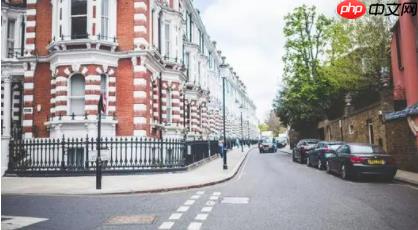

输出的图片out
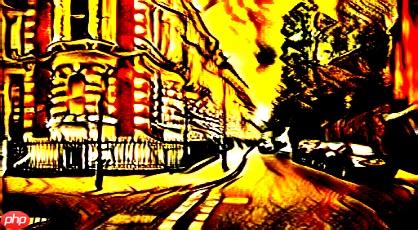
- 备注:
同样地,需要在自己的服务器或电脑运行,aistudio上跑OpenVINO会报GLIBC_2.27的错。但代码亲测有效。
In [3]
import os, os.pathimport sysimport jsonimport urllib.requestimport cv2import numpy as npfrom processor import *from openvino.inference_engine import IENetwork, IECore, ExecutableNetworkfrom IPython.display import Image

modelPath=""picPath='work/'def decodeImg(input_data,onnx_model=modelPath+'stylepro_artistic_decoder.onnx'):
    #onnx_model=rootPath+'stylepro_artistic_encoder.onnx'
    ie = IECore()    #
    net = ie.read_network(model=onnx_model)    # pdmodel might be dynamic shape, this will reshape based on the input
    input_key = list(net.input_info.items())[0][0] # 'inputs'
    net.reshape({input_key: input_data.shape})    #load the network on CPU
    exec_net = ie.load_network(net, 'CPU')    assert isinstance(exec_net, ExecutableNetwork)    #perform the inference step
    output = exec_net.infer({input_key: input_data})
    result_ie =list(output.values())[0]
    result_ie=np.array(result_ie)    #filter and print the top 5 results
    print(result_ie.shape)    # ´(1, 1, 512, 28, 28)
    return result_iedef encodeFeat(picname,onnx_model=modelPath+'stylepro_artistic_encoder.onnx'):

    #onnx_model=rootPath+'stylepro_artistic_encoder.onnx'
    ie = IECore()    #
    net = ie.read_network(model=onnx_model)
    test_image = image_preprocess(picname)
    # pdmodel might be dynamic shape, this will reshape based on the input
    input_key = list(net.input_info.items())[0][0] # 'inputs'
    net.reshape({input_key: test_image.shape})    #load the network on CPU
    exec_net = ie.load_network(net, 'CPU')    assert isinstance(exec_net, ExecutableNetwork)    #perform the inference step
    output = exec_net.infer({input_key: test_image})
    result_ie =list(output.values())
    result_ie=np.array(result_ie)    #filter and print the top 5 results
    print(result_ie.shape)    # output is :(1, 1, 512, 28, 28)
    return result_ie


content =cv2.imread(picPath+ "jj6.jpg")

pattern =cv2.imread(picPath+ "shahua.jpg")## get feature of pattern picture and content picturefea1=outputFeat(content)
fea2=outputFeat(pattern)##fr_feats = fr(fea1,fea2,1)print('fr_feats',fr_feats.shape)

output=decodeImg(fr_feats)
output=np.squeeze(output)#print('output',output.shape)#out=post_process(output,content.shape)print('out,',out['data'].shape)
cv2.imwrite(picPath+'out.jpg',out['data'])
---------------------------------------------------------------------------ImportError Traceback (most recent call last) in 6 import numpy as np 7 from processor import * ----> 8 fromopenvino.inference_engine import IENetwork, IECore, ExecutableNetwork 9 from IPython.display import Image 10 /opt/conda/envs/python35-paddle120-env/lib/python3.7/site-packages/openvino/inference_engine/__init__.py in ----> 1 from .ie_api import * 2 __all__ = ['IENetwork', "TensorDesc", "IECore", "Blob", "PreProcessInfo", "get_version"] 3 __version__ = get_version() 4 ImportError: /lib/x86_64-linux-gnu/libm.so.6: version `GLIBC_2.27' not found (required by /opt/conda/envs/python35-paddle120-env/bin/../lib/libngraph.so)




