

更多>
最新下载


jQuery自动填充表单功能代码
jQuery自动填充表单功能代码是一款利用jQueryUI的autocomplate工具实现表单的自动填充功能,数据可通过ajax从后台获取,或者从文本文件中获取都可。
0
2026-01-28


Vue记事本添加删除特效
使用vue制作简单的文本框输入关键词创建或删除计划事项记事本功能效果。可用于生活记事本备忘录特效。使用方法:参数介绍:新增(1、生成列表结构 v-for 和数组 2、获取用户输入 v-model 3、回车,新增数据 v-on .enter)--删除(数据改变和数据绑定的元素是同步变化的;时间的自定义参数;splice方法的应用)---计数(统计信息个数length)--清除(点击清除所有信息 v-
0
2026-01-28
24小时阅读排行榜
- 1 mysql安装完成后如何配置事件调度器_mysql任务管理配置
- 2 Three.js/Babylon.js如何加载上传的X3D/Collada格式XML
- 3 什么是mysql锁_mysql锁基础概念说明
- 4 c# 如何写日志 log4net
- 5 php动态网站开发怎样防止重复提交_PHP动态网站防重复提交法【方案】
- 6 css定位与布局的结合_使用position与display优化布局
- 7 C++构造函数怎么写 C++初始化列表与赋值的区别【细节】
- 8 如何为 HTML 表格添加棋盘式坐标标签(A–H / 1–8)
- 9 Go 中为何不推荐使用 this 作为方法接收者名称
- 10 XPath:匹配 class 属性值不包含指定子字符串的元素
- 11 Go 中方法接收者命名规范:为何不推荐使用 this
- 12 Go 中方法接收者命名规范:为何不应使用 this 关键字
- 13 如何在 PrimeVue 中将对象数据正确渲染为 Dropdown 下拉选项
- 14 如何在单页网站中实现上一篇/下一篇按钮的平滑滚动导航
- 15 Go 中方法接收者命名:为什么不应使用 this 关键字
更多>
最新教程

-
- Node.js 教程
- 16297 2025-08-28
-
- CSS3 教程
- 1546984 2025-08-27
-
- Rust 教程
- 23422 2025-08-27
-
- Vue 教程
- 25865 2025-08-22
-
- PostgreSQL 教程
- 22363 2025-08-21
-
- Git 教程
- 9317 2025-08-21
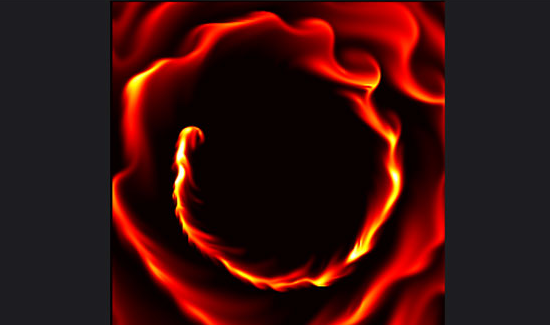
html5+canvas绘制抽象液体流动火焰动画特效
canvas.height = window.innerHeight;
if(animate && circle){
t = (t+0.1)%(TWO_PI);
x_new = Math.round(width/2 + width/4* Math.cos(t));
y_new = Math.round(height/2 + height/4* Math.sin(t));
disturbLine(x_new, y_new);
x_old = x_new;
y_old = y_new;
}
vel_step(u_, v_, u_old_, v_old_, visc_, dt_);
dens_step(dens_, dens_old_, u_, v_, diff_, dt_);
draw_texture();
ctx_2.putImageData(plot_rgba, 0, 0);
//ctx.drawImage(canvas_2,0,0,width,height,0,0,canvas.width,canvas.height);
ctx.drawImage(canvas_2,0,0,width,height,window.innerWidth/2-hwidth, window.innerHeight/2-hheight, canvas_2.width, canvas_2.height);
window.requestAnimationFrame(draw);
}
draw();


代码片段:
function draw() {
canvas.width = window.innerWidth;canvas.height = window.innerHeight;
if(animate && circle){
t = (t+0.1)%(TWO_PI);
x_new = Math.round(width/2 + width/4* Math.cos(t));
y_new = Math.round(height/2 + height/4* Math.sin(t));
disturbLine(x_new, y_new);
x_old = x_new;
y_old = y_new;
}
vel_step(u_, v_, u_old_, v_old_, visc_, dt_);
dens_step(dens_, dens_old_, u_, v_, diff_, dt_);
draw_texture();
ctx_2.putImageData(plot_rgba, 0, 0);
//ctx.drawImage(canvas_2,0,0,width,height,0,0,canvas.width,canvas.height);
ctx.drawImage(canvas_2,0,0,width,height,window.innerWidth/2-hwidth, window.innerHeight/2-hheight, canvas_2.width, canvas_2.height);
window.requestAnimationFrame(draw);
}
draw();
本站所有资源都是由网友投搞发布,或转载各大下载站,请自行检测软件的完整性!本站所有资源仅供学习与参考,请勿用于商业用途,否则产生的一切后果将由您自己承担!如有侵权请联系我们删除下架,联系方式:admin@php.cn
相关推荐


热门下载




canvas音谱可视化mp3音乐播放器代码
html5 canvas通过AudioContext对获取audio标签播放的音域和音高,调用js绘制相应高度的矩形或线条。
播放器特效
2021-03-10






