

更多>
最新下载


24小时阅读排行榜
- 1 HTML 中相对路径的 src 属性导致请求地址错误:如何正确设置资源路径
- 2 html个人页面怎么加点赞按钮_html点赞交互逻辑实现【交互】
- 3 vm.dirty_background_ratio=5 后回写频繁的 vm.dirty_expire_centisecs 延长
- 4 html5可视化编辑兼容旧浏览器吗_html5可视化兼容处理法【方案】
- 5 如何正确禁用多个按钮元素以防止重复点击
- 6 html5怎么调整图片色温_html5色温调节前端法【技巧】
- 7 html5怎么给图片加水印_html5图片水印添加方法【步骤】
- 8 html5怎么实现图片裁剪_html5图片裁剪实现方法【步骤】
- 9 Linux Buffer 与 Cache 的真实区别
- 10 如何实现一个支持 yield from 的异步上下文管理器
- 11 ulimit -n 软硬限制不一致的 /etc/security/limits.conf vs pam_limits
- 12 firewalld 启动失败 "RuntimeError: Failed to load zone" 的 zone 文件损坏修复
- 13 html5播放rtsp要服务器吗_html5播放rtsp需推流服务【架构】
- 14 html5日期格式与php怎么对接_html5日期php接收处理【步骤】
- 15 FIMO输出HTML有画布旋转角度吗_FIMO输出HTML旋转参数【说明】
更多>
最新教程

-
- Node.js 教程
- 16283 2025-08-28
-
- CSS3 教程
- 1546932 2025-08-27
-
- Rust 教程
- 23412 2025-08-27
-
- Vue 教程
- 25854 2025-08-22
-
- PostgreSQL 教程
- 22348 2025-08-21
-
- Git 教程
- 9309 2025-08-21
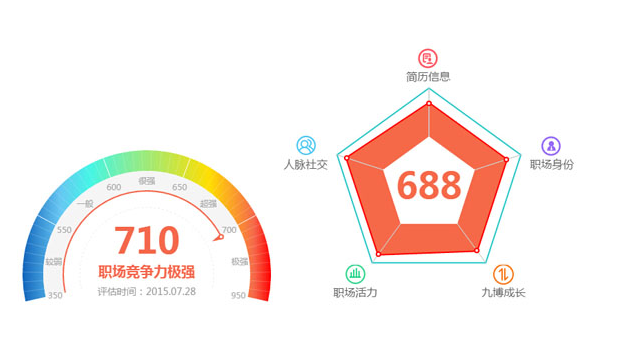
html5+Canvas仿支付宝芝麻信用仪表盘图表和雷达图表代码


这是一款基于Canvas实现漂亮的仿支付宝芝麻信用信用评估仪表盘图表和雷达图表特效,Canvas图表代码。
js代码
<script src="chart.meter.js"></script>
<script src="chart.radar.js"></script>
<script>
window.onload = function(){
Meter.setOptions({
element: 'meter',
centerPoint: {
x: 180,
y: 180
},
radius: 180,
data: {
value: 710,
title: '职场竞争力{t}',
subTitle: '评估时间:2015.07.28',
area: [{
min: 350, max: 550, text: '较弱'
},{
min: 550, max: 600, text: '一般'
},{
min: 600, max: 650, text: '很强'
},{
min: 650, max: 700, text: '超强'
},{
min: 700, max: 950, text: '极强'
}]
}
}).init();
Radar.setOptions({
element: 'radar',
radius: 140,
polar: [
{ text: '简历信息', max: 190, icon: { sx: 0, sy: 0, w: 32, h: 33, l: -17, t: -60 } },
{ text: '职场身份', max: 190, icon: { sx: 32, sy: 0, w: 30, h: 33, l: 30, t: -30 } },
{ text: '九博成长', max: 190, icon: { sx: 61, sy: 0, w: 32, h: 33, l: 10, t: 0 } },
{ text: '职场活力', max: 190, icon: { sx: 93, sy: 0, w: 31, h: 33, l: -40, t: 0 } },
{ text: '人脉社交', max: 190, icon: { sx: 124, sy: 0, w: 29, h: 33, l: -60, t: -30 } }
],
title: '{v}',
data: [130, 130, 130, 148, 150],
styles: {
label: {
image: 'icon.png'
}
}
}).init();
}
</script>
js代码
<script src="chart.meter.js"></script>
<script src="chart.radar.js"></script>
<script>
window.onload = function(){
Meter.setOptions({
element: 'meter',
centerPoint: {
x: 180,
y: 180
},
radius: 180,
data: {
value: 710,
title: '职场竞争力{t}',
subTitle: '评估时间:2015.07.28',
area: [{
min: 350, max: 550, text: '较弱'
},{
min: 550, max: 600, text: '一般'
},{
min: 600, max: 650, text: '很强'
},{
min: 650, max: 700, text: '超强'
},{
min: 700, max: 950, text: '极强'
}]
}
}).init();
Radar.setOptions({
element: 'radar',
radius: 140,
polar: [
{ text: '简历信息', max: 190, icon: { sx: 0, sy: 0, w: 32, h: 33, l: -17, t: -60 } },
{ text: '职场身份', max: 190, icon: { sx: 32, sy: 0, w: 30, h: 33, l: 30, t: -30 } },
{ text: '九博成长', max: 190, icon: { sx: 61, sy: 0, w: 32, h: 33, l: 10, t: 0 } },
{ text: '职场活力', max: 190, icon: { sx: 93, sy: 0, w: 31, h: 33, l: -40, t: 0 } },
{ text: '人脉社交', max: 190, icon: { sx: 124, sy: 0, w: 29, h: 33, l: -60, t: -30 } }
],
title: '{v}',
data: [130, 130, 130, 148, 150],
styles: {
label: {
image: 'icon.png'
}
}
}).init();
}
</script>
本站所有资源都是由网友投搞发布,或转载各大下载站,请自行检测软件的完整性!本站所有资源仅供学习与参考,请勿用于商业用途,否则产生的一切后果将由您自己承担!如有侵权请联系我们删除下架,联系方式:admin@php.cn
相关推荐
热门下载




canvas音谱可视化mp3音乐播放器代码
html5 canvas通过AudioContext对获取audio标签播放的音域和音高,调用js绘制相应高度的矩形或线条。
播放器特效
2021-03-10








