

更多>
最新下载


24小时阅读排行榜
- 1 多个XML文件合并及数据映射
- 2 C++ 怎么反转整数 C++ 取模运算反转数字逻辑【代码】
- 3 mysql在Linux中配置时间同步与时区设置
- 4 mysql登录失败如何排查_mysql账号异常解决方法
- 5 php如何判断数组下标是否存在_php存在性检测函数法【教程】
- 6 Golang简单工厂与抽象工厂有什么区别_工厂模式差异说明
- 7 mysql中WHERE子句的使用与多条件查询
- 8 javascript如何创建与操作节点?【教程】
- 9 c++中functor仿函数是什么_c++函数对象用法【进阶】
- 10 mysql并发更新同一行数据怎么办_mysql冲突解决思路
- 11 javascript在哪里运行_如何设置开发环境【教程】
- 12 javascript事件循环是什么_宏任务和微任务如何执行【教程】
- 13 行锁和表锁有什么区别_mysql锁机制解析
- 14 XSLT 3.0的新特性在数据映射中的应用
- 15 如何给XML文件添加数字签名 C#实现XML签名
更多>
最新教程

-
- Node.js 教程
- 16108 2025-08-28
-
- CSS3 教程
- 1546518 2025-08-27
-
- Rust 教程
- 23244 2025-08-27
-
- Vue 教程
- 25716 2025-08-22
-
- PostgreSQL 教程
- 22198 2025-08-21
-
- Git 教程
- 9185 2025-08-21
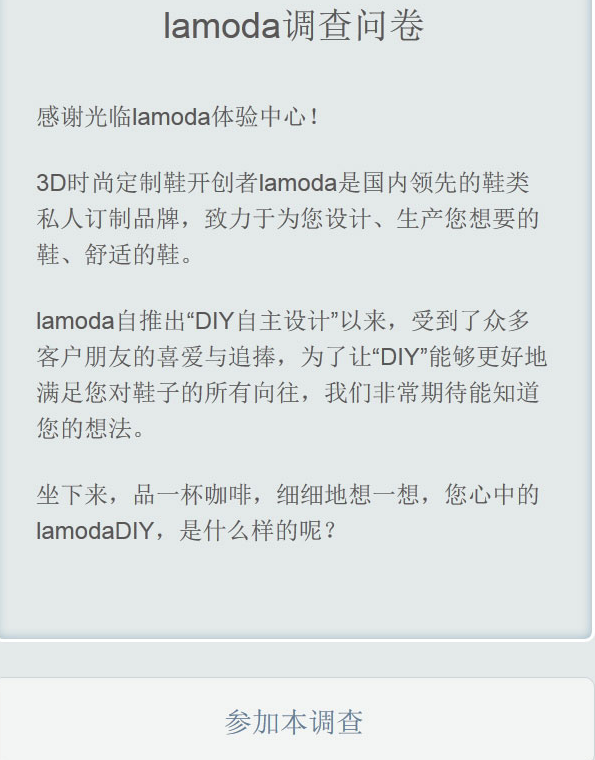
swiper-js插件实现的手机问卷调查特效


一款基于swiper.js插件实现的手机问卷调查特效,jQuery手机微信端问卷调查页面代码。
js代码
<script src="swiper/swiper.min.js"></script>
<script>
var mySwiper = new Swiper('.swiper-container', {
pagination: '.swiper-pagination',
nextButton: '.swiper-button-next',
prevButton: '.swiper-button-prev',
slidesPerView: 1,
paginationClickable: true,
spaceBetween: 30,
loop: true,
onReachEnd: function(swiper){
$("#t2").hide();
$("#t3").show();
}
});
$("#t2,#t3").hide();
$("a.jion").on("click",function(){
$("#t1").hide();
$("#t2").show();
});
$(".swiper-container label,.swiper-container input").click(function(){
var this_active = $(this).parents(".swiper-slide").index();
setTimeout(function(){
mySwiper.slideTo(this_active+1,1000)
},500);
});
$('.swiper-button-next').click(function(){
if(mySwiper .isEnd){
$("#t2").hide();
$("#t3").show();
}
})
</script>
js代码
<script src="swiper/swiper.min.js"></script>
<script>
var mySwiper = new Swiper('.swiper-container', {
pagination: '.swiper-pagination',
nextButton: '.swiper-button-next',
prevButton: '.swiper-button-prev',
slidesPerView: 1,
paginationClickable: true,
spaceBetween: 30,
loop: true,
onReachEnd: function(swiper){
$("#t2").hide();
$("#t3").show();
}
});
$("#t2,#t3").hide();
$("a.jion").on("click",function(){
$("#t1").hide();
$("#t2").show();
});
$(".swiper-container label,.swiper-container input").click(function(){
var this_active = $(this).parents(".swiper-slide").index();
setTimeout(function(){
mySwiper.slideTo(this_active+1,1000)
},500);
});
$('.swiper-button-next').click(function(){
if(mySwiper .isEnd){
$("#t2").hide();
$("#t3").show();
}
})
</script>
本站所有资源都是由网友投搞发布,或转载各大下载站,请自行检测软件的完整性!本站所有资源仅供学习与参考,请勿用于商业用途,否则产生的一切后果将由您自己承担!如有侵权请联系我们删除下架,联系方式:admin@php.cn
相关推荐



热门下载




canvas音谱可视化mp3音乐播放器代码
html5 canvas通过AudioContext对获取audio标签播放的音域和音高,调用js绘制相应高度的矩形或线条。
播放器特效
2021-03-10






