手册目录
个性化组件
广告组件
工具接口
帮助中心
支持 mip 中的悬浮元素整体使用方案
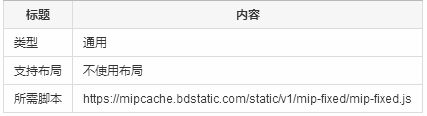
规则:宽度默认屏幕100%,高度最多85像素
<mip-fixed type="top">
    自定义内容,可以嵌套其他组件
</mip-fixed>
规则:宽度默认屏幕100%,高度最多85像素
<mip-fixed type="bottom">
    自定义内容,可以嵌套其他组件
</mip-fixed>
规则:宽度不超过屏幕10%,高度不超过屏幕25%,属性 bottom 或 top 必须有一个
<mip-fixed type="left" bottom="50px">
    自定义内容,可以嵌套其他组件
</mip-fixed>
规则:宽度不超过屏幕10%,高度不超过屏幕25%,属性 bottom 或 top 必须有一个
<mip-fixed type="right" top="50px">
    自定义内容,可以嵌套其他组件
</mip-fixed>
<mip-fixed type="gototop">
    <mip-gototop></mip-gototop>
</mip-fixed>
1、给 mip-fixed 标签添加一个自定义的 id:customid
2、给需要点击关闭悬浮元素的标签添加属性 on="tap:customid.close"
<mip-fixed type="top" id="customid">
  <div>我是顶部的fixed</div>
  <div on="tap:customid.close">我是关闭按钮</div>
</mip-fixed>
说明:悬浮类型
必选项:是
类型:字符串
取值范围:top/bottom/right/left
说明:距离屏幕顶部距离
必选项: 否
类型:字符串
取值范围:数值+单位,例如:50(px|em|rem|vh|vw|vmin|vmax|cm|mm|q|in|pc|pt)
默认值:auto
说明:距离屏幕底部距离
必选项: 否
取值范围:数值+单位,例如:50(px|em|rem|vh|vw|vmin|vmax|cm|mm|q|in|pc|pt)
默认值:auto
type为top、bottom 类别不需要添加属性:top/bottom;
type为left、right 类别需要至少添加一个top/bottom属性,优先用 bottom。
type为 gototop 类别不需要任何属性。
top <= 1
bottom <= 1
left + right <= 1
gototop <= 1
相关视频
科技资讯


24小时阅读榜
1
2
3
4
5
6
7
8
9
10
精品课程

共5课时 | 17.4万人学习

共49课时 | 78.2万人学习

共29课时 | 62.5万人学习

共25课时 | 39.8万人学习

共43课时 | 73.8万人学习