



springboot启动流程源码分析一、入口参数研究和创建对象
准备阶段分析
以下先看下SpringApplication的run()方法
package org.springframework.boot;
public ConfigurableApplicationContext run(String... args) {
   //1.计时器
   StopWatch stopWatch = new StopWatch();
   stopWatch.start();
   ConfigurableApplicationContext context = null;
   Collection<SpringBootExceptionReporter> exceptionReporters = new ArrayList<>();
   //2.headless配置
   configureHeadlessProperty();
   //3、获取监听
   SpringApplicationRunListeners listeners = getRunListeners(args);
   listeners.starting();
   try {
   //应用程序启动的参数
      ApplicationArguments applicationArguments = new DefaultApplicationArguments(args);
      //4、准备环境
      ConfigurableEnvironment environment = prepareEnvironment(listeners, applicationArguments);
      //环境创建成功后,配置bean信息,决定是否跳过 BeanInfo 类的扫描,如果设置为 true,则跳过
      configureIgnoreBeanInfo(environment);
      //打印banner信息
      Banner printedBanner = printBanner(environment);
      context = createApplicationContext();
      exceptionReporters = getSpringFactoriesInstances(SpringBootExceptionReporter.class,
            new Class[] { ConfigurableApplicationContext.class }, context);
      prepareContext(context, environment, listeners, applicationArguments, printedBanner);
      refreshContext(context);
      afterRefresh(context, applicationArguments);
      //停止计时
      stopWatch.stop();
      //控制是否打印日志的,这里为true,即打印日志
      if (this.logStartupInfo) {
         new StartupInfoLogger(this.mainApplicationClass).logStarted(getApplicationLog(), stopWatch);
      }
      listeners.started(context);
      callRunners(context, applicationArguments);
   }
   catch (Throwable ex) {
      handleRunFailure(context, ex, exceptionReporters, listeners);
      throw new IllegalStateException(ex);
   }
   try {
      listeners.running(context);
   }
   catch (Throwable ex) {
      handleRunFailure(context, ex, exceptionReporters, null);
      throw new IllegalStateException(ex);
   }
   return context;
}
我将会根据执行过程逐行进行分析
1、StopWatch计时器
此类实则为计时器,如下对具体使用进行分析
StopWatch stopWatch = new StopWatch();
//开始计时
stopWatch.start();
//停止计时
stopWatch.stop();
对于具体打印的上面写的为
//将当前类传入StartupInfoLogger创建了一个对象
//然后调用logStarted打印日志
new StartupInfoLogger(this.mainApplicationClass).logStarted(getApplicationLog(), stopWatch);
//创建一个Log类
protected Log getApplicationLog() {
   if (this.mainApplicationClass == null) {
      return logger;
   }
   return LogFactory.getLog(this.mainApplicationClass);
}
//调用log类的log.info()方法来打印日志
public void logStarted(Log log, StopWatch stopWatch) {
    if (log.isInfoEnabled()) {
            log.info(getStartedMessage(stopWatch));
    }
}
//打印详细的日志
private StringBuilder getStartedMessage(StopWatch stopWatch) {
   StringBuilder message = new StringBuilder();
   message.append("Started ");
   message.append(getApplicationName());
   message.append(" in ");
   message.append(stopWatch.getTotalTimeSeconds());
   try {
      double uptime = ManagementFactory.getRuntimeMXBean().getUptime() / 1000.0;
      message.append(" seconds (JVM running for " + uptime + ")");
   }
   catch (Throwable ex) {
      // No JVM time available
   }
   return message;
}
这里可以看到stopWatch.getTotalTimeSeconds()方法就是来获取实际的计时时间的。再者,通过这几行代码,我们也可以考虑下平常在写代码的时候,有几种日志打印方式?SpringBoot是怎么集成日志框架的?
2、configureHeadlessProperty()
private static final String SYSTEM_PROPERTY_JAVA_AWT_HEADLESS = "java.awt.headless";
private void configureHeadlessProperty() {
   System.setProperty(SYSTEM_PROPERTY_JAVA_AWT_HEADLESS,
         System.getProperty(SYSTEM_PROPERTY_JAVA_AWT_HEADLESS, Boolean.toString(this.headless)));
}
这一部分代码这样理解吧,首先java.awt包提供了用于创建用户界面和绘制图形图像的所有分类,那么 属性SYSTEM_PROPERTY_JAVA_AWT_HEADLESS就一定会和用户界面相关了。 这里将SYSTEM_PROPERTY_JAVA_AWT_HEADLESS设置为true,其实就是表示在缺少显示屏、键盘或者鼠标中的系统配置,如果将其设置为true,那么headless工具包就会被使用。
3、getRunListeners(args) 获取监听
总体上可以分这三步
获取一个默认的加载器
根据类型获取spring.factories中符合的类名
创建类实例,返回
如下将跟下代码
//获取所有监听
SpringApplicationRunListeners listeners = getRunListeners(args);
//启动监听
listeners.starting();
跳转进入getRunListeners方法
private SpringApplicationRunListeners getRunListeners(String[] args) {
   Class<?>[] types = new Class<?>[] { SpringApplication.class, String[].class };
   return new SpringApplicationRunListeners(logger,
         getSpringFactoriesInstances(SpringApplicationRunListener.class, types, this, args));
}
private <T> Collection<T> getSpringFactoriesInstances(Class<T> type, Class<?>[] parameterTypes, Object... args) {
  //3.1获取类加载器
   ClassLoader classLoader = getClassLoader();
   // Use names and ensure unique to protect against duplicates
   //3.2 根据类型获取spring.factories中符合的类名
   Set<String> names = new LinkedHashSet<>(SpringFactoriesLoader.loadFactoryNames(type, classLoader));
   //3.3 创建类实例
   List<T> instances = createSpringFactoriesInstances(type, parameterTypes, classLoader, args, names);
   //对实例进行排序
   AnnotationAwareOrderComparator.sort(instances);
   return instances;
}
SpringApplicationRunListeners类解读
先看下SpringApplicationRunListeners类
/**
 * A collection of {@link SpringApplicationRunListener}.
 *
 * @author Phillip Webb
 */
class SpringApplicationRunListeners {
   private final Log log;
   private final List<SpringApplicationRunListener> listeners;
   SpringApplicationRunListeners(Log log, Collection<? extends SpringApplicationRunListener> listeners) {
      this.log = log;
      this.listeners = new ArrayList<>(listeners);
   }
SpringApplicationRunListeners类内部关联了SpringApplicationRunListener的集合,说白了就是用List集合存储了SpringApplicationRunListeners类,那么,我们就需要了解一下这个类是干嘛的
老规矩,先把源码抬上来
/**
 *//可以理解为Spring Boot应用的运行时监听器
 * Listener for the {@link SpringApplication} {@code run} method.
 *//SpringApplicationRunListener的构造器参数必须依次为SpringApplication和String[]类型
 * {@link SpringApplicationRunListener}s are loaded via the {@link SpringFactoriesLoader}
 * and should declare a public constructor that accepts a {@link SpringApplication}
 * instance and a {@code String[]} of arguments.
 *//每次运行的时候将会创建一个 SpringApplicationRunListener
  A new
 * {@link SpringApplicationRunListener} instance will be created for each run.
 *
 */
public interface SpringApplicationRunListener {
   /**
    * Called immediately when the run method has first started. Can be used for very
    * early initialization.
    */
    //Spring应用刚启动
   void starting();
   /**
    * Called once the environment has been prepared, but before the
    * {@link ApplicationContext} has been created.
    * @param environment the environment
    */
    //ConfigurableEnvironment准备妥当,允许将其调整
   void environmentPrepared(ConfigurableEnvironment environment);
   /**
    * Called once the {@link ApplicationContext} has been created and prepared, but
    * before sources have been loaded.
    * @param context the application context
    */
    //ConfigurableApplicationContext准备妥当,允许将其调整
   void contextPrepared(ConfigurableApplicationContext context);
   /**
    * Called once the application context has been loaded but before it has been
    * refreshed.
    * @param context the application context
    */
    //ConfigurableApplicationContext已装载,但是任未启动
   void contextLoaded(ConfigurableApplicationContext context);
   /**
    * The context has been refreshed and the application has started but
    * {@link CommandLineRunner CommandLineRunners} and {@link ApplicationRunner
    * ApplicationRunners} have not been called.
    * @param context the application context.
    * @since 2.0.0
    */
    //ConfigurableApplicationContext已启动,此时Spring Bean已初始化完成
   void started(ConfigurableApplicationContext context);
   /**
    * Called immediately before the run method finishes, when the application context has
    * been refreshed and all {@link CommandLineRunner CommandLineRunners} and
    * {@link ApplicationRunner ApplicationRunners} have been called.
    * @param context the application context.
    * @since 2.0.0
    */
    //Spring应用正在运行
   void running(ConfigurableApplicationContext context);
   /**
    * Called when a failure occurs when running the application.
    * @param context the application context or {@code null} if a failure occurred before
    * the context was created
    * @param exception the failure
    * @since 2.0.0
    */
    //Spring应用运行失败
   void failed(ConfigurableApplicationContext context, Throwable exception);
}
单纯的看源码,是一个简单的接口,这时候我们可以看下作者给的注释。理解部分就直接加到上面源码中了。
再看下他的实现类EventPublishingRunListener
public class EventPublishingRunListener implements SpringApplicationRunListener, Ordered {
   private final SpringApplication application;
   private final String[] args;
   private final SimpleApplicationEventMulticaster initialMulticaster;
   public EventPublishingRunListener(SpringApplication application, String[] args) {
      this.application = application;
      this.args = args;
      this.initialMulticaster = new SimpleApplicationEventMulticaster();
      for (ApplicationListener<?> listener : application.getListeners()) {
         this.initialMulticaster.addApplicationListener(listener);
      }
   }
这里我们看到两点:

抖猫高清去水印微信小程序,源码为短视频去水印微信小程序全套源码,包含微信小程序端源码,服务端后台源码,支持某音、某手、某书、某站短视频平台去水印,提供全套的源码,实现功能包括:1、小程序登录授权、获取微信头像、获取微信用户2、首页包括:流量主已经对接、去水印连接解析、去水印操作指导、常见问题指引3、常用工具箱:包括视频镜头分割(可自定义时长分割)、智能分割(根据镜头自动分割)、视频混剪、模糊图片高
构造器参数和他实现的接口(上面刚分析了)注释中规定的一致
将SpringApplication中的ApplicationListener实例列表全部添加到了SimpleApplicationEventMulticaster对象中
SimpleApplicationEventMulticaster是Spring框架的一个监听类,用于发布Spring应用事件。因此EventPublishingRunListener实际充当了Spring Boot事件发布者的角色。
这里我再跟进源码的时候发现,针对SpringBoot的事件/监听机制内容还是挺多的,我们在充分理解的时候需要先了解Spring的事件/监听机制,后面将两个结合后单独进行对比分析。
3.1获取类加载器getClassLoader()
ClassLoader classLoader = getClassLoader();
public ClassLoader getClassLoader() {
  if (this.resourceLoader != null) {
     return this.resourceLoader.getClassLoader();
  }
  return ClassUtils.getDefaultClassLoader();
}
这里的类加载器获取首先是获取resourceLoader的类加载器,获取不到则获取默认的类加载器。 resourceLoader是资源加载器类,有具体的实现类。
3.2 根据类型获取spring.factories中符合的类名
SpringFactoriesLoader.loadFactoryNames(type, classLoader)
public static List<String> loadFactoryNames(Class<?> factoryClass, @Nullable ClassLoader classLoader) {
//获取类型名称:org.springframework.context.ApplicationContextInitializer
   String factoryClassName = factoryClass.getName();
   return (List)loadSpringFactories(classLoader).getOrDefault(factoryClassName, Collections.emptyList());
}
我们继续对loadSpringFactories追下去
private static Map<String, List<String>> loadSpringFactories(@Nullable ClassLoader classLoader) {
    //从缓存里面获取
    MultiValueMap<String, String> result = (MultiValueMap)cache.get(classLoader);
    if (result != null) {
        return result;
    } else {
        try {
        //执行classLoader.getResources("META-INF/spring.factories"),表示通过加载器获取META-INF/spring.factories下的资源
            Enumeration<URL> urls = classLoader != null ? classLoader.getResources("META-INF/spring.factories") : ClassLoader.getSystemResources("META-INF/spring.factories");
            LinkedMultiValueMap result = new LinkedMultiValueMap();
            while(urls.hasMoreElements()) {
               //文件地址
                URL url = (URL)urls.nextElement();
                //从指定位置加载UrlResource
                UrlResource resource = new UrlResource(url);
                //加载里面的属性,属性见下图
                Properties properties = PropertiesLoaderUtils.loadProperties(resource);
                Iterator var6 = properties.entrySet().iterator();
                while(var6.hasNext()) {
                    Entry<?, ?> entry = (Entry)var6.next();
                    //获取key值
                    String factoryClassName = ((String)entry.getKey()).trim();
                    //获取value值
                    String[] var9 = StringUtils.commaDelimitedListToStringArray((String)entry.getValue());
                    int var10 = var9.length;
//这里是将查询出来的key作为result的key,value转换成字符数组存放到result的value中
                    for(int var11 = 0; var11 < var10; ++var11) {
                        String factoryName = var9[var11];
                        result.add(factoryClassName, factoryName.trim());
                    }
                }
            }
            //将结果集存入缓存中
            cache.put(classLoader, result);
            return result;
        } catch (IOException var13) {
            throw new IllegalArgumentException("Unable to load factories from location [META-INF/spring.factories]", var13);
        }
    }
}
default V getOrDefault(Object key, V defaultValue) {
    V v;
    return (((v = get(key)) != null) || containsKey(key))
        ? v
        : defaultValue;
}
这个的意思是如果没有,则获取一个空的list
3.3创建实例createSpringFactoriesInstances()
这一步其实就是将上一步从META-INF/spring.factories加载进来的资源进行实例化。
private <T> List<T> createSpringFactoriesInstances()(Class<T> type, Class<?>[] parameterTypes,
      ClassLoader classLoader, Object[] args, Set<String> names) {
   List<T> instances = new ArrayList<>(names.size());
   for (String name : names) {
      try {
      //根据类加载器获取指定类
         Class<?> instanceClass = ClassUtils.forName(name, classLoader);
         Assert.isAssignable(type, instanceClass);
         //根据参数获取构造器
         Constructor<?> constructor = instanceClass.getDeclaredConstructor(parameterTypes);
         //根据传入的构造器对象以及构造器所需的参数创建一个实例
         T instance = (T) BeanUtils.instantiateClass(constructor, args);
         //添加实例到集合中
         instances.add(instance);
      }
      catch (Throwable ex) {
         throw new IllegalArgumentException("Cannot instantiate " + type + " : " + name, ex);
      }
   }
   return instances;
}
4、环境准备prepareEnvironment
prepareEnvironment(listeners, applicationArguments)
private ConfigurableEnvironment prepareEnvironment(SpringApplicationRunListeners listeners,
      ApplicationArguments applicationArguments) {
   // Create and configure the environment
   //4.1 创建一个环境
   ConfigurableEnvironment environment = getOrCreateEnvironment();
   //4.2 配置环境
   configureEnvironment(environment, applicationArguments.getSourceArgs());
   //4.3 ConfigurationPropertySourcesPropertySource对象存入到第一位
   ConfigurationPropertySources.attach(environment);
   //listeners环境准备(就是广播ApplicationEnvironmentPreparedEvent事件)
   listeners.environmentPrepared(environment);
   // 将环境绑定到SpringApplication
   bindToSpringApplication(environment);
     // 如果是非web环境,将环境转换成StandardEnvironment
   if (!this.isCustomEnvironment) {
      environment = new EnvironmentConverter(getClassLoader()).convertEnvironmentIfNecessary(environment,
            deduceEnvironmentClass());
   }
    // 配置PropertySources对它自己的递归依赖
   ConfigurationPropertySources.attach(environment);
   return environment;
}
4.1创建一个环境getOrCreateEnvironment
private ConfigurableEnvironment getOrCreateEnvironment() {
//有的话,直接返回
  if (this.environment != null) {
     return this.environment;
  }
  //这里我们在上面见到过,通过WebApplicationType.deduceFromClasspath()方法获取的
  switch (this.webApplicationType) {
  case SERVLET:
     return new StandardServletEnvironment();
  case REACTIVE:
     return new StandardReactiveWebEnvironment();
  default:
     return new StandardEnvironment();
  }
}
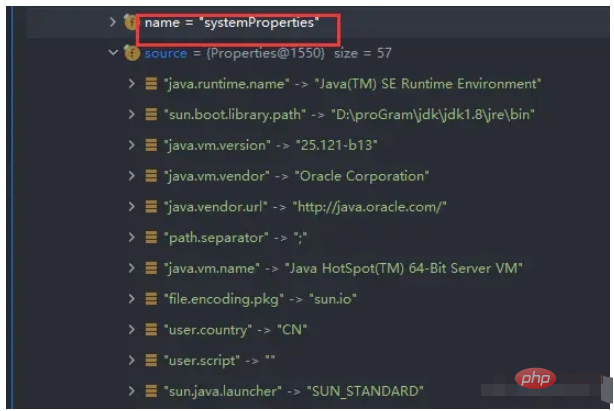
这里创建了一个StandardServletEnvironment实例的环境 systemProperties用来封装了JDK相关的信息 如下图
systemEnvironment用来封转环境相关的信息
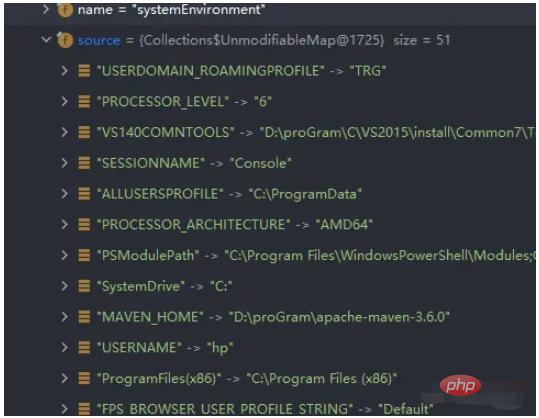
封装的还是挺详细的哈。
4.2 配置环境
protected void configureEnvironment(ConfigurableEnvironment environment, String[] args) {
   if (this.addConversionService) {
      ConversionService conversionService = ApplicationConversionService.getSharedInstance();
      environment.setConversionService((ConfigurableConversionService) conversionService);
   }
   configurePropertySources(environment, args);
   configureProfiles(environment, args);
}
setConversionService(ConfigurableConversionService conversionService)方法继承于ConfigurablePropertyResolver接口, 该接口是PropertyResolver类型都将实现的配置接口。提供用于访问和自定义将属性值从一种类型转换为另一种类型时使用的ConversionService的工具。PropertyResolver是用于针对任何底层源解析属性的接口。
configurePropertySources(environment, args);当前方法主要是将启动命令中的参数和run 方法中的参数封装为PropertySource。
protected void configurePropertySources(ConfigurableEnvironment environment, String[] args) {
//获取所有的属性源,就是获取4.1的ConfigurableEnvironment上获取到的属性
  MutablePropertySources sources = environment.getPropertySources();
  if (this.defaultProperties != null && !this.defaultProperties.isEmpty()) {
     sources.addLast(new MapPropertySource("defaultProperties", this.defaultProperties));
  }
  //是否添加命令启动参数,addCommandLineProperties为true,表示需要添加,但是前提是你得配置了参数
  if (this.addCommandLineProperties && args.length > 0) {
     String name = CommandLinePropertySource.COMMAND_LINE_PROPERTY_SOURCE_NAME;
     if (sources.contains(name)) {
        PropertySource<?> source = sources.get(name);
        CompositePropertySource composite = new CompositePropertySource(name);
        composite.addPropertySource(
              new SimpleCommandLinePropertySource("springApplicationCommandLineArgs", args));
        composite.addPropertySource(source);
        sources.replace(name, composite);
     }
     else {
        sources.addFirst(new SimpleCommandLinePropertySource(args));
     }
  }
}
configureProfiles(environment, args);环境配置
protected void configureProfiles(ConfigurableEnvironment environment, String[] args) {
//获取激活的环境
  environment.getActiveProfiles(); // ensure they are initialized
  // But these ones should go first (last wins in a property key clash)
  Set<String> profiles = new LinkedHashSet<>(this.additionalProfiles);
  profiles.addAll(Arrays.asList(environment.getActiveProfiles()));
  //设置当前的环境
  environment.setActiveProfiles(StringUtils.toStringArray(profiles));
}
4.3 ConfigurationPropertySourcesPropertySource对象存入
public static void attach(Environment environment) {
   Assert.isInstanceOf(ConfigurableEnvironment.class, environment);
   //获取所有的属性源,就是获取4.1的ConfigurableEnvironment上获取到的属性
   MutablePropertySources sources = ((ConfigurableEnvironment) environment).getPropertySources();
   //判断是否有 属性 configurationProperties
   PropertySource<?> attached = sources.get(ATTACHED_PROPERTY_SOURCE_NAME);
   if (attached != null && attached.getSource() != sources) {
      sources.remove(ATTACHED_PROPERTY_SOURCE_NAME);
      attached = null;
   }
   if (attached == null) {
   // 将sources封装成ConfigurationPropertySourcesPropertySource对象,并把这个对象放到sources的第一位置
      sources.addFirst(new ConfigurationPropertySourcesPropertySource(ATTACHED_PROPERTY_SOURCE_NAME,
            new SpringConfigurationPropertySources(sources)));
   }
} 




