



本篇文章给大家带来的内容是关于react首次渲染解析二(纯dom元素),有一定的参考价值,有需要的朋友可以参考一下,希望对你有所帮助。
上一篇文章中,介绍了顶层对象ReactCompositeComponent[T]是如何构造的,接下来我们看看 batchedMountComponentIntoNode 做了什么事情。
本文将要讲解的调用栈是下面这个样子的:
|=ReactMount.render(nextElement, container, callback)     ___
|=ReactMount._renderSubtreeIntoContainer()                 |
  |-ReactMount._renderNewRootComponent()                   |
    |-instantiateReactComponent()                          |
    |~batchedMountComponentIntoNode()                  upper half
      |~mountComponentIntoNode()                       (平台无关)
        |-ReactReconciler.mountComponent()                 |
          |-ReactCompositeComponent.mountComponent()       |
          |-ReactCompositeComponent.performInitialMount()  |
            |-instantiateReactComponent()                 _|_
            |-ReactDOMComponent.mountComponent()       lower half
        |-_mountImageIntoNode()                      (HTML DOM 相关)
                                                          _|_
如果看源码,我们会留意到很多transaction相关的代码,我们暂时先将其忽略,会在后续的文章中进行讲解。暂时可以理解为调用transaction.perform时,实际上就是对第一个参数进行函数调用。跳过一些模版代码后,实际上做事情的是 mountComponentIntoNode 这个方法。
// 文件位置:src/renderers/dom/client/ReactMount.js

function mountComponentIntoNode(
    wrapperInstance,    // ReactCompositeComponent[T]
    container,          // document.getElementById("root")
    transaction,
    shouldReuseMarkup,
    context
) {
    ...

    var markup = ReactReconciler.mountComponent(
        wrapperInstance,
        transaction,
        null,
        ReactDOMContainerInfo(wrapperInstance, container),
        context,
        0 /* parentDebugID */
    );

    ...

    ReactMount._mountImageIntoNode(
        markup,
        container,
        wrapperInstance,
        shouldReuseMarkup,
        transaction
    );
}
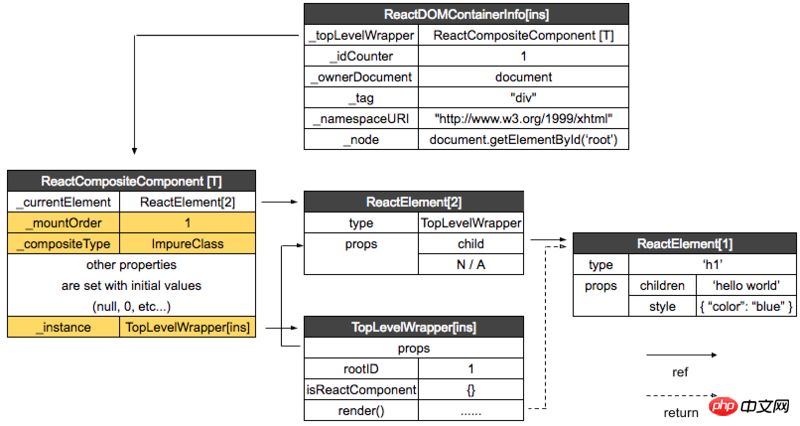
ReactReconciler.mountComponent 用于创建 DOM 元素,而 ReactMount._mountImageIntoNode 则是将刚创建的 DOM 元素挂载到页面。ReactReconciler.mountComponent 会调用 ReactCompositeComponent[T]的 mountComponent 方法。在看 mountComponent 方法前,还需要先准备好 hostContainerInfo,由 ReactDOMContainerInfo 生成:
// 文件位置:src/renderers/shared/stack/reconciler/ReactContainerInfo.js

function ReactDOMContainerInfo(
    topLevelWrapper,     // ReactCompositeComponent[T]
    node                 // document.getElementById("root")
) {
    var info = {
        _topLevelWrapper: topLevelWrapper,
        _idCounter: 1,
        _ownerDocument: node ?
            node.nodeType === DOC_NODE_TYPE ? node : node.ownerDocument : null,
        _node: node,
        _tag: node ? node.nodeName.toLowerCase() : null,
        _namespaceURI: node ? node.namespaceURI : null,
    };

    ...

    return info;
}
现在各实例间的关系是这样的:
再继续看 mountComponent 方法:
// 文件位置:src/renderers/shared/stack/reconciler/ReactCompositeComponent.js

mountComponent: function (
    transaction,
    hostParent,
    hostContainerInfo,
    context
) {
    ...

    // this._currentElement 为ReactElement[2](TopLevelWrapper)
    var publicProps = this._currentElement.props;
    var publicContext = this._processContext(context);

    // TopLevelWrapper
    var Component = this._currentElement.type;

    ...

    // Initialize the public class
    var doConstruct = shouldConstruct(Component);

    // 生成TopLevelWrapper 实例
    var inst = this._constructComponent(
        doConstruct,
        publicProps,
        publicContext,
        updateQueue
    );

    ...

    var markup;

    ...

    markup = this.performInitialMount(renderedElement,
            hostParent, hostContainerInfo, transaction, context

    ...

    return markup;
},

performInitialMount: function (renderedElement, hostParent,
    hostContainerInfo, transaction, context) {

    // TopLevelWrapper 实例
    var inst = this._instance;

    ...

    // If not a stateless component, we now render
    if (renderedElement === undefined) {
        // 返回值为 ReactElement[1]
        renderedElement = this._renderValidatedComponent();
    }

    // 返回 ReactNodeTypes.HOST
    var nodeType = ReactNodeTypes.getType(renderedElement);

    this._renderedNodeType = nodeType;

    // instantiateReactComponent.js
    var child = this._instantiateReactComponent(
        renderedElement,
        nodeType !== ReactNodeTypes.EMPTY /* shouldHaveDebugID */
    );
    this._renderedComponent = child;

    var markup = ReactReconciler.mountComponent(
        child,
        transaction,
        hostParent,
        hostContainerInfo,
        this._processChildContext(context),
        debugID
    );

    ...

    return markup;
},当运行到var child = this._instantiateReactComponent时,就会调用上篇文章说到的instantiateReactComponent文件:

// 文件位置:src/renderers/shared/stack/reconciler/instantiateReactComponent.js

function instantiateReactComponent(node, shouldHaveDebugID) {
    var instance;

    ...

    } else if (typeof node === 'object') {
        ...

        // element.type 为 ‘h1’
        if (typeof element.type === 'string') {
            instance = ReactHostComponent.createInternalComponent(element);
        }

    return instance;
}
ReactDom 会在执行的时候,执行ReactDefaultInjection.inject()将 ReactDOMComponent 注入到 ReactHostComponent 中,ReactHostComponent.createInternalComponent 最终会调用 ReactDOMComponent:
// 文件位置:src/renderers/dom/shared/ReactDomComponent.js

function ReactDOMComponent(element) {
    // h1
    var tag = element.type;

    validateDangerousTag(tag);

    // ReactElement[1]
    this._currentElement = element;

    this._tag = tag.toLowerCase();
    this._namespaceURI = null;
    this._renderedChildren = null;
    this._previousStyle = null;
    this._previousStyleCopy = null;
    this._hostNode = null;
    this._hostParent = null;
    this._rootNodeID = 0;
    this._domID = 0;
    this._hostContainerInfo = null;
    this._wrapperState = null;
    this._topLevelWrapper = null;
    this._flags = 0;
}
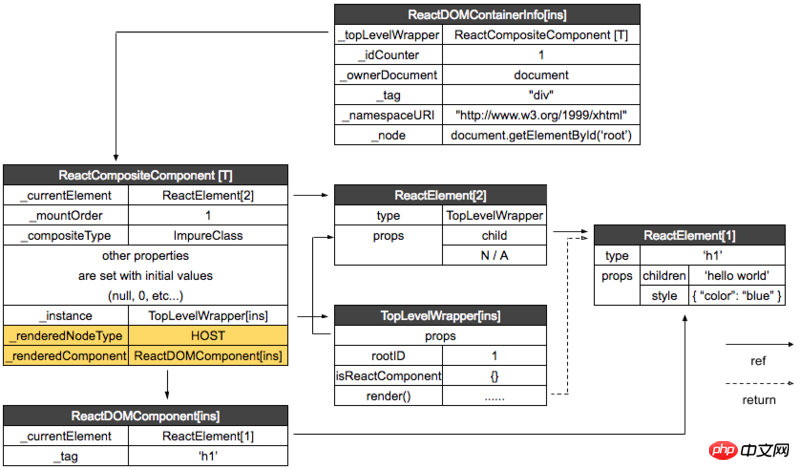
我们将返回的实例命名为 ReactDOMComponent[ins]。
ReactReconciler.mountComponent 会调用 ReactDomComponent 的 mountComponent 方法,这就会涉及到 HTML DOM 相关的内容,我们在下一篇进行讲解。
现在我们来看一下各实例间的关系:
目前为止的调用栈:
|=ReactMount.render(nextElement, container, callback)     ___
|=ReactMount._renderSubtreeIntoContainer()                 |
  |-ReactMount._renderNewRootComponent()                   |
    |-instantiateReactComponent()                          |
    |~batchedMountComponentIntoNode()                  upper half
      |~mountComponentIntoNode()                       (平台无关)
        |-ReactReconciler.mountComponent()                 |
          |-ReactCompositeComponent.mountComponent()       |
          |-ReactCompositeComponent.performInitialMount()  |
            |-instantiateReactComponent()                 _|_
            |-ReactDOMComponent.mountComponent()       lower half
        |-_mountImageIntoNode()                 (HTML DOM 相关下一篇讲解)
_|_ 




