



本篇文章给大家带来的内容是关于react首次渲染的解析(纯dom元素),有一定的参考价值,有需要的朋友可以参考一下,希望对你有所帮助。
React 是一个十分庞大的库,由于要同时考虑 ReactDom 和 ReactNative ,还有服务器渲染等,导致其代码抽象化程度很高,嵌套层级非常深,阅读其源码是一个非常艰辛的过程。在学习 React 源码的过程中,给我帮助最大的就是这个系列文章,于是决定基于这个系列文章谈一下自己的理解。本文会大量用到原文中的例子,想体会原汁原味的感觉,推荐阅读原文。
本系列文章将基于 React 15.4.2。
React.createElement
在写 React 项目的时候,我们一般会直接用 JSX 的形式来写,而 JSX 经过 Babel 编译后最终会将 HTML 标签转换为React.createElement的函数形式。如果想进行更深入的了解,可以看我之前写的这篇文章:你不知道的Virtual DOM(一):Virtual Dom介绍。文章中的h函数,如果不在 Babel 中配置的话,默认就是React.createElement。
下面,我们将从一个最简单的例子,来看React是如何渲染的
ReactDOM.render(
hello world
,
document.getElementById('root')
);经过JSX编译后,会是下面这个样子
ReactDOM.render(
    React.createElement(
        'h1',
        { style: { "color": "blue" } },
        'hello world'
    ),
    document.getElementById('root')
);先来看下React.createElement的源码。
// 文件位置:src/isomorphic/React.js

var ReactElement = require('ReactElement');

...

var createElement = ReactElement.createElement;

...

var React = {
    ...

    createElement: createElement,

    ...
}

module.exports = React;最终的实现需要查看ReactElement.createElement:
// 文件位置:src/isomorphic/classic/element/ReactElement.js

ReactElement.createElement = function (type, config, children) {
    ...

    // 1. 将过滤后的有效的属性,从config拷贝到props
    if (config != null) {

        ...

        for (propName in config) {
            if (hasOwnProperty.call(config, propName) &&
                !RESERVED_PROPS.hasOwnProperty(propName)) {
                props[propName] = config[propName];
            }
        }
    }

    // 2. 将children以数组的形式拷贝到props.children属性
    var childrenLength = arguments.length - 2;
    if (childrenLength === 1) {
        props.children = children;
    } else if (childrenLength > 1) {
        var childArray = Array(childrenLength);
        for (var i = 0; i < childrenLength; i++) {
            childArray[i] = arguments[i + 2];
        }
        if (__DEV__) {
            if (Object.freeze) {
                Object.freeze(childArray);
            }
        }
        props.children = childArray;
    }

    // 3. 默认属性赋值
    if (type && type.defaultProps) {
        var defaultProps = type.defaultProps;
        for (propName in defaultProps) {
            if (props[propName] === undefined) {
                props[propName] = defaultProps[propName];
            }
        }
    }

    ...

    return ReactElement(
        type,
        key,
        ref,
        self,
        source,
        ReactCurrentOwner.current,
        props
    );
};
本质上只做了3件事:
将过滤后的有效的属性,从config拷贝到props
将children以数组的形式拷贝到props.children属性
默认属性赋值

最终的返回值是ReactElement。我们再来看看它做了什么
// 文件位置:src/isomorphic/classic/element/ReactElement.js

var ReactElement = function (type, key, ref, self, source, owner, props) {
    var element = {
        // This tag allow us to uniquely identify this as a React Element
        $$typeof: REACT_ELEMENT_TYPE,

        // Built-in properties that belong on the element
        type: type,
        key: key,
        ref: ref,
        props: props,

        // Record the component responsible for creating this element.
        _owner: owner,
    };

    ...

    return element;
};
最终只是返回了一个简单对象。调用栈是这样的:
React.createElement
|=ReactElement.createElement(type, config, children)
    |-ReactElement(type,..., props)
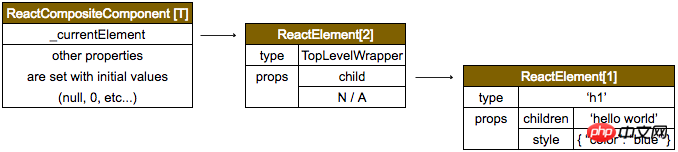
这里生成的 ReactElement 我们将其命名为ReactElement[1],它将作为参数传入到 ReactDom.render。
ReactDom.render
ReactDom.render 最终会调用 ReactMount 的 _renderSubtreeIntoContainer:
// 文件位置:src/renderers/dom/client/ReactMount.js

_renderSubtreeIntoContainer: function (parentComponent, nextElement, container, callback) {
    ...
    var nextWrappedElement = React.createElement(
        TopLevelWrapper,
        {
            child: nextElement
        }
    );

    ...

    var component = ReactMount._renderNewRootComponent(
        nextWrappedElement,
        container,
        shouldReuseMarkup,
        nextContext
    )._renderedComponent.getPublicInstance();

    ...

    return component;
},

...

var TopLevelWrapper = function () {
    this.rootID = topLevelRootCounter++;
};

TopLevelWrapper.prototype.isReactComponent = {};

TopLevelWrapper.prototype.render = function () {
    return this.props.child;
};

TopLevelWrapper.isReactTopLevelWrapper = true;

...

_renderNewRootComponent: function (
    nextElement,
    container,
    shouldReuseMarkup,
    context
) {
    ...

    var componentInstance = instantiateReactComponent(nextElement, false);

    ...

    return componentInstance;
},
这里又会调用到另一个文件 instantiateReactComponent:
// 文件位置:src/renders/shared/stack/reconciler/instantiateReactComponent.js

function instantiateReactComponent(node, shouldHaveDebugID) {
    var instance;

    ...

    instance = new ReactCompositeComponentWrapper(element);

    ...

    return instance;
}

// To avoid a cyclic dependency, we create the final class in this module
var ReactCompositeComponentWrapper = function (element) {
    this.construct(element);
};

Object.assign(
    ReactCompositeComponentWrapper.prototype,
    ReactCompositeComponent,
    {
        _instantiateReactComponent: instantiateReactComponent,
    }
);
这里又会调用到另一个文件 ReactCompositeComponent:
// 文件位置:src/renders/shared/stack/reconciler/ReactCompositeComponent.js

var ReactCompositeComponent = {
    construct: function (element) {
        this._currentElement = element;
        this._rootNodeID = 0;
        this._compositeType = null;
        this._instance = null;
        this._hostParent = null;
        this._hostContainerInfo = null;

        // See ReactUpdateQueue
        this._updateBatchNumber = null;
        this._pendingElement = null;
        this._pendingStateQueue = null;
        this._pendingReplaceState = false;
        this._pendingForceUpdate = false;

        this._renderedNodeType = null;
        this._renderedComponent = null;
        this._context = null;
        this._mountOrder = 0;
        this._topLevelWrapper = null;

        // See ReactUpdates and ReactUpdateQueue.
        this._pendingCallbacks = null;

        // ComponentWillUnmount shall only be called once
        this._calledComponentWillUnmount = false;

        if (__DEV__) {
            this._warnedAboutRefsInRender = false;
        }
    }

    ...
}我们用ReactCompositeComponent[T]来表示这里生成的顶层 component。
整个的调用栈是这样的:
ReactDOM.render
|=ReactMount.render(nextElement, container, callback)
|=ReactMount._renderSubtreeIntoContainer()
    |-ReactMount._renderNewRootComponent(
        nextWrappedElement, // scr:------------------> ReactElement[2]
        container,          // scr:------------------> document.getElementById('root')
        shouldReuseMarkup,  // scr: null from ReactDom.render()
        nextContext,        // scr: emptyObject from ReactDom.render()
    )
    |-instantiateReactComponent(
          node,             // scr:------------------> ReactElement[2]
          shouldHaveDebugID /* false */
        )
        |-ReactCompositeComponentWrapper(
            element         // scr:------------------> ReactElement[2]
        );
        |=ReactCompositeComponent.construct(element)
组件间的层级结构是这样的:
当顶层组件构建完毕后,下一步就是调用 batchedMountComponentIntoNode(来自 ReactMount 的 _renderNewRootComponent方法),进行页面的渲染了。




