



说明
最近用到了 Paypal 支付功能,英语一般般的我也不得不硬着头皮踩一踩这样的坑。经过近乎半个月的作,终于实现了简单的支付功能,那么首先就说说使用 Paypal 必定要知道的几点(当前日期 2018年08月07日):
1. 你应该知道 Paypal 支付功能是支持银联卡的,但是不支持中国买家账号支付给中国卖家账号
2. Paypal 接口有两套,切记,产品环境和 sandbox 测试环境不同
3. 测试账号同样不能使用中国账号给中国账号付款
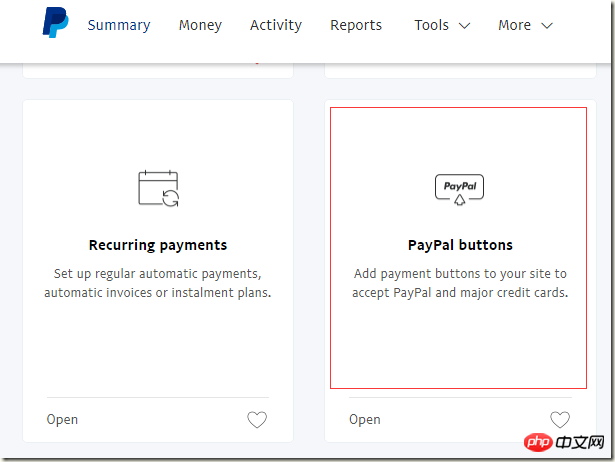
4. 如果你仅仅想具有固定金额的支付按钮,用你的 Paypal 商家账号登录官网,配置页里面完全可以配置出固定的支付按钮,然后 Copy 对应的 Html 到你的页面就 OK 了,也就没有必要通过更复杂的方式去支付了
5. 如果你必须动态价格和商品信息、或者你要学习基本的 Paypal 接口的话,那么就请静静的往下看吧
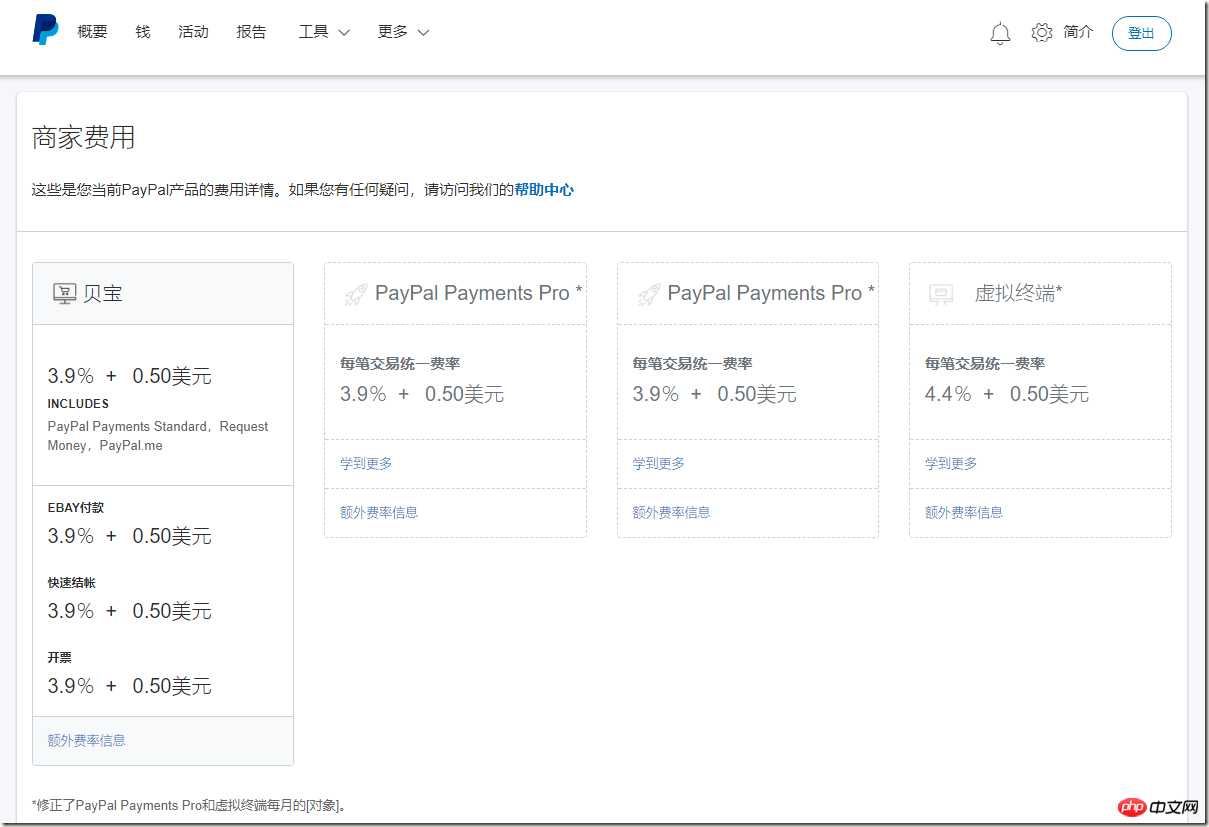
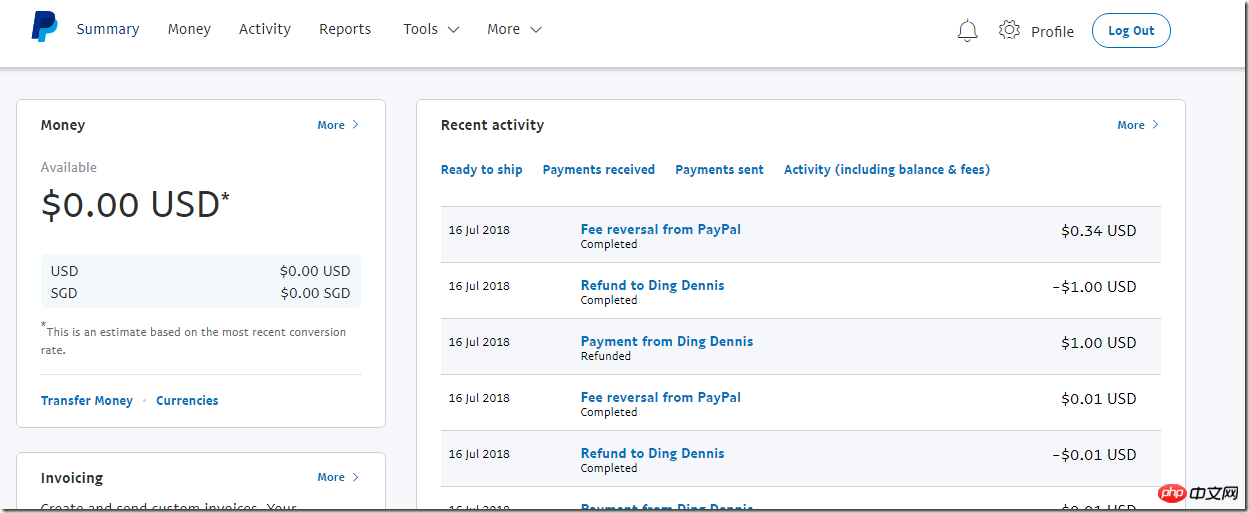
6. 真实环境支付 Paypal 每一笔都需要收取商家账号手续费的,并且手续费不低,如果你用真实环境测试,那么一定要记得每一笔都申请退款吧,退款很方便,商家后台就能直接发起,退款几乎是实时的。
Paypal 费用说明:https://www.paypal.com/businesswallet/fees/paypal-fees
相关资料
Paypal 官方地址:https://www.paypal.com/
Paypal 官方测试地址:https://www.sandbox.paypal.com
Paypal 开发者中心:https://developer.paypal.com/
Paypal API: https://api.paypal.com
Paypal sandbox API: https://api.sandbox.paypal.com
Paypal Checkout JS 支付模式
模式图片:
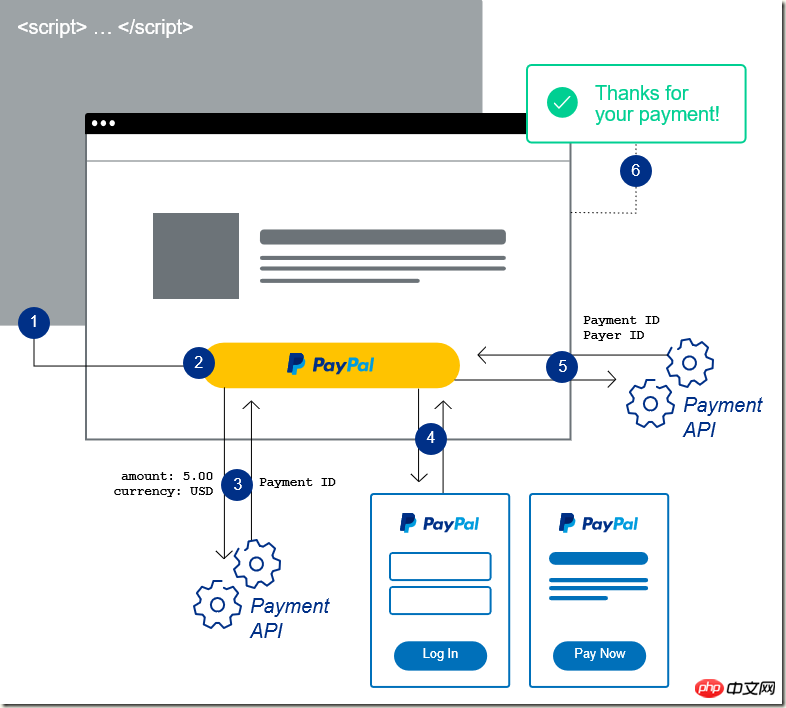
模式说明:
Checkout JS 模式是一种前端实现,使用官方提供的 Checkout.js SDK 实现支付,不需要自己写直接调用接口的代码,相对而言也挺简单,但是如果你想检测支付是否成功,你应当通过调用接口的方式验证了。
支付部分代码:
<p id="paypal-button"></p>
<script src="https://www.paypalobjects.com/api/checkout.js"></script>
<script type="text/javascript">
    paypal.Button.render({
        env: 'production', // production or sandbox 表示产品环境还是测试环境
        client: {
            production: '', // 产品环境,值为字符串,配置实际商家号的 ClientId
            // sandbox: '', // 测试环境,值为字符串,配置商家测试号的 ClientId
        },
        style: {
            size: 'medium',
            color: 'black',
            shape: 'pill',
            label: 'paypal',
            tagline: 'false',
            fundingicons: 'true'
        },
        commit: true,
        payment: function (data, actions) {
            return actions.payment.create({
                transactions: [
                    {
                        amount: {
                            total: "0.01",
                            currency: "USD"
                        },
                        description: "测试商品描述",
                        custom: "X00002"
                    }
                ],
                redirect_urls: {
                    return_url: 'http://localhost:4478/Success.aspx?type=js',
                    cancel_url: 'http://localhost:4478/Cancel.aspx'
                }
            });
        },
        onAuthorize: function (data, actions) {
            return actions.payment.execute()
                .then(function () {
                    actions.redirect();
                });
        },
        onCancel: function (data, actions) {
            actions.redirect();
        }
    }, '#paypal-button');
</script>
如果你需要在支付跳转的成功页再次验证一下是否支付成功,你需要自己调用官方提供的 RESTful API,参见下文的 RESTful API 支付模式
RESTful API 支付模式
说明
接口的方式很常见,和支付宝的接口类似,只是使用了 RESTful API 的模式,采用了 Basic Auth 的加密方式。使用接口的模式很常规,我们在页面点击按钮调用支付接口,弹出支付页,支付成功跳转到成功页面,成功页面再调用确认支付接口确认结果。
支付接口调用:
using System;
using System.Text;
using System.Web.Script.Serialization;
using cn.lovelong.Paypal.Config;
using cn.lovelong.Paypal.Enums;
using cn.lovelong.Paypal.Model;

namespace cn.lovelong.Paypal.Paypal
{
    /// <summary>
    /// CreatePayment 的摘要说明
    /// </summary>
    public class CreatePayment
    {
        public CreatePayment()
        {
        }

        public PaymentResult Pay(string json)
        {
            var jsonResult = HttpHelper.PostJson(
                UrlConfig.CreatePaymentUrl,
                AccountConfig.ClientId, AccountConfig.Secret, json,
                Encoding.UTF8);
            var result = new JavaScriptSerializer().Deserialize<PaymentResult>(jsonResult);
            return result;
        }

        public PaymentResult Pay(PaymentParam param)
        {
            var json = GetPayParams(param);
            return Pay(json);
        }

        public string GetPayParams(PaymentParam param)
        {
            var total = param.Total.ToString("N");
            var currency = Enum.GetName(typeof (PaypalCurrency), param.Currency);
            var payParams = new
            {
                intent = "sale",
                redirect_urls = new
                {
                    return_url = param.ReturnUrl,
                    cancel_url = param.CancelUrl,
                },
                payer = new
                {
                    payment_method = "paypal"
                },
                transactions = new dynamic[]
                {
                    new
                    {
                        amount = new
                        {
                            total = total,
                            currency = currency
                        },
                        description = param.Description,
                        custom = param.Code,
                        item_list = new
                        {
                            items = new dynamic[]
                            {
                                new
                                {
                                    name = param.Name,
                                    //description = param.Name,
                                    quantity = "1",
                                    price = total,
                                    //tax = "0.01",
                                    //sku = "1",
                                    currency = currency
                                }
                            }
                        }
                    }
                }
            };
            var json = new JavaScriptSerializer().Serialize(payParams);
            return json;
        }

        public string GetFullPayParams(decimal total, PaypalCurrency currency, string returnUrl, string cancelUrl)
        {
            var payParams = new
            {
                intent = "sale",
                redirect_urls = new
                {
                    return_url = returnUrl,
                    cancel_url = cancelUrl,
                },
                payer = new
                {
                    payment_method = "paypal"
                },
                transactions = new dynamic[]
                {
                    new
                    {
                        amount = new
                        {
                            total = total.ToString("N"),
                            currency = Enum.GetName(typeof(PaypalCurrency),currency),
                            details = new
                            {
                                subtotal = "30.00",
                                tax = "0.07",
                                shipping = "0.03",
                                handling_fee = "1.00",
                                shipping_discount = "-1.00",
                                insurance = "0.01"
                            }
                        },
                        description = "",
                        custom = "EBAY_EMS_90048630024435",
                        invoice_number = "48787589673",
                        payment_options = new
                        {
                            allowed_payment_method = "INSTANT_FUNDING_SOURCE"
                        },
                        soft_descriptor = "ECHI5786786",
                        item_list = new
                        {
                            items = new dynamic[]
                            {
                                new
                                {
                                    name = "hat",
                                    description = "Brown hat.",
                                    quantity = "5",
                                    price = "3",
                                    tax = "0.01",
                                    sku = "1",
                                    currency = "USD"
                                }
                            },
                            shipping_address = new
                            {
                                recipient_name = "Brian Robinson",
                                line1 = "4th Floor",
                                line2 = "Unit #34",
                                city = "San Jose",
                                country_code = "US",
                                postal_code = "95131",
                                phone = "011862212345678",
                                state = "CA"
                            },
                        }
                    }
                }
            };
            var json = new JavaScriptSerializer().Serialize(payParams);
            return json;
        }
    }
}
确认支付接口:
using System.Text;
using System.Web.Script.Serialization;
using cn.lovelong.Paypal.Config;
using cn.lovelong.Paypal.Model;

namespace cn.lovelong.Paypal.Paypal
{
    /// <summary>
    /// Approved 的摘要说明
    /// </summary>
    public class Approved
    {
        public PaymentResult DoJson(string paymentId, dynamic json)
        {
            var jsonResult = HttpHelper.PostJson(string.Format(UrlConfig.ApprovedUrl, paymentId),
                AccountConfig.ClientId, AccountConfig.Secret, json, Encoding.UTF8);
            var result = new JavaScriptSerializer().Deserialize<PaymentResult>(jsonResult);
            return result;
        }

        public PaymentResult Do(string paymentId, string payerId)
        {
            var json = GetPayParams(payerId);
            return DoJson(paymentId, json);
        }

        public string GetPayParams(string payerId)
        {
            var payParams = new
            {
                payer_id = payerId
            };
            var json = new JavaScriptSerializer().Serialize(payParams);
            return json;
        }
    }
}
查询支付结果接口调用:
using System;
using System.Collections.Generic;
using System.Linq;
using System.Text;
using System.Threading.Tasks;
using System.Web.Script.Serialization;
using cn.lovelong.Paypal.Config;
using cn.lovelong.Paypal.Model;

namespace cn.lovelong.Paypal.Paypal
{
    public class ShowPaymentDetails
    {
        public PaymentResult Do(string paymentId)
        {
            var json = HttpHelper.Get(
                string.Format(UrlConfig.ShowPaymentDetailsUrl, paymentId),
                AccountConfig.ClientId, AccountConfig.Secret,
                Encoding.UTF8);
            var result = new JavaScriptSerializer().Deserialize<PaymentResult>(json);
            return result;
        }
    }
}
最容易出问题的反而是通用类 HttpHelper:
using System;
using System.Collections;
using System.Collections.Generic;
using System.IO;
using System.Linq;
using System.Net;
using System.Security.Policy;
using System.Text;
using System.Threading.Tasks;

namespace cn.lovelong.Paypal
{
    public class HttpHelper
    {
        public static string PostForm(string url, string userName, string password, Dictionary<string,object> dic, Encoding encoding)
        {
            var param = string.Empty;
            foreach (var o in dic)
            {
                if (string.IsNullOrEmpty(param))
                    param += o.Key + "=" + o.Value;
                else
                    param += "&" + o.Key + "=" + o.Value;
            }
            byte[] byteArray = encoding.GetBytes(param);

            //处理HttpWebRequest访问https有安全证书的问题( 请求被中止: 未能创建 SSL/TLS 安全通道。)
            ServicePointManager.ServerCertificateValidationCallback += (s, cert, chain, sslPolicyErrors) => true;
            ServicePointManager.SecurityProtocol = SecurityProtocolType.Tls12 | SecurityProtocolType.Tls11 | SecurityProtocolType.Tls;

            HttpWebRequest request = (HttpWebRequest)WebRequest.Create(url);
            request.Headers.Add("Authorization", "Basic " + Convert.ToBase64String(encoding.GetBytes(userName + ":" + password)));
            request.PreAuthenticate = true;

            request.Method = "POST";
            request.ContentType = "application/x-www-form-urlencoded";
            request.ContentLength = byteArray.Length;

            //写入参数
            Stream newStream = request.GetRequestStream();
            newStream.Write(byteArray, 0, byteArray.Length);
            newStream.Close();

            using (HttpWebResponse response = (HttpWebResponse)request.GetResponse())
            {
                using (var stream = response.GetResponseStream())
                {
                    if(stream != null)
                    using (StreamReader sr = new StreamReader(stream, Encoding.UTF8))
                    {
                        return sr.ReadToEnd();
                    }
                }
            }
            return string.Empty;
        }

        public static string PostJson(string url, string userName, string password, string json, Encoding encoding)
        {
            byte[] byteArray = encoding.GetBytes(json);

            //处理HttpWebRequest访问https有安全证书的问题( 请求被中止: 未能创建 SSL/TLS 安全通道。)
            ServicePointManager.ServerCertificateValidationCallback += (s, cert, chain, sslPolicyErrors) => true;
            ServicePointManager.SecurityProtocol = SecurityProtocolType.Tls12 | SecurityProtocolType.Tls11 |
                                                    SecurityProtocolType.Tls;

            HttpWebRequest request = (HttpWebRequest) WebRequest.Create(url);
            request.Headers.Add("Authorization", "Basic " + Convert.ToBase64String(encoding.GetBytes(userName + ":" + password)));
            request.PreAuthenticate = true;

            request.Method = "POST";
            request.Headers.Add("Cache-Control", "no-cache");
            request.ContentType = "application/json";
            request.ContentLength = byteArray.Length;

            //写入参数
            Stream newStream = request.GetRequestStream();
            newStream.Write(byteArray, 0, byteArray.Length);
            newStream.Close();

            using (HttpWebResponse response = (HttpWebResponse) request.GetResponse())
            {
                using (var stream = response.GetResponseStream())
                {
                    if (stream != null)
                        using (StreamReader sr = new StreamReader(stream, Encoding.UTF8))
                        {
                            return sr.ReadToEnd();
                        }
                }
            }
            return string.Empty;
        }

        public static string Get(string url, string userName, string password, Encoding encoding)
        {
            //处理HttpWebRequest访问https有安全证书的问题( 请求被中止: 未能创建 SSL/TLS 安全通道。)
            ServicePointManager.ServerCertificateValidationCallback += (s, cert, chain, sslPolicyErrors) => true;
            ServicePointManager.SecurityProtocol = SecurityProtocolType.Tls12 | SecurityProtocolType.Tls11 |
                                                    SecurityProtocolType.Tls;

            HttpWebRequest request = (HttpWebRequest)WebRequest.Create(url);
            request.Headers.Add("Authorization", "Basic " + Convert.ToBase64String(encoding.GetBytes(userName + ":" + password)));
            request.PreAuthenticate = true;

            request.Method = "GET";
            using (HttpWebResponse response = (HttpWebResponse)request.GetResponse())
            {
                using (var stream = response.GetResponseStream())
                {
                    if (stream != null)
                        using (StreamReader sr = new StreamReader(stream, Encoding.UTF8))
                        {
                            return sr.ReadToEnd();
                        }
                }
            }
            return string.Empty;
        }
    }
}
主要的功能都已经实现了!看看演示 Demo 吧!
1. 支付页面
2. Checkout JS 方式(如果你的页面点击登录之后一直在第二个页面转圈的话,那只能说明你的登录账号不能支付你的商家账号,或者你的账号如果登录之后显示添加银行卡的提示,说明你的商家账号和你的账号都是中国账号,那你只能添加多币种卡支付,不能用银联支付了):
付款就好了!
3. 接口方式我就没有使用弹出页面了,最简单的方式(接口会直接在调用接口的页面触发支付跳转),点击接口支付
我就不支付了,我用的商家账号是自己的新加坡的账号, 按照今天的汇率 $0.01 = ¥0.068,你至少需要支付 0.07 元才能完成支付,而文章开头也说了,商家需要付税,也就是说你支付的 0.07 都会变成给 Paypal 的税,商家一分钱也拿不到,也就是说,你至少支付 3.5元人民币($0.51 = ¥3.481)商家才能得到微额的款项。
下面给出 Demo 源码,源码中配置的商家号是我自己的,请自行修改,为了方便大家没有商家账号的朋友做测试我就不删除了,朋友们也不要真的支付测试,你的测试只会让 Paypal 赚钱而已!
我的开发环境是 VS2015 + C# 6.0 + JS ,代码仅供参考,请自行修改扩展学习使用!
相关推荐:




