



最近做一个项目,看到以前同事写的进度条效果不错,所以,拿来简化了下,不炫,但是项目中还是够用的。
还是,先来看下调用以后的效果
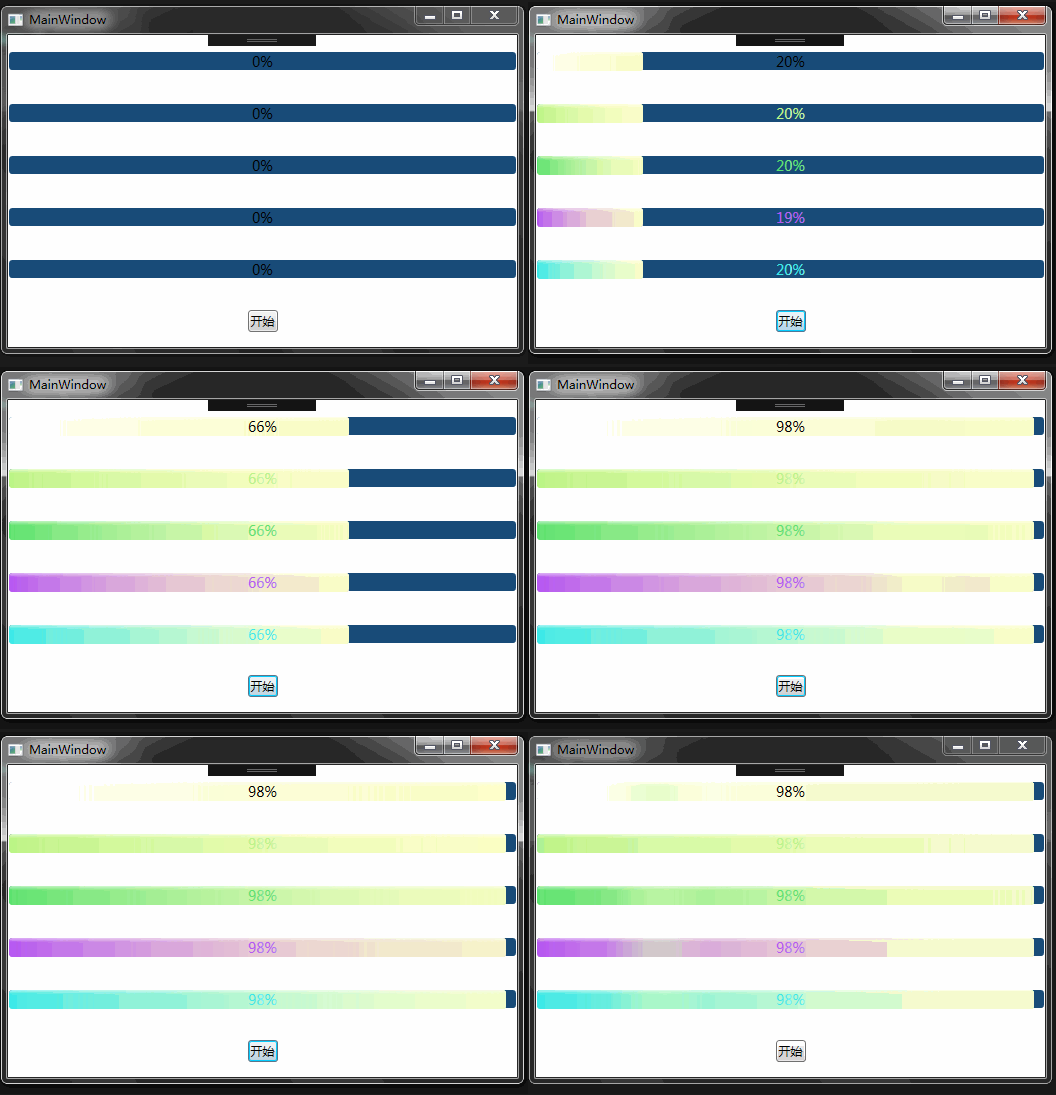
1、因为ProgressbBar的Foreground显示不得不一样,所以,要有一个参数去给控件进行设置,因此定义了一个参数值ForegroundColor
public int ForegroundColor
{get{return _foregroundColor;
    }set{
        _foregroundColor = value;
        LinearGradientBrush lgb = dictionary["ForegroundColor" + value] as LinearGradientBrush;if (lgb != null)
            proBar.Foreground = txt.Foreground = percent.Foreground = lgb;
    }
}
代码里有这么一句话“LinearGradientBrush lgb = dictionary["ForegroundColor" + value] as LinearGradientBrush;”是为了方便通过这是这个参数去样式文件里取样式的。
iOS开发学习之iOS多线程和RunLoop 中文WORD版
下载
iOS多线程编程对于iOS开发初学者来说,总是会觉得很难理解和掌握,现在通过几个实例来更加系统全面的理解iOS多线程编程,希望对大家有所帮助。 有些程序是一条直线,起点到终点;有些程序是一个圆,不断循环,直到将它切断。直线的如简单的Hello World,运行打印完,它的生命周期便结束了,像昙花一现那样;圆如操作系统,一直运行直到你关机。 一个运行着的程序就是一个进程或者叫做一个任务,一个进程至少包含一个线程,线程就是程序的执行流。Mac和iOS中的程序启动,创建好一个进程的同时,一个线程便开始运行,
2、既然是ProgressBar就要有一个进度值,这个值,我们用TextBlock来进行显示,一定要实现通知接口,这样,才能保证实时的通知到页面上。
public string ValueText
{get{return _valueText;
    }set{
        _valueText = value;if (this.PropertyChanged != null)
        {this.PropertyChanged.Invoke(this, new PropertyChangedEventArgs("ValueText"));
        }
    }
}
3、启用一个后台线程,来不断的更新进度效果
private void Bgw_DoWork(object sender, DoWorkEventArgs e)
{for (int i = 0; i < BarValue; i++)
    {
        System.Threading.Thread.Sleep(50);
        proBar.Dispatcher.Invoke(new Action(                                     delegate{if (proBar.Value <= BarValue)
            {
                proBar.Value++;
            }
        }));
        ValueText = i + "";
    }
    ValueText = BarValue + "";
}
源码




