



本文围绕CV领域MLP模型压缩中的剪枝技术展开,介绍剪枝因深度学习模型过参数化而生,可去除冗余参数。细粒度剪枝分训练基准模型、剪去低于阈值连接、微调恢复性能等步骤。还给出MLP剪枝实现代码,包括网络搭建、训练、剪枝函数等,展示剪枝前后效果,提及卷积剪枝思路。
☞☞☞AI 智能聊天, 问答助手, AI 智能搜索, 免费无限量使用 DeepSeek R1 模型☜☜☜

模型压缩之剪枝(MLP)(cv领域)
- 之前写完模型知识蒸馏后,就去忙着肝论文了,这不它又来了,开始继续模型压缩的知识
- 模型压缩之知识蒸馏
0 剪枝概述
- 深度学习网络模型从卷积层到全连接层存在着大量冗余的参数,大量神经元激活值趋近于0,将这些神经元去除后可以表现出同样的模型表达能力,这种情况被称为过参数化,而对应的技术则被称为模型剪枝。
1 细粒度剪枝核心技术(连接剪枝)
- 对权重连接和神经元进行剪枝是最简单,也是最早期的剪枝技术,下图展示的就是一个剪枝前后对比,剪枝内容包括了连接和神经元。(如下图)
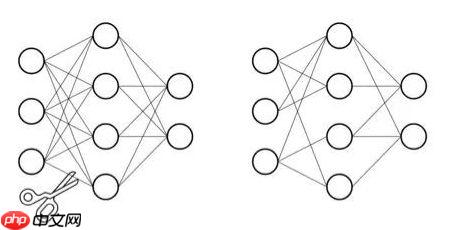
剪枝步骤
- 第一步:训练一个基准模型。
- 第二步:对权重值的幅度进行排序,去掉低于一个预设阈值的连接,得到剪枝后的网络。
- 第三步:对剪枝后网络进行微调以恢复损失的性能,然后继续进行第二步,依次交替,直到满足终止条件,比如精度下降在一定范围内。
2 项目介绍
- 本项目实现如何对MLP进行剪枝处理,同时给出卷积的剪枝思路
- 如下图,剪枝前后的结果展示,将靠近0的权重进行处理
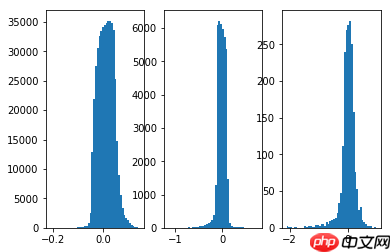
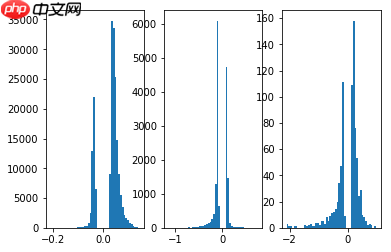

3 前馈知识
- 计算一个多维数组的任意百分比分位数,此处的百分位是从小到大排列,只需用np.percentile即可
np.percentile(a, q, axis=None, out=None, overwrite_input=False, interpolation='linear', keepdims=False)

a : array,用来算分位数的对象,可以是多维的数组
q : 介于0-100的float,用来计算是几分位的参数,如四分之一位就是25,如要算两个位置的数就(25,75)
axis : 坐标轴的方向,一维的就不用考虑了,多维的就用这个调整计算的维度方向,取值范围0/1
out : 输出数据的存放对象,参数要与预期输出有相同的形状和缓冲区长度
overwrite_input : bool,默认False,为True时及计算直接在数组内存计算,计算后原数组无法保存
interpolation : 取值范围{'linear', 'lower', 'higher', 'midpoint', 'nearest'}
            默认liner,比如取中位数,但是中位数有两个数字6和7,选不同参数来调整输出
keepdims : bool,默认False,为真时取中位数的那个轴将保留在结果中
In [1]
# 作用:找到一组数的分位数值,如二分位数等(具体什么位置根据自己定义)# 方便我们之后设定剪枝的阈值import numpy as np
a = np.array([[1,2,3,4,5,6,7,8,9]])
np.percentile(a, 50)
5.0
核心代码实现步骤
- 1 通过设定的阈值找到相应的权重,大于这个权重为true,小于为false,生成bool矩阵
- 2 将bool矩阵转为0-1矩阵,这就是我们所需的mask
- 3 mask乘上初始权重得到最终剪枝后的权重
4 代码实现
In [1]
# 导入所需包import paddleimport paddle.nn as nnimport paddle.nn.functional as Fimport paddle.utilsimport numpy as npimport mathfrom copy import deepcopyfrom matplotlib import pyplot as pltfrom paddle.io import Datasetfrom paddle.io import DataLoaderfrom paddle.vision import datasetsfrom paddle.vision import transforms
/opt/conda/envs/python35-paddle120-env/lib/python3.7/site-packages/matplotlib/__init__.py:107: DeprecationWarning: Using or importing the ABCs from 'collections' instead of from 'collections.abc' is deprecated, and in 3.8 it will stop working
  from collections import MutableMapping
/opt/conda/envs/python35-paddle120-env/lib/python3.7/site-packages/matplotlib/rcsetup.py:20: DeprecationWarning: Using or importing the ABCs from 'collections' instead of from 'collections.abc' is deprecated, and in 3.8 it will stop working
  from collections import Iterable, Mapping
/opt/conda/envs/python35-paddle120-env/lib/python3.7/site-packages/matplotlib/colors.py:53: DeprecationWarning: Using or importing the ABCs from 'collections' instead of from 'collections.abc' is deprecated, and in 3.8 it will stop working
  from collections import Sized
In [2]
# 搭建基础线性层class MaskedLinear(nn.Linear):
    def __init__(self, in_features, out_features, bias=True):
        super(MaskedLinear, self).__init__(in_features, out_features, bias)
        self.mask_flag = False
        self.mask = None

    def set_mask(self, mask):
        self.mask = mask
        self.weight.set_value(self.weight * self.mask)
        self.mask_flag = True

    def get_mask(self):
        print(self.mask_flag)        return self.mask    def forward(self, x):
        if self.mask_flag:
            weight = self.weight * self.mask            return F.linear(x, weight, self.bias)        else:            return F.linear(x, self.weight, self.bias)
In [3]
# 搭建MLP网络class MLP(nn.Layer):
    def __init__(self):
        super(MLP, self).__init__()
        self.linear1 = MaskedLinear(28 * 28 * 3, 200)
        self.relu1 = nn.ReLU()
        self.linear2 = MaskedLinear(200, 200)
        self.relu2 = nn.ReLU()
        self.linear3 = MaskedLinear(200, 10)    def forward(self, x):
        out = paddle.reshape(x, (x.shape[0], -1))
        out = self.relu1(self.linear1(out))
        out = self.relu2(self.linear2(out))
        out = self.linear3(out)        return out    def set_masks(self, masks):
        # Should be a less manual way to set masks
        # Leave it for the future
        self.linear1.set_mask(masks[0])
        self.linear2.set_mask(masks[1])
        self.linear3.set_mask(masks[2])
In [4]
# 打印输出网络结构mlp_Net = MLP()
paddle.summary(mlp_Net,(1, 3, 28, 28))
W0127 11:14:20.232509   135 device_context.cc:447] Please NOTE: device: 0, GPU Compute Capability: 7.0, Driver API Version: 10.1, Runtime API Version: 10.1
W0127 11:14:20.238121   135 device_context.cc:465] device: 0, cuDNN Version: 7.6.
---------------------------------------------------------------------------
 Layer (type)       Input Shape          Output Shape         Param #
===========================================================================
MaskedLinear-1      [[1, 2352]]            [1, 200]           470,600
    ReLU-1           [[1, 200]]            [1, 200]              0
MaskedLinear-2       [[1, 200]]            [1, 200]           40,200
    ReLU-2           [[1, 200]]            [1, 200]              0
MaskedLinear-3       [[1, 200]]            [1, 10]             2,010
===========================================================================
Total params: 512,810
Trainable params: 512,810
Non-trainable params: 0
---------------------------------------------------------------------------
Input size (MB): 0.01
Forward/backward pass size (MB): 0.01
Params size (MB): 1.96
Estimated Total Size (MB): 1.97
---------------------------------------------------------------------------
{'total_params': 512810, 'trainable_params': 512810}In [5]
# 图像转tensor操作,也可以加一些数据增强的方式,例如旋转、模糊等等# 数据增强的方式要加在Compose([  ])中def get_transforms(mode='train'):
    if mode == 'train':
        data_transforms = transforms.Compose([
            transforms.ToTensor(),
            transforms.Normalize(mean=[0.4914, 0.4822, 0.4465], std=[0.2023, 0.1994, 0.2010])])    else:
        data_transforms = transforms.Compose([
            transforms.ToTensor(),
            transforms.Normalize(mean=[0.4914, 0.4822, 0.4465], std=[0.2023, 0.1994, 0.2010])])    return data_transforms# 获取官方MNIST数据集def get_dataset(name='MNIST', mode='train'):
    if name == 'MNIST':
        dataset = datasets.MNIST(mode=mode, transform=get_transforms(mode))    return dataset# 定义数据加载到模型形式def get_dataloader(dataset, batch_size=128, mode='train'):
    dataloader = DataLoader(dataset, batch_size=batch_size, num_workers=2, shuffle=(mode == 'train'))    return dataloader
In [6]
# 初始化函数,用于模型初始化class AverageMeter():
    """ Meter for monitoring losses"""
    def __init__(self):
        self.avg = 0
        self.sum = 0
        self.cnt = 0
        self.reset()    def reset(self):
        """reset all values to zeros"""
        self.avg = 0
        self.sum = 0
        self.cnt = 0

    def update(self, val, n=1):
        """update avg by val and n, where val is the avg of n values"""
        self.sum += val * n
        self.cnt += n
        self.avg = self.sum / self.cnt
In [7]
# mlp网络训练def mlp_train_one_epoch(model, dataloader, criterion, optimizer, epoch, total_epoch, report_freq=20):
    print(f'----- Training Epoch [{epoch}/{total_epoch}]:')
    loss_meter = AverageMeter()
    acc_meter = AverageMeter()
    model.train()    for batch_idx, data in enumerate(dataloader):
        image = data[0]
        label = data[1]

        out = model(image)
        loss = criterion(out, label)

        loss.backward()
        optimizer.step()
        optimizer.clear_grad()

        pred = nn.functional.softmax(out, axis=1)
        acc1 = paddle.metric.accuracy(pred, label)

        batch_size = image.shape[0]
        loss_meter.update(loss.cpu().numpy()[0], batch_size)
        acc_meter.update(acc1.cpu().numpy()[0], batch_size)        if batch_idx > 0 and batch_idx % report_freq == 0:            print(f'----- Batch[{batch_idx}/{len(dataloader)}], Loss: {loss_meter.avg:.5}, Acc@1: {acc_meter.avg:.4}')    print(f'----- Epoch[{epoch}/{total_epoch}], Loss: {loss_meter.avg:.5}, Acc@1: {acc_meter.avg:.4}')
In [8]
# mlp网络预测def mlp_validate(model, dataloader, criterion, report_freq=10):
    print('----- Validation')
    loss_meter = AverageMeter()
    acc_meter = AverageMeter()
    model.eval()    for batch_idx, data in enumerate(dataloader):
        image = data[0]
        label = data[1]

        out = model(image)
        loss = criterion(out, label)

        pred = paddle.nn.functional.softmax(out, axis=1)
        acc1 = paddle.metric.accuracy(pred, label)
        batch_size = image.shape[0]
        loss_meter.update(loss.cpu().numpy()[0], batch_size)
        acc_meter.update(acc1.cpu().numpy()[0], batch_size)        if batch_idx > 0 and batch_idx % report_freq == 0:            print(f'----- Batch [{batch_idx}/{len(dataloader)}], Loss: {loss_meter.avg:.5}, Acc@1: {acc_meter.avg:.4}')    print(f'----- Validation Loss: {loss_meter.avg:.5}, Acc@1: {acc_meter.avg:.4}')
In [9]
def weight_prune(model, pruning_perc):
    '''
    Prune pruning_perc % weights layer-wise
    '''
    threshold_list = []    for p in model.parameters():        if len(p.shape) != 1: # bias
            weight = p.abs().numpy().flatten()  # 将权重参数拉伸为1维
            threshold = np.percentile(weight, pruning_perc)   # 根据阈值对权重参数进行筛选
            threshold_list.append(threshold)    # generate mask
    masks = []
    idx = 0
    for p in model.parameters():        if len(p.shape) != 1:
            pruned_inds = p.abs() > threshold_list[idx]         # 返回bool矩阵
            pruned_inds = paddle.cast(pruned_inds, 'float32')   # paddle.cast将bool->float
            masks.append(pruned_inds)
            idx += 1
    return masks
In [10]
# mlp网络主函数def mlp_main():
    total_epoch = 1
    batch_size = 256

    model = MLP()
    train_dataset = get_dataset(mode='train')
    train_dataloader = get_dataloader(train_dataset, batch_size, mode='train')
    val_dataset = get_dataset(mode='test')
    val_dataloader = get_dataloader(val_dataset, batch_size, mode='test')
    criterion = nn.CrossEntropyLoss()
    scheduler = paddle.optimizer.lr.CosineAnnealingDecay(0.02, total_epoch)
    optimizer = paddle.optimizer.Momentum(learning_rate=scheduler,
                                          parameters=model.parameters(),
                                          momentum=0.9,
                                          weight_decay=5e-4)

    eval_mode = False
    if eval_mode:
        state_dict = paddle.load('./mlp_ep2.pdparams')
        model.set_state_dict(state_dict)
        mlp_validate(model, val_dataloader, criterion)        return

    save_freq = 5
    test_freq = 1
    for epoch in range(1, total_epoch+1):
        mlp_train_one_epoch(model, train_dataloader, criterion, optimizer, epoch, total_epoch)
        scheduler.step()        if epoch % test_freq == 0 or epoch == total_epoch:
            mlp_validate(model, val_dataloader, criterion)        if epoch % save_freq == 0 or epoch == total_epoch:
            paddle.save(model.state_dict(), f'./mlp_ep{epoch}.pdparams')
            paddle.save(optimizer.state_dict(), f'./mlp_ep{epoch}.pdopts')    # 剪枝后的效果
    print("\n=====Pruning 60%=======\n")
    pruned_model = deepcopy(model)
    mask = weight_prune(pruned_model, 60)
    pruned_model.set_masks(mask)
    mlp_validate(pruned_model, val_dataloader, criterion)    return model,pruned_model
In [11]
# 返回值是剪枝前后网络模型mlp_model, mlp_pruned_model = mlp_main()
In [12]
# 定义模型权重展示函数def plot_weights(model):
    modules = [module for module in model.sublayers()]
    num_sub_plot = 0
    for i, layer in enumerate(modules):        if hasattr(layer, 'weight'):
            plt.subplot(131+num_sub_plot)
            w = layer.weight
            w_one_dim = w.cpu().numpy().flatten()
            plt.hist(w_one_dim[w_one_dim!=0], bins=50)
            num_sub_plot += 1
    plt.show()
In [13]
# 剪枝前的权重plot_weights(mlp_model)
/opt/conda/envs/python35-paddle120-env/lib/python3.7/site-packages/matplotlib/cbook/__init__.py:2349: DeprecationWarning: Using or importing the ABCs from 'collections' instead of from 'collections.abc' is deprecated, and in 3.8 it will stop working
  if isinstance(obj, collections.Iterator):
/opt/conda/envs/python35-paddle120-env/lib/python3.7/site-packages/matplotlib/cbook/__init__.py:2366: DeprecationWarning: Using or importing the ABCs from 'collections' instead of from 'collections.abc' is deprecated, and in 3.8 it will stop working
  return list(data) if isinstance(data, collections.MappingView) else data
In [14]
# 剪枝后的权重plot_weights(mlp_pruned_model)
5 如何实现卷积层的剪枝
- 通过上面MLP的实现,想必大家都知道,关键是如何找出mask矩阵
- 看下面代码是不是就大彻大悟了

- 通过找出np.percentile找出阈值对应权重,再通过np.where实现mask矩阵
- 剩下的就大家自己去实现吧
- 郑重声明:我可不是偷懒哈
In [25]
# 找出特定元素的位置# 筛选出True值对应位置的数据np.random.seed(7) #相同的种子可确保随机数按序生成时是相同的,结果可重现b = np.random.randint(40, 100, size=(6,6)) 	 # 生成40到100,6x6个随机数print('b={}\nb中小于70的元素为\n\n{}'.format(b,b<70))
ind = np.where(b>60,b,0)  # 返回的是一个tuple 类型print("np.where(b>60,b,0)=\n{}".format(ind))
b=[[87 44 65 94 43 59] [63 79 68 97 54 63] [48 65 86 82 66 48] [79 78 44 88 47 84] [40 51 95 98 46 59] [84 45 96 64 95 93]] b中小于70的元素为 [[False True True False True True] [ True False True False True True] [ True True False False True True] [False False True False True False] [ True True False False True True] [False True False True False False]] np.where(b>60,b,0)= [[87 0 65 94 0 0] [63 79 68 97 0 63] [ 0 65 86 82 66 0] [79 78 0 88 0 84] [ 0 0 95 98 0 0] [84 0 96 64 95 93]]




