



本文介绍了基于PaddleDetection套件进行钢铁表面缺陷识别的实践过程。先介绍赛题及NEU数据集,含6种热轧带钢缺陷。接着说明数据准备步骤,包括解压、安装工具、改名、拆分及格式转换。然后详述用faster_rcnn_swin_tiny_fpn_3x_coco模型的训练流程,涉及配置文件修改、训练评估,最后提及推理及生成比赛数据的方法。
☞☞☞AI 智能聊天, 问答助手, AI 智能搜索, 免费无限量使用 DeepSeek R1 模型☜☜☜

0.引言
作为一个新人练习赛,这个比赛可以非常好的帮助大家熟悉使用Paddle。在这里我使用PaddleDetection套件中的网络进行训练,本项目将带大家对PaddleDetection套件使用有一个实践的过程。
1.赛题介绍
本次比赛聚焦图像目标识别技术,需要选手从图像中识别出钢铁表面的缺陷位置,并给出锚点框的坐标,同时对不同的缺陷进行分类,以期产出泛化性更好、性能更稳定的钢铁表面缺陷识别模型。2.数据介绍及数据准备
本数据集来自NEU表面缺陷检测数据集,收集了6种典型的热轧带钢表面缺陷,即氧化铁皮压入(RS)、斑块(Pa)、开裂(Cr)、点蚀(PS)、夹杂(In)和划痕(Sc)。
可在比赛页面看到详情:https://aistudio.baidu.com/aistudio/competition/detail/114/0/task-definition
数据格式转换,数据拆分
下面是Paddle提供的两个处理数据的命令说明文档。PadlleX:
https://github.com/PaddlePaddle/PaddleX/tree/develop/docs/data

PaddleDetection: https://github.com/PaddlePaddle/PaddleDetection/blob/release%2F2.3/docs/tutorials/PrepareDataSet.md
In [ ]
# 解压文件并移除多余的目录! unzip /home/aistudio/data/data105746/train.zip -d /home/aistudio/data/steel
!rm -r /home/aistudio/data/steel/__MACOSX
! unzip /home/aistudio/data/data105747/test.zip -d /home/aistudio/data/steel
!rm -r /home/aistudio/data/steel/__MACOSX
In [ ]
# 安装paddlex 用于拆分数据集# 升级pip!pip install --upgrade pip -i https://mirror.baidu.com/pypi/simple
!pip install "paddlex>2.0.0" -i https://mirror.baidu.com/pypi/simple
In [ ]
# 修改文件名字 JPEGImages  Annotations!mv /home/aistudio/data/steel/train/ANNOTATIONS  /home/aistudio/data/steel/train/Annotations
!mv /home/aistudio/data/steel/train/IMAGES  /home/aistudio/data/steel/train/JPEGImages
In [ ]
#使用paddleX拆分数据集!paddlex --split_dataset --format VOC --dataset_dir /home/aistudio/data/steel/train --val_value 0.001 --test_value 0.0
In [ ]
# 下载PaddleDetection%cd /home/aistudio/work
!git clone https://gitee.com/paddlepaddle/PaddleDetection.git -b release/2.3
In [ ]
# 进入PaddleDetection%cd /home/aistudio/work/PaddleDetection# 安装其它依赖!pip install -r /home/aistudio/work/PaddleDetection/requirements.txt
# 临时环境安装!pip install pycocotools -i https://mirror.baidu.com/pypi/simple
!pip install lap -i https://mirror.baidu.com/pypi/simple
In [ ]
%cd /home/aistudio/work/PaddleDetection/#转换train!python tools/x2coco.py \
        --dataset_type voc \
        --voc_anno_dir /home/aistudio/data/steel/train/ \
--voc_anno_list /home/aistudio/data/steel/train/train_list.txt \
--voc_label_list /home/aistudio/data/steel/train/labels.txt \
--voc_out_name /home/aistudio/data/steel/train/voc_train.json#转换test!python tools/x2coco.py \
        --dataset_type voc \
        --voc_anno_dir /home/aistudio/data/steel/train/ \
--voc_anno_list /home/aistudio/data/steel/train/val_list.txt \
--voc_label_list /home/aistudio/data/steel/train/labels.txt \
--voc_out_name /home/aistudio/data/steel/train/voc_val.json

!rm -r /home/aistudio/data/steel/train/Annotations/*
!mv /home/aistudio/data/steel/train/*.json /home/aistudio/data/steel/train/Annotations/
3. 训练流程
在试了多种模型后,我发现faster_rcnn_swin_tiny_fpn_3x_coco效果最好。接下来就带着大家走一遍训练流程把。3.1 配置好训练文件
3.1.1 faster_rcnn_swin_tiny_fpn_1x_coco
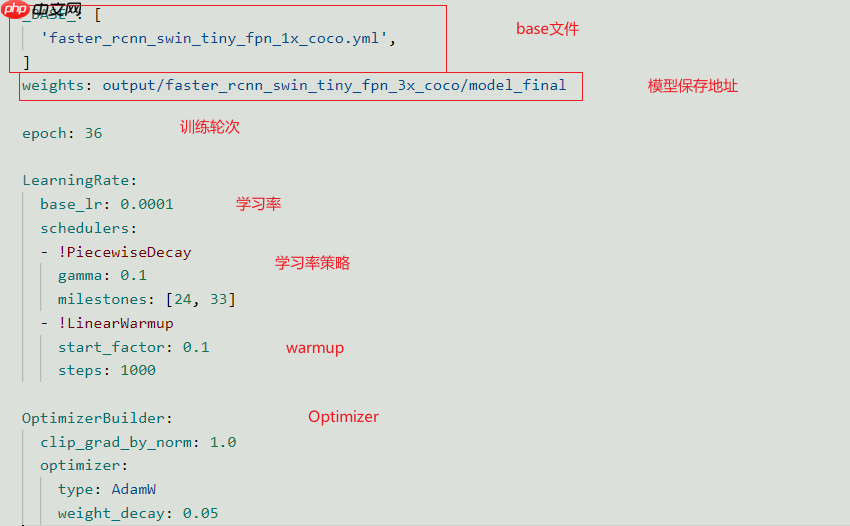
首先打开work/PaddleDetection/configs/faster_rcnn下的faster_rcnn_swin_tiny_fpn_1x_coco.yml 一般来说,需要修改的就是weights即模型保存路径。及训练轮次,学习率等。可以将一些需要改动的参数放到此文件中,这样就不会防止改动了里面得文件导致使用其他模型时还要再去那个文件进行改动。此文件的参数优先级高于其他base文件。
3.1.2 faster_rcnn_swin_tiny_fpn_1x_coco
然后打开_BASE_的路径,即faster_rcnn_swin_tiny_fpn_1x_coco.yml文件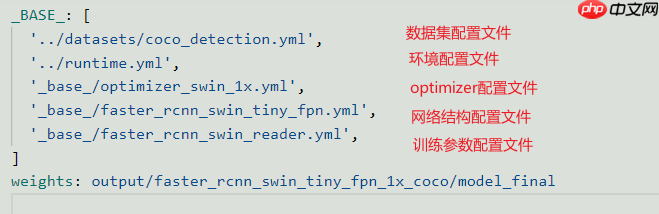
我们最需要改的是 第一个得数据集配置文件,以及训练参数配置文件。
3.1.3 coco_detection
打开work/PaddleDetection/configs/datasets/路径下的coco_detection.yml改成如下。具体路径可以自己琢磨一下 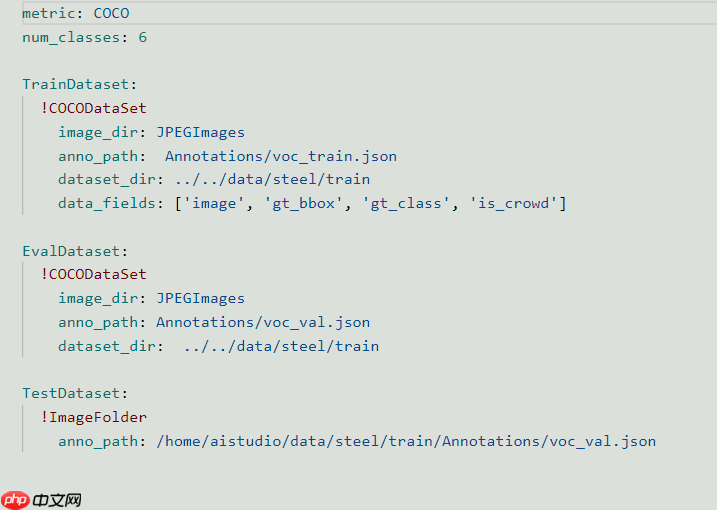
3.1.4 其他
其他基本不用动。打开work/PaddleDetection/configs/faster_rcnn/_base_/路径下的faster_rcnn_swin_tiny_fpn.yml。可以修改其中的batch_size。这些事基本的超参,其他的可以自行研究。4. 训练及评估
In [ ]
# 训练!python tools/train.py -c configs/faster_rcnn/faster_rcnn_swin_tiny_fpn_3x_coco.yml --use_vdl=true --vdl_log_dir=vdl_dir/scalar --eval
In [ ]
# 单卡断点续训# !python tools/train.py -c configs/faster_rcnn/faster_rcnn_swin_tiny_fpn_3x_coco.yml \# -r /home/aistudio/work/output/faster_rcnn_swin_tiny_fpn_3x_coco/best \# --eval \# --use_vdl=true \# --vdl_log_dir=vdl_dir/scalar \# --eval
5. 生成比赛数据
In [ ]
# 推理图像和生成txt文件!python tools/infer.py -c  configs/faster_rcnn/faster_rcnn_swin_tiny_fpn_3x_coco.yml \
-o weights=/home/aistudio/work/PaddleDetection/output/faster_rcnn_swin_tiny_fpn_3x_coco/34 \
--infer_dir=/home/aistudio/data/steel/test/IMAGES/ \
--output_dir=/home/aistudio/data/steel/infer_output\
--draw_threshold=0.005 --save_txt=True
In [ ]
import csvimport os
headers = ['image_id','bbox','category_id','confidence']
classList = ['crazing','inclusion','pitted_surface','scratches','patches','rolled-in_scale']
rows = []

rootdir = '/home/aistudio/data/steel/infer_output'list = os.listdir(rootdir) #列出文件夹下所有的目录与文件for i in range(0,len(list)):
       path = os.path.join(rootdir,list[i])       if os.path.isfile(path) and path.endswith('txt'):
           txtFile = open(path)           print(path)
           result = txtFile.readlines()           for r in result:
               ls = r.split(' ')
               Cls = ls[0]
               sco = float(ls[1])
               xmin = float(ls[2])
               ymin = float(ls[3])
               w = float(ls[4])
               h = float(ls[5])
               xmax = xmin+w
               ymax = ymin+h
               clsID = classList.index(Cls)
               imgID = list[i][:-4]
               row = [imgID,[xmin,ymin,xmax,ymax],clsID,sco]
               rows.append(row)with open('submission.csv','w')as f:
    f_csv = csv.writer(f)
    f_csv.writerow(headers)
    f_csv.writerows(rows)
In [ ]
import pandas as pd
datafile = pd.read_csv('/home/aistudio/work/PaddleDetection/submission.csv')# 按照列值排序data = datafile.sort_values(by="image_id", ascending=True)
data.to_csv('submission_final.csv', mode='a+', index=False)




