


- - 推送(添加元素):将元素添加到堆栈顶部。
- - pop(删除元素):从顶部删除元素。
- - isfull:检查堆栈是否已达到其限制(在本例中为 10)。
- - isempty:检查堆栈是否为空。
- - 显示:显示堆栈元素。
1.示例:
索引.html
<!doctype html>
<html lang="en">
  <head>
    <meta charset="utf-8" />
    <meta name="viewport" content="width=device-width, initial-scale=1.0" />
    <title>stack | last in first out (lifo) or first in last out | - by sudhanshu gaikwad (filo)</title>
  </head>
  <body>
    <h3>stack in javascript</h3>
    <script>
      let data = [];

      // add an element to the array
      function addele(ele) {
        if (isfull()) {
          console.log("array is full, element can't be added!");
        } else {
          console.log("element added!");
          data.push(ele);
        }
      }

      // check if the array is full
      function isfull() {
        return data.length >= 10;
      }

      // remove an element from the array
      function remove() {
        if (isempty()) {
          console.log("array is empty, can't remove element!");
        } else {
          data.pop();
          console.log("element removed!");
        }
      }

      // check if the array is empty
      function isempty() {
        return data.length === 0;
      }

      // display the array elements
      function display() {
        console.log("updated array >> ", data);
      }

      // example usage
      addele(55);
      addele(85);
      addele(25);
      remove();
      display(); // [55, 85]
    </script>
  </body>
</html>
2.示例:
index2.html
<!doctype html>
<html lang="en">
<head>
<meta charset="utf-8" />
<meta name="viewport" content="width=device-width, initial-scale=1.0" />
<title>what is stack in javascript | by sudhanshu gaikwad</title>
<style>
* {
box-sizing: border-box;
}
body {
font-family: "roboto condensed", sans-serif;
background-color: #f4f4f4;
margin: 0;
padding: 0;
display: flex;
flex-direction: column;
justify-content: center;
align-items: center;
height: 100vh;
}
.container {
background-color: white;
padding: 20px;
border-radius: 10px;
box-shadow: 0 4px 8px rgba(0, 0, 0, 0.1);
max-width: 400px;
width: 100%;
margin-bottom: 20px;
}
h3 {
color: #333;
text-align: center;
margin-bottom: 20px;
}
input {
padding: 10px;
width: calc(100% - 20px);
margin-bottom: 10px;
border: 1px solid #ccc;
border-radius: 5px;
}
button {
padding: 10px;
margin: 10px 0;
border: none;
border-radius: 5px;
background-color: #292f31;
color: white;
cursor: pointer;
width: 100%;
}
button:hover {
background-color: #e9e9ea;
color: #292f31;
}
.message {
margin-top: 15px;
color: #333;
font-size: 16px;
text-align: center;
}
.footer {
text-align: center;
margin-top: 20px;
font-size: 14px;
color: #555;
}
/* responsive design */
@media (max-width: 768px) {
.container {
padding: 15px;
max-width: 90%;
}
button {
font-size: 14px;
}
input {
font-size: 14px;
}
}
</style>
</head>
<body>
<div class="container">
<!-- title -->
<h3>stack in javascript</h3>
<!-- input section -->
<input type="text" id="addele" placeholder="enter an element" />
<!-- buttons section -->
<button onclick="adddata()">add element</button>
<button onclick="removeele()">remove element</button>
<button onclick="display()">show array</button>
<!-- message sections -->
<div id="add" class="message"></div>
<div id="remove" class="message"></div>
<div id="display" class="message"></div>
</div>
<!-- footer with copyright symbol -->
<div class="footer">
© 2024 sudhanshu developer | all rights reserved
</div>
<script>
let data = [];
// function to add an element to the stack
function adddata() {
let newele = document.getelementbyid("addele").value;
if (isfull()) {
document.getelementbyid("add").innerhtml = "array is full, element cannot be added!";
} else if (newele.trim() === "") {
document.getelementbyid("add").innerhtml = "please enter a valid element!";
} else {
data.push(newele);
document.getelementbyid("add").innerhtml = `element "${newele}" added!`;
document.getelementbyid("addele").value = "";
console.log("current array: ", data);
display();
}
}
function isfull() {
return data.length >= 10;
}
function removeele() {
if (isempty()) {
document.getelementbyid("remove").innerhtml = "array is empty!";
} else {
let removedelement = data.pop();
document.getelementbyid("remove").innerhtml = `element "${removedelement}" removed!`;
console.log("current array: ", data);
display();
}
}
function isempty() {
return data.length === 0;
}
function display() {
let displayarea = document.getelementbyid("display");
displayarea.innerhtml = "";
if (data.length === 0) {
displayarea.innerhtml = "no elements in the array!";
console.log("array is empty.");
} else {
for (let i = 0; i < data.length; i++) {
displayarea.innerhtml += `element ${i + 1}: ${data[i]}<br>`;
}
console.log("displaying array: ", data);
}
}
</script>
</body>
</html>
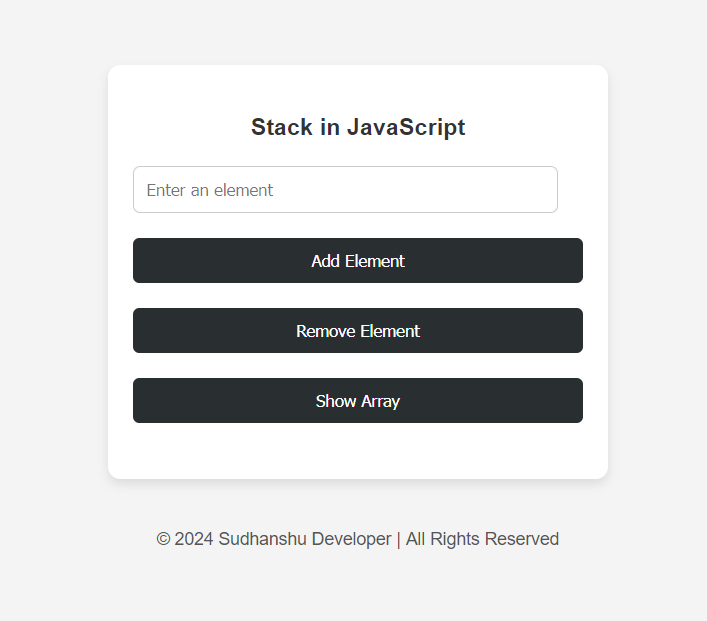
输出:
带有用户输入的 c 语言堆栈

#include <stdio.h>
#include <stdbool.h>

#define max 10

int data[max];
int top = -1;

// function to check if the stack is full
bool isfull() {
    return top >= max - 1;
}

// function to check if the stack is empty
bool isempty() {
    return top == -1;
}

// function to add an element to the stack (push operation)
void addele() {
    int ele;
    if (isfull()) {
        printf("array is full, element can't be added!\n");
    } else {
        printf("enter an element to add: ");
        scanf("%d", &ele); // read user input
        data[++top] = ele; // increment top and add element
        printf("element %d added!\n", ele);
    }
}

// function to remove an element from the stack (pop operation)
void remove() {
    if (isempty()) {
        printf("array is empty, can't remove element!\n");
    } else {
        printf("element %d removed!\n", data[top--]); // remove element and decrement top
    }
}

// function to display all elements in the stack
void display() {
    if (isempty()) {
        printf("array is empty!\n");
    } else {
        printf("updated array >> ");
        for (int i = 0; i <= top; i++) {
            printf("%d ", data[i]);
        }
        printf("\n");
    }
}

int main() {
    int choice;
    do {
        printf("\n1. add element\n2. remove element\n3. display stack\n4. exit\n");
        printf("enter your choice: ");
        scanf("%d", &choice); // read the user's choice

        switch (choice) {
            case 1:
                addele();
                break;
            case 2:
                remove();
                break;
            case 3:
                display();
                break;
            case 4:
                printf("exiting...\n");
                break;
            default:
                printf("invalid choice! please select a valid option.\n");
        }
    } while (choice != 4);

    return 0;
}
示例输出:
1. Add Element
2. Remove Element
3. Display Stack
4. Exit
Enter your choice: 1
Enter an element to add: 55
Element 55 Added!

1. Add Element
2. Remove Element
3. Display Stack
4. Exit
Enter your choice: 3
Updated Array >> 55

1. Add Element
2. Remove Element
3. Display Stack
4. Exit
Enter your choice: 4
Exiting...




