
1、在做集群的时候是需要ssh互信,它有利于在另一节点方便操作。
2、当使用scp远程拷贝操作时,需要输入目标服务器的用户名和密码,这个时候可以做linux服务器之间ssh互信配置, 这样在多个linux服务器之间做操作时就可以免密登陆。
简而言之,服务器存储目标主机的证书,以便自动完成认证,无需输入密码。
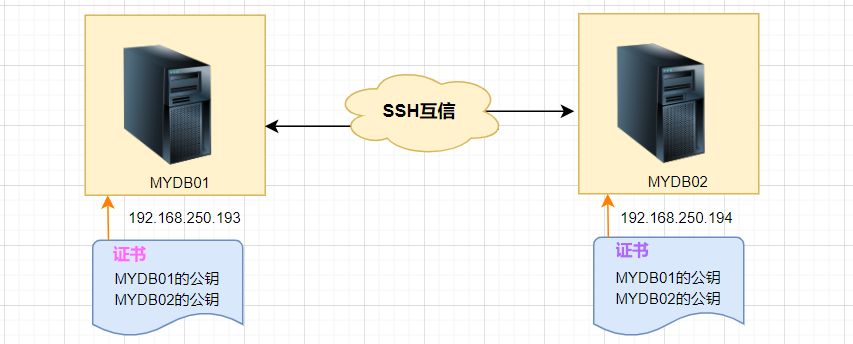
1、各节点生成自己的公钥和私钥对。
2、将自己的公钥文件发送给对方。
3、验证互信配置是否成功。
这里以MYDB01和MYDB02两台LINUX主机为例:
在两台主机上分别生成,提示输入信息时直接回车:
# MYDB01主机:
[root@MYDB01 ~]# ssh-keygen -t rsa
Generating public/private rsa key pair.
Enter file in which to save the key (/root/.ssh/id_rsa):
Enter passphrase (empty for no passphrase):
Enter same passphrase again:
Your identification has been saved in /root/.ssh/id_rsa.
Your public key has been saved in /root/.ssh/id_rsa.pub.
The key fingerprint is:
SHA256:lQex2+SbdmGGNBvU8vjaTKVCbfAmk8Eva+C6BPJ49G0 root@MYDB01
The key's randomart image is:
+---[RSA 2048]----+
|oo.. |
| == .|
|+ *@ |
| ..BB=B .|
|. o S..o=O+o |
| = o .. +=+. |
|. o o.E.+*.|
| . ... ...o|
|.. |
+----[SHA256]-----+
[root@MYDB01 ~]#
# MYDB02主机:
[root@MYDB02 ~]# ssh-keygen -t rsa
Generating public/private rsa key pair.
Enter file in which to save the key (/root/.ssh/id_rsa):
Created directory '/root/.ssh'.
Enter passphrase (empty for no passphrase):
Enter same passphrase again:
Your identification has been saved in /root/.ssh/id_rsa.
Your public key has been saved in /root/.ssh/id_rsa.pub.
The key fingerprint is:
SHA256:8DGfMHFZDrEOOYhcpFGXI8tndQXTE4FampR6cTowAo4 root@MYDB02
The key's randomart image is:
+---[RSA 2048]----+
|o++ o.+=+=+o |
| + =oo=+*+=.o|
|E =.o+OB.X.. |
|oo+XB. |
| oS.+. |
| |
| |
| |
| |
+----[SHA256]-----+
[root@MYDB02 ~]#
这样,就创建了公钥和密钥,会生成**id_rsa和id_rsa.pub**两个文件。
生成ssh密钥后,密钥将默认存储在家目录下的**.ssh/目录**中。
私钥和公钥的权限分别为**600和644**。
.ssh目录权限必须是700

本系统有两种操作用户,一种为普通用户,一种为管理员。普通用户可以查看公告、查看规章制度、更改个人密码、查看部门信息、查看员工信息、发表留言、进行工作总结等等;管理员可以对规章制度管理、系统权限设置、操作记录查看、部门管理、员工管理、任务分配、留言管理、工资管理、合同管理等登录帐号admin 密码 admin
 0
0

选项:
-t rsa|dsa默认是rsa格式。
接着可以查看生成的公钥和私钥文件:
[root@MYDB01 ~]# cd /root/.ssh
[root@MYDB01 .ssh]# pwd
/root/.ssh
[root@MYDB01 .ssh]# ll -sh
总用量 12K
4.0K -rw-------1 root root 1.7K 2月14 16:17 id_rsa
4.0K -rw-r--r--1 root root393 2月14 16:17 id_rsa.pub
[root@MYDB01 .ssh]#
# 命令格式:
ssh-copy-id [-i [identity_file]] [user@]machine
这个命令的作用是:将id_rsa.pub文件内容传输至对方的 .ssh目录中,生成文件名为authorized_keys 文件,并且会设置远程主机用户目录的**.ssh和.ssh/authorized_keys**权限。
# 在MYDB01上执行以下操作:
[root@MYDB01 .ssh]# ssh-copy-id 192.168.250.194
/usr/bin/ssh-copy-id: INFO: Source of key(s) to be installed: "/root/.ssh/id_rsa.pub"
/usr/bin/ssh-copy-id: INFO: attempting to log in with the new key(s), to filter out any that are already installed
/usr/bin/ssh-copy-id: INFO: 1 key(s) remain to be installed -- if you are prompted now it is to install the new keys
root@192.168.250.194's password:

Number of key(s) added: 1

Now try logging into the machine, with: "ssh '192.168.250.194'"
and check to make sure that only the key(s) you wanted were added.

[root@MYDB01 .ssh]#
这里在MYDB02主机上查看:
[root@MYDB02 ~]# cd /root/.ssh
[root@MYDB02 .ssh]# ll
总用量 12
-rw------- 1 root root393 2月14 16:41 authorized_keys
-rw------- 1 root root 1679 2月14 16:20 id_rsa
-rw-r--r-- 1 root root393 2月14 16:20 id_rsa.pub
[root@MYDB02 .ssh]# cat authorized_keys
ssh-rsa AAAAB3NzaC1yc2EAAAADAQABAAABAQCtQ+pBp1T9fHAkrifEShaOAfBJFT+HdljR8mBxl7wZ1a91g3Zuzu35gJKsUjD+NqP9JcdyKapE309SHPvosvsJjLfccF4PaEZAgqHryu+S3cBn8zqA6fm62hsx/qI4I80PV0btcqfwphsD+5+vgkDJWAsUGQtqZdmMClAIy5gs0He0K2jpciKHvxWWClB3+dTJ0e9yIuIkV7lM+jqVIqYFJD0bRyy0zgNsY5/cLYFllM42TQDos93hVdqGXOHREpWo01KX2Jd8MKj4yNeiqgnj2mDtiNFWOUSkAbHpcKInuUOErJMqkV7MP0er5UKY/NemDzuORr2RxYqSTWaz/T7N root@MYDB01
[root@MYDB02 .ssh]#
上面的操作只是单方面信任,主机MYDB01登录主机MYDB02不需输入密码,反过来不行,所以还需下面操作:
# 在主机MYDB02上将其钥复制到主机MYDB01上:
[root@MYDB02 .ssh]# ssh-copy-id 192.168.250.193
/usr/bin/ssh-copy-id: INFO: Source of key(s) to be installed: "/root/.ssh/id_rsa.pub"
The authenticity of host '192.168.250.193 (192.168.250.193)' can't be established.
ECDSA key fingerprint is SHA256:vThEoRhUOECeD5jhE+m8TZA2+6OoElIoNOQ3XqtopZw.
ECDSA key fingerprint is MD5:97:40:b2:35:6e:07:5a:61:1f:73:f1:b2:6e:54:5b:7d.
Are you sure you want to continue connecting (yes/no)? y
Please type 'yes' or 'no': yes
/usr/bin/ssh-copy-id: INFO: attempting to log in with the new key(s), to filter out any that are already installed
/usr/bin/ssh-copy-id: INFO: 1 key(s) remain to be installed -- if you are prompted now it is to install the new keys
root@192.168.250.193's password:

Number of key(s) added: 1

Now try logging into the machine, with: "ssh '192.168.250.193'"
and check to make sure that only the key(s) you wanted were added.

[root@MYDB02 .ssh]#
分别在MYDB01主机和MYDB02主机上通过SSH登录,看是否需要输入密码:
在MYDB01主机上登录MYDB02主机:
[root@MYDB01 .ssh]# ssh 192.168.250.194
Last login: Tue Jan 9 15:41:56 2023 from 192.168.250.193
[root@MYDB02 ~]#
无密登录成功。
同样,在MYDB02主机上登录MYDB01主机:
[root@MYDB02 .ssh]# ssh 192.168.250.193
Last failed login: Tue Feb 14 16:48:54 CST 2023 from 192.168.250.194 on ssh:notty
There was 1 failed login attempt since the last successful login.
Last login: Tue Jan 9 15:41:34 2024 from 192.168.250.194
[root@MYDB01 ~]#
以上就是Linux SSH登录互信配置的详细内容,更多请关注php中文网其它相关文章!

每个人都需要一台速度更快、更稳定的 PC。随着时间的推移,垃圾文件、旧注册表数据和不必要的后台进程会占用资源并降低性能。幸运的是,许多工具可以让 Windows 保持平稳运行。

Copyright 2014-2025 https://www.php.cn/ All Rights Reserved | php.cn | 湘ICP备2023035733号


 423
423









 收藏
收藏













