

更多>
最新下载

边框动画css,简单的登录界面html
这是一款好看的边框动画css,简单的登录界面html,4色边框线条动画,充分响应式设计,简约大方,可用于网页会员登录、后台登录等,供大家查看。
0
2026-01-29


24小时阅读排行榜
- 1 Python 定时任务的实现方式对比
- 2 Linux 磁盘分区设计的常见误区
- 3 Python 抽象基类 ABC 的工程价值
- 4 rsync "no space left" 的目标磁盘 df -i 与 inode 耗尽
- 5 Python 带参数装饰器的正确写法
- 6 CTE 递归查询深度过大导致栈溢出的 max_recursion 设置
- 7 为 CSS 下拉菜单正确添加圆角而不隐藏子菜单内容
- 8 html5可视化编辑怎么调层级顺序_html5可视化层级调整法【步骤】
- 9 Python 大文件逐行处理的正确方式
- 10 Python list 扩容机制与性能分析
- 11 SQL 如何实现“增量同步”基于时间戳或版本号的方案
- 12 argparse 如何让子命令自动继承父解析器的 add_argument
- 13 Python pip 安装依赖冲突的解决思路
- 14 如何使用 Flexbox 实现水平导航列表项等宽自适应填充
- 15 Python 异步上下文管理器的实现
更多>
最新教程

-
- Node.js 教程
- 16358 2025-08-28
-
- CSS3 教程
- 1547090 2025-08-27
-
- Rust 教程
- 23470 2025-08-27
-
- Vue 教程
- 25899 2025-08-22
-
- PostgreSQL 教程
- 22396 2025-08-21
-
- Git 教程
- 9338 2025-08-21
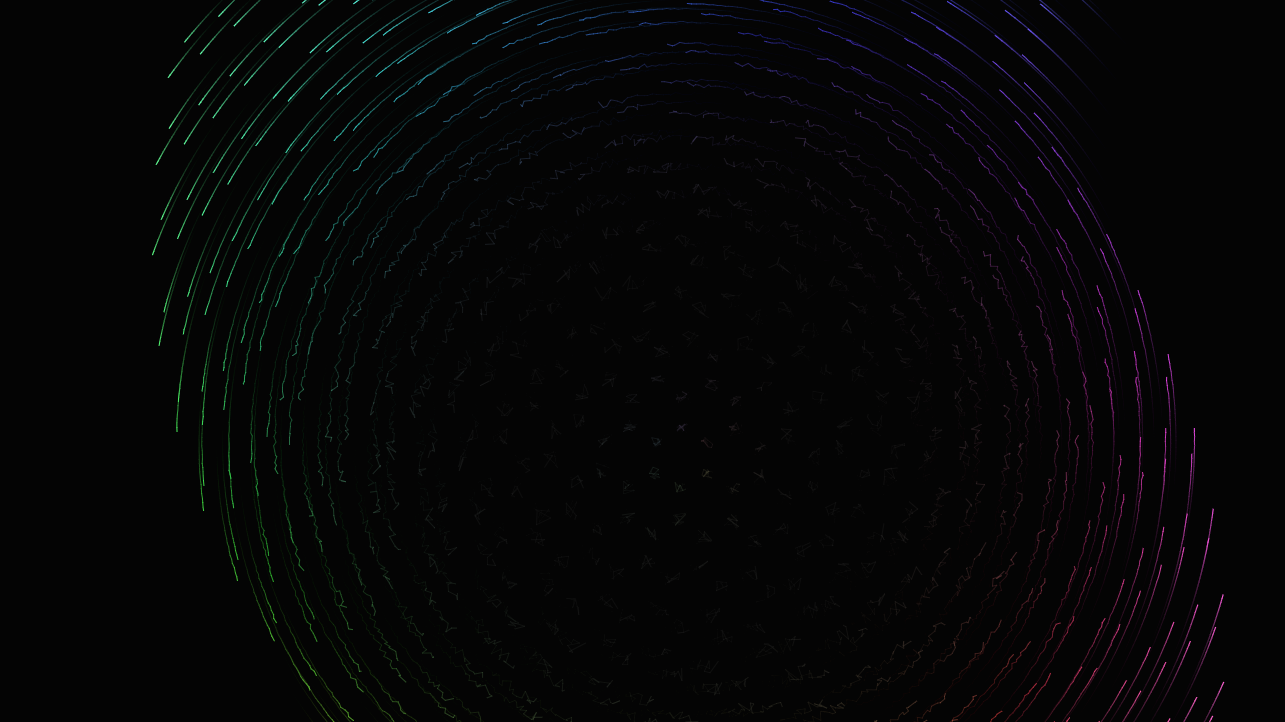
HTML5+Canvas的黑洞特效


<!doctype html>
<html>
<head>
<meta charset="utf-8">
<title>不要失去你的彩虹</title>
<style>
canvas {
position: absolute;
top: 0;
left: 0;
}
</style>
</head>
<body>
<canvas id=c></canvas>
<script>
let w = c.width = window.innerWidth;
let h = c.height = window.innerHeight;
const ctx = c.getContext('2d');
const opts = {
hexLength: 30,
lenFn: ({ len, t }) =>
len + Math.sin(t),
radFn: ({ rad, len, t, excitement }) =>
rad + (excitement + opts.propFn({ len, t }))*2 / 4,
propFn: ({ len, t }) =>
len / opts.hexLength / 10 - t,
excitementFn: ({ len, t }) =>
Math.sin(opts.propFn({ len, t }))**2,
colorFn: ({ rad, excitement, t }) =>
`hsl(${rad / Math.TAU * 360 + t}, ${excitement * 100}%, ${20 + excitement * 50}%)`,
timeStep: .01,
randomJig: 8,
repaintColor: 'rgba(0,0,0,.1)'
};
let tick = 0;
Math.TAU = 6.28318530717958647692;
const vertices = [];
class Vertex {
constructor({ x, y }) {
this.len = Math.sqrt(x*x + y*y);
this.rad = Math.acos(x / this.len) * (y > 0 ? 1 : -1) + .13;
this.prevPoint = { x, y };
}
step() {
const excitement = opts.excitementFn({ len: this.len, t: tick });
const param = {
len: this.len,
rad: this.rad,
t: tick,
excitement
};
const nextLen = opts.lenFn(param);
const nextRad = opts.radFn(param);
const color = opts.colorFn(param);
ctx.strokeStyle = color;
ctx.lineWidth = excitement + .2;
ctx.beginPath();
ctx.moveTo(this.prevPoint.x, this.prevPoint.y);
this.prevPoint.x = nextLen * Math.cos(nextRad) +
Math.random() * (1-excitement)**2 * opts.randomJig * 2 - opts.randomJig;
this.prevPoint.y = nextLen * Math.sin(nextRad) +
Math.random() * (1-excitement)**2 * opts.randomJig * 2 - opts.randomJig;
ctx.lineTo(this.prevPoint.x, this.prevPoint.y);
ctx.stroke();
}
static gen() {
vertices.length = 0;
const hexCos = Math.cos(Math.TAU / 12) * opts.hexLength;
const hexSin = Math.sin(Math.TAU / 12) * opts.hexLength;
let alternanceX = false;
for(let x = 0; x < w; x += hexCos) {
let alternance = alternanceX = !alternanceX;
for(let y = 0; y < h; y += hexSin + opts.hexLength) {
alternance = !alternance;
vertices.push(new Vertex({
x: x - w / 2,
y: y + alternance * hexSin - h / 2
}))
}
}
}
}
Vertex.gen();
ctx.fillStyle = '#222';
ctx.fillRect(0, 0, w, h);
const anim = () => {
window.requestAnimationFrame(anim);
tick += opts.timeStep;
ctx.fillStyle = opts.repaintColor;
ctx.fillRect(0, 0, w, h);
ctx.translate(w/2, h/2);
vertices.forEach((vertex) => vertex.step());
ctx.translate(-w/2, -h/2);
}
anim();
window.addEventListener('resize', () => {
w = c.width = window.innerWidth;
h = c.height = window.innerHeight;
Vertex.gen();
tick = 0;
ctx.fillStyle = '#222';
ctx.fillRect(0, 0, w, h);
})
</script>
</body>
<html>
<head>
<meta charset="utf-8">
<title>不要失去你的彩虹</title>
<style>
canvas {
position: absolute;
top: 0;
left: 0;
}
</style>
</head>
<body>
<canvas id=c></canvas>
<script>
let w = c.width = window.innerWidth;
let h = c.height = window.innerHeight;
const ctx = c.getContext('2d');
const opts = {
hexLength: 30,
lenFn: ({ len, t }) =>
len + Math.sin(t),
radFn: ({ rad, len, t, excitement }) =>
rad + (excitement + opts.propFn({ len, t }))*2 / 4,
propFn: ({ len, t }) =>
len / opts.hexLength / 10 - t,
excitementFn: ({ len, t }) =>
Math.sin(opts.propFn({ len, t }))**2,
colorFn: ({ rad, excitement, t }) =>
`hsl(${rad / Math.TAU * 360 + t}, ${excitement * 100}%, ${20 + excitement * 50}%)`,
timeStep: .01,
randomJig: 8,
repaintColor: 'rgba(0,0,0,.1)'
};
let tick = 0;
Math.TAU = 6.28318530717958647692;
const vertices = [];
class Vertex {
constructor({ x, y }) {
this.len = Math.sqrt(x*x + y*y);
this.rad = Math.acos(x / this.len) * (y > 0 ? 1 : -1) + .13;
this.prevPoint = { x, y };
}
step() {
const excitement = opts.excitementFn({ len: this.len, t: tick });
const param = {
len: this.len,
rad: this.rad,
t: tick,
excitement
};
const nextLen = opts.lenFn(param);
const nextRad = opts.radFn(param);
const color = opts.colorFn(param);
ctx.strokeStyle = color;
ctx.lineWidth = excitement + .2;
ctx.beginPath();
ctx.moveTo(this.prevPoint.x, this.prevPoint.y);
this.prevPoint.x = nextLen * Math.cos(nextRad) +
Math.random() * (1-excitement)**2 * opts.randomJig * 2 - opts.randomJig;
this.prevPoint.y = nextLen * Math.sin(nextRad) +
Math.random() * (1-excitement)**2 * opts.randomJig * 2 - opts.randomJig;
ctx.lineTo(this.prevPoint.x, this.prevPoint.y);
ctx.stroke();
}
static gen() {
vertices.length = 0;
const hexCos = Math.cos(Math.TAU / 12) * opts.hexLength;
const hexSin = Math.sin(Math.TAU / 12) * opts.hexLength;
let alternanceX = false;
for(let x = 0; x < w; x += hexCos) {
let alternance = alternanceX = !alternanceX;
for(let y = 0; y < h; y += hexSin + opts.hexLength) {
alternance = !alternance;
vertices.push(new Vertex({
x: x - w / 2,
y: y + alternance * hexSin - h / 2
}))
}
}
}
}
Vertex.gen();
ctx.fillStyle = '#222';
ctx.fillRect(0, 0, w, h);
const anim = () => {
window.requestAnimationFrame(anim);
tick += opts.timeStep;
ctx.fillStyle = opts.repaintColor;
ctx.fillRect(0, 0, w, h);
ctx.translate(w/2, h/2);
vertices.forEach((vertex) => vertex.step());
ctx.translate(-w/2, -h/2);
}
anim();
window.addEventListener('resize', () => {
w = c.width = window.innerWidth;
h = c.height = window.innerHeight;
Vertex.gen();
tick = 0;
ctx.fillStyle = '#222';
ctx.fillRect(0, 0, w, h);
})
</script>
</body>
</html>
这是一个HTML5+Canvas的黑洞特效,需要的朋友可以直接下载使用,更多特效代码尽在PHP中文网。
本站所有资源都是由网友投搞发布,或转载各大下载站,请自行检测软件的完整性!本站所有资源仅供学习与参考,请勿用于商业用途,否则产生的一切后果将由您自己承担!如有侵权请联系我们删除下架,联系方式:admin@php.cn
相关推荐





热门下载




canvas音谱可视化mp3音乐播放器代码
html5 canvas通过AudioContext对获取audio标签播放的音域和音高,调用js绘制相应高度的矩形或线条。
播放器特效
2021-03-10






