扫码关注官方订阅号
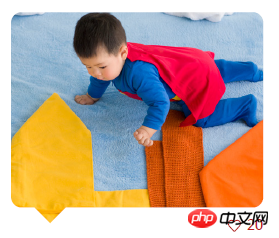
怎么用p画出这样的效果
p怎么和它的伪类after共用一样背景图片?能实现吗?
1、可以画三角形2、可以这样:把背景色换为你需要的图片,注意色差!.d1{
position: relative; border: 1px dashed #999; background: #fff; width: 150px; height: 100px;
}
.d1 span{
display: block; width: 20px; height: 20px; position: absolute; border-right:1px dashed #999; border-bottom:1px dashed #999; transform: rotate(45deg); bottom: -10px; left: 50%; margin-left:-15px; background: #fff; z-index: 99;
}3、直接PS扣图最直接了。
inherit , inherit 使用继承。
微信扫码关注PHP中文网服务号
QQ扫码加入技术交流群
Copyright 2014-2026 https://www.php.cn/ All Rights Reserved | php.cn | 湘ICP备2023035733号
PHP学习
技术支持
返回顶部
1、可以画三角形
2、可以这样:把背景色换为你需要的图片,注意色差!
.d1{
}
.d1 span{
}
3、直接PS扣图最直接了。
inherit , inherit
使用继承。












