
python写文件打开后是乱码
巴扎黑
巴扎黑 2017-04-17 11:56:52
[Python讨论组]

windows7 +2.7.5
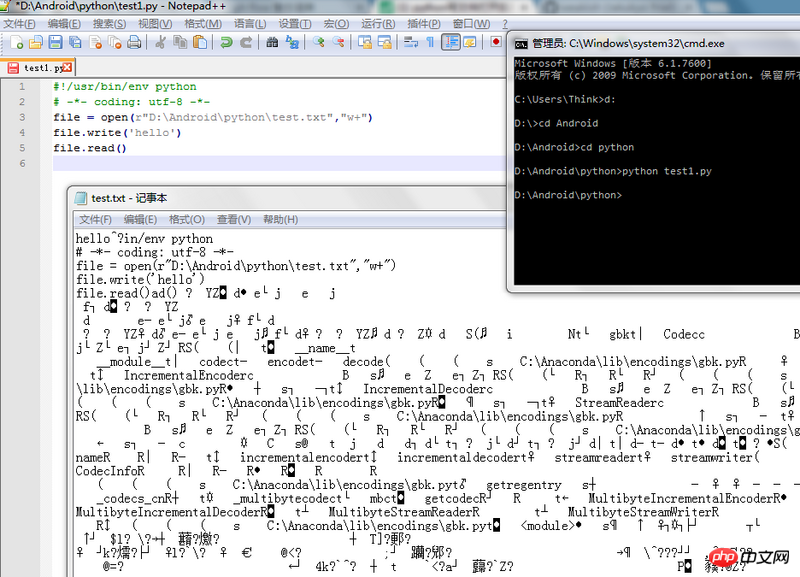
我的源代码:

#!/usr/bin/env python
# -*- coding: utf-8 -*-
file = open(r"D:\Android\python\test.txt","w+")
file.write('hello')
file.read()

python test1.py后,用记事本打开文件显示乱码,请问这是怎么回事啊?
巴扎黑
巴扎黑

全部回复(4)
天蓬老师

更新:

我在路上就在想,这么底层的一个特性,为什么 Python 没有为程序员处理掉呢?都用 Python 了,谁会为了那么大的便利牺牲一丁点性能呢?一回来我就做了测试。

经测试,Python 2.7.5 on Windows XP 重现此情况,Python 3.3.2 on Windows XP 没有重现。这说明 Python 2 确实该换了!

再次更新:

找到原因之后我就觉得这问题在哪里见过,今天终于找出来了, python-cn 邮件列表里讨论过的。


真正的答案来啦~~我在 MSDN 里找得好苦哦 QAQ

真正的原因不在于 Python 怎么样了,而在于 Windows 怎么样了。经查源码(Python 2.7.6)Objects/fileobject.c:2837,Python 是使用 fopen/fread/fwrite 这系列函数来读写文件的。MSDN 说:

When the "r+", "w+", or "a+" access type is specified, both reading and writing are allowed (the file is said to be open for "update"). However, when you switch from reading to writing, the input operation must encounter an EOF marker. If there is no EOF, you must use an intervening call to a file positioning function. The file positioning functions are fsetpos, fseek, and rewind. When you switch from writing to reading, you must use an intervening call to either fflush or to a file positioning function.

所以会有 @沙渺 发现添加 flush() 调用后正确的结果。

Linux 下没有重现。man 3 fopen 说:

Reads and writes may be intermixed on read/write streams in any order. Note that ANSI C requires that a file positioning function intervene between output and input, unless an input operation encounters end-of-file. (If this condition is not met, then a read is allowed to return the result of writes other than the most recent.) Therefore it is good practice (and indeed sometimes necessary under Linux) to put an fseek(3) or fgetpos(3) operation between write and read operations on such a stream. This operation may be an apparent no-op (as in fseek(..., 0L, SEEK_CUR) called for its synchronizing side effect.

所以 Windows 的这种行为是符合 ANSI C 标准的,但是 Linux 并不(总是)需要这样做。(并且,跨平台的方案是使用文件定位函数而不是 fflush()。)

阿神

Windows下的编码是个大坑,别用记事本了,换nodepad++吧。

黄舟

乱码应该是报错信息,读文件之前先打开,最后还最好要 close

试试下面这个

#!/usr/bin/env python
# -*- coding: utf-8 -*-
file = open(r"D:\Android\python\test.txt","w+")
file.write('hello')

file = open("D:\Android\python\test.txt")
file.read()
ringa_lee

file文件的读写,一定要注意,在写完之后,必须要seek(0),把文件指针重新指向文件开头,然后再读,否则就会从缓冲区读取一大堆乱码——顺便,这是不是一个潜在的缓冲区溢出漏洞啊。

热门教程
更多>
最新下载
更多>
网站特效
网站源码
网站素材
前端模板
关于我们 免责申明 举报中心 意见反馈 讲师合作 广告合作 最新更新
php中文网:公益在线php培训,帮助PHP学习者快速成长!
关注服务号 技术交流群
PHP中文网订阅号
每天精选资源文章推送

Copyright 2014-2026 https://www.php.cn/ All Rights Reserved | php.cn | 湘ICP备2023035733号











