



介绍
想象一下您在网上购物时发现了一种您喜欢的产品,但不知道它的名字。上传图片并让应用程序为您找到它,这不是很棒吗?
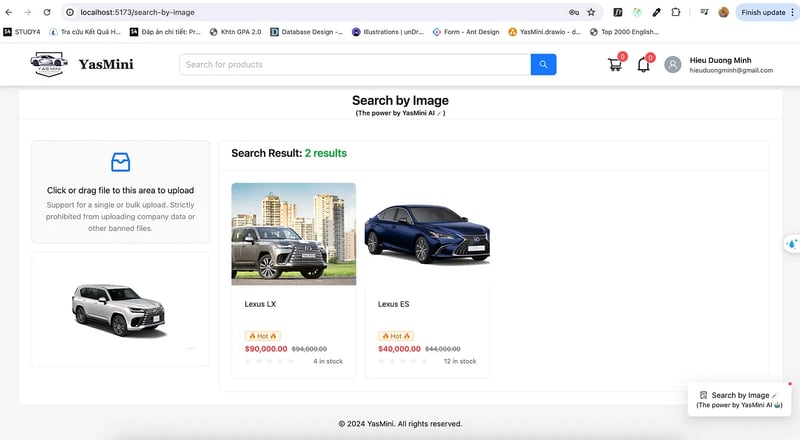
在本文中,我们将向您展示如何构建这一功能:使用 spring boot 和 google cloud vertex ai 的基于图像的产品搜索功能。
功能概述
此功能允许用户上传图像并接收与其匹配的产品列表,使搜索体验更加直观和视觉驱动。
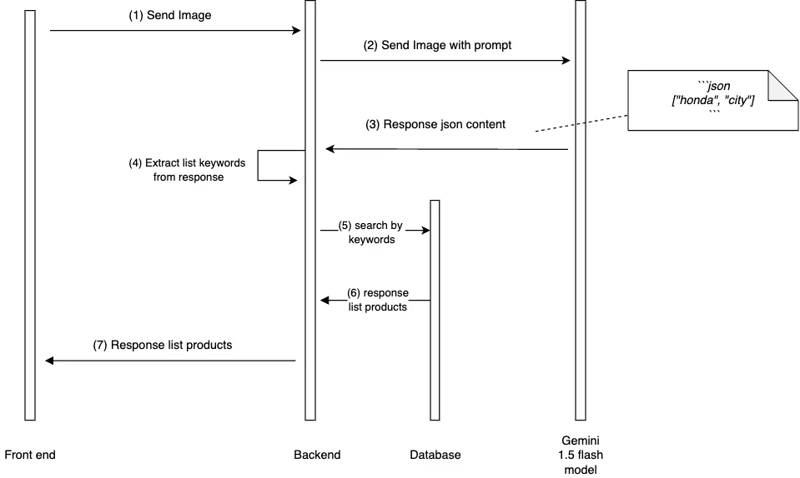
基于图像的产品搜索功能利用 google cloud vertex ai 处理图像并提取相关关键词。然后使用这些关键字在数据库中搜索匹配的产品。
技术栈
- java 21
- spring 启动 3.2.5
- postgresql
- 顶点人工智能
- reactjs
我们将逐步完成设置此功能的过程。
逐步实施
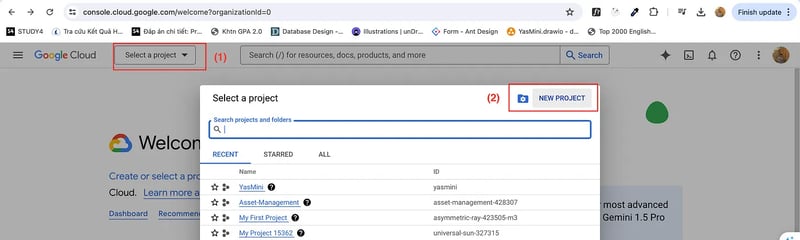
1. 在google console上创建一个新项目
首先,我们需要为此在 google console 上创建一个新项目。
如果您已经有一个帐户,我们需要转到 https://console.cloud.google.com 并创建一个新帐户。如果您有的话,请登录该帐户。
如果您添加银行帐户,google cloud 将为您提供免费试用。
创建帐户或登录现有帐户后,您可以创建新项目。
2. 启用顶点ai服务
在搜索栏上,我们需要找到 vertex ai 并启用所有推荐的 api。
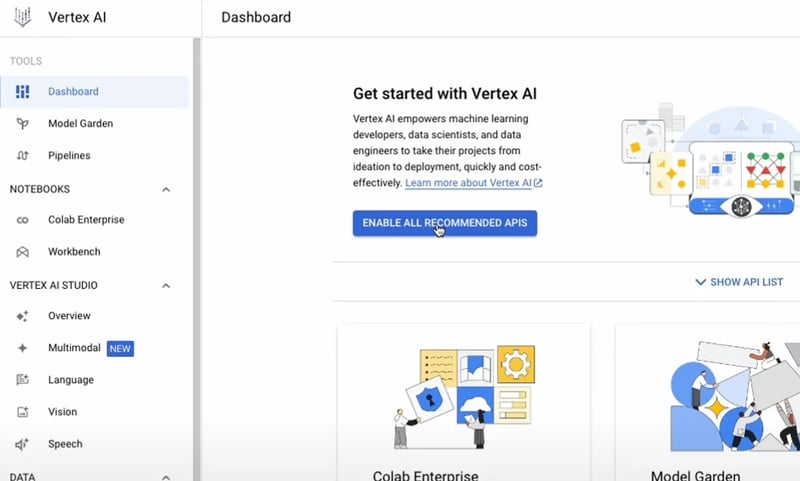
vertex ai 是 google cloud 完全托管的机器学习 (ml) 平台,旨在简化 ml 模型的开发、部署和管理。它允许您通过提供 automl、自定义模型训练、超参数调整和模型监控等工具和服务来大规模构建、训练和部署 ml 模型 gemini 1.5 flash 是 google gemini 模型系列的一部分,专为 ml 应用程序中的高效、高性能推理而设计。 gemini 模型是 google 开发的一系列高级 ai 模型,常用于自然语言处理 (nlp)、视觉任务和其他 ai 驱动的应用程序
注意: 对于其他框架,您可以直接使用 gemini api,网址为 https://aistudio.google.com/app/prompts/new_chat。使用结构提示功能,因为您可以自定义输出以匹配输入,这样您将获得更好的结果。
3. 创建与您的应用程序匹配的新提示
在这一步,我们需要定制一个与您的应用相匹配的提示。
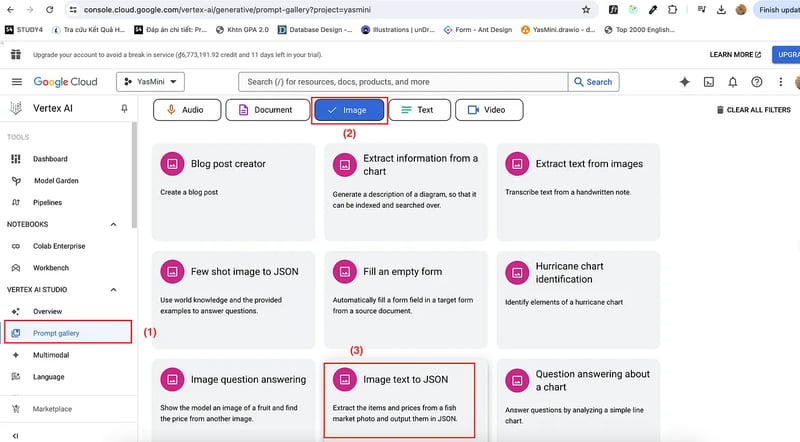
vertex ai studio 在提示图库提供了很多示例提示。我们使用示例图像文本到json来提取与产品图像相关的关键字。
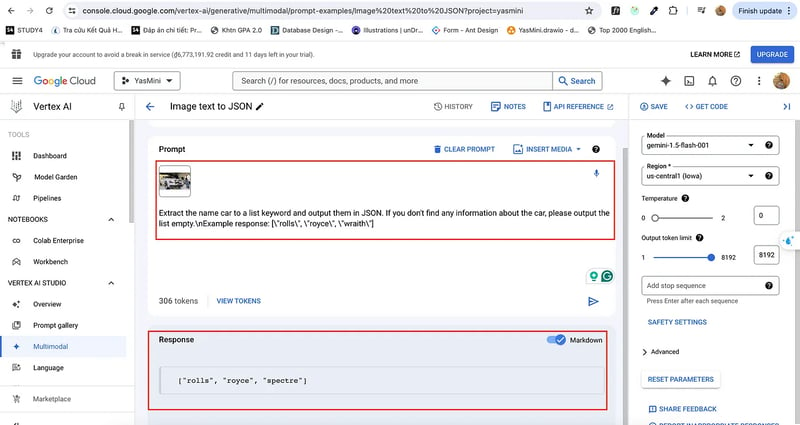
我的应用程序是一个 carshop,所以我构建了一个这样的提示。我期望模型会用与图像相关的关键字列表来回复我。
我的提示:将名称 car 提取到列表关键字并以 json 格式输出。如果没有找到任何有关汽车的信息,请将列表输出为空。n响应示例:[“rolls”, “royce”, “wraith”]

我们根据您的应用程序定制合适的提示后。现在,我们就来探讨一下如何与 spring boot application 集成。
4. 与 spring boot 应用程序集成
我构建了一个关于汽车的电子商务应用程序。所以我想通过图像找到汽车。
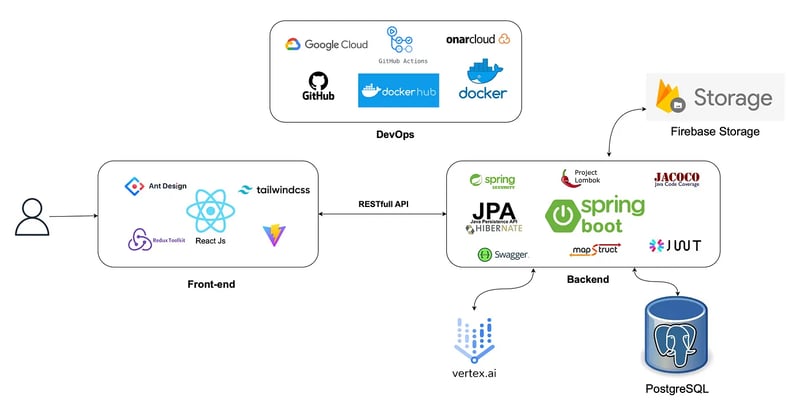
首先,在 pom.xml 文件中,您应该更新您的依赖项:
<!-- config version for dependency-->
<properties>
    <spring-cloud-gcp.version>5.1.2</spring-cloud-gcp.version>
    <google-cloud-bom.version>26.32.0</google-cloud-bom.version>
</properties>

<!-- in your dependencymanagement, please add 2 dependencies below -->
<dependencymanagement>
  <dependencies>
      <dependency>
          <groupid>com.google.cloud</groupid>
          <artifactid>spring-cloud-gcp-dependencies</artifactid>
          <version>${spring-cloud-gcp.version}</version>
          <type>pom</type>
          <scope>import</scope>
      </dependency>

      <dependency>
          <groupid>com.google.cloud</groupid>
          <artifactid>libraries-bom</artifactid>
          <version>${google-cloud-bom.version}</version>
          <type>pom</type>
          <scope>import</scope>
      </dependency>
  </dependencies>
</dependencymanagement>

<!-- in your tab dependencies, please add the dependency below -->
<dependencies>
  <dependency>
      <groupid>com.google.cloud</groupid>
      <artifactid>google-cloud-vertexai</artifactid>
  </dependency>
</dependencies>
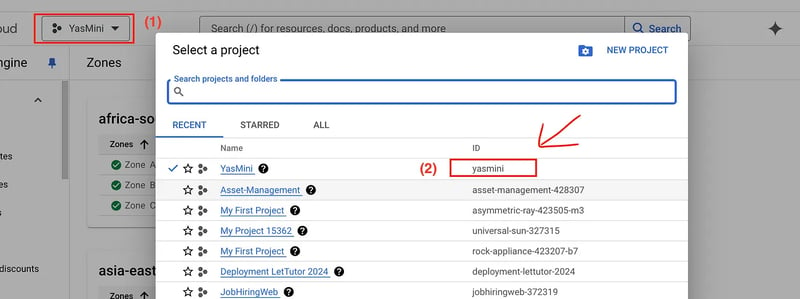
在 pom.xml 文件中完成配置后,创建一个配置类 geminiconfig.java
- model_name:“gemini-1.5-flash”
- location:“设置项目时的位置”
- project_id:“您的项目id”
import com.google.cloud.vertexai.vertexai;
import com.google.cloud.vertexai.generativeai.generativemodel;
import org.springframework.context.annotation.bean;
import org.springframework.context.annotation.configuration;

@configuration(proxybeanmethods = false)
public class geminiconfig {

    private static final string model_name = "gemini-1.5-flash";
    private static final string location = "asia-southeast1";
    private static final string project_id = "yasmini";

    @bean
    public vertexai vertexai() {
        return new vertexai(project_id, location);
    }

    @bean
    public generativemodel getmodel(vertexai vertexai) {
        return new generativemodel(model_name, vertexai);
    }
}
其次,创建图层service、controller来实现寻车功能。创建班级服务。
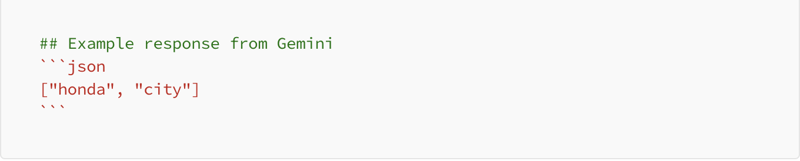
因为 gemini api 响应的是 markdown 格式,所以我们需要创建一个函数来帮助转换为 json,然后我们将 json 转换为 java 中的 list 字符串。
import com.fasterxml.jackson.core.jsonprocessingexception;
import com.fasterxml.jackson.databind.objectmapper;
import com.google.cloud.vertexai.api.content;
import com.google.cloud.vertexai.api.generatecontentresponse;
import com.google.cloud.vertexai.api.part;
import com.google.cloud.vertexai.generativeai.*;
import com.learning.yasminishop.common.entity.product;
import com.learning.yasminishop.common.exception.appexception;
import com.learning.yasminishop.common.exception.errorcode;
import com.learning.yasminishop.product.productrepository;
import com.learning.yasminishop.product.dto.response.productresponse;
import com.learning.yasminishop.product.mapper.productmapper;
import lombok.requiredargsconstructor;
import lombok.extern.slf4j.slf4j;
import org.springframework.stereotype.service;
import org.springframework.transaction.annotation.transactional;
import org.springframework.web.multipart.multipartfile;

import java.util.hashset;
import java.util.list;
import java.util.objects;
import java.util.set;

@service
@requiredargsconstructor
@slf4j
@transactional(readonly = true)
public class yasminiaiservice {

    private final generativemodel generativemodel;
    private final productrepository productrepository;

    private final productmapper productmapper;


    public list<productresponse> findcarbyimage(multipartfile file){
        try {
            var prompt = "extract the name car to a list keyword and output them in json. if you don't find any information about the car, please output the list empty.\nexample response: [\"rolls\", \"royce\", \"wraith\"]";
            var content = this.generativemodel.generatecontent(
                    contentmaker.frommultimodaldata(
                            partmaker.frommimetypeanddata(objects.requirenonnull(file.getcontenttype()), file.getbytes()),
                            prompt
                    )
            );

            string jsoncontent = responsehandler.gettext(content);
            log.info("extracted keywords from image: {}", jsoncontent);
            list<string> keywords = convertjsontolist(jsoncontent).stream()
                    .map(string::tolowercase)
                    .tolist();

            set<product> results = new hashset<>();
            for (string keyword : keywords) {
                list<product> products = productrepository.searchbykeyword(keyword);
                results.addall(products);
            }

            return results.stream()
                    .map(productmapper::toproductresponse)
                    .tolist();

        } catch (exception e) {
            log.error("error finding car by image", e);
            return list.of();
        }
    }

    private list<string> convertjsontolist(string markdown) throws jsonprocessingexception {
        objectmapper objectmapper = new objectmapper();
        string parsejson = markdown;
        if(markdown.contains("```

json")){
            parsejson = extractjsonfrommarkdown(markdown);
        }
        return objectmapper.readvalue(parsejson, list.class);
    }

    private string extractjsonfrommarkdown(string markdown) {
        return markdown.replace("

```json\n", "").replace("\n```

", "");
    }
}
我们需要创建一个控制器类来为前端做一个端点
import com.learning.yasminishop.product.dto.response.productresponse;
import lombok.requiredargsconstructor;
import lombok.extern.slf4j.slf4j;
import org.springframework.security.access.prepost.preauthorize;
import org.springframework.web.bind.annotation.*;
import org.springframework.web.multipart.multipartfile;

import java.util.list;

@restcontroller
@requestmapping("/ai")
@requiredargsconstructor
@slf4j
public class yasminiaicontroller {

    private final yasminiaiservice yasminiaiservice;


    @postmapping
    public list<productresponse> findcar(@requestparam("file") multipartfile file) {

        var response = yasminiaiservice.findcarbyimage(file);
        return response;
    }
}
5. 重要步骤:使用 google cloud cli 登录 google cloud
spring boot 应用程序无法验证您的身份,并且无法让您接受 google cloud 中的资源。
所以我们需要登录google并提供授权。
5.1 首先我们需要在您的机器上安装gcloud cli
教程链接:https://cloud.google.com/sdk/docs/install
检查上面的链接并将其安装到您的机器上
5.2 登录
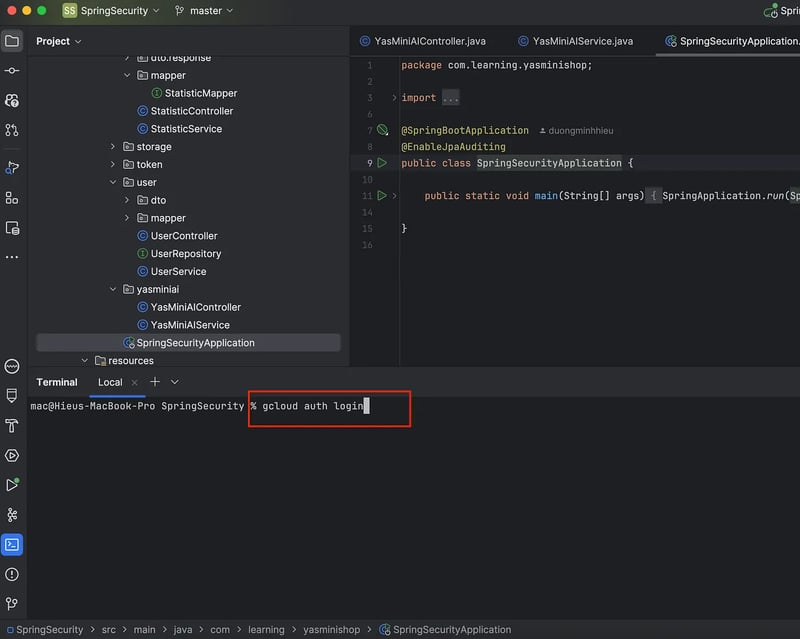
- 在项目中打开你的终端(你必须 cd 进入项目)
- 类型:gcloud auth login
- 输入,就会看到允许登录的窗口
gcloud auth login
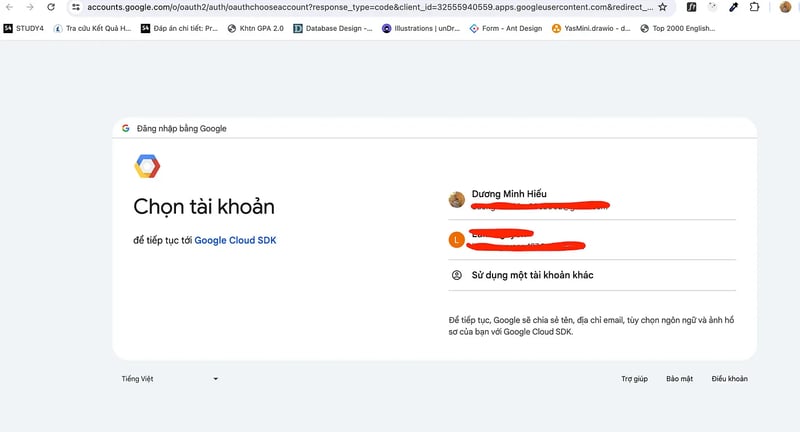
注意: 登录后,凭据会保存在 google maven 包中,重启 spring boot 应用程序时无需再次登录。
结论
所以上面这些都是基于我的电子商务项目实现的,你可以根据你的项目、你的框架进行修改。在其他框架中,除了 spring boot(nestjs,..),您可以使用 https://aistudio.google.com/app/prompts/new_chat。并且不需要创建新的 google cloud 帐户。
具体实现可以在我的repo查看:
后端:https://github.com/duongminhhieu/yasminishop
前端:https://github.com/duongminhhieu/yasmini-frontend
学习愉快!!!




