



在上一篇文章中,我们讨论了如何使用 python 获取 nifty 和 bank nifty 数据。那篇文章的反响很好,因此根据大众的需求,这里有一个扩展版本。在本文中,我们将学习如何每 30 秒从 nse 网站获取期权链数据。此内容仅用于学习目的。
在 python 中,我们将使用 asyncio 每 30 秒向 nse 数据发出一次 api 请求。
在python中安装所需的库
pip 安装 aiohttp 异步
代码
import aiohttp
import asyncio
import requests
import json
import math
import time


def strRed(skk):         return "\033[91m {}\033[00m".format(skk)
def strGreen(skk):       return "\033[92m {}\033[00m".format(skk)
def strYellow(skk):      return "\033[93m {}\033[00m".format(skk)
def strLightPurple(skk): return "\033[94m {}\033[00m".format(skk)
def strPurple(skk):      return "\033[95m {}\033[00m".format(skk)
def strCyan(skk):        return "\033[96m {}\033[00m".format(skk)
def strLightGray(skk):   return "\033[97m {}\033[00m".format(skk)
def strBlack(skk):       return "\033[98m {}\033[00m".format(skk)
def strBold(skk):        return "\033[1m {}\033[00m".format(skk)

def round_nearest(x, num=50): return int(math.ceil(float(x)/num)*num)
def nearest_strike_bnf(x): return round_nearest(x, 100)
def nearest_strike_nf(x): return round_nearest(x, 50)

url_oc      = "https://www.nseindia.com/option-chain"
url_bnf     = 'https://www.nseindia.com/api/option-chain-indices?symbol=BANKNIFTY'
url_nf      = 'https://www.nseindia.com/api/option-chain-indices?symbol=NIFTY'
url_indices = "https://www.nseindia.com/api/allIndices"

headers = {'user-agent': 'Mozilla/5.0 (Windows NT 10.0; Win64; x64) AppleWebKit/537.36 (KHTML, like Gecko) Chrome/80.0.3987.149 Safari/537.36',
            'accept-language': 'en,gu;q=0.9,hi;q=0.8',
            'accept-encoding': 'gzip, deflate, br'}

cookies = dict()

def set_cookie():
    sess = requests.Session()
    request = sess.get(url_oc, headers=headers, timeout=5)
    return dict(request.cookies)

async def get_data(url, session):
    global cookies
    async with session.get(url, headers=headers, timeout=5, cookies=cookies) as response:
        if response.status == 401:
            cookies = set_cookie()
            async with session.get(url, headers=headers, timeout=5, cookies=cookies) as response:
                return await response.text()
        elif response.status == 200:
            return await response.text()
        return ""

async def fetch_all_data():
    async with aiohttp.ClientSession() as session:
        indices_data = await get_data(url_indices, session)
        bnf_data = await get_data(url_bnf, session)
        nf_data = await get_data(url_nf, session)
    return indices_data, bnf_data, nf_data

# Process the fetched data
def process_indices_data(data):
    global bnf_ul, nf_ul, bnf_nearest, nf_nearest
    data = json.loads(data)
    for index in data["data"]:
        if index["index"] == "NIFTY 50":
            nf_ul = index["last"]
        if index["index"] == "NIFTY BANK":
            bnf_ul = index["last"]
    bnf_nearest = nearest_strike_bnf(bnf_ul)
    nf_nearest = nearest_strike_nf(nf_ul)

def process_oi_data(data, nearest, step, num):
    data = json.loads(data)
    currExpiryDate = data["records"]["expiryDates"][0]
    oi_data = []
    for item in data['records']['data']:
        if item["expiryDate"] == currExpiryDate:
            if nearest - step*num <= item["strikePrice"] <= nearest + step*num:
                oi_data.append((item["strikePrice"], item["CE"]["openInterest"], item["PE"]["openInterest"]))
    return oi_data

def print_oi_data(nifty_data, bank_nifty_data, prev_nifty_data, prev_bank_nifty_data):
    print(strBold(strLightPurple("Nifty Open Interest:")))
    for i, (strike, ce_oi, pe_oi) in enumerate(nifty_data):
        ce_change = ce_oi - prev_nifty_data[i][1] if prev_nifty_data else 0
        pe_change = pe_oi - prev_nifty_data[i][2] if prev_nifty_data else 0
        ce_color = strGreen(ce_oi) if ce_change > 0 else strRed(ce_oi)
        pe_color = strGreen(pe_oi) if pe_change > 0 else strRed(pe_oi)
        print(f"Strike Price: {strike}, Call OI: {ce_color} ({strBold(f'+{ce_change}') if ce_change > 0 else strBold(ce_change) if ce_change < 0 else ce_change}), Put OI: {pe_color} ({strBold(f'+{pe_change}') if pe_change > 0 else strBold(pe_change) if pe_change < 0 else pe_change})")

    print(strBold(strLightPurple("\nBank Nifty Open Interest:")))
    for i, (strike, ce_oi, pe_oi) in enumerate(bank_nifty_data):
        ce_change = ce_oi - prev_bank_nifty_data[i][1] if prev_bank_nifty_data else 0
        pe_change = pe_oi - prev_bank_nifty_data[i][2] if prev_bank_nifty_data else 0
        ce_color = strGreen(ce_oi) if ce_change > 0 else strRed(ce_oi)
        pe_color = strGreen(pe_oi) if pe_change > 0 else strRed(pe_oi)
        print(f"Strike Price: {strike}, Call OI: {ce_color} ({strBold(f'+{ce_change}') if ce_change > 0 else strBold(ce_change) if ce_change < 0 else ce_change}), Put OI: {pe_color} ({strBold(f'+{pe_change}') if pe_change > 0 else strBold(pe_change) if pe_change < 0 else pe_change})")

def calculate_support_resistance(oi_data):
    highest_oi_ce = max(oi_data, key=lambda x: x[1])
    highest_oi_pe = max(oi_data, key=lambda x: x[2])
    return highest_oi_ce[0], highest_oi_pe[0]

async def update_data():
    global cookies
    prev_nifty_data = prev_bank_nifty_data = None
    while True:
        cookies = set_cookie()
        indices_data, bnf_data, nf_data = await fetch_all_data()

        process_indices_data(indices_data)

        nifty_oi_data = process_oi_data(nf_data, nf_nearest, 50, 10)
        bank_nifty_oi_data = process_oi_data(bnf_data, bnf_nearest, 100, 10)

        support_nifty, resistance_nifty = calculate_support_resistance(nifty_oi_data)
        support_bank_nifty, resistance_bank_nifty = calculate_support_resistance(bank_nifty_oi_data)

        print(strBold(strCyan(f"\nMajor Support and Resistance Levels:")))
        print(f"Nifty Support: {strYellow(support_nifty)}, Nifty Resistance: {strYellow(resistance_nifty)}")
        print(f"Bank Nifty Support: {strYellow(support_bank_nifty)}, Bank Nifty Resistance: {strYellow(resistance_bank_nifty)}")

        print_oi_data(nifty_oi_data, bank_nifty_oi_data, prev_nifty_data, prev_bank_nifty_data)

        prev_nifty_data = nifty_oi_data
        prev_bank_nifty_data = bank_nifty_oi_data

        for i in range(30, 0, -1):
            print(strBold(strLightGray(f"\rFetching data in {i} seconds...")), end="")
            time.sleep(1)
        print(strBold(strCyan("\nFetching new data... Please wait.")))
        await asyncio.sleep(1)

async def main():
    await update_data()

asyncio.run(main())
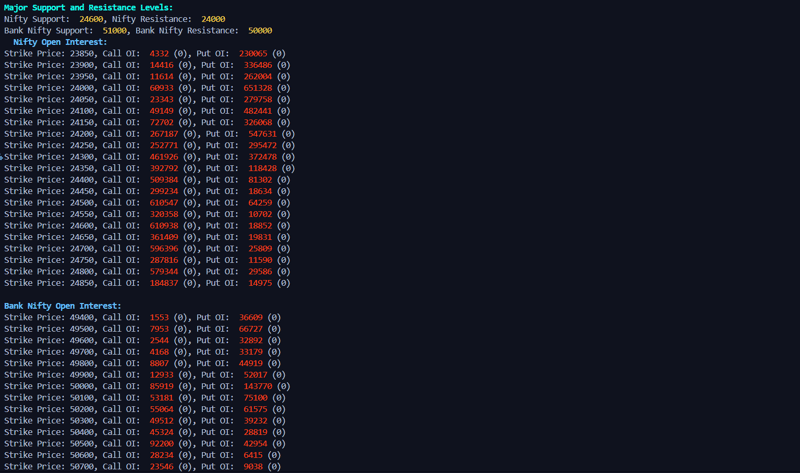
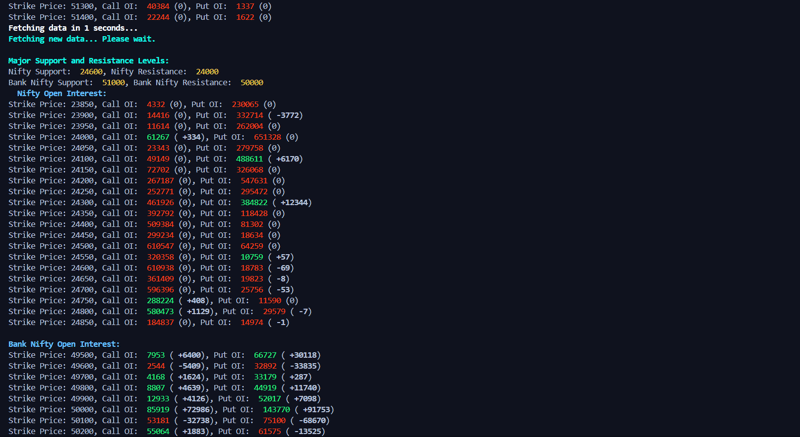
输出:

立即学习“Python免费学习笔记(深入)”;
您甚至可以通过此链接观看演示视频
谢谢!!
我们下一篇富有洞察力的博客见。




