



在2021年1月,openai宣布了两个新模型:dall-e和clip。这两个模型都是多模态模型,以某种方式连接文本和图像。clip的全称是对比语言-图像预训练(contrastive language-image pre-training),它是一种基于对比文本-图像对的预训练方法。为什么要介绍clip呢?因为目前火热的stable diffusion并不是单一模型,而是由多个模型组成。其中一个关键组成部分是文本编码器,用于对用户的文本输入进行编码,而这个文本编码器就是clip模型中的文本编码器
CLIP模型在训练时,可以给它一个输入句子,并提取最相关的图像来配合它。CLIP学习了一个完整的句子和它所描述的图像之间的关系。也就是说它是在完整的句子上训练的,而不是像“汽车”、“狗”等离散的分类,这一点对于应用至关重要。当训练完整的短语时,模型可以学习更多的东西,并识别照片和文本之间的模式。他们还证明,当在相当大的照片和与之相对应的句子数据集上进行训练时,该模型是可以作为分类器的。CLIP在发布的时候能在无任何微调的情况下(zero-shot ),在 ImageNet 数据集上的分类表现超 ResNets-50 微调后的效果,也就是说他是非常有用的。
☞☞☞AI 智能聊天, 问答助手, AI 智能搜索, 免费无限量使用 DeepSeek R1 模型☜☜☜
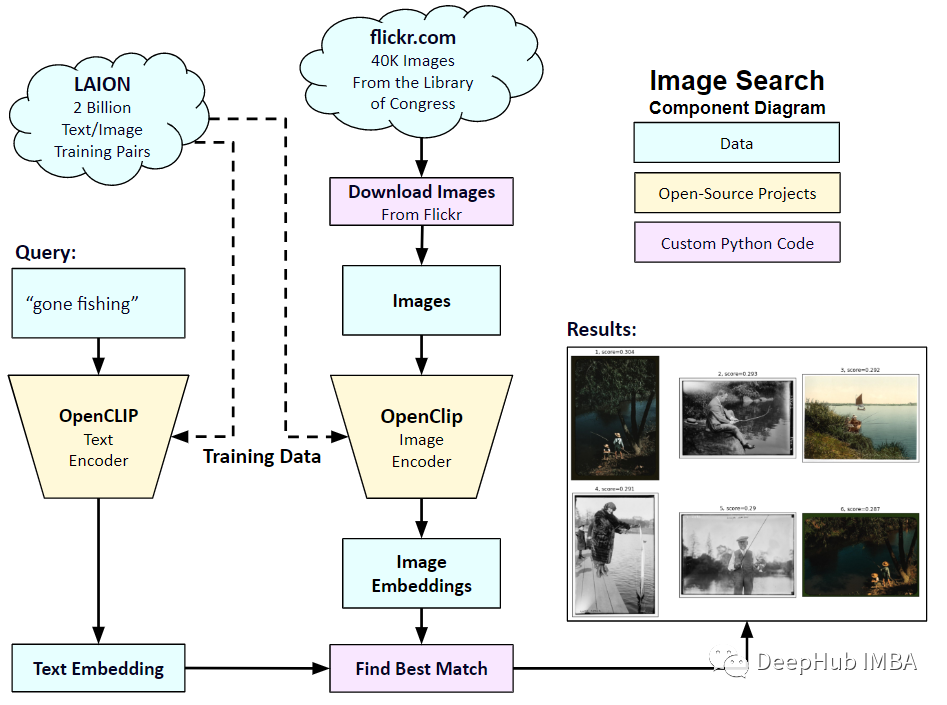
所以在本文中,我们将使用PyTorch中从头开始实现CLIP模型,以便我们对CLIP有一个更好的理解
这里就需要用到2个库:timm和transformers,我们先导入代码
import os import cv2 import gc import numpy as np import pandas as pd import itertools from tqdm.autonotebook import tqdm import albumentations as A import matplotlib.pyplot as plt import torch from torch import nn import torch.nn.functional as F import timm from transformers import DistilBertModel, DistilBertConfig, DistilBertTokenizer
下一步就是预处理数据和通用配置config。config是一个普通的python文件,我们将所有的超参数放在里面,如果使用Jupyter Notebook的情况下,它是一个在Notebook开头定义的类。
class CFG:debug = Falseimage_path = "../input/flickr-image-dataset/flickr30k_images/flickr30k_images"captions_path = "."batch_size = 32num_workers = 4head_lr = 1e-3image_encoder_lr = 1e-4text_encoder_lr = 1e-5weight_decay = 1e-3patience = 1factor = 0.8epochs = 2device = torch.device("cuda" if torch.cuda.is_available() else "cpu") model_name = 'resnet50'image_embedding = 2048text_encoder_model = "distilbert-base-uncased"text_embedding = 768text_tokenizer = "distilbert-base-uncased"max_length = 200 pretrained = True # for both image encoder and text encodertrainable = True # for both image encoder and text encodertemperature = 1.0 # image sizesize = 224 # for projection head; used for both image and text encodersnum_projection_layers = 1projection_dim = 256 dropout = 0.1还有一些我们自定义指标的辅助类
class AvgMeter:def __init__(self, name="Metric"):self.name = nameself.reset() def reset(self):self.avg, self.sum, self.count = [0] * 3 def update(self, val, count=1):self.count += countself.sum += val * countself.avg = self.sum / self.count def __repr__(self):text = f"{self.name}: {self.avg:.4f}"return text def get_lr(optimizer):for param_group in optimizer.param_groups:return param_group["lr"]我们的目标是描述图像和句子。所以数据集必须同时返回句子和图像。所以需要使用DistilBERT标记器对句子(标题)进行标记,然后将标记id (input_ids)和注意掩码提供给DistilBERT。DistilBERT比BERT 模型要小,但是模型的结果都差不多,所以我们选择使用它。
下一步就是使用HuggingFace tokenizer进行标记化。在__init__中获得的tokenizer对象,将在模型运行时加载。标题被填充并截断到预定的最大长度。在加载相关图像之前,我们将在__getitem__中加载一个编码的标题,这是一个带有键input_ids和attention_mask的字典,并对其进行转换和扩充(如果有的话)。然后把它变成一个张量,并以“image”作为键存储在字典中。最后我们将标题的原始文本与关键字“标题”一起输入字典。
class CLIPDataset(torch.utils.data.Dataset):def __init__(self, image_filenames, captions, tokenizer, transforms):"""image_filenames and cpations must have the same length; so, if there aremultiple captions for each image, the image_filenames must have repetitivefile names """ self.image_filenames = image_filenamesself.captions = list(captions)self.encoded_captions = tokenizer(list(captions), padding=True, truncatinotallow=True, max_length=CFG.max_length)self.transforms = transforms def __getitem__(self, idx):item = {key: torch.tensor(values[idx])for key, values in self.encoded_captions.items()} image = cv2.imread(f"{CFG.image_path}/{self.image_filenames[idx]}")image = cv2.cvtColor(image, cv2.COLOR_BGR2RGB)image = self.transforms(image=image)['image']item['image'] = torch.tensor(image).permute(2, 0, 1).float()item['caption'] = self.captions[idx] return item def __len__(self):return len(self.captions) def get_transforms(mode="train"):if mode == "train":return A.Compose([A.Resize(CFG.size, CFG.size, always_apply=True),A.Normalize(max_pixel_value=255.0, always_apply=True),])else:return A.Compose([A.Resize(CFG.size, CFG.size, always_apply=True),A.Normalize(max_pixel_value=255.0, always_apply=True),])图像和文本编码器:我们将使用ResNet50作为图像编码器。
class ImageEncoder(nn.Module):"""Encode images to a fixed size vector""" def __init__(self, model_name=CFG.model_name, pretrained=CFG.pretrained, trainable=CFG.trainable):super().__init__()self.model = timm.create_model(model_name, pretrained, num_classes=0, global_pool="avg")for p in self.model.parameters():p.requires_grad = trainable def forward(self, x):return self.model(x)
使用DistilBERT作为文本编码器。使用CLS令牌的最终表示来获得句子的整个表示。
class TextEncoder(nn.Module):def __init__(self, model_name=CFG.text_encoder_model, pretrained=CFG.pretrained, trainable=CFG.trainable):super().__init__()if pretrained:self.model = DistilBertModel.from_pretrained(model_name)else:self.model = DistilBertModel(cnotallow=DistilBertConfig()) for p in self.model.parameters():p.requires_grad = trainable # we are using the CLS token hidden representation as the sentence's embeddingself.target_token_idx = 0 def forward(self, input_ids, attention_mask):output = self.model(input_ids=input_ids, attention_mask=attention_mask)last_hidden_state = output.last_hidden_statereturn last_hidden_state[:, self.target_token_idx, :]
上面的代码已经将图像和文本编码为固定大小的向量(图像2048,文本768),我们需要图像和文本具有相似的尺寸,以便能够比较它们,所以我们把2048维和768维向量投影到256维(projection_dim),只有维度相同我们才能比较它们。
class ProjectionHead(nn.Module):def __init__(self,embedding_dim,projection_dim=CFG.projection_dim,dropout=CFG.dropout):super().__init__()self.projection = nn.Linear(embedding_dim, projection_dim)self.gelu = nn.GELU()self.fc = nn.Linear(projection_dim, projection_dim)self.dropout = nn.Dropout(dropout)self.layer_norm = nn.LayerNorm(projection_dim) def forward(self, x):projected = self.projection(x)x = self.gelu(projected)x = self.fc(x)x = self.dropout(x)x = x + projectedx = self.layer_norm(x)return x
所以最后我们的CLIP模型就是这样:
class CLIPModel(nn.Module):def __init__(self,temperature=CFG.temperature,image_embedding=CFG.image_embedding,text_embedding=CFG.text_embedding,):super().__init__()self.image_encoder = ImageEncoder()self.text_encoder = TextEncoder()self.image_projection = ProjectionHead(embedding_dim=image_embedding)self.text_projection = ProjectionHead(embedding_dim=text_embedding)self.temperature = temperature def forward(self, batch):# Getting Image and Text Featuresimage_features = self.image_encoder(batch["image"])text_features = self.text_encoder(input_ids=batch["input_ids"], attention_mask=batch["attention_mask"])# Getting Image and Text Embeddings (with same dimension)image_embeddings = self.image_projection(image_features)text_embeddings = self.text_projection(text_features) # Calculating the Losslogits = (text_embeddings @ image_embeddings.T) / self.temperatureimages_similarity = image_embeddings @ image_embeddings.Ttexts_similarity = text_embeddings @ text_embeddings.Ttargets = F.softmax((images_similarity + texts_similarity) / 2 * self.temperature, dim=-1)texts_loss = cross_entropy(logits, targets, reductinotallow='none')images_loss = cross_entropy(logits.T, targets.T, reductinotallow='none')loss = (images_loss + texts_loss) / 2.0 # shape: (batch_size)return loss.mean() #这里还加了一个交叉熵函数 def cross_entropy(preds, targets, reductinotallow='none'):log_softmax = nn.LogSoftmax(dim=-1)loss = (-targets * log_softmax(preds)).sum(1)if reduction == "none":return losselif reduction == "mean":return loss.mean()
这里需要说明下,CLIP使用 symmetric cross entropy 作为损失函数,可以降低噪音影响,提高模型鲁棒性,我们这里为了简单只是用cross entropy 。

我们可以进行测试:
# A simple Example batch_size = 4 dim = 256 embeddings = torch.randn(batch_size, dim) out = embeddings @ embeddings.T print(F.softmax(out, dim=-1))
下一步就是训练了,有一些函数可以帮助我们加载训练和验证的dataloader
def make_train_valid_dfs():dataframe = pd.read_csv(f"{CFG.captions_path}/captions.csv")max_id = dataframe["id"].max() + 1 if not CFG.debug else 100image_ids = np.arange(0, max_id)np.random.seed(42)valid_ids = np.random.choice(image_ids, size=int(0.2 * len(image_ids)), replace=False)train_ids = [id_ for id_ in image_ids if id_ not in valid_ids]train_dataframe = dataframe[dataframe["id"].isin(train_ids)].reset_index(drop=True)valid_dataframe = dataframe[dataframe["id"].isin(valid_ids)].reset_index(drop=True)return train_dataframe, valid_dataframe def build_loaders(dataframe, tokenizer, mode):transforms = get_transforms(mode=mode)dataset = CLIPDataset(dataframe["image"].values,dataframe["caption"].values,tokenizer=tokenizer,transforms=transforms,)dataloader = torch.utils.data.DataLoader(dataset,batch_size=CFG.batch_size,num_workers=CFG.num_workers,shuffle=True if mode == "train" else False,)return dataloader然后就是训练和评估
def train_epoch(model, train_loader, optimizer, lr_scheduler, step):loss_meter = AvgMeter()tqdm_object = tqdm(train_loader, total=len(train_loader))for batch in tqdm_object:batch = {k: v.to(CFG.device) for k, v in batch.items() if k != "caption"}loss = model(batch)optimizer.zero_grad()loss.backward()optimizer.step()if step == "batch":lr_scheduler.step() count = batch["image"].size(0)loss_meter.update(loss.item(), count) tqdm_object.set_postfix(train_loss=loss_meter.avg, lr=get_lr(optimizer))return loss_meter def valid_epoch(model, valid_loader):loss_meter = AvgMeter() tqdm_object = tqdm(valid_loader, total=len(valid_loader))for batch in tqdm_object:batch = {k: v.to(CFG.device) for k, v in batch.items() if k != "caption"}loss = model(batch) count = batch["image"].size(0)loss_meter.update(loss.item(), count) tqdm_object.set_postfix(valid_loss=loss_meter.avg)return loss_meter最后整合起来就是全部流程
def main():train_df, valid_df = make_train_valid_dfs()tokenizer = DistilBertTokenizer.from_pretrained(CFG.text_tokenizer)train_loader = build_loaders(train_df, tokenizer, mode="train")valid_loader = build_loaders(valid_df, tokenizer, mode="valid") model = CLIPModel().to(CFG.device)params = [{"params": model.image_encoder.parameters(), "lr": CFG.image_encoder_lr},{"params": model.text_encoder.parameters(), "lr": CFG.text_encoder_lr},{"params": itertools.chain(model.image_projection.parameters(), model.text_projection.parameters()), "lr": CFG.head_lr, "weight_decay": CFG.weight_decay}]optimizer = torch.optim.AdamW(params, weight_decay=0.)lr_scheduler = torch.optim.lr_scheduler.ReduceLROnPlateau(optimizer, mode="min", patience=CFG.patience, factor=CFG.factor)step = "epoch" best_loss = float('inf')for epoch in range(CFG.epochs):print(f"Epoch: {epoch + 1}")model.train()train_loss = train_epoch(model, train_loader, optimizer, lr_scheduler, step)model.eval()with torch.no_grad():valid_loss = valid_epoch(model, valid_loader) if valid_loss.avg < best_loss:best_loss = valid_loss.avgtorch.save(model.state_dict(), "best.pt")print("Saved Best Model!") lr_scheduler.step(valid_loss.avg)应用:获取图像嵌入并找到匹配。
我们训练完成后如何实际应用呢?我们需要编写一个函数加载训练后的模型,为其提供验证集中的图像,并返回形状(valid_set_size, 256)和模型本身的image_embeddings。
def get_image_embeddings(valid_df, model_path):tokenizer = DistilBertTokenizer.from_pretrained(CFG.text_tokenizer)valid_loader = build_loaders(valid_df, tokenizer, mode="valid") model = CLIPModel().to(CFG.device)model.load_state_dict(torch.load(model_path, map_locatinotallow=CFG.device))model.eval() valid_image_embeddings = []with torch.no_grad():for batch in tqdm(valid_loader):image_features = model.image_encoder(batch["image"].to(CFG.device))image_embeddings = model.image_projection(image_features)valid_image_embeddings.append(image_embeddings)return model, torch.cat(valid_image_embeddings) _, valid_df = make_train_valid_dfs() model, image_embeddings = get_image_embeddings(valid_df, "best.pt") def find_matches(model, image_embeddings, query, image_filenames, n=9):tokenizer = DistilBertTokenizer.from_pretrained(CFG.text_tokenizer)encoded_query = tokenizer([query])batch = {key: torch.tensor(values).to(CFG.device)for key, values in encoded_query.items()}with torch.no_grad():text_features = model.text_encoder(input_ids=batch["input_ids"], attention_mask=batch["attention_mask"])text_embeddings = model.text_projection(text_features) image_embeddings_n = F.normalize(image_embeddings, p=2, dim=-1)text_embeddings_n = F.normalize(text_embeddings, p=2, dim=-1)dot_similarity = text_embeddings_n @ image_embeddings_n.T values, indices = torch.topk(dot_similarity.squeeze(0), n * 5)matches = [image_filenames[idx] for idx in indices[::5]] _, axes = plt.subplots(3, 3, figsize=(10, 10))for match, ax in zip(matches, axes.flatten()):image = cv2.imread(f"{CFG.image_path}/{match}")image = cv2.cvtColor(image, cv2.COLOR_BGR2RGB)ax.imshow(image)ax.axis("off") plt.show()调用方法如下:
find_matches(model, image_embeddings,query="one dog sitting on the grass",image_filenames=valid_df['image'].values,n=9)
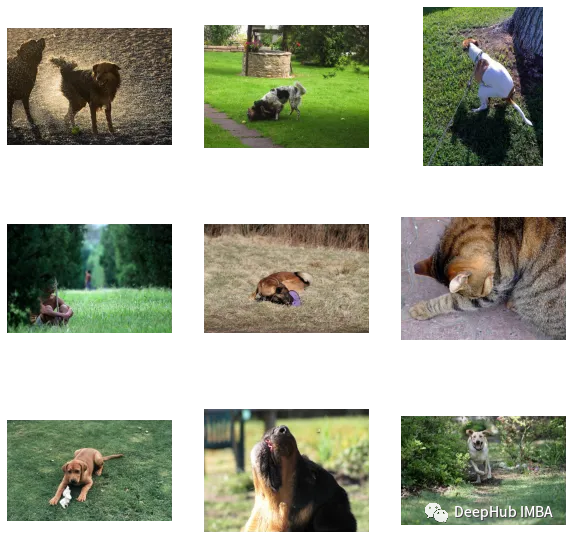
我们可以看到,我们自定义的效果还是不错的(但是图里面有只猫,哈哈)。换句话说,CLIP这种方法在小数据集上进行自定义也是可行的
以下是本文的代碼和數據集:
https://www.kaggle.com/code/jyotidabas/simple-openai-clip-implementation




