



nginx 代理模块
说明:代理模块的指令有很多我这里只讲解重要的proxy_pass,想了解更多代理指令请参考官方中文文档。
这个模块可以转发请求到其他的服务器。http/1.0无法使用keepalive(后端服务器将为每个请求创建并且删除连接)。nginx为浏览器发送http/1.1并为后端服务器发送http/1.0,这样浏览器就可以为浏览器处理keepalive。
如下例:
location / {
 proxy_pass    http://localhost:8000;
 proxy_set_header x-real-ip $remote_addr;
}
注意,当使用http proxy模块(甚至fastcgi),所有的连接请求在发送到后端服务器之前nginx将缓存它们,因此,在测量从后端传送的数据时,它的进度显示可能不正确。
实验拓扑:
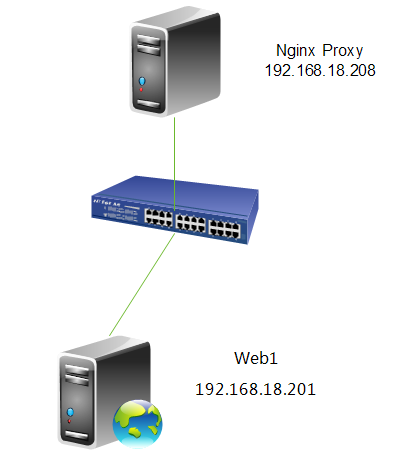
7.配置http反向代理
[root@nginx ~]# cd /etc/nginx/
[root@nginx nginx]# cp nginx.conf nginx.conf.bak #备份一个原配置文件
[root@nginx nginx]# vim nginx.conf
location / {
        proxy_pass   http://192.168.18.201;
    }
指令说明:proxy_pass
语法:proxy_pass url
默认值:no
使用字段:location, location中的if字段
这个指令设置被代理服务器的地址和被映射的uri,地址可以使用主机名或ip加端口号的形式,例如:proxy_pass http://localhost:8000/uri/;
8.重新加载一下配置文件
[root@nginx ~]# service nginx reload
nginx: the configuration file /etc/nginx/nginx.conf syntax is ok
nginx: configuration file /etc/nginx/nginx.conf test is successful
重新载入 nginx:                      [确定]
9.测试一下
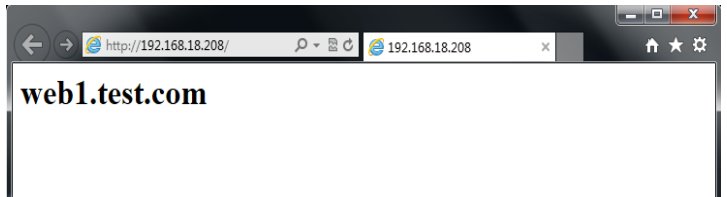
注,大家可以看到,当我们访问192.168.18.208时,被代理重新定向到web1上。
10.查看一下web服务器日志
[root@web1 ~]# tail /var/log/httpd/access_log
192.168.18.208 - - [04/sep/2013:00:14:20 +0800] "get /favicon.ico http/1.0" 404 289 "-" "mozilla/5.0 (windows nt 6.1; wow64) applewebkit/537.36 (khtml, like gecko) chrome/28.0.1500.95 safari/537.36"
192.168.18.208 - - [04/sep/2013:00:14:20 +0800] "get / http/1.0" 200 23 "-" "mozilla/5.0 (windows nt 6.1; wow64) applewebkit/537.36 (khtml, like gecko) chrome/28.0.1500.95 safari/537.36"
192.168.18.208 - - [04/sep/2013:00:14:20 +0800] "get /favicon.ico http/1.0" 404 289 "-" "mozilla/5.0 (windows nt 6.1; wow64) applewebkit/537.36 (khtml, like gecko) chrome/28.0.1500.95 safari/537.36"
192.168.18.138 - - [04/sep/2013:00:14:45 +0800] "get / http/1.1" 200 23 "-" "mozilla/5.0 (windows nt 6.1; wow64) applewebkit/537.36 (khtml, like gecko) chrome/28.0.1500.95 safari/537.36"
192.168.18.138 - - [04/sep/2013:00:14:48 +0800] "get /favicon.ico http/1.1" 404 289 "-" "mozilla/5.0 (windows nt 6.1; wow64) applewebkit/537.36 (khtml, like gecko) chrome/28.0.1500.95 safari/537.36"
192.168.18.208 - - [04/sep/2013:00:14:55 +0800] "get /favicon.ico http/1.0" 404 289 "-" "mozilla/5.0 (windows nt 6.1; wow64) applewebkit/537.36 (khtml, like gecko) chrome/28.0.1500.95 safari/537.36"
192.168.18.208 - - [04/sep/2013:00:15:05 +0800] "get /favicon.ico http/1.0" 404 289 "-" "mozilla/5.0 (windows nt 6.1; wow64) applewebkit/537.36 (khtml, like gecko) chrome/28.0.1500.95 safari/537.36"
192.168.18.208 - - [04/sep/2013:00:15:13 +0800] "get /favicon.ico http/1.0" 404 289 "-" "mozilla/5.0 (windows nt 6.1; wow64) applewebkit/537.36 (khtml, like gecko) chrome/28.0.1500.95 safari/537.36"
192.168.18.208 - - [04/sep/2013:00:15:16 +0800] "get / http/1.0" 200 23 "-" "mozilla/5.0 (windows nt 6.1; wow64) applewebkit/537.36 (khtml, like gecko) chrome/28.0.1500.95 safari/537.36"
192.168.18.208 - - [04/sep/2013:00:15:16 +0800] "get /favicon.ico http/1.0" 404 289 "-" "mozilla/5.0 (windows nt 6.1; wow64) applewebkit/537.36 (khtml, like gecko) chrome/28.0.1500.95 safari/537.36"
注,大家可以看到我们这里的客户的ip全是,nginx代理服务器的ip,并不是真实客户端的ip。下面我们修改一下,让日志的ip显示真实的客户端的ip。

使用模板与程序分离的方式构建,依靠专门设计的数据库操作类实现数据库存取,具有专有错误处理模块,通过 Email 实时报告数据库错误,除具有满足购物需要的全部功能外,成新商城购物系统还对购物系统体系做了丰富的扩展,全新设计的搜索功能,自定义成新商城购物系统代码功能代码已经全面优化,杜绝SQL注入漏洞前台测试用户名:admin密码:admin888后台管理员名:admin密码:admin888
11.修改nginx配置文件
location / {
    proxy_pass   http://192.168.18.201;
    proxy_set_header x-real-ip $remote_addr; #加上这一行
}
指令说明:proxy_set_header
语法:proxy_set_header header value
默认值: host and connection
使用字段:http, server, location
这个指令允许将发送到被代理服务器的请求头重新定义或者增加一些字段。这个值可以是一个文本,变量或者它们的组合。proxy_set_header在指定的字段中没有定义时会从它的上级字段继承。
12.重新加载一下配置文件
[root@nginx ~]# service nginx reload
nginx: the configuration file /etc/nginx/nginx.conf syntax is ok
nginx: configuration file /etc/nginx/nginx.conf test is successful
重新载入 nginx:                      [确定]
13.测试并查看日志
[root@web1 ~]# tail /var/log/httpd/access_log
192.168.18.208 - - [03/sep/2013:16:26:18 +0800] "get / http/1.0" 200 23 "-" "mozilla/5.0 (compatible; msie 10.0; windows nt 6.1; wow64; trident/6.0)"
192.168.18.208 - - [03/sep/2013:16:26:18 +0800] "get / http/1.0" 200 23 "-" "mozilla/5.0 (compatible; msie 10.0; windows nt 6.1; wow64; trident/6.0)"
192.168.18.208 - - [03/sep/2013:16:26:18 +0800] "get / http/1.0" 200 23 "-" "mozilla/5.0 (compatible; msie 10.0; windows nt 6.1; wow64; trident/6.0)"
192.168.18.208 - - [03/sep/2013:16:26:18 +0800] "get / http/1.0" 200 23 "-" "mozilla/5.0 (compatible; msie 10.0; windows nt 6.1; wow64; trident/6.0)"
192.168.18.208 - - [03/sep/2013:16:26:18 +0800] "get / http/1.0" 200 23 "-" "mozilla/5.0 (compatible; msie 10.0; windows nt 6.1; wow64; trident/6.0)"
192.168.18.208 - - [03/sep/2013:16:26:18 +0800] "get / http/1.0" 200 23 "-" "mozilla/5.0 (compatible; msie 10.0; windows nt 6.1; wow64; trident/6.0)"
192.168.18.208 - - [03/sep/2013:16:26:18 +0800] "get / http/1.0" 200 23 "-" "mozilla/5.0 (compatible; msie 10.0; windows nt 6.1; wow64; trident/6.0)"
192.168.18.208 - - [03/sep/2013:16:26:18 +0800] "get / http/1.0" 200 23 "-" "mozilla/5.0 (compatible; msie 10.0; windows nt 6.1; wow64; trident/6.0)"
192.168.18.208 - - [03/sep/2013:16:26:18 +0800] "get / http/1.0" 200 23 "-" "mozilla/5.0 (compatible; msie 10.0; windows nt 6.1; wow64; trident/6.0)"
192.168.18.208 - - [03/sep/2013:16:26:18 +0800] "get / http/1.0" 200 23 "-" "mozilla/5.0 (compatible; msie 10.0; windows nt 6.1; wow64; trident/6.0)"
注,大家可以看到日志记录的还是代理的ip,没有显示真实客户端的ip,为什么呢?我们来看一下httpd的配置文件。
14.查看并修改httpd配置文件
[root@web1 ~]# vim /etc/httpd/conf/httpd.conf

注,大家可以这里记录日志的参数还是%h,下面我们修改一下参数。

注,这是修改后的参数,将h%修改为%{x-real-ip}i,好的下面我们再来测试一下。
15.重启并测试
[root@web1 ~]# service httpd restart
停止 httpd:                        [确定]
正在启动 httpd:                      [确定]
[root@web1 ~]# tail /var/log/httpd/access_log
192.168.18.138 - - [03/sep/2013:17:09:14 +0800] "get / http/1.0" 200 23 "-" "mozilla/5.0 (compatible; msie 10.0; windows nt 6.1; wow64; trident/6.0)"
192.168.18.138 - - [03/sep/2013:17:09:14 +0800] "get / http/1.0" 200 23 "-" "mozilla/5.0 (compatible; msie 10.0; windows nt 6.1; wow64; trident/6.0)"
192.168.18.138 - - [03/sep/2013:17:09:15 +0800] "get / http/1.0" 200 23 "-" "mozilla/5.0 (compatible; msie 10.0; windows nt 6.1; wow64; trident/6.0)"
192.168.18.138 - - [03/sep/2013:17:09:15 +0800] "get / http/1.0" 200 23 "-" "mozilla/5.0 (compatible; msie 10.0; windows nt 6.1; wow64; trident/6.0)"
192.168.18.138 - - [03/sep/2013:17:09:15 +0800] "get / http/1.0" 200 23 "-" "mozilla/5.0 (compatible; msie 10.0; windows nt 6.1; wow64; trident/6.0)"
192.168.18.138 - - [03/sep/2013:17:09:15 +0800] "get / http/1.0" 200 23 "-" "mozilla/5.0 (compatible; msie 10.0; windows nt 6.1; wow64; trident/6.0)"
192.168.18.138 - - [03/sep/2013:17:09:15 +0800] "get / http/1.0" 200 23 "-" "mozilla/5.0 (compatible; msie 10.0; windows nt 6.1; wow64; trident/6.0)"
192.168.18.138 - - [03/sep/2013:17:09:15 +0800] "get / http/1.0" 200 23 "-" "mozilla/5.0 (compatible; msie 10.0; windows nt 6.1; wow64; trident/6.0)"
192.168.18.138 - - [03/sep/2013:17:09:15 +0800] "get / http/1.0" 200 23 "-" "mozilla/5.0 (compatible; msie 10.0; windows nt 6.1; wow64; trident/6.0)"
192.168.18.138 - - [03/sep/2013:17:09:15 +0800] "get / http/1.0" 200 23 "-" "mozilla/5.0 (compatible; msie 10.0; windows nt 6.1; wow64; trident/6.0)"
注,大家可以看到现在的日志里记录的ip地址就是真实的客户端地址了。




