



常规的excel数据处理中,就是对excel数据文件的读/写/文件对象操作。
通过对应的python非标准库xlrd/xlwt/xlutils,来实现具体的数据处理业务逻辑。
在复杂的Excel业务数据处理中,三兄弟扮演的角色缺一不可。今天我们的内容是关于如何采用xlrd/xlwt/xlutils三个模块来实现数据处理。
1、模块说明
使用该三个模块来处理Excel数据最好的地方就是他们和Excel文件对象对应的数据处理概念是一样的,能更好的便于我们理解数据对象。
首先,这三个模块都是python的非标准库,可以选择pip的方式来进行安装。
立即学习“Python免费学习笔记(深入)”;
pip install xlrd

pip install xlwt

pip install xlutils
下面是我们为演示数据处理的过程准备的源数据内容,只是用于测试。
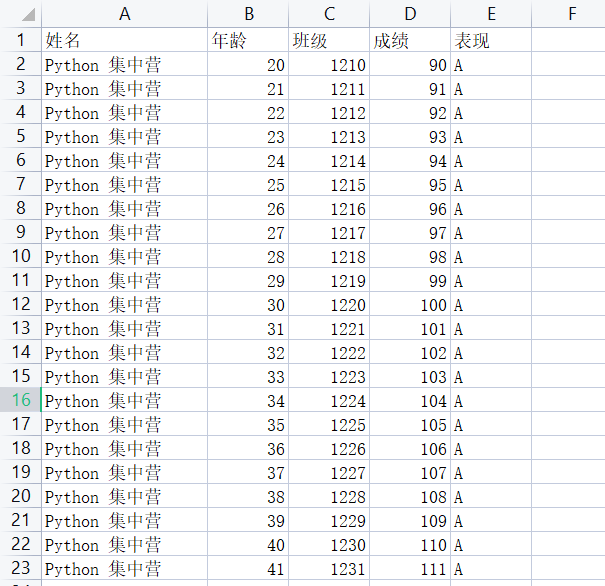

xlrd:用于读取Excle数据文件将返回的数据对象放到内存中,然后查询数据文件对象的相关信息。
xlwt:用于在内存中生成新的数据文件对象,处理完成后写入到Excel数据文件中。
xlutils:主要的作用就是copy新的文件对象,在新的数据对象中完成数据处理操作。
将xlrd/xlwt/xlutils三个模块分别都导入到待开发的代码块中提供支持。
# Importing the xlrd module.
import xlrd as read

# Importing the xlwt module.
import xlwt as write

# Copying the contents of the original workbook into a new workbook.
from xlutils.copy import copy
2、xlrd处理
# Opening the workbook and assigning it to the variable `work_book`.
work_book = read.open_workbook('D:/test-data-work/test.xls')

# Assigning the sheet named 'Sheet1' to the variable `sheet`.
sheet = work_book.sheet_by_name('Sheet1')

# `row = sheet.nrows` is assigning the number of rows in the sheet to the variable `row`.
row = sheet.nrows

# `col = sheet.ncols` is assigning the number of columns in the sheet to the variable `col`.
col = sheet.ncols

print('Sheet1工作表有:{0}行,{1}列'.format(str(row), str(col)))

# Sheet1工作表有:23行,5列
下面是三种常用的sheet对象的数据遍历方式,分别是按行/列的方式进行数据遍历。
for a in sheet.get_rows():
    print(a)

# [text:'姓名', text:'年龄', text:'班级', text:'成绩', text:'表现']
# [text:'Python 集中营', number:20.0, number:1210.0, number:90.0, text:'A']
# [text:'Python 集中营', number:21.0, number:1211.0, number:91.0, text:'A']
# [text:'Python 集中营', number:22.0, number:1212.0, number:92.0, text:'A']
# [text:'Python 集中营', number:23.0, number:1213.0, number:93.0, text:'A']
# [text:'Python 集中营', number:24.0, number:1214.0, number:94.0, text:'A']
# [text:'Python 集中营', number:25.0, number:1215.0, number:95.0, text:'A']
# [text:'Python 集中营', number:26.0, number:1216.0, number:96.0, text:'A']
# [text:'Python 集中营', number:27.0, number:1217.0, number:97.0, text:'A']
# [text:'Python 集中营', number:28.0, number:1218.0, number:98.0, text:'A']
# [text:'Python 集中营', number:29.0, number:1219.0, number:99.0, text:'A']
# [text:'Python 集中营', number:30.0, number:1220.0, number:100.0, text:'A']
# [text:'Python 集中营', number:31.0, number:1221.0, number:101.0, text:'A']
# [text:'Python 集中营', number:32.0, number:1222.0, number:102.0, text:'A']
# [text:'Python 集中营', number:33.0, number:1223.0, number:103.0, text:'A']
# [text:'Python 集中营', number:34.0, number:1224.0, number:104.0, text:'A']
# [text:'Python 集中营', number:35.0, number:1225.0, number:105.0, text:'A']
# [text:'Python 集中营', number:36.0, number:1226.0, number:106.0, text:'A']
# [text:'Python 集中营', number:37.0, number:1227.0, number:107.0, text:'A']
# [text:'Python 集中营', number:38.0, number:1228.0, number:108.0, text:'A']
# [text:'Python 集中营', number:39.0, number:1229.0, number:109.0, text:'A']
# [text:'Python 集中营', number:40.0, number:1230.0, number:110.0, text:'A']
# [text:'Python 集中营', number:41.0, number:1231.0, number:111.0, text:'A']

for b in range(row):
    print(sheet.row_values(b))

# ['姓名', '年龄', '班级', '成绩', '表现']
# ['Python 集中营', 20.0, 1210.0, 90.0, 'A']
# ['Python 集中营', 21.0, 1211.0, 91.0, 'A']
# ['Python 集中营', 22.0, 1212.0, 92.0, 'A']
# ['Python 集中营', 23.0, 1213.0, 93.0, 'A']
# ['Python 集中营', 24.0, 1214.0, 94.0, 'A']
# ['Python 集中营', 25.0, 1215.0, 95.0, 'A']
# ['Python 集中营', 26.0, 1216.0, 96.0, 'A']
# ['Python 集中营', 27.0, 1217.0, 97.0, 'A']
# ['Python 集中营', 28.0, 1218.0, 98.0, 'A']
# ['Python 集中营', 29.0, 1219.0, 99.0, 'A']
# ['Python 集中营', 30.0, 1220.0, 100.0, 'A']
# ['Python 集中营', 31.0, 1221.0, 101.0, 'A']
# ['Python 集中营', 32.0, 1222.0, 102.0, 'A']
# ['Python 集中营', 33.0, 1223.0, 103.0, 'A']
# ['Python 集中营', 34.0, 1224.0, 104.0, 'A']
# ['Python 集中营', 35.0, 1225.0, 105.0, 'A']
# ['Python 集中营', 36.0, 1226.0, 106.0, 'A']
# ['Python 集中营', 37.0, 1227.0, 107.0, 'A']
# ['Python 集中营', 38.0, 1228.0, 108.0, 'A']
# ['Python 集中营', 39.0, 1229.0, 109.0, 'A']
# ['Python 集中营', 40.0, 1230.0, 110.0, 'A']
# ['Python 集中营', 41.0, 1231.0, 111.0, 'A']

for c in range(col):
    print(sheet.col_values(c))

# ['姓名', 'Python 集中营', 'Python 集中营', 'Python 集中营', 'Python 集中营', 'Python 集中营', 'Python 集中营', 'Python 集中营', 'Python 集中营', 'Python 集中营', 'Python 集中营', 'Python 集中营', 'Python 集中营', 'Python 集中营', 'Python 集中营', 'Python 集中营', 'Python 集中营', 'Python 集中营', 'Python 集中营', 'Python 集中营', 'Python 集中营', 'Python 集中营', 'Python 集中营']
# ['年龄', 20.0, 21.0, 22.0, 23.0, 24.0, 25.0, 26.0, 27.0, 28.0, 29.0, 30.0, 31.0, 32.0, 33.0, 34.0, 35.0, 36.0, 37.0, 38.0, 39.0, 40.0, 41.0]
# ['班级', 1210.0, 1211.0, 1212.0, 1213.0, 1214.0, 1215.0, 1216.0, 1217.0, 1218.0, 1219.0, 1220.0, 1221.0, 1222.0, 1223.0, 1224.0, 1225.0, 1226.0, 1227.0, 1228.0, 1229.0, 1230.0, 1231.0]
# ['成绩', 90.0, 91.0, 92.0, 93.0, 94.0, 95.0, 96.0, 97.0, 98.0, 99.0, 100.0, 101.0, 102.0, 103.0, 104.0, 105.0, 106.0, 107.0, 108.0, 109.0, 110.0, 111.0]
# ['表现', 'A', 'A', 'A', 'A', 'A', 'A', 'A', 'A', 'A', 'A', 'A', 'A', 'A', 'A', 'A', 'A', 'A', 'A', 'A', 'A', 'A', 'A']
3、xlwt处理
# Creating a new workbook.
work_book_2 = write.Workbook()

# Creating a new sheet named 'Sheet4' in the workbook.
sheet_2 = work_book_2.add_sheet('Sheet4')

list = [
    ['姓名', '年龄', '班级', '成绩'],
    ['张三', '20', '1210', '89'],
    ['李四', '21', '1211', '90'],
    ['王五', '22', '1212', '91'],
]
for row_index in range(4):
    for col_index in range(4):
        sheet_2.write(row_index, col_index, list[row_index][col_index])
        col_index += 1
    row_index += 1

# Saving the workbook to the specified location.
work_book_2.save('D:/test-data-work/test2.xls')
4、xlutils处理
# Opening the workbook and assigning it to the variable `work_book_3`.
work_book_3 = read.open_workbook('D:/test-data-work/test.xls')

# Copying the contents of the original workbook into a new workbook.
work_book_3_copy = copy(work_book_3)

# Saving the contents of the original workbook into a new workbook.
work_book_3_copy.save('D:/test-data-work/test3.xls') 




