一、数据库搭建
很简单的一个user表,加两个用户admin和wskh

二、后端搭建
2.1 引入关键依赖
<dependency>
    <groupId>org.springframework.boot</groupId>
    <artifactId>spring-boot-starter-websocket</artifactId>
</dependency>
2.2 WebSocket配置类
WebSocketConfig的作用是:开启WebSocket监听
import org.springframework.context.annotation.Bean;
import org.springframework.context.annotation.Configuration;
import org.springframework.web.socket.server.standard.ServerEndpointExporter;

/**
* @Author:WSKH
* @ClassName:WebSocketConfig
* @ClassType:配置类
* @Description:WebSocket配置类
* @Date:2022/1/25/12:21
* @Email:1187560563@qq.com
* @Blog:https://blog.csdn.net/weixin_51545953?type=blog
*/

@Configuration
public class WebSocketConfig {
    /** * 开启webSocket * @return */
    @Bean
    public ServerEndpointExporter serverEndpointExporter() {
        return new ServerEndpointExporter();
    }
}
WebSocketServer里写了一些事件,如发送消息事件,建立连接事件,关闭连接事件等
import com.wskh.chatroom.util.FastJsonUtils;
import org.slf4j.Logger;
import org.slf4j.LoggerFactory;
import org.springframework.stereotype.Component;

import javax.websocket.*;
import javax.websocket.server.PathParam;
import javax.websocket.server.ServerEndpoint;
import java.io.EOFException;
import java.io.IOException;
import java.util.concurrent.ConcurrentHashMap;

@ServerEndpoint("/websocket/{sid}")
@Component
public class WebSocketServer {
    private static final Logger log = LoggerFactory.getLogger(WebSocketServer.class);

    private static int onlineCount = 0;

    private static ConcurrentHashMap<String,WebSocketServer> webSocketServerMap = new ConcurrentHashMap<>();

    private Session session;

    private String sid;


    @OnOpen
    public void onOpen(Session session, @PathParam("sid") String sid) {
        this.sid = sid;
        this.session = session;
        webSocketServerMap.put(sid, this);
        addOnlineCount();
        log.info("有新窗口开始监听:"+sid+",当前在线人数为" + getOnlineCount());
        try {
            sendInfo("openSuccess:"+webSocketServerMap.keySet());
        } catch (IOException e) {
            e.printStackTrace();
        }
    }

    @OnClose
    public void onClose() {
        webSocketServerMap.remove(sid);
        subOnlineCount();
        log.info("有一连接关闭!当前在线人数为" + getOnlineCount());
        try {
            sendInfo("openSuccess:"+webSocketServerMap.keySet());
        } catch (IOException e) {
            e.printStackTrace();
        }
    }

    @OnMessage
    public void onMessage(String message) throws IOException {
        if("ping".equals(message)) {
            sendInfo(sid, "pong");
        }
        if(message.contains(":")) {
            String[] split = message.split(":");
            sendInfo(split[0], "receivedMessage:"+sid+":"+split[1]);
        }
    }

    @OnError
    public void onError(Session session, Throwable error) {
        if(error instanceof EOFException) {
            return;
        }
        if(error instanceof IOException && error.getMessage().contains("已建立的连接")) {
            return;
        }
        log.error("发生错误", error);
    }

    /**
     * 实现服务器主动推送
     */
    public void sendMessage(String message) throws IOException {
        synchronized (session) {
            this.session.getBasicRemote().sendText(message);
        }
    }

    public static void sendObject(Object obj) throws IOException {
        sendInfo(FastJsonUtils.convertObjectToJSON(obj));
    }

    public static void sendInfo(String sid,String message) throws IOException {
        WebSocketServer socketServer = webSocketServerMap.get(sid);
        if(socketServer != null) {
            socketServer.sendMessage(message);
        }
    }

    public static void sendInfo(String message) throws IOException {
        for(String sid : webSocketServerMap.keySet()) {
            webSocketServerMap.get(sid).sendMessage(message);
        }
    }

    public static void sendInfoByUserId(Long userId,Object message) throws IOException {
        for(String sid : webSocketServerMap.keySet()) {
            String[] sids =  sid.split("id");
            if(sids.length == 2) {
                String id = sids[1];
                if(userId.equals(Long.parseLong(id))) {
                    webSocketServerMap.get(sid).sendMessage(FastJsonUtils.convertObjectToJSON(message));
                }
            }
        }
    }

    public static Session getWebSocketSession(String sid) {
        if(webSocketServerMap.containsKey(sid)) {
            return webSocketServerMap.get(sid).session;
        }
        return null;
    }

    public static synchronized void addOnlineCount() {
        onlineCount++;
    }

    public static synchronized void subOnlineCount() {
        onlineCount--;
    }

    public static synchronized int getOnlineCount() {
        return onlineCount;
    }
}
2.3 配置跨域
import org.springframework.context.annotation.Configuration;
import org.springframework.web.servlet.config.annotation.CorsRegistry;
import org.springframework.web.servlet.config.annotation.WebMvcConfigurerAdapter;

@Configuration
public class WebMvcConfig extends WebMvcConfigurerAdapter {

    @Override
    // 跨域配置
    public void addCorsMappings(CorsRegistry registry) {
        registry.addMapping("/**")
                .allowedOrigins("*")
                .allowedMethods("POST", "GET", "PUT", "OPTIONS", "DELETE")
                .maxAge(3600)
                .allowCredentials(true);
    }

}
2.4 发送消息的控制类
/**
 * @Author:WSKH
 * @ClassName:MsgController
 * @ClassType:控制类
 * @Description:信息控制类
 * @Date:2022/1/25/12:47
 * @Email:1187560563@qq.com
 * @Blog:https://blog.csdn.net/weixin_51545953?type=blog
 */
@ApiModel("信息控制类")
@RestController
@RequestMapping("/chatroom/msg")
public class MsgController {
    @ApiOperation("发送信息方法")
    @PostMapping("/sendMsg")
    public R sendMsg(String msg) throws IOException {
        WebSocketServer.sendInfo(msg);
        return R.ok().message("发送成功");
    }
}
至此,后端部分大体配置完毕。
立即学习“前端免费学习笔记(深入)”;
三、前端搭建
本文使用vue-admin-template-master模板进行聊天室的前端搭建

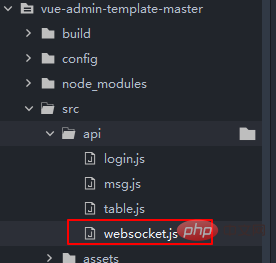
3.1 自定义文件websocket.js
将下面文件放在api文件夹下
//websocket.js
import Vue from 'vue'

// 1、用于保存WebSocket 实例对象
export const WebSocketHandle = undefined

// 2、外部根据具体登录地址实例化WebSocket 然后回传保存WebSocket
export const WebsocketINI = function(websocketinstance) {
  this.WebSocketHandle = websocketinstance
  this.WebSocketHandle.onmessage = OnMessage
}

// 3、为实例化的WebSocket绑定消息接收事件:同时用于回调外部各个vue页面绑定的消息事件
// 主要使用WebSocket.WebSocketOnMsgEvent_CallBack才能访问  this.WebSocketOnMsgEvent_CallBack 无法访问很诡异
const OnMessage = function(msg) {
  // 1、消息打印
  // console.log('收到消息:', msg)

  // 2、如果外部回调函数未绑定 结束操作
  if (!WebSocket.WebSocketOnMsgEvent_CallBack) {
    console.log(WebSocket.WebSocketOnMsgEvent_CallBack)
    return
  }

  // 3、调用外部函数
  WebSocket.WebSocketOnMsgEvent_CallBack(msg)
}

// 4、全局存放外部页面绑定onmessage消息回调函数:注意使用的是var
export const WebSocketOnMsgEvent_CallBack = undefined

// 5、外部通过此绑定方法 来传入的onmessage消息回调函数
export const WebSocketBandMsgReceivedEvent = function(receiveevent) {
  WebSocket.WebSocketOnMsgEvent_CallBack = receiveevent
}

// 6、封装一个直接发送消息的方法:
export const Send = function(msg) {
  if (!this.WebSocketHandle || this.WebSocketHandle.readyState !== 1) {
    // 未创建连接 或者连接断开 无法发送消息
    return
  }
  this.WebSocketHandle.send(msg)// 发送消息
}

// 7、导出配置
const WebSocket = {
  WebSocketHandle,
  WebsocketINI,
  WebSocketBandMsgReceivedEvent,
  Send,
  WebSocketOnMsgEvent_CallBack
}

// 8、全局绑定WebSocket
Vue.prototype.$WebSocket = WebSocket
3.2 main.js中全局引入websocket
import '@/utils/websocket' // 全局引入 WebSocket 通讯组件
3.3 App.vue中声明websocket对象
App.vue
<template>
  <div id="app">
    <router-view />
  </div>
</template>

<script>
  import {getInfo} from './api/login.js';
  import {getToken} from './utils/auth.js'
  export default {
    name: 'App',
    mounted() {
      // 每3秒检测一次websocket连接状态 未连接 则尝试连接 尽量保证网站启动的时候 WebSocket都能正常长连接
      setInterval(this.WebSocket_StatusCheck, 3000)
      // 绑定消息回调事件
      this.$WebSocket.WebSocketBandMsgReceivedEvent(this.WebSocket_OnMesage)
      // 初始化当前用户信息
      this.token = getToken()
      getInfo(this.token).then((rep)=>{
        console.log(rep)
        this.userName = rep.data.name
      }).catch((error)=>{
        console.log(error)
      })
    },
    data(){
      return{

      }
    },
    methods: {

      // 实际消息回调事件
      WebSocket_OnMesage(msg) {
        console.log('收到服务器消息:', msg.data)
        console.log(msg)
        let chatDiv = document.getElementById("chatDiv")
        let newH3 = document.createElement("div")
        if(msg.data.indexOf('openSuccess')>=0){
			// 忽略连接成功消息提示
        }else{
          if(msg.data.indexOf(this.userName)==0){
            // 说明是自己发的消息,应该靠右边悬浮
            newH3.innerHTML = "<div style='width:100%;text-align: right;'><h4 style=''>"+msg.data+"</h4></div>"
          }else{
            newH3.innerHTML = "<div style='width:100%;text-align: left;'><h4 style=''>"+msg.data+"</h4></div>"
          }
        }
        chatDiv.appendChild(newH3)
      },

      // 1、WebSocket连接状态检测:
      WebSocket_StatusCheck() {
        if (!this.$WebSocket.WebSocketHandle || this.$WebSocket.WebSocketHandle.readyState !== 1) {
          console.log('Websocket连接中断,尝试重新连接:')
          this.WebSocketINI()
        }
      },

      // 2、WebSocket初始化:
      async WebSocketINI() {
        // 1、浏览器是否支持WebSocket检测
        if (!('WebSocket' in window)) {
          console.log('您的浏览器不支持WebSocket!')
          return
        }

        let DEFAULT_URL = "ws://" + '127.0.0.1:8002' + '/websocket/' + new Date().getTime()

        // 3、创建Websocket连接
        const tmpWebsocket = new WebSocket(DEFAULT_URL)

        // 4、全局保存WebSocket操作句柄:main.js 全局引用
        this.$WebSocket.WebsocketINI(tmpWebsocket)

        // 5、WebSocket连接成功提示
        tmpWebsocket.onopen = function(e) {
          console.log('webcoket连接成功')
        }

        //6、连接失败提示
        tmpWebsocket.onclose = function(e) {
          console.log('webcoket连接关闭:', e)
        }
      }

    }
  }
</script>
3.4 聊天室界面.vue
<template>
  <div>
    <div >聊天内容:</div>
    <div  id="chatDiv">

    </div>
    <div >聊天输入框:</div>
    <el-input v-model="text">

    </el-input>
    <el-button @click="sendMsg">点击发送</el-button>
  </div>
</template>

<script>
  import {getInfo} from '../../api/login.js';
  import {getToken} from '../../utils/auth.js'
  import msgApi from '../../api/msg.js'
  export default {
    mounted() {
      //
      this.token = getToken()
      getInfo(this.token).then((rep)=>{
        console.log(rep)
        this.userName = rep.data.name
      }).catch((error)=>{
        console.log(error)
      })
    },
    data() {
      return {
        text: "",
        token:"",
        userName:"",
      }
    },
    methods: {
      sendMsg(){
        let msg = this.userName+":"+this.text
        msgApi.sendMsg(msg).then((rep)=>{

        }).catch((error)=>{

        })
        this.text = ""
      }
    }
  }
</script>

<style scoped="true">
  .selfMsg{
    float: right;
  }
</style>
3.5 最终效果
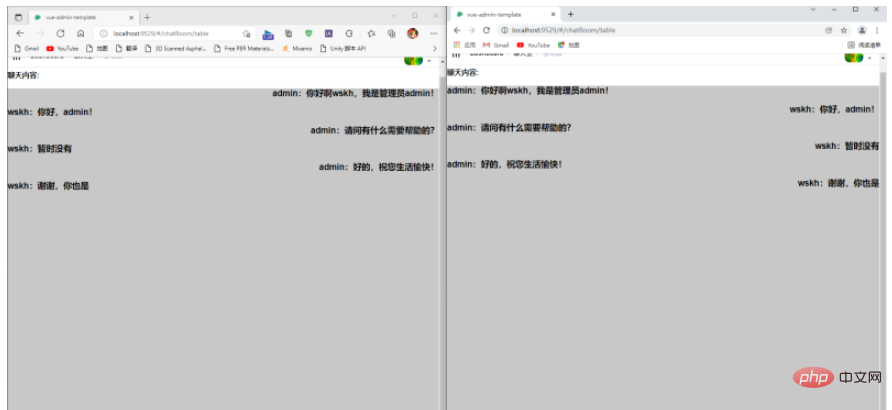
用两个不同的浏览器,分别登录admin账号和wskh账号进行聊天测试,效果如下(左边为admin):