



1. npm下载拖拽缩放库
npm install vue-grid-layout@3.0.0-beta1 --save
2. vue3 使用 vue-grid-layout报错:external_commonjs_vue_commonjs2_vue_root_Vue_default.a is not a constructor
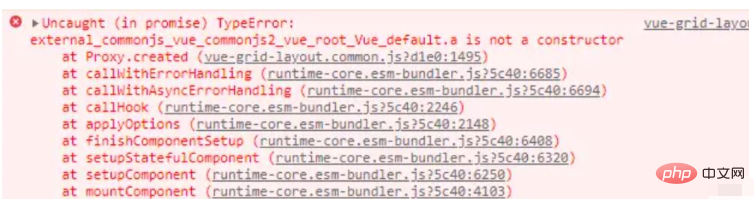
解决方案: vue3版本记得下载对应 vue-grid-layout@3.0.0-beta1版本的库,因为vue-grid-layout是vue2版本的,但用的是vue3版本,所以要安装vue3的依赖和相关配置
3. 在main.js中注册
// 将自动注册所有组件为全局组件
import keycloakInit from '@/utils/util.keycloak'
import VueGridLayout from 'vue-grid-layout'

const app = createApp(App)
app.use(store)
app.use(router)
app.use(ElementPlus)
app.use(VueGridLayout)
app.mount('#app')
4. 页面中使用组件 -- 控制保存和编辑
页面使用效果图:
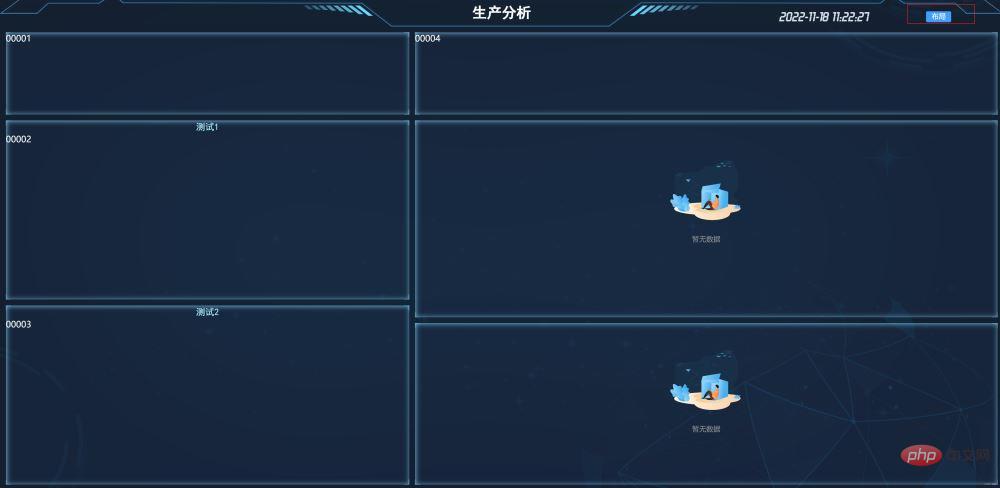
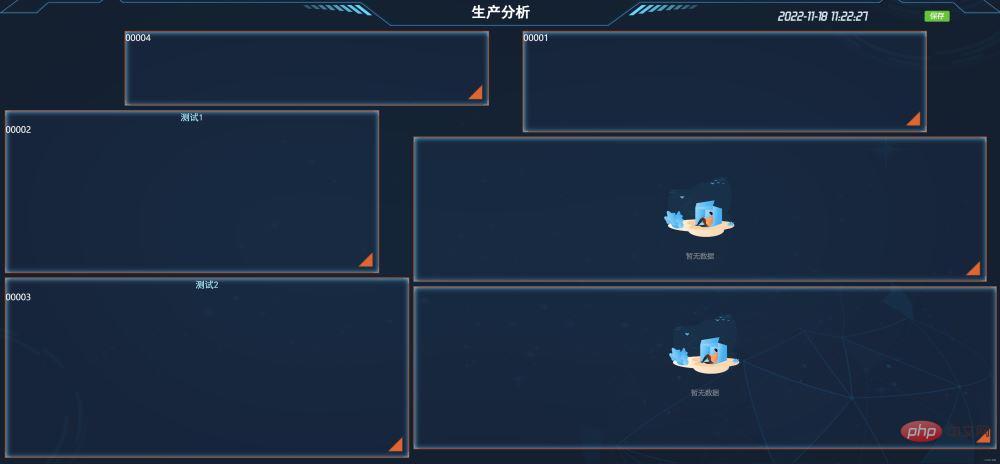
点击布局进行自定义拖拽功能 ----- 效果图 ----- 箭头处可进行拖拽大小及位置:
立即学习“前端免费学习笔记(深入)”;

页面代码如下:
属性 GridLayout参数 和 GridItem参数 官网有详细介绍
<template>
    <div class="nav-wrapper-b">
        <div class="bar-title-b">
            {{getChangeLine + ' ' + barTitle}}
        </div>
        <div class="time-b">
            <span >{{ date }} {{ time }}</span>
            <div >
                <el-button v-if="isEditDraggable"
                           type="success"
                           size="small"
                           @click="saveDragDataHome">保存
                </el-button>
                <el-button v-else
                           type="primary"
                           size="small"
                           @click="editDragDataHome">布局
                </el-button>
            </div>
        </div>
    </div>
    <div class="home-container-b">
        <!--********************** 实现自定义组件 *********************-->
        <div class="drag-body" :class="isEditDraggable ? 'drag-body-edit' : ''">
            <grid-layout :layout.sync="layoutDraggableList"
                         :col-num="100"
                         :row-height="5"
                         :is-draggable="draggableLayout"
                         :is-resizable="resizableLayout"
                         :vertical-compact="true"
                         :use-css-transforms="true">
                <grid-item v-for="item in layoutDraggableList"
                           :static="false"
                           :x="item.x"
                           :y="item.y"
                           :w="item.w"
                           :h="item.h"
                           :i="item.i"
                           >
                    <!--测试组件-->
                    <div class="layout-component top-left-first-components"
                         v-if="item.i == 'topLeftFirst'">
                        <box-container-is>
                            00001
                        </box-container-is>
                    </div>
                    <!--前五组件-->
                    <div class="layout-component"
                         v-if="item.i == 'topLeftSecond'">
                        <box-container :boxTitle="'测试1'">
                            00002
                        </box-container>
                    </div>
                    <!--前五-->
                    <div class="layout-component"
                         v-if="item.i == 'topLeftThird'">
                        <box-container :boxTitle="'测试2'">
                           00003
                        </box-container>
                    </div>
                    <!--信息组件-->
                    <div class="layout-component"
                         v-if="item.i == 'topRightFirst'">
                        <box-container-is>
                            00004
                        </box-container-is>
                    </div>
                    <!--组件-->
                    <div class="layout-component"
                         v-if="item.i == 'topRightSecond'">
                        <box-container>
                            <topRightSecondBHome></topRightSecondBHome>
                        </box-container>
                    </div>
                    <!--组件-->
                    <div class="layout-component"
                         v-if="item.i == 'topRightThird'">
                        <box-container-is>
                            <topRightThirdBHome></topRightThirdBHome>
                        </box-container-is>
                    </div>
                </grid-item>
            </grid-layout>
        </div>
    </div>
</template>

<script setup>
    import emitter from '@/utils/eventbus'
    import {getDate, getTime, getTimeHours} from "@/utils/date";
    import {useRoute, useRouter} from "vue-router";
    import boxContainer from "@/components/boxContainer/index";
    import boxContainerIs from "@/components/boxContainer/index1";
    import {
        workOrderLine,
        topRightSecondBHome,
        topRightThirdBHome,
    } from "./components";
    import {computed, ref} from "vue";
    import {getCurrentInstance, nextTick} from "@vue/runtime-core";
    import {onBeforeUnmount, onMounted, watch} from "vue";
    import {saveTemplateApi} from '@/api/workOrderLineApi'
    import {ElMessage} from "element-plus";

    const {proxy} = getCurrentInstance()
    //年月日
    const date = ref(getDate());
    //时分秒
    const time = ref(getTime());
    const getChangeLine = ref('')
    const hours = ref(getTimeHours())
    const barTitle = ref("")
    const router = useRouter();

    /*____________________________主页拖拽布局开始_______________________________*/
    let isEditDraggable = ref(false)
    const draggableLayout = ref(false)
    const resizableLayout = ref(false)
    const layoutDraggableList = ref([])

    //点击编辑布局
    function editDragDataHome() {
        isEditDraggable.value = true
    }

    //保存布局
    function saveDragDataHome() {
        isEditDraggable.value = false
        console.log(layoutDraggableList.value)
        saveTemplateApi(layoutDraggableList.value).then(response => {
            if (response.code == 200) {
                ElMessage({
                    message: '模板布局已保存成功',
                    type: 'success',
                    duration: 6 * 1000
                })
            }
        })
    }

    /*_____________________________主页拖拽布局结束______________________________*/

    //模拟后端请求到的数据
    let demoData = ref({
        "id": 162,
        "subjectId": 161,
        "name": "主页",
        "title": "生产分析",
        "description": "第一个看板菜单信息",
        "templateList": [
            {
                "id": 163,
                "titleName": "人员信息",
                "disabled": true,
                "i": "topLeftFirst",
                "x": 0,
                "y": 0,
                "w": 41,
                "h": 10,
                "menuId": 162
            },
            {
                "id": 164,
                "titleName": "前五",
                "disabled": true,
                "i": "topLeftSecond",
                "x": 0,
                "y": 10,
                "w": 41,
                "h": 21,
                "menuId": 162
            },
            {
                "id": 165,
                "titleName": "吸嘴-抛料率前五",
                "disabled": true,
                "i": "topLeftThird",
                "x": 0,
                "y": 31,
                "w": 41,
                "h": 21,
                "menuId": 162
            },
            {
                "id": 166,
                "titleName": "",
                "disabled": true,
                "i": "topRightFirst",
                "x": 41,
                "y": 0,
                "w": 59,
                "h": 10,
                "menuId": 162
            },
            {
                "id": 167,
                "titleName": "",
                "disabled": true,
                "i": "topRightSecond",
                "x": 41,
                "y": 10,
                "w": 59,
                "h": 23,
                "menuId": 162
            },
            {
                "id": 168,
                "titleName": "",
                "disabled": true,
                "i": "topRightThird",
                "x": 41,
                "y": 33,
                "w": 59,
                "h": 19,
                "menuId": 162
            }
        ]
    })
    initialHeightFun(demoData.value)

    //根据高度进行调整尺寸
    function initialHeightFun(data) {
        nextTick(() => {
            layoutDraggableList.value = data.templateList
            barTitle.value = data.title
        })
    }

    onBeforeUnmount(() => {})

    //监听拖拽功能
    watch(isEditDraggable, (res) => {
        draggableLayout.value = !draggableLayout.value;
        resizableLayout.value = !resizableLayout.value;
    })
</script>

<style lang="scss" scoped>
    /*----------------拖拽样式开始----------------*/
    .drag-body {
        width: 100%;
        height: 100%;
    }

    .layout-component {
        width: 100%;
        height: 100%;
        display: flex;
        flex-wrap: wrap;
        align-content: space-between;
    }

    .layout-component-low-warning-second {
        width: 95%;
        height: 100%;
        margin-right: 1%;
        float: left;
    }

    .layout-component-low-warning-text {
        width: 4%;
        height: 100%;
        float: right;
    }

    .layout-component-low-throwing-second {
        width: 100%;
        height: 100%;
    }

    .drag-body-edit {
        .vue-grid-item:not(.vue-grid-placeholder) {
            outline: 2px solid rgba(255, 96, 28, 0.71);
        }
    }

    .vue-grid-item {
        box-sizing: border-box !important;
    }

    .vue-grid-layout {
        background: url("~@/assets/image/bg1.png");
        -moz-background-size: 100% 100%;
        background-size: 100% 100%;
    }

    ::v-deep .vue-resizable-handle {
        background: url("~@/assets/image/ic_show_more.png") no-repeat 100% 100%;
        padding: 0 3px 3px 0;
        background-origin: content-box;
        -webkit-box-sizing: border-box;
        position: absolute;
        width: 45px;
        height: 45px;
        bottom: 0;
        right: 0;
    }

    .vue-grid-item:not(.vue-grid-placeholder) {
        //border: 1px solid #409eff;
        color: #ffffff;
    }

    .vue-grid-item .resizing {
        opacity: 0.9;
    }

    .vue-grid-item .static {
        background: transparent;
    }

    .vue-grid-item .text {
        font-size: 24px;
        text-align: center;
        position: absolute;
        top: 0;
        bottom: 0;
        left: 0;
        right: 0;
        margin: auto;
        height: 100%;
        width: 100%;
    }

    .vue-grid-item .no-drag {
        height: 100%;
        width: 100%;
    }

    .vue-grid-item .minMax {
        font-size: 12px;
    }

    .vue-grid-item .add {
        cursor: pointer;
    }

    /*----------------拖拽样式结束----------------*/

    .nav-wrapper-b {
        height: 60px;
        line-height: 60px;
        width: 100%;
        background: url("~@/assets/image/top.png") no-repeat;
        background-size: 100% 100%;
        text-align: center;
        position: relative;
        color: #d5dfe8;
        font-family: "黑体";

        .bar-title-b {
            font-size: 32px;
            color: #ffffff;
            font-weight: bolder;
        }

        .time-b {
            position: absolute;
            right: 1%;
            top: 50%;
            transform: translateY(-35%);
            font-family: "Time Number";
            font-weight: bold;
            font-size: 29px;
            width: 35%;
        }

        .mapChoose-b {
            position: absolute;
            left: 22px;
            bottom: 15px;
            color: #eee;
        }
    }

    .home-container-b {
        width: 100%;
        height: 100%;
        position: relative;
        margin-top: 0;
    }

    .nav_btn {
        position: absolute;
        top: 5px;
        width: 50%;
        height: auto;
    }
</style> 




