



本文分两篇为大家介绍php实现购物车功能,具有一定的参考价值,相信大家一定喜欢。
1、需求分析
我们需要找到一种将数据库连接到用户的浏览器的方法。用户能够按目录浏览商品。 用户应该能够从商品目录中选取商品以便此后的购买。我们也要能够记录他们选中的物品。 当用户完成购买,要合计他们的订单,获取运送商品细节,并处理付款。 创建一个管理界面,以便管理员在上面添加、编辑图书和目录。
2、解决方案
2.1 用户视图

2.2 管理员视图

2.3 book-o-rama中的文件列表

3、实现数据库3.1 创建book_sc数据库的SQL代码
CREATE DATABASE book_sc; #创建book_sc数据库

USE book_sc; #使用book_sc数据库

CREATE TABLE customers #创建用户表
(
 customerid INT UNSIGNED NOT NULL AUTO_INCREMENT PRIMARY KEY,
 name CHAR(60) NOT NULL,
 address CHAR(80) NOT NULL,
 city CHAR(30) NOT NULL,
 state CHAR(10),
 zip CHAR(10),
 country CHAR(20) NOT NULL
);

CREATE TABLE orders #创建订单表
(
 orderid INT UNSIGNED NOT NULL AUTO_INCREMENT PRIMARY KEY,
 customerid INT UNSIGNED NOT NULL,
 amount FLOAT(6,2),
 date DATE NOT NULL,
 order_status CHAR(10),
 ship_name CHAR(60) NOT NULL,
 ship_address CHAR(80) NOT NULL,
 ship_city CHAR(30) NOT NULL,
 ship_state CHAR(20),
 ship_zip CHAR(10),
 ship_country CHAR(20) NOT NULL
);

CREATE TABLE books #创建图书表
(
 isbn CHAR(13) NOT NULL PRIMARY KEY,
 author CHAR(80),
 title CHAR(100),
 catid INT UNSIGNED,
 price FLOAT(4,2) NOT NULL,
 description VARCHAR(255)
);

CREATE TABLE categories #创建目录表
(
 catid INT UNSIGNED NOT NULL AUTO_INCREMENT PRIMARY KEY,
 catname CHAR(60) NOT NULL
);

CREATE TABLE order_items #订单物品表
(
 orderid INT UNSIGNED NOT NULL,
 isbn CHAR(13) NOT NULL,
 item_price FLOAT(4,2) NOT NULL,
 quantity TINYINT UNSIGNED NOT NULL,
 PRIMARY KEY(orderid,isbn)
);

CREATE TABLE admin #管理员表
(
 username char(16) NOT NULL PRIMARY KEY,
 password CHAR(40) NOT NULL
);

GRANT SELECT,INSERT,UPDATE,DELETE
on book_sc.*
to book_sc@localhost IDENTIFIED by 'password';
3.2 数据库测试数据文档
USE book_sc;


INSERT INTO books VALUES ('0672329166','Luke Welling and Laura Thomson','PHP and MySQL Web Development',1,49.99,
'PHP & MySQL Web Development teaches the reader to develop dynamic, secure e-commerce web sites. You will learn to integrate and implement these technologies by following real-world examples and working sample projects.');
INSERT INTO books VALUES ('067232976X','Julie Meloni','Sams Teach Yourself PHP, MySQL and Apache All-in-One',1,34.99,
'Using a straightforward, step-by-step approach, each lesson in this book builds on the previous ones, enabling you to learn the essentials of PHP scripting, MySQL databases, and the Apache web server from the ground up.');
INSERT INTO books VALUES ('0672319241','Sterling Hughes and Andrei Zmievski','PHP Developer\'s Cookbook',1,39.99,
'Provides a complete, solutions-oriented guide to the challenges most often faced by PHP developers\r\nWritten specifically for experienced Web developers, the book offers real-world solutions to real-world needs\r\n');

INSERT INTO categories VALUES (1,'Internet');
INSERT INTO categories VALUES (2,'Self-help');
INSERT INTO categories VALUES (5,'Fiction');
INSERT INTO categories VALUES (4,'Gardening');

INSERT INTO admin VALUES ('admin', sha1('admin'));
4、实现在线目录

主页-目录
由以下代码实现:
4.1 index.php
<?php
/**
* @author switch
* @copyright 2015
* 网站首页,显示系统中的图书目录
*/
//require_once语句和require语句完全相同,唯一区别是PHP会检查该文件是否已经被包含过,如果是则不会再次包含。
require_once('book_sc_fns.php');
session_start(); //开始会话
do_html_header('Welcome to Book-O-Rama'); //页头
echo "Please choose a category:
立即学习“PHP免费学习笔记(深入)”;
";
$cat_array = get_categories(); //从数据库获取目录
display_categories($cat_array); //显示目录链接
if(isset($_SESSION['admin_user'])) //如果是管理员,显示管理员操作
display_button("admin.php","admin-menu","Admin Menu");
do_html_footer(); //页尾
?>
4.2 book_fns.php文件中的函数get_categories()
function get_categories() //从数据库中获取目录列表
 {
 $conn = db_connect(); //连接数据库
 $query = "select catid,catname from categories";
 $result = @$conn ->query($query);
 if(!$result) //查询失败,返回false
  return false;
 $num_cats = @$result ->num_rows;
 if($num_cats == 0) //数据库中无目录,返回false
  return false;
 $result = db_result_to_array($result);
 return $result;
 }
4.3 output_fns.php文件中的函数display_categories()
function display_categories($cat_array) //输出目录
{
if(!is_array($cat_array))
{
echo "No categories currently available
";
return;
}
echo "- ";
foreach($cat_array as $row)
{
$url = "show_cat.php?catid=". $row['catid'];
$title = $row['catname'];
echo "
- "; do_html_URL($url,$title); echo " "; } echo "
"; }
4.4 db_fns.php文件中的函数db_result_to_array()
function db_result_to_array($result) //结果到数组
 {
 $res_array = array();

 for($count = 0; $row = $result ->fetch_assoc(); $count++)
  $res_array[$count] = $row;

 return $res_array;
 }

Internet目录下的所有图书
由以下代码实现:
4.5 show_cat.php
<?php

/**
 * @author switch
 * @copyright 2015
 * 显示特定目录包含的所有图书
 */
 //require_once语句和require语句完全相同,唯一区别是PHP会检查该文件是否已经被包含过,如果是则不会再次包含。
 require_once('book_sc_fns.php');

 session_start();

 @$catid = $_GET['catid'];
 $name = get_category_name($catid);

 do_html_header($name);

 $book_array = get_books($catid);

 display_books($book_array);

 //如果是管理员,显示管理界面按钮
 if(isset($_SESSION['admin_user']))
 {
 display_button("index.php","continue","Continue Shopping");
 display_button("admin.php","admin-menu","Admin Menu");
 display_button("edit_category_form.php?catid=". $catid,"edit-category","Edit Category");
 }
 else //否则显示主界面按钮
 {
 display_button("index.php","continue-shopping","Continue Shopping");
 }
 do_html_footer();
?>
4.6 book_fns.php文件中的函数get_category_name()
function get_category_name($catid) //获取目录名
 {
 $conn = db_connect(); //连接数据库
 $query = "select catname from categories where catid = '". $catid ."'";
 $result = @$conn ->query($query);
 if(!$result) //查询失败,原因为查询出错
  return false;

 $num_cats = @$result ->num_rows;

 if($num_cats == 0) //查询失败,原因为无目录
  return false;
 $row = $result ->fetch_object();
 return $row ->catname;
 }
4.8 book_fns.php文件中的函数get_books()
function get_books($catid) //从数据库中获取图书
 {
 if((!$catid) || ($catid == '')) //如果目录ID为空
  return false;

 $conn = db_connect();
 $query = "select * from books where catid = '". $catid ."'";
 $result = @$conn ->query($query);
 if(!$result) //查询失败,原因为查询出错
  return false;

 $num_books = @$result ->num_rows;

 if($num_books == 0) //查询失败,原因为无图书
  return false;

 $result = db_result_to_array($result);
 return $result;
 }
4.9 output_fns文件中的函数display_books()
function display_books($book_array) //输出图书
{
if(!is_array($book_array))
echo "No books currently available in this category
";
else //有图书,建表
{
echo "| ";
// 如果图片存在
if(@file_exists("images/". $row['isbn'] .".jpg"))
{
$title = " | "; $title = $row['title'] ." by ". $row['author']; do_html_URL($url,$title); echo " |
"; }

PHP and MySQL Web Development的详细信息
由以下代码实现:
4.10 show_book.php
<?php
 /**
 * @author switch
 * @copyright 2015
 * 显示特定图书的详细信息
 */
 //require_once语句和require语句完全相同,唯一区别是PHP会检查该文件是否已经被包含过,如果是则不会再次包含。
 require_once('book_sc_fns.php');

 session_start();

 $isbn = $_GET['isbn'];

 $book = get_book_details($isbn);
 do_html_header($book['title']);
 display_book_details($book);

 //设置继续按钮
 $target = "index.php";
 if($book['catid'])
 $target = "show_cat.php?catid = ". $book['catid'];

 //如果是管理员,显示编辑链接
 if(check_admin_user())
 {
 display_button("edit_book_form.php?isbn=". $isbn,"edit-item","Edit Item");
 display_button("admin.php","admin-menu","Admin Menu");
 display_button($target,"continue","Continue");
 }
 else
 {
 display_button("show_cart.php?new=". $isbn,"add-to-cart","Add". $book['title']." To My Shopping Cart");
 display_button($target,"continue-shopping","Continue Shopping");
 }
 do_html_footer();
?>
4.11 book_fns.php文件中的函数get_book_details()
function get_book_details($isbn) //从数据库中获取一本图书的详细说明
 {
 if((!$isbn) || ($isbn == '')) //如果图书统一书号为空
  return false;

 $conn = db_connect(); //连接数据库
 $query = "select * from books where isbn = '". $isbn ."'";
 $result = @$conn ->query($query);
 if(!$result) //查询失败,原因为查询出错
  return false;
 $result = @$result ->fetch_assoc();
 return $result;
 }
4.12 output_fns.php文件中的函数display_book_details()
function display_book_details($book) //输出图书详细说明
 {
 if(is_array($book))
 {
echo "| @@##@@ | "; } } echo "
|
The details of this book cannot be displayed at this time.
"; } echo ""; }
5、实现购物车
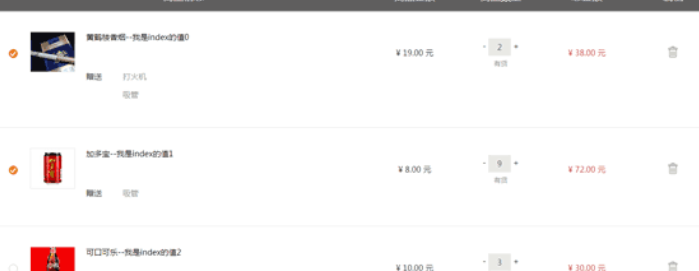
不使用参数的脚本只显示购物车的内容

带有参数new的脚本将添加一个物品到购物车
由以下代码实现:
5.1 show_cart.php
<?php
/**
* @author switch
* @copyright 2015
* 显示用户购物车的内容。也用来向购物车添加图书
*/
//require_once语句和require语句完全相同,唯一区别是PHP会检查该文件是否已经被包含过,如果是则不会再次包含。
require_once('book_sc_fns.php');
session_start();
@$new = $_GET['new'];
if($new)
{
if(!isset($_SESSION['cart'])) //购物车中无物品
{
$_SESSION['cart'] =array();
$_SESSION['items'] = 0;
$_SESSION['total_price'] = '0.00';
}
if(isset($_SESSION['cart'][$new]))
{
$_SESSION['cart'][$new]++;
}
else
{
$_SESSION['cart'][$new] = 1;
}
$_SESSION['total_price'] = calculate_price($_SESSION['cart']);
$_SESSION['items'] = calculate_items($_SESSION['cart']);
}
if(isset($_POST['save']))
{
foreach($_SESSION['cart'] as $isbn => $qty)
{
if($_POST[$isbn] == '0')
unset($_SESSION['cart'][$isbn]);
else
$_SESSION['cart'][$isbn] = $_POST[$isbn];
}
$_SESSION['total_price'] = calculate_price($_SESSION['cart']);
$_SESSION['items'] = calculate_items($_SESSION['cart']);
}
do_html_header("Your shopping cart");
if((@$_SESSION['cart']) && (array_count_values($_SESSION['cart'])))
{
display_cart($_SESSION['cart']);
}
else
{
echo "There are no items in your cart
";
}
$target = "index.php";
//如果只有一种物品添加到购物车,可以继续购物
if($new)
{
$details = get_book_details($new);
if($details['catid'])
{
$target = "show_cat.php?catid=". $details['catid'];
}
}
display_button($target,"continue-shopping","Continue Shopping");
//SSL链接--需要配置,PS:没配置,所以不能使用
// $path = $_SERVER['PHP_SELF']; //获取路径
// $server = $_SERVER['SERVER_NAME']; //获取主机名
// $path = str_replace('show_cart.php','',$path);
// display_button("https://". $server . $path ."checkout.php","go-to-checkout","Go To Checkout");
//非SSL链接
display_button("checkout.php","go-to-checkout","Go To Checkout");
do_html_footer();
?>
5.2 output_fns.php文件中的函数display_cart()
function display_cart($cart,$change = true,$images = 1) //显示购物车
 {
echo "5.3 book_fns.php文件中的函数calculate_price()
function calculate_price($cart) //计算购物车中物品总价
 {
 $price = 0.0;
 if(is_array($cart))
 {
  $conn = db_connect();
  foreach($cart as $isbn => $qty)
  {
  $query = "select price from books where isbn ='". $isbn ."'";
  $result = $conn ->query($query);
  if($result)
  {
   $item = $result ->fetch_object();
   $item_price = $item ->price;
   $price += $item_price * $qty;
  }
  }
 }
 return $price;
 }
5.4 book_fns.php文件中的函数calculate_items()
function calculate_items($cart) //计算购物车中的物品总数
 {
 $items = 0;
 if(is_array($cart))
 {
  foreach($cart as $isbn => $qty)
  $items += $qty;
 }
 return $items;
 }

获取顾客的详细信息
由以下代码实现:
5.5 checkout.php
<?php
/**
* @author switch
* @copyright 2015
* 向用户显示所有的订单细节。获取商品运送细节
*/
//require_once语句和require语句完全相同,唯一区别是PHP会检查该文件是否已经被包含过,如果是则不会再次包含。
require_once('book_sc_fns.php');
session_start();
do_html_header("Checkout");
if((@$_SESSION['cart']) && (array_count_values($_SESSION['cart'])))
{
display_cart($_SESSION['cart'],false,0);
display_checkout_form();
}
else
{
echo "Thers are no items in your cart
";
}
display_button("show_cart.php","continue-shopping","Continue Shopping");
do_html_footer();
?>
5.6 output_fns.php文件中的display_checkout_form()
function display_checkout_form() //输出付款台界面
 {
 ?>
<?php }
已填写好信息的订单

获取客户信用卡信息
由以下代码实现:
5.7 purchase.php
<?php
/**
* @author switch
* @copyright 2015
* 从用户获取付款细节
*/
//require_once语句和require语句完全相同,唯一区别是PHP会检查该文件是否已经被包含过,如果是则不会再次包含。
require_once('book_sc_fns.php');
session_start();
do_html_header("Checkout");
//创建变量
$name = $_POST['name'];
$address = $_POST['address'];
$city = $_POST['city'];
$zip = $_POST['zip'];
$country = $_POST['country'];
//如果订单细节填满
if(($_SESSION['cart']) && ($name) && ($address) && ($city) && ($zip) && ($country))
{
if(insert_order($_POST) != false)
{
display_cart($_SESSION['cart'],false,0);
display_shipping(calculate_shipping_cost());
display_card_form($name);
display_button("show_cart.php","continue-shopping","Continue Shopping");
}
else
{
echo "Could not store data, please try again.
";
display_button('checkout.php','back','Back');
}
}
else
{
echo "You did not fill in all the fields, please try again.
";
display_button('checkout.php','back','Back');
}
do_html_footer();
?>
5.8 order_fns.php文件中的函数insert_order()
function insert_order($order_details) //提取订单细节作为变量
 {
 extract($order_details);

 //设置邮寄地址为当前地址
 if((!$ship_name) && (!$ship_address) && (!$ship_city) && (!$ship_state) && (!$ship_zip) &&(!$ship_country))
 {
  $ship_name = $name;
  $ship_address = $address;
  $ship_city = $city;
  $ship_state = $state;
  $ship_zip = $zip;
  $ship_country = $country;
 }

 //连接数据库
 $conn = db_connect();

 //事务开始,必须关闭自动提交
 $conn ->autocommit(false);

 $query = "select customrid from customers where
   name ='". $name ."' and address = '". $address ."'
   and city = '". $city ."' and state = '". $state ."'
   and zip = '". $zip ."' and country = '". $country ."'";

 $result = $conn ->query($query);

 if(@$result ->num_rows > 0)
 {
  $customer = $result ->fetch_object();
  $customerid = $customer ->customerid;
 }
 else
 {
  $query = "insert into customers values
   ('','". $name ."','". $address ."','". $city ."','". $state ."','". $zip ."','". $country ."')";
  $result = $conn ->query($query);

  if(!$result)
  return false;
 }

 $customerid = $conn ->insert_id; //返回上次查询中自增量的ID

 $date = date("Y-m-d");

 $query ="insert into orders values
  ('','". $customerid ."','". $_SESSION['total_price'] ."','". $date ."','PARTIAL','". $ship_name ."','". $ship_address ."','". $ship_city ."','". $ship_state ."','". $ship_zip ."','". $ship_country ."')";

 $result = $conn ->query($query);
 if(!$result)
  return false;

 $query = "select orderid from orders where
   customerid ='". $customerid ."' and
   amount > (". $_SESSION['total_price'] ."-.001) and
   amount < (". $_SESSION['total_price'] ."+.001) and
   date ='". $date ."' and
   order_status = 'PARTIAL' and
   ship_name ='". $ship_name ."' and
   ship_address ='". $ship_address ."' and
   ship_city ='". $ship_city ."' and
   ship_state ='". $ship_state ."' and
   ship_zip ='". $ship_zip ."' and
   ship_country ='". $ship_country ."'";

 $result = $conn ->query($query);

 if($result ->num_rows > 0)
 {
  $order = $result ->fetch_object();
  $orderid = $order ->orderid;
 }
 else
  return false;

 foreach($_SESSION['cart'] as $isbn => $quantity)
 {
  $detail = get_book_details($isbn);
  $query = "delete from order_items where
   orderid = '". $orderid ."' and isbn = '". $isbn ."'";
  $result = $conn ->query($query);

  $query = "insert into order_items values
   ('". $orderid ."','". $isbn ."',". $detail['price'] .",$quantity)";
  $result = $conn ->query($query);
  if(!$result)
  return false;
 }

 //事务关闭,开启自动提交
 $conn ->commit();
 $conn ->autocommit(true);

 return $orderid;
 }
5.9 output_fns.php文件中的函数display_shipping()
function display_shipping($shipping) //输出包含运费的总价
 {
 ?>
| Shipping | <?php echo number_format($shipping, 2); ?> |
| TOTAL INCLUDING SHIPPING | $ <?php echo number_format($shipping+$_SESSION['total_price'], 2); ?> |
|---|
<?php }
5.10 output_fns.php文件中的函数display_card_form()
function display_card_form($name) //输出信用卡信息
 {
 ?>
5.11 db_fns.php文件中的函数db_connect()
function db_connect() //连接数据库
 {
 $result = new mysqli('localhost','book_sc','password','book_sc');
 if(!$result) //连接失败
  return false;
 $result ->autocommit(true);
 return $result;
 }
6、实现付款

已填写好信息的信用卡详细信息

购物成功
由以下代码实现:
6.1 process.php
<?php
/**
* @author switch
* @copyright 2015
* 处理付款细节,将订单添加到数据库
*/
//require_once语句和require语句完全相同,唯一区别是PHP会检查该文件是否已经被包含过,如果是则不会再次包含。
require_once('book_sc_fns.php');
session_start();
do_html_header('Checkout');
//创建变量
$card_type = $_POST['card_type'];
$card_number = $_POST['card_number'];
$card_month = $_POST['card_month'];
$card_year = $_POST['card_year'];
$card_name = $_POST['card_name'];
if(($_SESSION['cart']) && ($card_type) && ($card_number) && ($card_month) && ($card_year) &&($card_name))
{
//显示没有图片,不允许更改数量的购物车
display_cart($_SESSION['cart'],false,0);
display_shipping(calculate_shipping_cost());
if(process_card($_POST))
{
//清空购物车
session_destroy();
//这里可以写一些关于信用卡接口调用的函数,调用银行写好的接口
echo "Thank you for shopping with us. Your order has been placed.
";
display_button("index.php","continue-shopping","Continue Shopping");
}
else
{
echo "Could not process your card. Please contact the card issuer or try again.
";
display_button("purchase.php","back","Back");
}
}
else
{
echo "You did not fill in all the fields,please try again.
";
display_button("purchase.php","back","Back");
}
do_html_footer();
?>
以上就是php实现购物车功能的前篇,代码很详细,希望对大家的学习有所帮助,之后还有下篇分享给大家,不要错过。




