



node 19已正式发布,下面本篇文章就来带大家详解了解一下node.js 19的 6 大特性,希望对大家有所帮助!

通译自:6 Major Features of Node.js 19. Details of Node.js 19 new features… | by Jennifer Fu | Oct, 2022 | Better Programming
Node.js 14 将在 2023 年 4 月结束更新维护,Node.js 16 (LTS) 预计将在 2023 年 9 月结束更新维护。
而Node 19 在 2022-10-18 发布。【相关教程推荐:nodejs视频教程】
我们知道 Node.js 版本分两种:LTS 和 Current
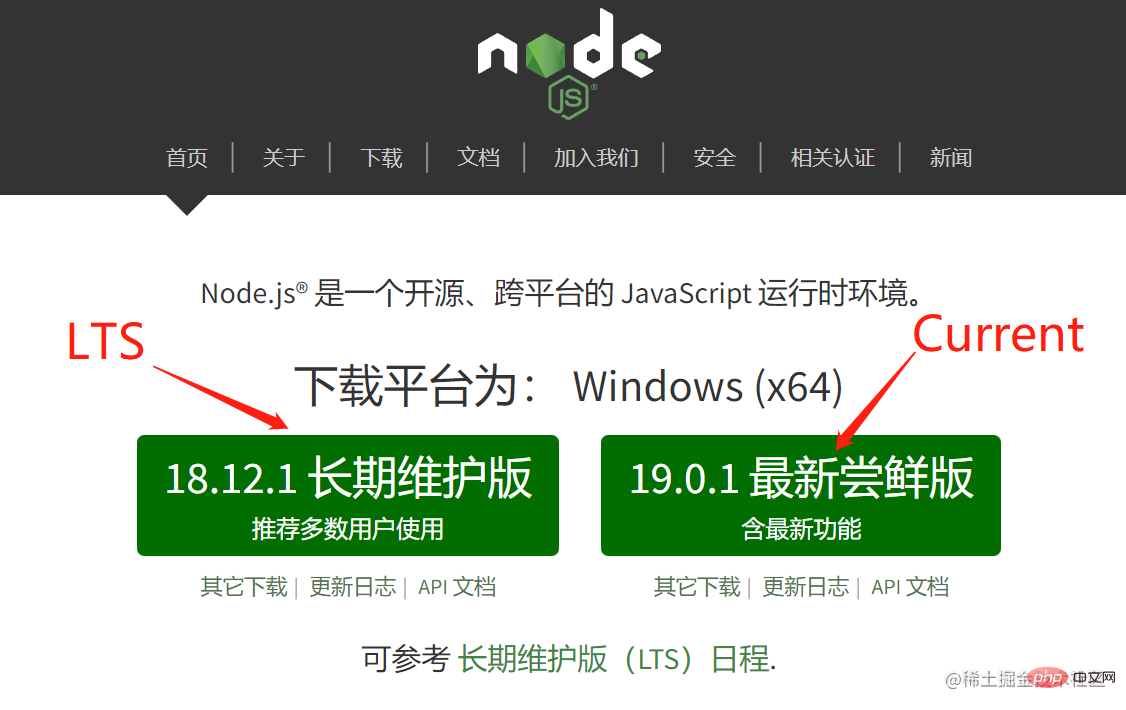
其中,Current 版本通常每 6 个月发布一次。
每年 4 月份发布新的偶数版本;
每年 10 月份发布新的奇数版本;
在刚过去的 10 月,发布的 V19.0.1 成为最新的 “Current” 尝鲜版,它一共带来 6 大特性。
1. HTTP(S)/1.1 KeepAlive 默认为 true
Node.js v19 设置 keepAlive 默认值为 true,这意味着所有出站的 HTTP(s) 连接都将使用 HTTP 1.1 keepAlive,默认时间为 5S;
代码测试:
const http = require('node:http');
console.log(http.globalAgent);
const https = require('node:https');
console.log(https.globalAgent);
我们可以对比看看 v16 和 v19 的 node server Agent 配置差异:
- V16
% nvm use 16
Now using node v16.0.0 (npm v7.10.0)
% node server
Agent {
  _events: [Object: null prototype] {
    free: [Function (anonymous)],
    newListener: [Function: maybeEnableKeylog]
  },
  _eventsCount: 2,
  _maxListeners: undefined,
  defaultPort: 80,
  protocol: 'http:',
  options: [Object: null prototype] { path: null },
  requests: [Object: null prototype] {},
  sockets: [Object: null prototype] {},
  freeSockets: [Object: null prototype] {},
  keepAliveMsecs: 1000,
  keepAlive : false,
  maxSockets: Infinity,
  maxFreeSockets: 256,
  scheduling: 'lifo',
  maxTotalSockets: Infinity,
  totalSocketCount: 0,
  [Symbol(kCapture)]: false
}
Agent {
  _events: [Object: null prototype] {
    free: [Function (anonymous)],
    newListener: [Function: maybeEnableKeylog]
  },
  _eventsCount: 2,
  _maxListeners: undefined,
  defaultPort: 443,
  protocol: 'https:',
  options: [Object: null prototype] { path: null },
  requests: [Object: null prototype] {},
  sockets: [Object: null prototype] {},
  freeSockets: [Object: null prototype] {},
  keepAliveMsecs: 1000,
  keepAlive: false,
  maxSockets: Infinity,
  maxFreeSockets: 256,
  scheduling: 'lifo',
  maxTotalSockets: Infinity,
  totalSocketCount: 0,
  maxCachedSessions: 100,
  _sessionCache: { map: {}, list: [] },
  [Symbol(kCapture)]: false
}
第 18、40 行,keepAlive 默认设置为 false;
- V19
% nvm use 19
Now using node v19.0.0 (npm v8.19.2)
% node server
Agent {
  _events: [Object: null prototype] {
    free: [Function (anonymous)],
    newListener: [Function: maybeEnableKeylog]
  },
  _eventsCount: 2,
  _maxListeners: undefined,
  defaultPort: 80,
  protocol: 'http:',
  options: [Object: null prototype] {
    keepAlive: true,
    scheduling: 'lifo',
    timeout: 5000,
    noDelay: true,
    path: null
  },
  requests: [Object: null prototype] {},
  sockets: [Object: null prototype] {},
  freeSockets: [Object: null prototype] {},
  keepAliveMsecs: 1000,
  keepAlive: true,
  maxSockets: Infinity,
  maxFreeSockets: 256,
  scheduling: 'lifo',
  maxTotalSockets: Infinity,
  totalSocketCount: 0,
  [Symbol(kCapture)]: false
}
Agent {
  _events: [Object: null prototype] {
    free: [Function (anonymous)],
    newListener: [Function: maybeEnableKeylog]
  },
  _eventsCount: 2,
  _maxListeners: undefined,
  defaultPort: 443,
  protocol: 'https:',
  options: [Object: null prototype] {
    keepAlive: true,
    scheduling: 'lifo',
    timeout: 5000,
    noDelay: true,
    path: null
  },
  requests: [Object: null prototype] {},
  sockets: [Object: null prototype] {},
  freeSockets: [Object: null prototype] {},
  keepAliveMsecs: 1000,
  keepAlive: true,
  maxSockets: Infinity,
  maxFreeSockets: 256,
  scheduling: 'lifo',
  maxTotalSockets: Infinity,
  totalSocketCount: 0,
  maxCachedSessions: 100,
  _sessionCache: { map: {}, list: [] },
  [Symbol(kCapture)]: false
}
第 14、16、42、44 行设置 keepAlive 默认值及时间;
启用 keepAlive 能使连接重用,提高网络的吞吐量。
另外,服务器将在调用 close() 自动断开空闲的客户端,内部依靠 http(s).Server.close API 实现;
这些修改,进一步优化了体验和性能。
2. 稳定的 WebCrypto API
WebCrypto API 是一个使用密码学构建的系统接口,在 node.js v19 趋于稳定(除 Ed25519、Ed448、X25519、X448 外)。
我们可以通过调用 globalThis.crypto 或 require('node:crypto').webcrypto 来访问,下面以 subtle 加密函数为例;
const { subtle } = globalThis.crypto;

(async function() {

  const key = await subtle.generateKey({
    name: 'HMAC',
    hash: 'SHA-256',
    length: 256
  }, true, ['sign', 'verify']);

  console.log('key =', key);

  const enc = new TextEncoder();
  const message = enc.encode('I love cupcakes');

  console.log('message =', message);

  const digest = await subtle.sign({
    name: 'HMAC'
  }, key, message);

  console.log('digest =', digest);

})();
首先生成 HMAC 密钥,生成的密钥可同时用于验证消息数据完整性和真实性;
然后,对字符串 I love cupcakes 加密;

最后创建 消息摘要,它是一种加密散列函数;
在控制台显示:key 、message 、digest 信息
% node server
key = CryptoKey {
  type: 'secret',
  extractable: true,
  algorithm: { name: 'HMAC', length: 256, hash: [Object] },
  usages: [ 'sign', 'verify' ]
}
message = Uint8Array(15) [   73, 32, 108, 111, 118,  101, 32,  99, 117, 112,   99, 97, 107, 101, 115]
digest = ArrayBuffer {
  [Uint8Contents]: <30 01 7a 5c d9 e2 82 55 6b 55 90 4f 1d de 36 d7 89 dd fb fb 1a 9e a0 cc 5d d8 49 13 38 2f d1 bc>,
  byteLength: 32
}
3. 自定义 ESM resolution 调整
Node.js 已经删除 --experimental-specifier-resolution ,其功能现在可以通过自定义加载器实现。
可以在这个库中测试:nodejs/loaders-test: Examples demonstrating the Node.js ECMAScript Modules Loaders API
git clone https://github.com/nodejs/loaders-test.git

% cd loaders-test/commonjs-extension-resolution-loader

% yarn install
比如 loaders-test/commonjs-extension-resolution-loader/test/basic-fixtures/index.js 文件:
import { version } from 'process';

import { valueInFile } from './file';
import { valueInFolderIndex } from './folder';

console.log(valueInFile);
console.log(valueInFolderIndex);
./file 如果没有自定义加载器,不会去查找文件的扩展名,比如 ./file.js 或 ./file.mjs
设置自定义加载器后,则可解决上述问题:
import { isBuiltin } from 'node:module';
import { dirname } from 'node:path';
import { cwd } from 'node:process';
import { fileURLToPath, pathToFileURL } from 'node:url';
import { promisify } from 'node:util';

import resolveCallback from 'resolve/async.js';

const resolveAsync = promisify(resolveCallback);

const baseURL = pathToFileURL(cwd() + '/').href;


export async function resolve(specifier, context, next) {
  const { parentURL = baseURL } = context;

  if (isBuiltin(specifier)) {
    return next(specifier, context);
  }

  // `resolveAsync` works with paths, not URLs
  if (specifier.startsWith('file://')) {
    specifier = fileURLToPath(specifier);
  }
  const parentPath = fileURLToPath(parentURL);

  let url;
  try {
    const resolution = await resolveAsync(specifier, {
      basedir: dirname(parentPath),
      // For whatever reason, --experimental-specifier-resolution=node doesn't search for .mjs extensions
      // but it does search for index.mjs files within directories
      extensions: ['.js', '.json', '.node', '.mjs'],
    });
    url = pathToFileURL(resolution).href;
  } catch (error) {
    if (error.code === 'MODULE_NOT_FOUND') {
      // Match Node's error code
      error.code = 'ERR_MODULE_NOT_FOUND';
    }
    throw error;
  }

  return next(url, context);
}
测试命令:
% node --loader=./loader.js test/basic-fixtures/index
(node:56149) ExperimentalWarning: Custom ESM Loaders is an experimental feature. This feature could change at any time
(Use `node --trace-warnings ...` to show where the warning was created)
hello from file.js
将不会再报错,正常运行。
4. 移除对 DTrace/SystemTap/ETW 支持
在 Node.js v19中,移除了对 DTrace/SystemTap/ETW 的支持,主要是因为资源的优先级问题。
数据表明很少人用到 DTrace、SystemTap 或 ETW,维护它们没有多大的意义。
如果你想恢复使用,可提 issues => github.com/nodejs/node…
5. 升级 V8 引擎至 10.7
Node.js v19 将 V8 JavaScript 引擎更新至 V8 10.7,其中包含一个新函数 Intl.NumberFormat,用于格式化敏感数字。
Intl.NumberFormat(locales, options)
对于不同的语言,传入不同的 locales:
const number = 123456.789;

console.log(new Intl.NumberFormat('de-DE', { style: 'currency', currency: 'EUR' }).format(number));
console.log(new Intl.NumberFormat('ja-JP', { style: 'currency', currency: 'JPY' }).format(number));
console.log(new Intl.NumberFormat('ar-SA', { style: 'currency', currency: 'EGP' }).format(number));
console.log(new Intl.NumberFormat('zh-CN', { style: 'currency', currency: 'CNY' }).format(number));
6. 试验 Node watch 模式
运行时增加了 node --watch 选项。
在 "watch" 模式下运行,当导入的文件被改变时,会重新启动进程。
比如:
const express = require("express");
const path = require("path");
const app = express();
app.use(express.static(path.join(__dirname, "../build")));

app.listen(8080, () =>
  console.log("Express server is running on localhost:8080")
);
% node --watch server (node:67643) ExperimentalWarning: Watch mode is an experimental feature. This feature could change at any time (Use `node --trace-warnings ...` to show where the warning was created) Express server is running on localhost:8080
Node.js 14 将在 2023 年 4 月结束更新维护,Node.js 16 (LTS) 预计将在 2023 年 9 月结束更新维护。
建议大家开始计划将版本按需升级到 Node.js 16(LTS)或 Node.js 18(LTS)。
更多node相关知识,请访问:nodejs 教程!




