



在css3中,可以利用“animation-fill-mode”属性设置动画之后不回弹,该属性用于规定动画在播放之前或之后,是否保持动画效果,语法为“animation-fill-mode:forwards;”。

本教程操作环境:windows10系统、CSS3&&HTML5版、Dell G3电脑。
css3怎样让动画不回弹
在css中想要实现动画不回弹需要利用到animation-fill-mode属性。
animation-fill-mode 属性规定动画在播放之前或之后,其动画效果是否可见。
注释:其属性值是由逗号分隔的一个或多个填充模式关键词。
立即学习“前端免费学习笔记(深入)”;
语法为:

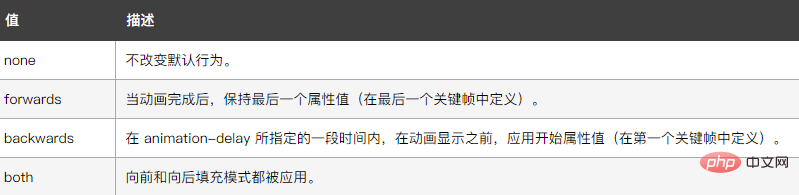
animation-fill-mode : none | forwards | backwards | both;
其中可能的值为:
示例如下:
<!DOCTYPE html>
<html lang="en">
<head>
    <meta charset="UTF-8">
    <meta name="viewport" content="width=device-width, initial-scale=1.0">
    <meta http-equiv="X-UA-Compatible" content="ie=edge">
    <title>Document</title>
    <style>
        div{
            width:100px;
            height:100px;
            margin:0 auto;
            background-color:pink;
            animation:fadenum 5s;
            animation-fill-mode:forwards;
        }
        @keyframes fadenum{
   100%{width:300px;}
}
    </style>
</head>
<body>
    <div></div>
</body>
</html>
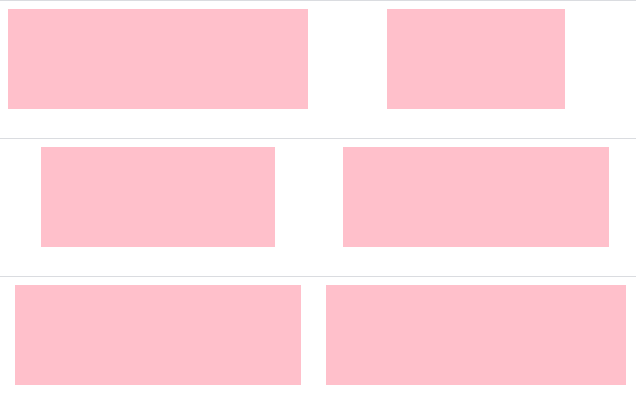
输出结果:
(学习视频分享:css视频教程)




