



小程序怎么实现列表滚动上下联动效果?下面本篇文章给大家介绍一下微信小程序开发列表滚动上下联动效果的方法,希望对大家有所帮助!

1、背景
最近在做公司的一款小程序,其中有一块的设计的是在列表做上下滚动的是时候,顶部的tab栏跟着一起联动,当点击tab栏的时候,列表数据也跟随联动。
下面是实现的一个效果图:
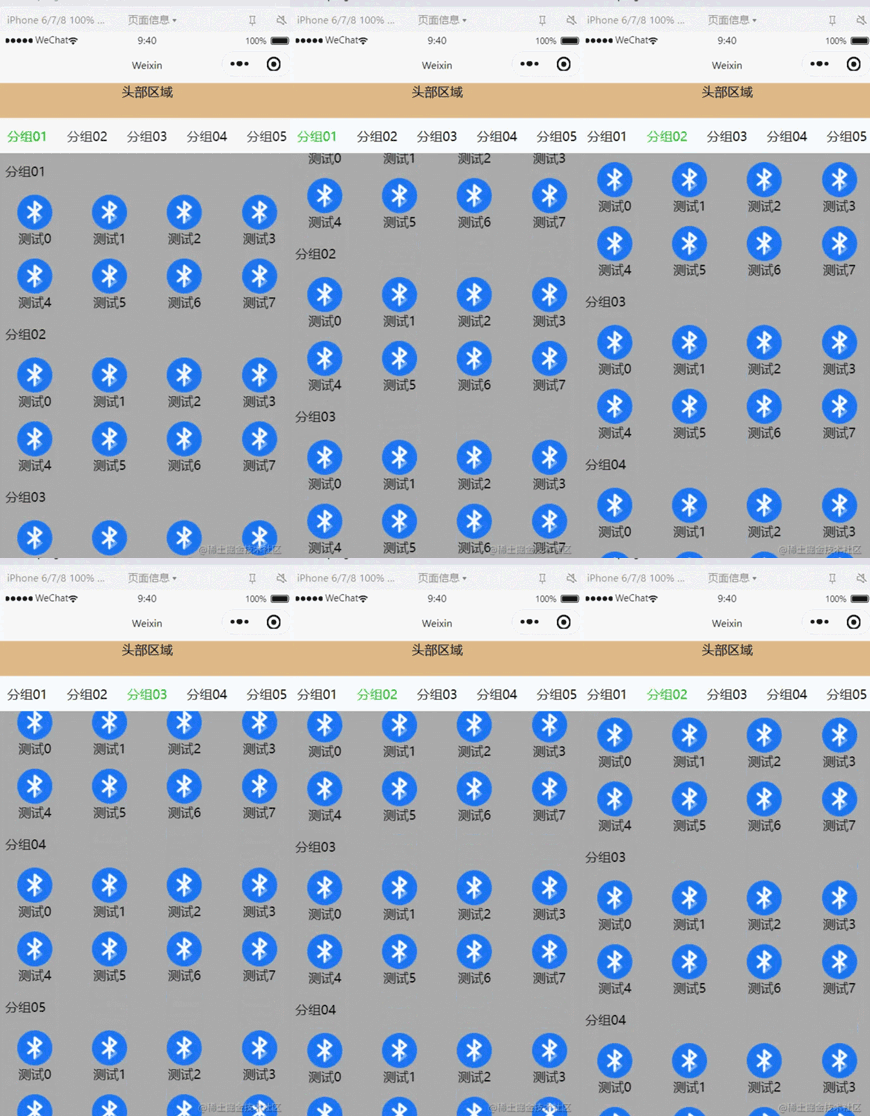
顶部的头部区域不跟随列表滚动; 头部区域以下属于滚动区域。
2、实现
2.1 原理介绍
这个地方的实现主要借助了微信小程序原生的scroll-view组件。
使用它的 scroll-into-view 属性,可以实现点击顶部的tab栏,将页面滚动到指定的列表位置;
使用 bindscroll 事件,可以知道当前页面滚动的距离,根据滚动的距离做tab栏的切换操作;
2.1 页面布局代码
先说下界面的整体布局,主要分为两部分,头部固定区域 + 可滚动列表区域。
可滚动的列表区域的标题栏当滚动一定的距离后,它也要固定在顶部。
代码实现:
头部区域


    {{item.name}}


      {{item.name}}


      {{item.name}}
在布局代码中有几个点需要注意:

1、scrollAreaHeight 滚动区域的高度计算。 --- 通过获取当前设备的窗口高度减去顶部固定区域的高度
2、水平tab栏是否置顶。 --- 根据页面的滚动距离来判断,如果滚动距离 大于或者等于 水平tab栏的高度,则置顶;
3、设置数据列表的id="v_{{index}}" id,后续点击tab栏滚动到指定的位置就是根据这个id去实现的。
2.2 样式代码
/**index.wxss**/
.list{
  width: 100%;
  height: 100%;
  display: flex;
  flex-direction: column;
}

.head-area{
  display: flex;
  flex-direction: row;
  flex-wrap: nowrap;
  height: 88rpx;
  width: 100%;
  padding: 0 10;
}

.head-area-item{
  display: flex;
  height: 88rpx;
  text-align: center;
  width: 150rpx;
  align-items: center;
  justify-content: center;
}

.head-area-item-select{
  color: #09bb07;
}

image{
  width: 88rpx;
  height: 88rpx;
}

.list-group{
  display: flex;
  width: 100%;
  height: 1000%;
  flex-direction: column;
}

.list-group-item{
  display: flex;
  width: 100%;
  background-color: #aaa;
  flex-direction: column;
}

.group-name{
  height: 88rpx;
  display: flex;
  text-align: center;
  align-items: center;
  margin-left: 20rpx;
}

.group-children{
  display: flex;
  flex-direction: row;
  flex-wrap: wrap;
  width: 100%;
}

.group-children-item{
  height: 160rpx;
  display: flex;
  flex-direction: column;
  justify-content: center;
  align-items: center;
}

.head-float{
  position: fixed;
  top: 88rpx;
  background-color: #ffffff;
}
2.3 逻辑代码
// index.js
Page({
  heightArr: [],
  //记录scroll-view滚动过程中距离顶部的高度
  distance: 0,
  data: {
    appGroupList:[
      {name:"分组01",children:[{"name":"测试0","url":"/images/bluetooth.png"},
      {"name":"测试1","url":"/images/bluetooth.png"},
      {"name":"测试2","url":"/images/bluetooth.png"},
      {"name":"测试3","url":"/images/bluetooth.png"},
      {"name":"测试4","url":"/images/bluetooth.png"},
      {"name":"测试5","url":"/images/bluetooth.png"},
      {"name":"测试6","url":"/images/bluetooth.png"},
      {"name":"测试7","url":"/images/bluetooth.png"}]},
      {name:"分组02",children:[{"name":"测试0","url":"/images/bluetooth.png"},
      {"name":"测试1","url":"/images/bluetooth.png"},
      {"name":"测试2","url":"/images/bluetooth.png"},
      {"name":"测试3","url":"/images/bluetooth.png"},
      {"name":"测试4","url":"/images/bluetooth.png"},
      {"name":"测试5","url":"/images/bluetooth.png"},
      {"name":"测试6","url":"/images/bluetooth.png"},
      {"name":"测试7","url":"/images/bluetooth.png"}]},
      {name:"分组03",children:[{"name":"测试0","url":"/images/bluetooth.png"},
      {"name":"测试1","url":"/images/bluetooth.png"},
      {"name":"测试2","url":"/images/bluetooth.png"},
      {"name":"测试3","url":"/images/bluetooth.png"},
      {"name":"测试4","url":"/images/bluetooth.png"},
      {"name":"测试5","url":"/images/bluetooth.png"},
      {"name":"测试6","url":"/images/bluetooth.png"},
      {"name":"测试7","url":"/images/bluetooth.png"}]},
      {name:"分组04",children:[{"name":"测试0","url":"/images/bluetooth.png"},
      {"name":"测试1","url":"/images/bluetooth.png"},
      {"name":"测试2","url":"/images/bluetooth.png"},
      {"name":"测试3","url":"/images/bluetooth.png"},
      {"name":"测试4","url":"/images/bluetooth.png"},
      {"name":"测试5","url":"/images/bluetooth.png"},
      {"name":"测试6","url":"/images/bluetooth.png"},
      {"name":"测试7","url":"/images/bluetooth.png"}]},
      {name:"分组05",children:[{"name":"测试0","url":"/images/bluetooth.png"},
      {"name":"测试1","url":"/images/bluetooth.png"},
      {"name":"测试2","url":"/images/bluetooth.png"},
      {"name":"测试3","url":"/images/bluetooth.png"},
      {"name":"测试4","url":"/images/bluetooth.png"},
      {"name":"测试5","url":"/images/bluetooth.png"},
      {"name":"测试6","url":"/images/bluetooth.png"},
      {"name":"测试7","url":"/images/bluetooth.png"}]},
    ],
    itemWidth: wx.getSystemInfoSync().windowWidth / 4,
    scrollAreaHeight:wx.getSystemInfoSync().windowHeight - 44,
    float:false,
    curSelectTab:0,
    scrollToItem:null,
    scrollTop: 0, //到顶部的距离
    listGroupHeight:0,
  },

  onReady: function () {
    this.cacluItemHeight();
  },

  scroll:function(e){
    console.log("scroll:",e);
    if(e.detail.scrollTop>=44){
      this.setData({
        float : true
      })
    } else if(e.detail.scrollTop<44) {
      this.setData({
        float : false
      })
    }
    let scrollTop = e.detail.scrollTop;
    let current = this.data.curSelectTab;
    if (scrollTop >= this.distance) {
      //页面向上滑动
      //列表当前可视区域最底部到顶部的距离 超过 当前列表选中项距顶部的高度(且没有下标越界),则更新tab栏
      if (current + 1 < this.heightArr.length && scrollTop >= this.heightArr[current]) {
        this.setData({
          curSelectTab: current + 1
        })
      }
    } else {
      //页面向下滑动
      //如果列表当前可视区域最顶部到顶部的距离 小于 当前列表选中的项距顶部的高度,则切换tab栏的选中项
      if (current - 1 >= 0 && scrollTop < this.heightArr[current - 1]) {
        this.setData({
          curSelectTab: current - 1
        })
      }
    }
    //更新到顶部的距离
    this.distance = scrollTop;
  },

  tabClick(e){
    this.setData({
      curSelectTab: e.currentTarget.dataset.index,
      scrollToItem: "v_"+e.currentTarget.dataset.index
    })
  },

  //计算每一个item高度
  cacluItemHeight() {
    let that = this;
    this.heightArr = [];
    let h = 0;
    const query = wx.createSelectorQuery();
    query.selectAll('.list-group-item').boundingClientRect()
    query.exec(function(res) {
      res[0].forEach((item) => {
        h += item.height;
        that.heightArr.push(h);
      })
      console.log(that.heightArr);
      that.setData({
        listGroupHeight: that.heightArr[that.heightArr.length - 1 ]
      })
    })
  },
})
在逻辑代码中最主要的有两个地方:
1、cacluItemHeight 计算列表中item的高度数组,并将最终计算的结果保存在 heightArr数组中。
heightArr数组中的每一项的值是在前一项的基础之上进行累加。
2、scroll 中判断当前的滚动方向,根据滚动判断当前的方向,然后根据滚动的距离设置当前选择的tab。
好了,就这么多,基于以上的内容基本可以实现想要的滚动联动、切换tab联动效果。
【相关学习推荐:小程序开发教程】




