



php读写excel类,支持多工作簿和自定义样式
<?php
/**
 * @desc excel接口
 * @author mengdejun
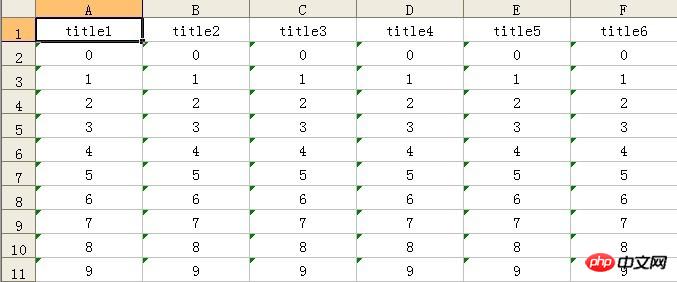
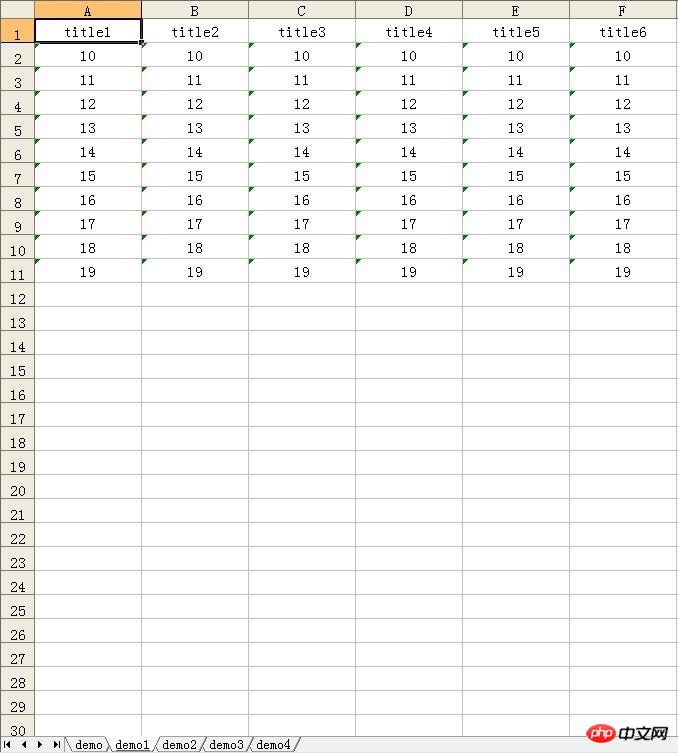
 */
interface  IExcel
{
		//导入excel
		public function import($fileName,$convert_callback_function=null);
		//导出excel
 		public function export($fileName="excel");
 		//添加行
 		public function addRow(array $array,$sheet="sheet1");
 		//添加表头
 		public function addHead(array $array,$sheet="sheet1");
 		//添加工作簿
 		public function  addSheet($sheet);
 		//释放资源
 		public function release();
}
?>
2. [代码][PHP]代码
<?php
include_once ('IExcel.php');
/**
 * @desc php生成excel类函数
 * @author mengdejun
 * @date 20100806
 * @version 1.1.2
 */
class HtmlExcel implements IExcel
{
	private $_line=array();
	private $isHeader=false;
	private $convert=false;
	public function __construct(){}

	/**
	 * @desc 添加表头信息,注:表头仅可添加一次,若无表头则将内容行的第一行作为表头
	 * @param array $array
	 * @param unknown_type $sheet
	 */
	public function addHead(array $array, $sheet = "sheet1")
	{
		if(!$this->isHeader)
			$this->_line[]=$this->getLine($array);
		$this->isHeader=true;
	}

	/**
	 * @desc 添加自定义字符转换或过滤函数
	 * @param unknown_type $functionName 回调函数名
	 */
	public function addConvert($functionName="convert")
	{
		$this->convert=$functionName;
	}

	protected function getLine(array $array,$sheet='sheet1')
	{
		$_temp="";
		$_count=sizeof($array);
		$index=0;
			foreach($array as $value):
				$_temp.=$this->convert($value);
					if($index==$_count-1):
						$_temp.="\t\n";
					else:
						$_temp.="\t";
					endif;
				$index++;
			endforeach;
		return $_temp;
	}

	/**
	 * @desc 添加excel行,若没有设置表头则将该数组的第一个元素作为表头
	 * @param array $array
	 * @param unknown_type $sheet
	 */
	public function addRow(array $array, $sheet = "sheet1")
	{
		$this->_line[]=$this->getLine($array,$sheet);
		return $this->_line;
	}

	/**
	 * @desc 嵌套添加excel行,若没有设置表头则将该数组的第一个元素作为表头
	 * @param array $array
	 * @param unknown_type $sheet
	 */
	public function addRows(array $array,$sheet = "sheet1")
	{
		foreach($array as $value):
			if(is_array($value)):
				$this->addRow($value);
			else:
				$this->addRow($array);
			endif;
		endforeach;
	}

	/**
	 * @desc 添加工作簿,暂不支持V1.0
	 * @deprecated
	 * @param array $array
	 */
	public function addSheet($sheet) {return;}

	/**
	 * @desc 返回excel表行数
	 */
	public function getRows()
	{
		return sizeof($this->_line);
	}

	/**
	 * @desc 返回excel内容
	 */
	public function getBody()
	{
		return $this->_line;
	}

	/**
	 * @desc 导出excel文件
	 * @param unknown_type $fileName 导出文件名
	 */
	public function export($fileName = "excel")
	{
		header("Content-Type: application/vnd.ms-excel;");
		header("Content-Disposition:filename={$fileName}.xls");
		for($index=0;$index<sizeof($this->_line);$index++):
			echo $this->_line[$index];
		endfor;
	}

	/**
	 * @desc 用户自定义编码转化以及数据筛选函数
	 * @param unknown_type $str
	 */
	protected function convert($str)
	{
		if(function_exists($this->convert)):
			return call_user_func($this->convert,$str);
		else:
			return $str;
		endif;
	}

	/**
	 * @desc 设置表格内容
	 * @param unknown_type $array
	 */
	public function setBody($array)
	{
		$this->_line=$array;
	}
	/**
	 * @desc 释放资源
	 */
	public function release()
	{
		unset($this->_line);
	}
	public function import($fileName,$convert_callback_function=null){}
}
?>
3. [代码][PHP]代码
<?php
include_once ('IExcel.php');
/**
 * @desc php生成excel类函数 支持导入 导出 多工作薄(数据分卷技术)
 * @filesource XmlExcel.php
 * @author mengdejun
 * @date 20100801
 * @version 1.8.1
 */
if(!defined("CHARSET")):define("CHARSET","UTF-8");endif;
if(!defined("VERSION")):define("VERSION","12.00");endif;
if(!defined("THIS_VERSION")):define("THIS_VERSION","1.8.1");endif;
if(!defined("NULL")):define("NULL",null);endif;
class XmlExcel implements IExcel
{
	private $header = "<?xml version=\"1.0\" encoding=\"%s\"?>\n
	<Workbook xmlns=\"urn:schemas-microsoft-com:office:spreadsheet\"
	xmlns:x=\"urn:schemas-microsoft-com:office:excel\"
	xmlns:ss=\"urn:schemas-microsoft-com:office:spreadsheet\"
	xmlns:html=\"http://www.w3.org/TR/REC-html40\">";
	private $documentInfo="<DocumentProperties xmlns=\"urn:schemas-microsoft-com:office:office\">
	<Author>{author}</Author><Created>{time}</Created><Company>{company}</Company>
	<Version>{version}</Version></DocumentProperties>";
    private $footer = "</Workbook>";
    private $align_left="<Style ss:ID=\"s62\"><Alignment ss:Horizontal=\"Left\" ss:Vertical=\"Center\"/>
    </Style>";
    private $align_center="<Style ss:ID=\"s63\"><Alignment ss:Horizontal=\"Center\" ss:Vertical=\"Center\"/>
    </Style>";
    private $align_right="<Style ss:ID=\"s64\"><Alignment ss:Horizontal=\"Right\" ss:Vertical=\"Center\"/>
    </Style>";
    private $align_bold="<Style ss:ID=\"s65\"><Alignment ss:Horizontal=\"Center\" ss:Vertical=\"Center\"/>
    <Font ss:FontName=\"宋体\" x:CharSet=\"134\" ss:Size=\"12\" ss:Color=\"#000000\" ss:Bold=\"1\"/></Style>";
    private $align_default="<Style ss:ID=\"Default\" ss:Name=\"Normal\">
    <Alignment ss:Horizontal=\"%s\" ss:Vertical=\"Center\"/><Borders/>
    <Font ss:FontName=\"宋体\" x:CharSet=\"134\" ss:Size=\"11\" ss:Color=\"#000000\"/>
    <Interior/><NumberFormat/><Protection/></Style>";
    private $charset=CHARSET;
    private $convert="convert";
    private static $pre_workBook=NULL;
    private $_line=NULL;
    private $_column=NULL;
    private $_columnType=NULL;
    private $_styles=NULL;
    private $_style=NULL;
    private $_title=NULL;
    private $_align="Left";
    private $defaultHeight=13.5;
    private $defaultWidth=54;
    private $_sheets=NULL;
	private $_heads=NULL;
	/**
	 * @desc 构造方法 PHP5.X
	 * @param string $charset 字符编码
	 */
    public function __construct($charset = 'UTF-8')
    {
    	$this->charset=$charset;
    }
    /**
	 * @desc 构造方法 PHP4.X
	 * @param string $charset 字符编码
	 */
    public function XmlExcel($charset = 'UTF-8')
    {
    	$this->charset=$charset;
    }
    /**
     * @desc 析构方法
     */
	public function __destruct(){}
	/**
	 * @desc 释放可用资源
	 * @return null
	 */
	public function release()
	{
		unset($this->_line,$this->_column,$this->_heads,$this->_sheets,$this->_styles,
		$this->_style,$this->_title,self::$pre_workBook);
	}
    /**
     * @desc 数组行转换函数
     * @param array $array
     */
	protected function getLine(array $array)
	{
		$_temp="<Row ss:AutoFitHeight=\"0\">";
			foreach($array as $key=>$val):
				#读取指定数据类型,默认String
				$_type=!empty($this->_columnType)&&isset($this->_columnType)?
				!empty($this->_columnType[$key])&&isset($this->_columnType)?
				$this->_columnType[$key]:"String":"String";
				$_temp.="<Cell><Data ss:Type=\"{$_type}\">{$this->convert($val)}</Data>
				</Cell>";
			endforeach;
		$_temp.="</Row>";
		return $_temp;
	}
	/**
	 * @desc 添加表格头,默认的第一个数组将作为表头
	 * @param array $array
	 * @param string $sheet 工作表名
	 * @exception $array 不能为空
	 */
	public function addHead(array $array, $sheet = "sheet1")
	{
		$this->_line[$sheet][0]=$this->getLine($array);
		$this->_title[$sheet]['width']=count($array)-1;
		$this->_sheets[]=$sheet;
		$this->_heads[$sheet][0]=$array;
	}
	/**
	 * @desc 添加行
	 * @param array $array
	 * @param string $sheet
	 */
	public function addRow(array $array, $sheet = "sheet1",$isErrorReport=true)
	{
		if($isErrorReport):
			if(empty($array)||!isset($array)||count($array)==0):
				exit("data can't null'");
			else:
				$this->_line[$sheet][]=$this->getLine($array);
			endif;
		else:
			$this->_line[$sheet][]=$this->getLine($array);
		endif;
	}
	/**
	 * @desc 设置工作簿的表头对象
	 * @param $head 表头数据
	 * @param $sheet 工作簿名称
	 */
	public function setSheetHead(array $head,$sheet="Sheet1")
	{
		$this->_line[$sheet][]=$this->getLine($head);
	}
	/**
	 * @desc 添加多行 支持嵌套数组
	 * @param array $array
	 * @param unknown_type $sheet
	 */
	public function addRows(array $array,$sheet = "Sheet1")
	{
		foreach($array as $value):
			if(is_array($value)):
				$this->addRow($value,$sheet);
			else:
				$this->addRow($array,$sheet);
			endif;
		endforeach;
	}
	/**
	 * @desc 获取制定工作薄的列宽度
	 * @param @sheet 工作薄名称
	 */
	public function getColumnLength($sheet="Sheet1")
	{
		return $this->_title[$sheet]['width'];
	}
	/**
	 * @desc 添加工作薄
	 * @param unknown_type unknown_type $sheet
	 */
	public function addSheet($sheet,$array=array())
	{
		$this->_line[$sheet][]=$array;
	}
	/**
	 * @desc 工作薄添加标题
	 * @param string $str 标题
	 * @param string $sheet 工作薄名
	 */
	public function addTitle($str,$sheet="Sheet1")
	{
		$str=$this->convert($str);
		$this->_title[$sheet]['title']="<Row ss:AutoFitHeight=\"0\" ss:StyleID=\"s65\">
		<Cell ss:MergeAcross=\"{num}\"><Data ss:Type=\"String\">{$str}</Data></Cell></Row>";
	}
	/**
	 * @desc excel导出
	 * @param string $fileName 导出的文件名
	 */
	public function export($fileName = "excel",$isConvert=false)
	{
		if($isConvert):
			$fileName=$this->getConvertString($fileName);
		endif;
		header("Content-Type: application/vnd.ms-excel; charset=" . $this->charset);
        header("Content-Disposition:attachment; filename=\"{$fileName}.xls\"");
        echo stripslashes(sprintf($this->header, $this->charset));
        echo str_replace("{company}","xiao meng online",str_replace("{time}",date("Y-m-dH:i:s",time()),
        str_replace("{author}","mengdejun",str_replace("{version}",VERSION,$this->documentInfo))));
        echo "<Styles>";
        echo stripslashes(sprintf($this->align_default, $this->_align));
	    echo $this->align_left;
	    echo $this->align_right;
	    echo $this->align_center;
	    echo $this->align_bold;
        echo "</Styles>";
        $_hasData=count($this->_line)==0?false:true;
        if($_hasData):
        	#有数据,解析数组对象到excel表格
        	foreach($this->_line as $key=>$value):
        	echo "<Worksheet ss:Name=\"{$this->convert($key)}\">
        	<Table ss:DefaultColumnWidth=\"{$this->defaultWidth}\" ss:DefaultRowHeight=\"{
        	$this->defaultHeight}\">";
        		#列样式和宽度
        		if(isset($this->_column[$key]['style_width'])):
        			foreach($this->_column[$key]['style_width'] as $s_key=>$s_value):
        				echo "<Column ss:Index=\"{$s_key}\" ss:AutoFitWidth=\"1\"
        				ss:Width=\"$s_value\"/>";
        			endforeach;
        		endif;
        		#表格标题
        		if(!empty($this->_title[$key]['title'])):
        			echo str_replace("{num}",$this->_title[$key]['width'],
        			$this->_title[$key]['title']);
        		endif;
        		#单元格
        		foreach($value as $_v):
        			echo $_v;
        		endforeach;
        	echo "</Table></Worksheet>";
        	endforeach;
        	#加载标准工作薄(默认三个工作簿)
        	$length=count($this->_line);
        	while($length<3):
        		$length++;
        		echo "<Worksheet ss:Name=\"Sheet{$length}\"><Table></Table></Worksheet>";
        	endwhile;
        else:
        	 #无数据,添加默认工作簿和数据支持(错误处理:文件读取失败)
        	 for($index=1;$index<=3;$index++):
        	 	echo "<Worksheet ss:Name=\"Sheet{$index}\"><Table></Table></Worksheet>";
        	 endfor;
        endif;
        echo $this->footer;
	}
	/**
	 * @desc excel导入函数,注该函数的文件名必须是非中文
	 * @param unknown_type $fileName 导入的文件
	 * @param unknown_type $convert_callback_function 回调函数 支持编码转换,需返回转换后的字符串
	 * @return 三维数组,分别对应 工作薄/行/单元格
	 */
	public function import($fileName,$convert_callback_function=null)
	{
		$xls=simplexml_load_file($fileName);
		$is_convert=!empty($convert_callback_function)&&function_exists($convert_callback_function);
		$index=0;
		$_ra=array();
		foreach($xls->Worksheet as $worksheet):#循环工作薄
			$index_i=1;
			foreach($worksheet->Table->Row as $cells):#循环行
				if($index_i!==1):
					foreach($cells as $cell):#循环单元格
$_ra[$index][$index_i][]=$is_convert?call_user_func($convert_callback_function,$cell->Data):$cell->Data;
					endforeach;
				endif;
				$index_i++;
			endforeach;
			$index++;
		endforeach;
		return $_ra;
	}
	/**
	 * @desc 设置字符编码
	 * @param string $charset 设置导出文件的编码
	 */
	public function setCharset($charset="GBK")
	{
		$this->charset = $charset;
	}

	/**
	 * 设置工作薄的列的宽度 array(1=>10,2=>23,3=>23,4=>213,5=>asd) 重复设置该值 将覆盖前一次操作的结果
	 * @param string $sheet 工作薄名
	 * @param array $array 列数组
	 */
	public function setColumnWidth($sheet="sheet1",$array)
	{
	if(!empty($this->_column[$sheet]['style_width'])&&isset($this->_column[$sheet]['style_width'])):
			unset($this->_column[$sheet]['style_width']);
		endif;
		$this->_column[$sheet]['style_width']=$array;
	}
	/**
	 * @desc 设置所有工作薄的列宽度
	 * @param array $array 列宽度
	 */
	public function setAllColumnWidth(array $array)
	{
		$_temp=$this->getAllSheetNames();
		foreach($_temp as $value):
			$this->setColumnWidth($value,$array);
		endforeach;
	}
	/**
	 * @desc 设置默认行高
	 * @param integer $height
	 */
	public function setDefaultRowHeight($height="54")
	{
		$this->defaultHeight=$height;
	}
	/**
	 * 设置字符编码转换函数(回调函数)
	 * @param string $convert 设置转换函数 默认名称为convert
	 */
	public function addConvert($convert="convert")
	{
		$this->convert = $convert;
	}
	/**
	 * @desc 内部回调函数,完成字符编码的转化
	 * @param unknown_type $str
	 */
	protected function convert($str)
	{
		if(function_exists($this->convert)):
			return call_user_func($this->convert,$str);
		else:
			return $str;
		endif;
	}
	/**
	 * 获取工作薄个数
	 * @param int $sheet 获取工作薄的个数
	 * @return integer
	 */
	public function getSheets()
	{
		return sizeof($this->_line);
	}
	/**
	 * 获取工作薄表格行数
	 * @param String $sheet 工作薄名
	 * @return integer
	 */
	public function getRows($sheet)
	{
		return sizeof($this->_line[$sheet]);
	}
	/**
	 * @desc 获取指定工作薄的表头信息
	 * @param string $sheet 工作薄名称
	 */
	public function getHead($sheet)
	{
		return $this->_heads[$sheet][0];
	}
	/**
	 * @desc 设置默认行高度
	 * @param integer $defaultHeight 行的默认高度 无默认值
	 */
	public function setDefaultHeight($defaultHeight) {
		$this->defaultHeight = $defaultHeight;
	}
	/**
	 * @desc 设置默认的列宽度
	 * @param integer $defaultWidth 列的默认宽度 无默认值
	 */
	public function setDefaultWidth($defaultWidth) {
		$this->defaultWidth = $defaultWidth;
	}
	/**
	 * @desc 当前工作薄可用行数
	 */
	public function currentSheetsLength()
	{
		return sizeof($this->_line)+1;
	}
	/**
	 * @desc 设置默认的居中方式
	 * @param string $_align 可选值 Left(left),Center(center),Right(right)
	 */
	public function setDefaultAlign($_align)
	{
		$this->_align = ucfirst($_align);
	}
	/**
	 * @desc 自动创建工作薄,支持自动分卷技术,该方法与addHead冲突,使用该方法时请勿调用addHead,
	 否则将添加一个空白的工作薄
	 * @param array $head 表头
	 * @param array $data 数据
	 * @param int $pageSize 页面行数 默认60000,excel最大支持65536
	 * @param string $defaultName 工作薄名,工作簿不能重名
	 */
	public function addPageRow(array $head,array $data,$pageSize=60000,$defaultName="Sheet")
	{
		if(!isset($defaultName)||$defaultName=="Sheet")$defaultName="Sheet".($this->getSheets()+1);
		if(empty(self::$pre_workBook)):
			self::$pre_workBook=$defaultName;
			if(!isset($this->_heads[self::$pre_workBook][0]))
			$this->addHead($head,self::$pre_workBook);
			$this->addRow($data,self::$pre_workBook);
		else:
			if($this->getRows(self::$pre_workBook)>=($pageSize+1)):
				$this->addHead($head,$defaultName);
				$this->addRow($data,$defaultName);
				self::$pre_workBook=$defaultName;
			else:
				$this->addRow($data,self::$pre_workBook);
			endif;
		endif;
	}
	/**
	 * @desc 返回所有工作薄名
	 * @param null
	 */
	public function getAllSheetNames()
	{
		return $this->_sheets;
	}
	/**
	 * @desc 设置所有表格标题(分卷) 默认为合并当前工作薄的所有列,并居中显示(粗体)
	 该方法必须在工作簿存在的情况下调用.
	 * @param string $title 标题
	 */
	public function setAllTitle($title)
	{
		$_temp=$this->getAllSheetNames();
		foreach($_temp as $value):
			$this->addTitle($title,$value);
		endforeach;
	}
	/**
	 * @desc 编码转换函数
	 * @param string $str 转换的字符串
	 * @param string $source_code 原编码 默认UTF-8
	 * @param string $target_code 目标编码 默认GBK
	 */
	protected function getConvertString($str,$source_code='UTF-8',$target_code='GBK')
	{
		return !empty($str)&&is_string($str)?iconv($source_code,$target_code,$str):$str;
	}
	/**
	 * @desc 打印调试信息
	 * @param null
	 */
	public function debug($out=true)
	{
		if($out):
			var_dump($this->_line);
		else:
			return $this->_line;
		endif;
	}
	/**
	 * @desc 工作薄命名后缀 调用此方法将生成全局唯一工作薄名
	 * @param $name 自定义工作薄名
	 */
	public function uniqueName($name)
	{
		$size=$this->getSheets();
		if($size==0)return $name;
		else return $name.$size;
	}
	/**设置单位格数据类型,该方法需在填充数据前完成 数据类型参照指定版本的excel
	 * @param $_columnType the $_columnType to set array 指定的键值对数组
	 */
	public function set_columnType($_columnType)
	{
		$this->_columnType = $_columnType;
	}
}
?>
4. [代码][PHP]代码
<?php
	include'lib/XmlExcel.php';
	$xls=new XmlExcel;
	$xls->setDefaultWidth(80);
	$xls->setDefaultAlign("center");
	$xls->setDefaultHeight(18);
	$xls->addHead(array("title1","title2","title3","title4","title5","title6"),"demo1");
	for($ind=0;$ind<10;$ind++):
		$xls->addRow(array($ind,$ind,$ind,$ind,$ind,$ind),"demo1");
	endfor;
	$xls->export("demo1");
?>
立即学习“PHP免费学习笔记(深入)”;
5. [代码][PHP]代码
<?php
	include'lib/XmlExcel.php';
	$xls=new XmlExcel;
	$xls->setDefaultWidth(80);
	$xls->setDefaultAlign("center");
	$xls->setDefaultHeight(18);
	for($ind=0;$ind<50;$ind++):
		$xls->addPageRow(array("title1","title2","title3","title4","title5","title6"),
		array($ind,$ind,$ind,$ind,$ind,$ind),10,$xls->uniqueName("demo"));
	endfor;
	$xls->export("demo2");
?>
6. [图片] e1.jpg
7. [图片] e2.jpg
以上就是php读写excel类,支持多工作簿和自定义样式的内容,更多相关内容请关注PHP中文网(www.php.cn)!




