



如何在node.js中使用控制台?本篇文章给大家介绍一下在node.js中使用控制台的方法,了解一下console 类中的大多数方法,希望对大家有所帮助!

在这篇文章中,我们将学习如何更有效地使用Node.js console 类中的大多数方法。【推荐学习:《nodejs 教程》】
前提条件
本教程在Chrome浏览器70.0.3538.77版本和Node.js 8.11.3版本中得到验证。
使用console.log,console.info, 和console.debug
console.log 方法会打印到标准输出,无论是终端还是浏览器控制台。
它默认输出字符串,但可以与模板字符串结合使用,以修改其返回的内容。
console.log(string, substitution)
console.info 和console.debug 方法在操作上与 console.log 相同。
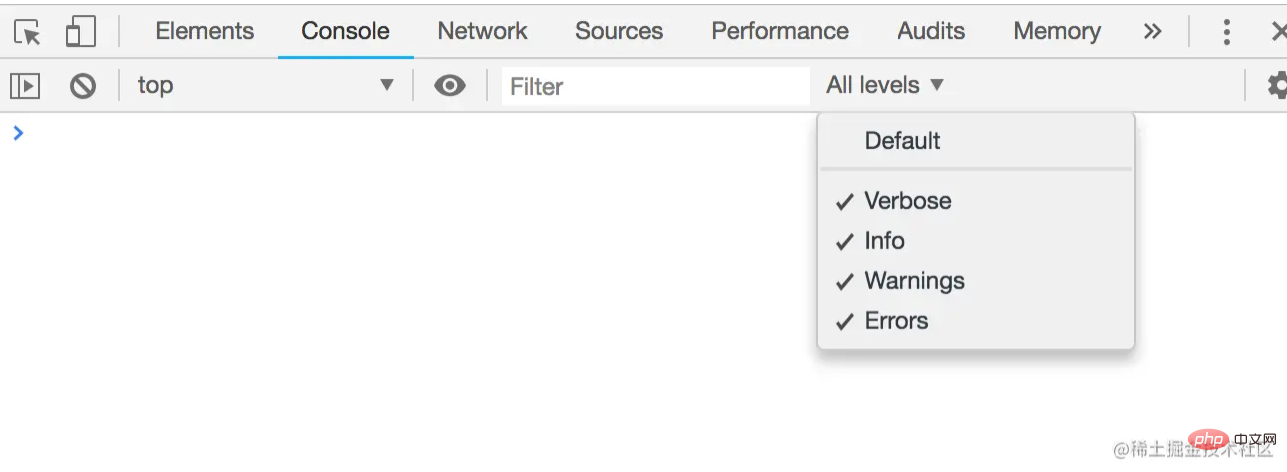
你可以在Firefox浏览器控制台中默认使用console.debug ,但要在Chrome浏览器中使用它,你必须在所有级别菜单中把日志级别设置为Verbose。
模板字符串中的参数被传递给 util.format它将处理这些参数,用相应的转换值替换每个替换标记。
支持的替换代币是。
util.format
const msg = `Using the console class`;
console.log('%s', msg);
console.log(msg);
这段代码将输出以下内容。
OutputUsing the console class
Using the console class
%s 是默认的替换模式。
%s,%d,%f,%i
const circle = (radius = 1) => {
  const profile = {};
  const pi = 22/7;
  profile.diameter = 2 * pi * radius;
  profile.circumference = pi * radius * 2;
  profile.area = pi * radius * 2;
  profile.volume = 4/3 * pi * radius^3;

  console.log('This circle has a radius of: %d cm', radius);
  console.log('This circle has a circumference of: %f cm', profile.diameter);
  console.log('This circle has an area of: %i cm^2', profile.area);
  console.log('The profile of this cirlce is: %o', profile);
  console.log('Diameter %d, Area: %f, Circumference %i', profile.diameter, profile.area, profile.circumference)
}

circle();
这段代码将输出以下内容。
OutputThis circle has a radius of: 1 cm
This circle has a circumference of: 6.285714285714286 cm
This circle has an area of: 6 cm^2
The profile of this cirlce is: {diameter: 6.285714285714286, circumference: 6.285714285714286, area: 6.285714285714286, volume: 7}
Diameter 6, Area: 6.285714285714286, Circumference 6-
%o将被一个数字(整数或浮点数)所替代。 -
%d将被一个浮动值所取代。 -
%f将被一个整数取代。 -
%i将被一个对象所取代。
%o 特别方便,因为我们不需要用 JSON.stringify来展开我们的对象,因为它默认显示对象的所有属性。
请注意,你可以使用任意多的令牌替换。它们只是按照你传递的参数的顺序被替换。
%o
这个替换令牌将CSS样式应用于被替换的文本。
console.log('LOG LEVEL: %c OK', 'color: green; font-weight: normal');
console.log('LOG LEVEL: %c PRIORITY', 'color: blue; font-weight: medium');

console.log('LOG LEVEL: %c WARN', 'color: red; font-weight: bold');
console.log('ERROR HERE');
这段代码将输出以下内容。
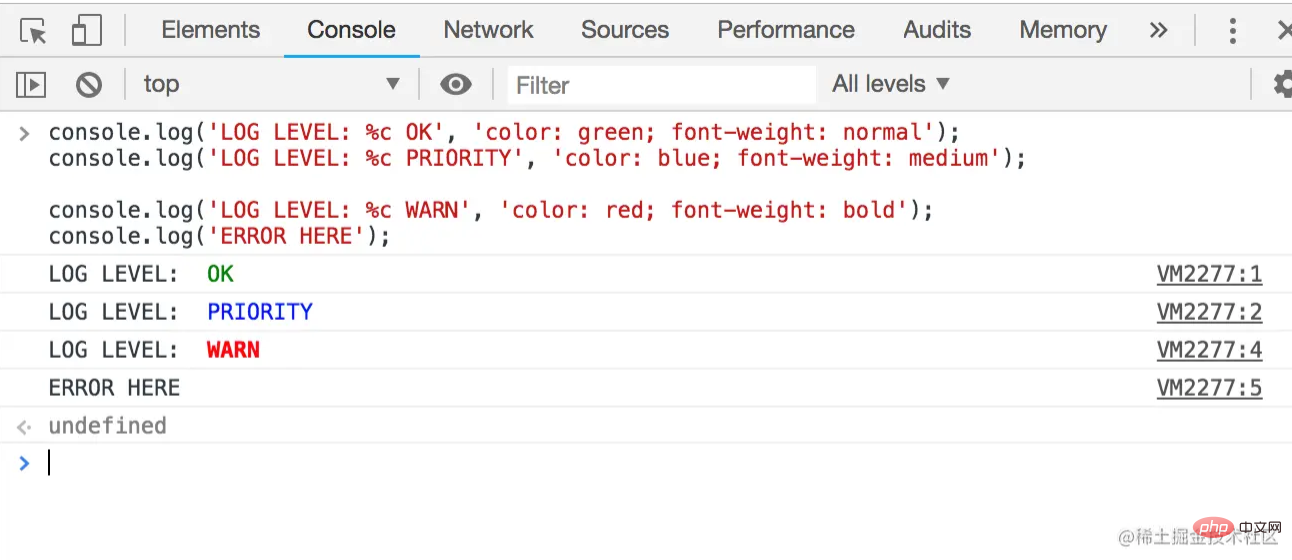
在JSON.stringify 替换标记之后,我们传递给%c 的文本会受到样式的影响,但之前的文本则保持原样,没有样式。
使用%c
传给它的第一个参数是要以表的形式返回的数据。第二个是要显示的选定列的数组。
console.table(tabularData, [properties])
这个方法将把传递给它的输入格式化为表格,然后在表格表示之后记录输入对象。
数组
如果一个数组作为数据被传递给它,数组中的每个元素将是表格中的一行。
const books = ['The Silmarillion', 'The Hobbit', 'Unfinished Tales'];
console.table(books);

对于一个深度为1的简单数组,表格中的第一列有标题索引。在第一列的索引标题下是数组的索引,数组中的项目在第二列的值标题下列出。
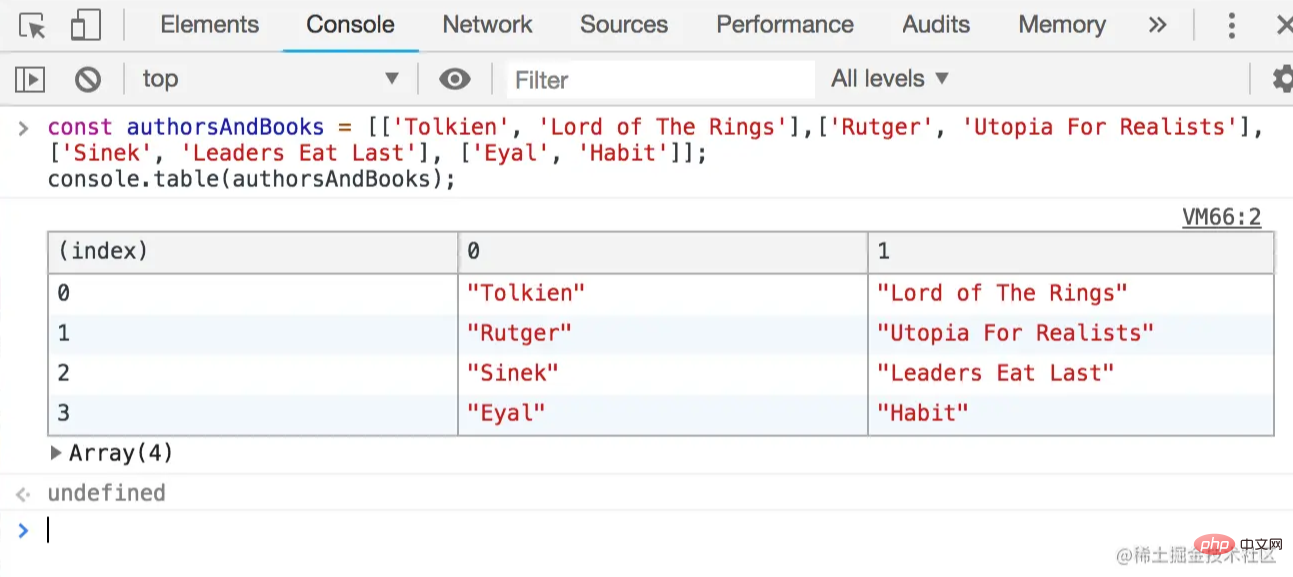
这就是嵌套数组的情况。
const authorsAndBooks = [['Tolkien', 'Lord of The Rings'],['Rutger', 'Utopia For Realists'], ['Sinek', 'Leaders Eat Last'], ['Eyal', 'Habit']];
console.table(authorsAndBooks);
对象
对于深度为1的对象,对象的键会列在索引标题下,而对象中的值则列在第二列标题下。
const inventory = { apples: 200, mangoes: 50, avocados: 300, kiwis: 50 };
console.table(inventory);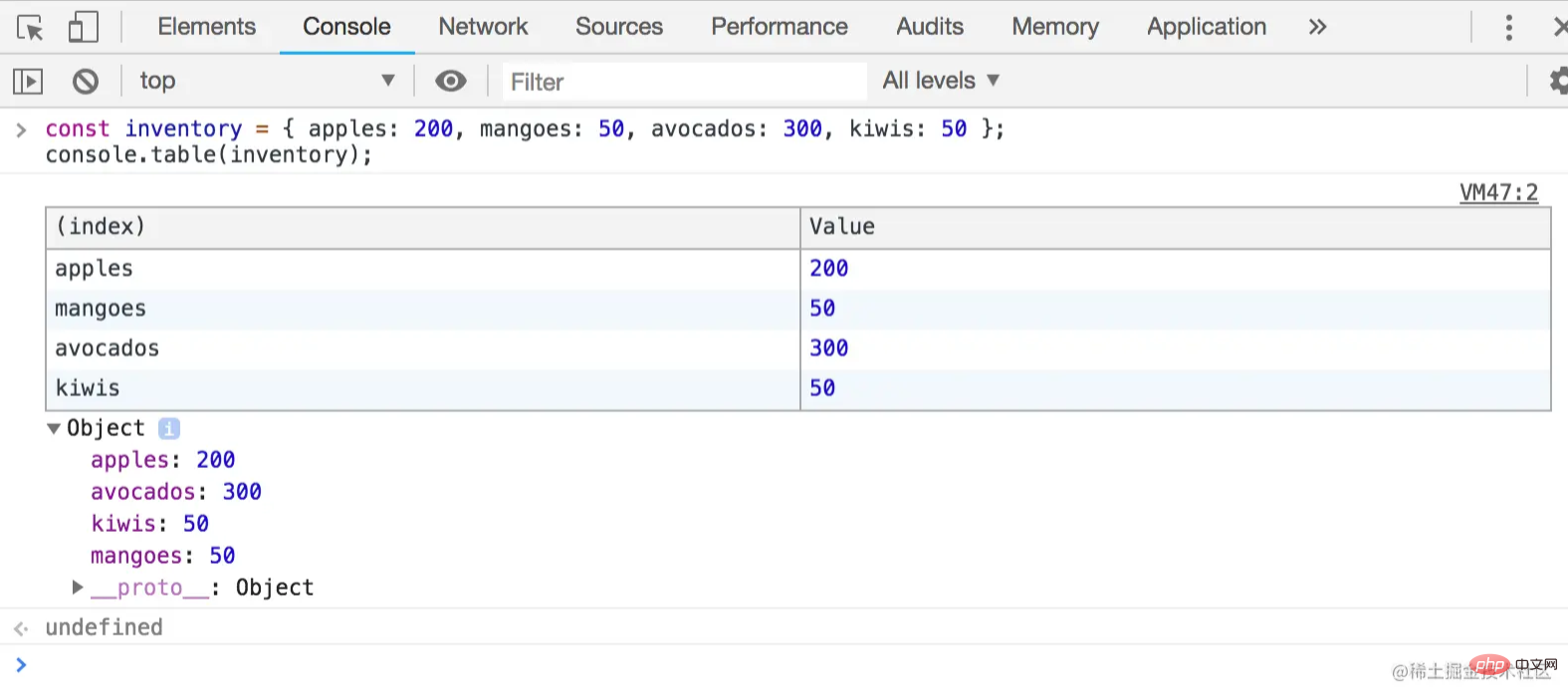
对于嵌套的对象。
const forexConverter = { asia: { rupee: 1.39, renminbi: 14.59 , ringgit: 24.26 }, africa: { rand: 6.49, nakfa: 6.7 , kwanza:0.33 }, europe: { swissfranc: 101.60, gbp: 130, euro: 115.73 } };
console.table(forexConverter);
还有一些嵌套的对象。
const workoutLog = { Monday: { push: 'Incline Bench Press', pull: 'Deadlift'}, Wednesday: { push: 'Weighted Dips', pull: 'Barbell Rows'}};
console.table(workoutLog);
这里,我们指定只想看到列推下的数据。
console.table(workoutLog, 'push');
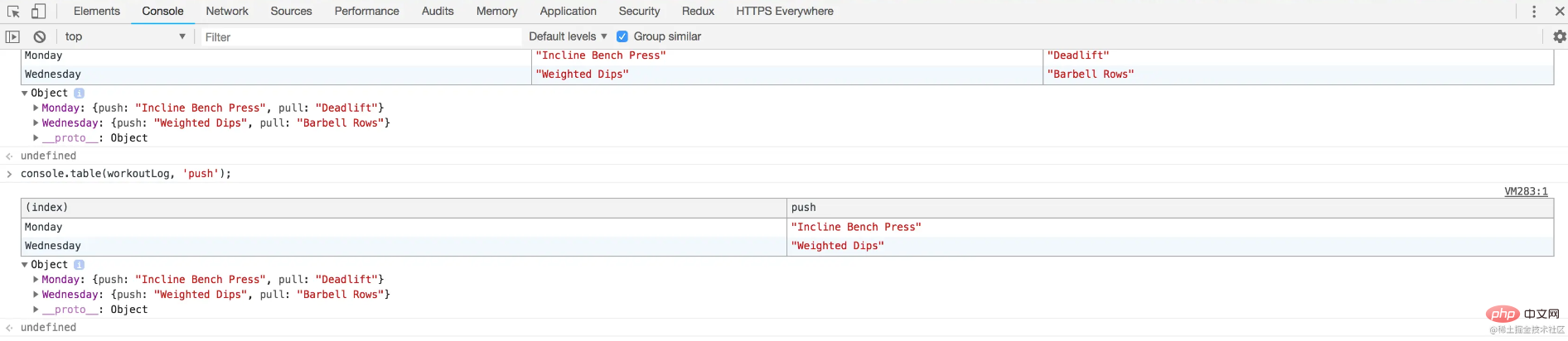
要对某一列下的数据_进行排序_,只需点击该列标题。
很方便,是吗?
试着把一个带有一些数值的对象作为数组传给console.log!
使用console.table
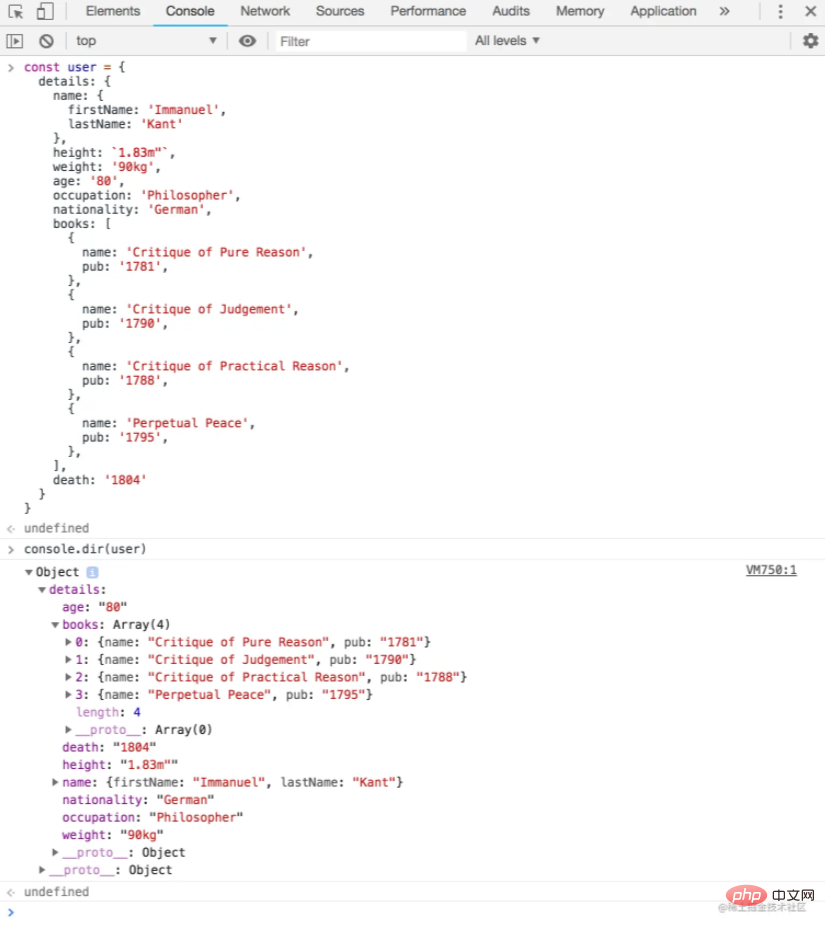
传给这个函数的第一个参数是要记录的对象,而第二个参数是一个包含选项的对象,这些选项将定义结果输出的格式,或者对象中的哪些属性将被显示。
返回的是一个由node的util.expect函数格式化的对象。
输入对象中的嵌套或子对象可在披露三角形下展开。
console.dir(object, options);
// where options = { showHidden: true ... }
让我们看看这个动作。

const user = {
  details: {
    name: {
      firstName: 'Immanuel',
      lastName: 'Kant'
    },
    height: `1.83m"`,
    weight: '90kg',
    age: '80',
    occupation: 'Philosopher',
    nationality: 'German',
    books: [
      {
        name: 'Critique of Pure Reason',
        pub: '1781',
      },
      {
        name: 'Critique of Judgement',
        pub: '1790',
      },
      {
        name: 'Critique of Practical Reason',
        pub: '1788',
      },
      {
        name: 'Perpetual Peace',
        pub: '1795',
      },
    ],
    death: '1804'
  }
}

console.dir(user);
这里是Chrome浏览器的控制台。
使用console.table
这个函数将为传递给它的XML/HTML渲染一棵交互式树。如果无法渲染节点树,它默认为一个Javascript对象。
console.dirxml(object|nodeList);
与console.dir ,渲染的树可以通过点击披露三角形来扩展,在其中可以看到子节点。
它的输出类似于我们在浏览器的Elements标签下发现的输出。
这是我们从维基百科页面传入一些HTML时的情况。
const toc = document.querySelector('#toc');
console.dirxml(toc);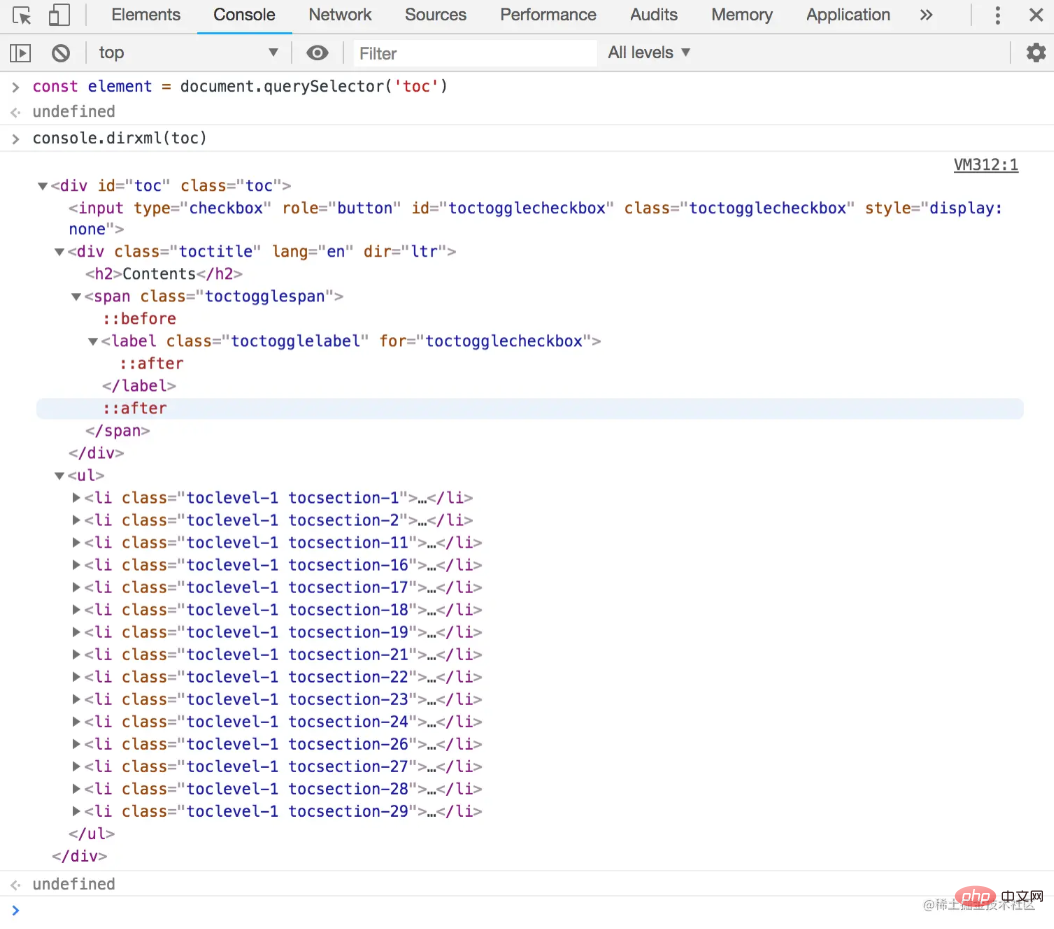
让我们从这个网站上的一个页面传入一些HTML。
console.dirxml(document)
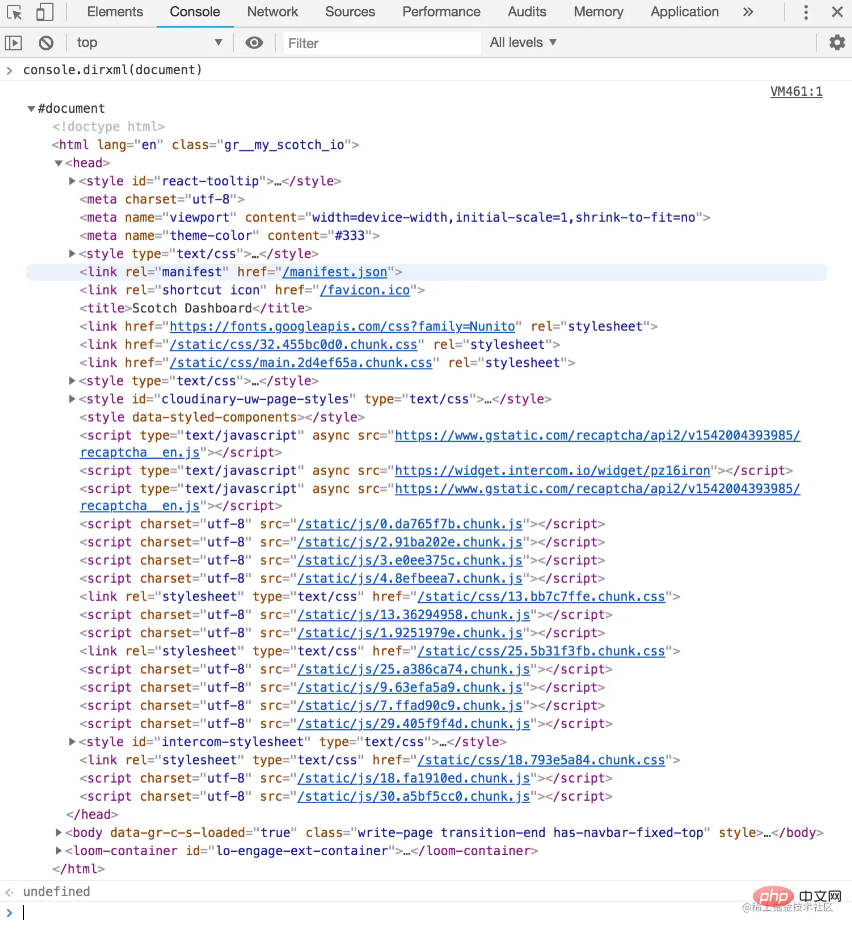
这就是我们传入一个对象时的情况。
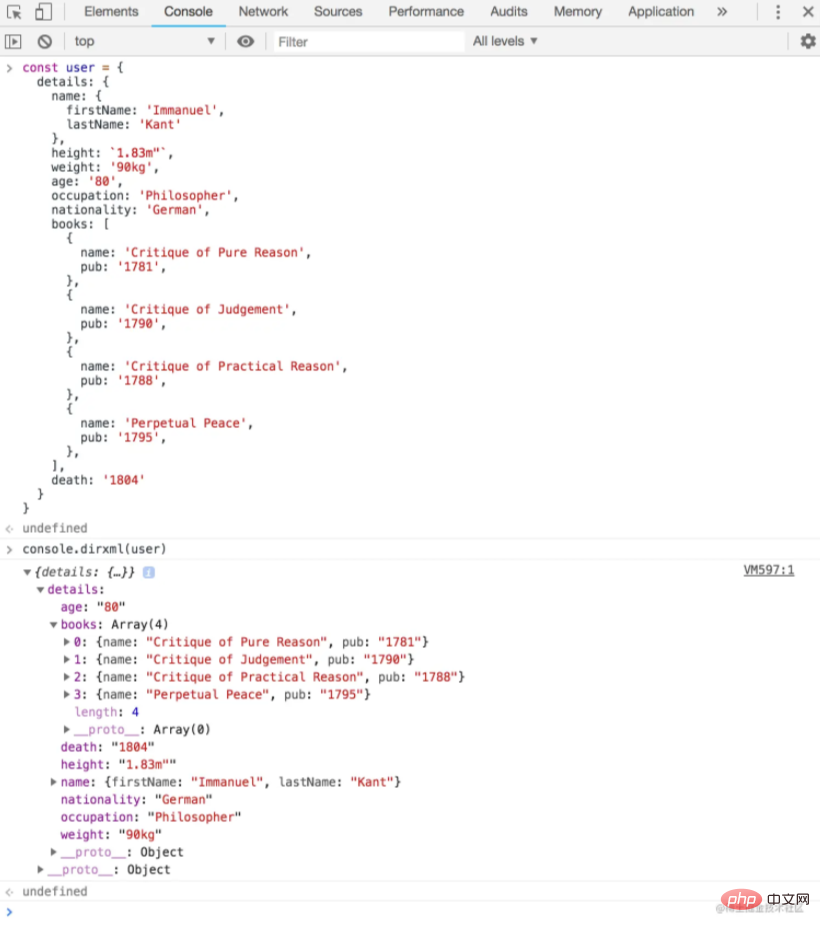
试着在一些HTML上调用console.dirxml ,看看会发生什么。
使用console.dir
传递给函数的第一个参数是一个要测试是否为真值的值。所有传递的其他参数被认为是信息,如果传递的值没有被评估为真值,就会被打印出来。
Node REPL将抛出一个错误,停止后续代码的执行。
console.assert(value, [...messages])
下面是一个基本的例子。
console.assert(false, 'Assertion failed');
OutputAssertion failed: Assertion failed
现在,让我们找点乐子。我们将建立一个小型测试框架,使用console.dir
const sum = (a = 0, b = 0) => Number(a) + Number(b);

function test(functionName, actualFunctionResult, expected) {
  const actual = actualFunctionResult;
  const pass = actual === expected;
  console.assert(pass, `Assertion failed for ${functionName}`);
  return `Test passed ${actual} === ${expected}`;
}

console.log(test('sum', sum(1,1), 2)); // Test passed 2 === 2
console.log(test('sum', sum(), 0));    // Test passed 0 === 0
console.log(test('sum', sum, 2));      // Assertion failed for sum
console.log(test('sum', sum(3,3), 4)); // Assertion failed for sum使用console.assert 和console.assert
这两个基本上是相同的。它们都会打印传递给它们的任何字符串。
然而,console.error 在信息传递之前会打印出一个三角形的警告符号。
console.warn(string, substitution);

而console.warn ,在信息传递前打印出一个危险符号。
console.error(string, substitution);

让我们注意到,字符串替换可以用与console.warn 方法相同的方式来应用。
下面是一个使用console.error 的迷你日志函数。
const sum = (a = 0, b = 0) => Number(a) + Number(b);

function otherTest(actualFunctionResult, expected) {
  if (actualFunctionResult !== expected) {
    console.error(new Error(`Test failed ${actualFunctionResult} !== ${expected}`));
  } else {
    // pass
  }
}

otherTest(sum(1,1), 3);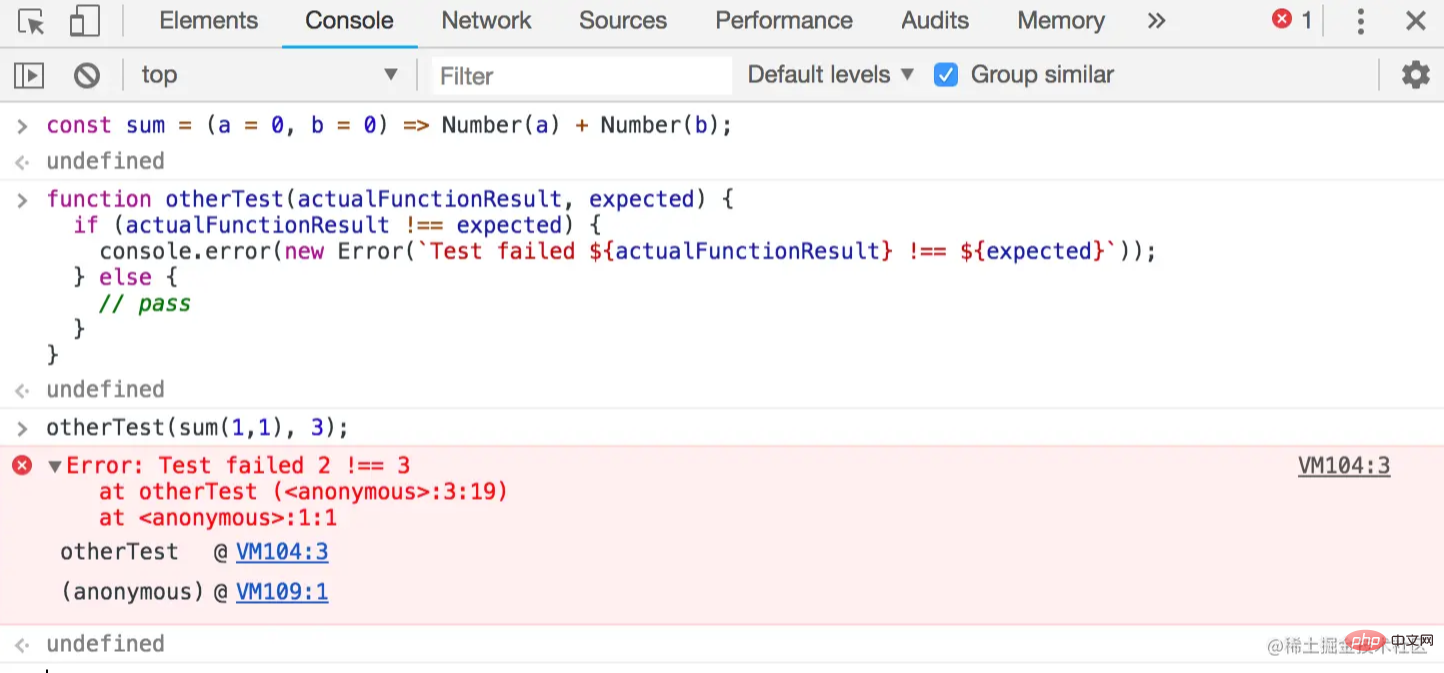
使用console.log
这个控制台方法将打印字符串console.error ,后面是传递给函数的标签,然后是堆栈跟踪到函数的当前位置。
function getCapital(country) {
  const capitalMap = {
    belarus: 'minsk', australia: 'canberra', egypt: 'cairo', georgia: 'tblisi', latvia: 'riga', samoa: 'apia'
  };
  console.trace('Start trace here');
  return Object.keys(capitalMap).find(item => item === country) ? capitalMap[country] : undefined;
}

console.log(getCapital('belarus'));
console.log(getCapital('accra'));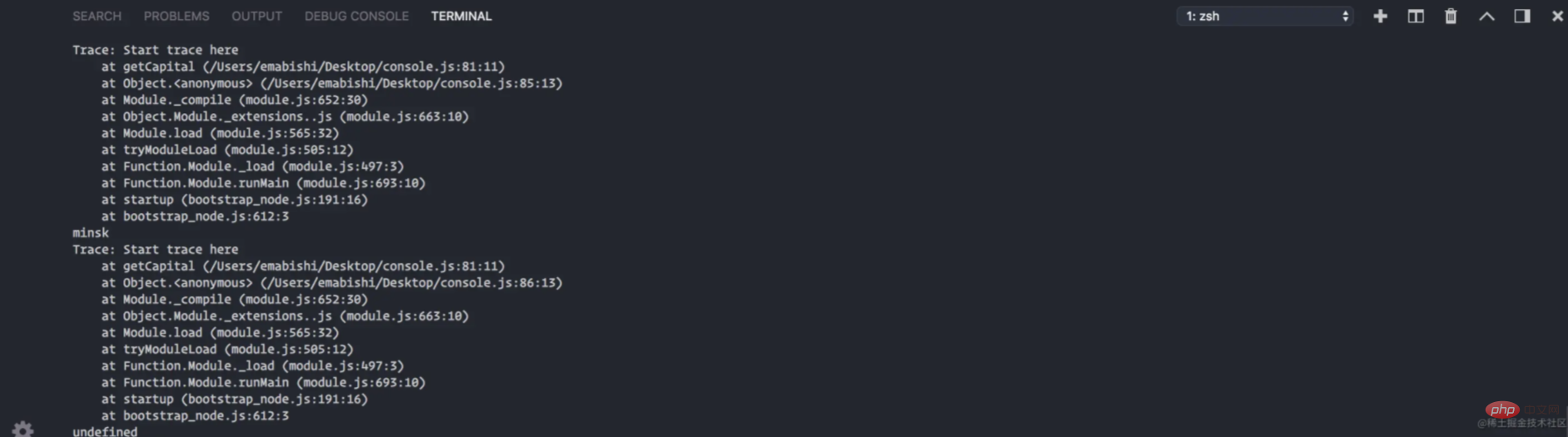
使用console.trace(label)
Count将开始并递增一个名为Trace: 的计数器。
让我们建立一个单词计数器来看看它是如何工作的。
const getOccurences = (word = 'foolish') => {
  const phrase = `Oh me! Oh life! of the questions of these recurring, Of the endless trains of the faithless, of cities fill’d with the foolish, Of myself forever reproaching myself, for who more foolish than I, and who more faithless?`;

  let count = 0;
  const wordsFromPhraseArray = phrase.replace(/[,.!?]/igm, '').split(' ');
  wordsFromPhraseArray.forEach((element, idx) => {
    if (element === word) {
      count ++;
      console.count(word);
    }
  });
  return count;
}

getOccurences();getOccurences('foolish');在这里,我们看到console.count(label) 这个词被记录了两次。该词在短语中每出现一次就记录一次。
[secondary_label]
foolish: 1
foolish: 2
2
我们可以用这个方法来查看一个函数被调用了多少次,或者我们的代码中的某一行被执行了多少次。
使用label
顾名思义,这将重置一个计数器,该计数器有一个由foolish 方法设置的console.countReset(label) 。
const getOccurences = (word = 'foolish') => {
  const phrase = `Oh me! Oh life! of the questions of these recurring, Of the endless trains of the faithless, of cities fill’d with the foolish, Of myself forever reproaching myself, for who more foolish than I, and who more faithless?`;

  let count = 0;
  const wordsFromPhraseArray = phrase.replace(/[,.!?]/igm, '').split(' ');
  wordsFromPhraseArray.forEach((element, idx) => {
    if (element === word) {
      count ++;
      console.count(word);
      console.countReset(word);
    }
  });
  return count;
}

getOccurences();getOccurences('foolish');[secondary_label] foolish: 1 foolish: 1 2
我们可以看到,我们的console.count 函数返回2,因为在这句话中确实有两次出现label ,但由于我们的计数器在每次匹配时都被重置,所以它记录了两次getOccurences 。
使用foolish 和foolish: 1
console.time(label) 函数启动一个定时器,并将console.timeEnd(label) 作为参数提供给该函数,而console.time 函数停止一个定时器,并将label 作为参数提供给该函数。
console.time('<timer-label>');
console.timeEnd('<timer-label>');我们可以通过向两个函数传递相同的console.timeEnd 名称来计算出运行一个操作所需的时间。
const users = ['Vivaldi', 'Beethoven', 'Ludovico'];

const loop = (array) => {
  array.forEach((element, idx) => {
    console.log(element);
  })
}

const timer = () => {
  console.time('timerLabel');
  loop(users);
  console.timeEnd('timerLabel');
}

timer();
我们可以看到计时器停止后显示的计时器标签与时间值相对应。
OutputVivaldi
Beethoven
Ludovico
timerLabel: 0.69091796875ms
循环函数花了0.6909ms完成了对数组的循环操作。
结论
最后,我们已经来到了本教程的结尾。
请注意,本教程没有涵盖label 类的非标准使用,如label ,console ,和console.profile 。
更多编程相关知识,请访问:编程入门!!




