



移除方法:首先获取指定dom对象,然后使用removeattribute()方法来移除属性;语法格式“dom对象.removeattribute(元素的属性名)”。removeattribute()方法可以删除具有指定名称的属性。

本教程操作环境:windows7系统、javascript1.8.5版、Dell G3电脑。
在javascript中,可以利用removeAttribute() 方法来删除属性。
removeAttribute() 方法可以删除具有指定名称的属性,无返回值。
语法:
立即学习“Java免费学习笔记(深入)”;
移动端UI&微信UI YDUI Touch
下载
YDUI Touch专为移动端打造,在技术实现、交互设计上兼容主流移动设备,保证代码轻、性能高;使用 Flexbox 技术,灵活自如地对齐、收缩、扩展元素,轻松搞定移动页面布局;用 rem 实现强大的屏幕适配布局,等比例适配所有屏幕;自定义Javascript组件、Less文件、Less变量,定制一份属于自己的YDUI。
element.removeAttribute(attributename)
参数attributename:要移除的属性的名称,不可省略。
示例:删除 header 元素的 style 属性
<!DOCTYPE html>
<html>

	<head>
		<meta charset="UTF-8">
		<title>删除 header 元素的 style 属性</title>
	</head>

	<body>

			<h1 style="color:red">Hello World</h1>

			<p id="demo">点击按钮来删除标题中的 style 属性。</p>

			<button onclick="myFunction()">试一下</button>

			<script>
				function myFunction() {
					document.getElementsByTagName("H1")[0].removeAttribute("style");
				}
			</script>

		</body>

</html>
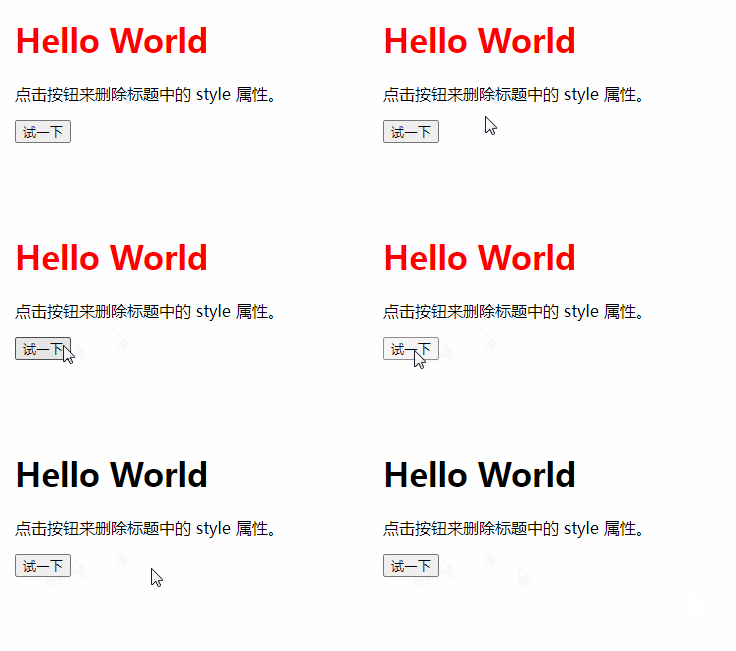
效果图:
推荐学习:javascript高级教程





