




nginx简单介绍:
(学习视频分享:编程入门)
Nginx (engine x) 是一款轻量级的 Web 服务器 、反向代理服务器及电子邮件(IMAP/POP3)代理服务器。它是来自俄罗斯的Igor Sysoev在为Rambler Media工作期间,使用C语言开发的。
Igor Sysoev将Nginx的代码开源,并且赋予其最自由的2-clause BSD-like license许可证。由于Nginx使用基于事件驱动的架构能够并发处理百万级别的TCP连接,高度模块化的设计和自由的许可证使得扩展Nginx功能的第三方模块层出不穷,而且优秀的设计带来了极佳的稳定性,因此其作为Web服务器被广泛应用到大流量的网站上。
所谓反向代理(Reverse Proxy)方式是指以代理服务器来接受 internet 上的连接请求,然后将请求转发给内部网络上的服务器,并将从服务器上得到的结果返回给 internet 上请求连接的客户端,此时代理服务器对外就表现为一个反向代理服务器。
既然有反向代理,那么也就有正向代理。正向代理是一个位于客户端和原始服务器之间的服务器,为了从原始服务器取得内容,客户端向代理发送一个请求并指定目标,然后代理向原始服务器转交请求并将获得的内容返回给客户端。
可以说正向代理代理的是客户端,反向代理代理的是服务器。

使用Nginx有如下优势:
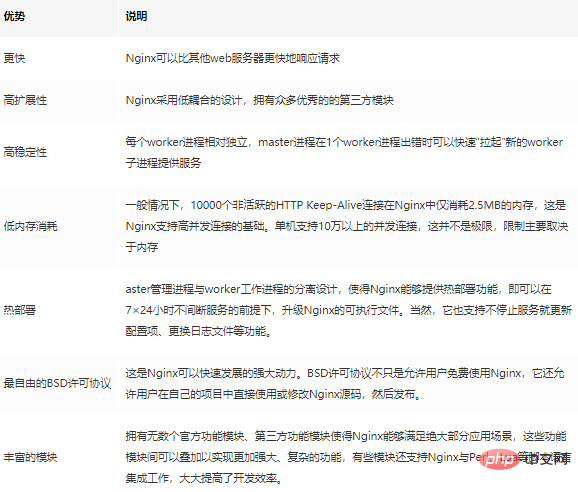
依赖库
现在服务器一般都使用Linux操作系统,在编译和安装Nginx之前,你需要先安装其依赖的库。
下面列举几个完成Web服务器最基本功能所必需的库。
GCC
GCC(GNU Compiler Collection)可用来编译C语言程序。
Nginx通常不会直接提供二进制可执行程序,因此我们需要编译其源码。
而且我们可能会使用C++来编写Nginx HTTP模块,这时就需要用到G++编译器了。
用yum安装G++编译器:
yum install -y gcc-c++
PCRE
PCRE库PCRE(Perl Compatible Regular Expressions,Perl兼容正则表达式)是由Philip Hazel开发的函数库,目前为很多软件所使用,该库支持正则表达式。它由RegEx演化而来,实际上, Perl正则表达式也是源自于Henry Spencer写的RegEx。
如果我们在配置文件nginx.conf里使用了正则表达式,那么在编译Nginx时就必须把PCRE库编译进Nginx,因为Nginx的HTTP模块要靠它来解析正则表达式。
当然,如果你确认不会使用正则表达式,就不必安装它。
其yum安装方式如下:
yum install -y pcre pcre-devel
pcre-devel是使用PCRE做二次开发时所需要的开发库,包括头文件等,这也是编译Nginx所必须使用的。
zlib库
zlib库用于对HTTP包的内容做gzip格式的压缩,如果我们在nginx.conf里配置了gzip on, 并指定对于某些类型(content-type)的HTTP响应使用gzip来进行压缩以减少网络传输量,那么,在编译时就必须把zlib编译进Nginx。
其yum安装方式如下
yum install -y zlib zlib-devel
同理,zlib是直接使用的库,zlib-devel是二次开发所需要的库。
OpenSSL开发库
如果我们的服务器不只是要支持HTTP,还需要在更安全的SSL协议上传输HTTP,那么就需要拥有OpenSSL了。
另外,如果我们想使用MD5、SHA1等散列函数,那么也需要安装它。
其yum安装方式如下:
yum install -y openssl openssl-devel
下载源码包
进入Nginx官方站点的下载界面,选择最新的稳定版本。
然后使用 wget 命令下载:
[root@host nginx]# wget http://nginx.org/download/nginx-1.16.0.tar.gz
--2019-05-23 03:28:52--  http://nginx.org/download/nginx-1.16.0.tar.gz
Resolving nginx.org... 62.210.92.35, 95.211.80.227, 2001:1af8:4060:a004:21::e3
Connecting to nginx.org|62.210.92.35|:80... connected.
HTTP request sent, awaiting response... 200 OK
Length: 1032345 (1008K) [application/octet-stream]
Saving to: “nginx-1.16.0.tar.gz”

100%[==========================================================================================================================================>] 1,032,345    715K/s   in 1.4s

2019-05-23 03:28:53 (715 KB/s) - “nginx-1.16.0.tar.gz” saved [1032345/1032345]
解压文件:
[root@host nginx]# tar xf nginx-1.16.0.tar.gz
[root@host nginx]# ls
nginx-1.16.0  nginx-1.16.0.tar.gz
[root@host nginx]# cd nginx-1.16.0
[root@host nginx-1.16.0]# ls
auto  CHANGES  CHANGES.ru  conf  configure  contrib  html  LICENSE  man  README  src
编译安装
编译并安装Nginx使用下面三条命令:
./configure make make install
如果你依赖的库找不到的话,在执行./configure命令的时候会报错,例如找不到PCRE库:
./configure: error: the HTTP rewrite module requires the PCRE library.
You can either disable the module by using --without-http_rewrite_module
option, or install the PCRE library into the system, or build the PCRE library
statically from the source with nginx by using --with-pcre=<path> option.
正常的输出应该是下面这样,并且生成了Makefile:
[root@host nginx-1.16.0]# ./configure
checking for OS
 + Linux 4.10.4-1.el6.elrepo.i686 i686
checking for C compiler ... found
 + using GNU C compiler
 + gcc version: 4.4.7 20120313 (Red Hat 4.4.7-23) (GCC)
checking for gcc -pipe switch ... found
checking for -Wl,-E switch ... found
checking for gcc builtin atomic operations ... found
checking for C99 variadic macros ... found
checking for gcc variadic macros ... found
checking for gcc builtin 64 bit byteswap ... found
checking for unistd.h ... found
checking for inttypes.h ... found
checking for limits.h ... found
checking for sys/filio.h ... not found
checking for sys/param.h ... found
checking for sys/mount.h ... found
checking for sys/statvfs.h ... found
checking for crypt.h ... found
checking for Linux specific features
checking for epoll ... found
checking for EPOLLRDHUP ... found
checking for EPOLLEXCLUSIVE ... not found
checking for O_PATH ... not found
checking for sendfile() ... found
checking for sendfile64() ... found
checking for sys/prctl.h ... found
checking for prctl(PR_SET_DUMPABLE) ... found
checking for prctl(PR_SET_KEEPCAPS) ... found
checking for capabilities ... found
checking for crypt_r() ... found
checking for sys/vfs.h ... found
checking for nobody group ... found
checking for poll() ... found
checking for /dev/poll ... not found
checking for kqueue ... not found
checking for crypt() ... not found
checking for crypt() in libcrypt ... found
checking for F_READAHEAD ... not found
checking for posix_fadvise() ... found
checking for O_DIRECT ... found
checking for F_NOCACHE ... not found
checking for directio() ... not found
checking for statfs() ... found
checking for statvfs() ... found
checking for dlopen() ... not found
checking for dlopen() in libdl ... found
checking for sched_yield() ... found
checking for sched_setaffinity() ... found
checking for SO_SETFIB ... not found
checking for SO_REUSEPORT ... found
checking for SO_ACCEPTFILTER ... not found
checking for SO_BINDANY ... not found
checking for IP_TRANSPARENT ... found
checking for IP_BINDANY ... not found
checking for IP_BIND_ADDRESS_NO_PORT ... not found
checking for IP_RECVDSTADDR ... not found
checking for IP_SENDSRCADDR ... not found
checking for IP_PKTINFO ... found
checking for IPV6_RECVPKTINFO ... found
checking for TCP_DEFER_ACCEPT ... found
checking for TCP_KEEPIDLE ... found
checking for TCP_FASTOPEN ... not found
checking for TCP_INFO ... found
checking for accept4() ... found
checking for eventfd() ... found
checking for int size ... 4 bytes
checking for long size ... 4 bytes
checking for long long size ... 8 bytes
checking for void * size ... 4 bytes
checking for uint32_t ... found
checking for uint64_t ... found
checking for sig_atomic_t ... found
checking for sig_atomic_t size ... 4 bytes
checking for socklen_t ... found
checking for in_addr_t ... found
checking for in_port_t ... found
checking for rlim_t ... found
checking for uintptr_t ... uintptr_t found
checking for system byte ordering ... little endian
checking for size_t size ... 4 bytes
checking for off_t size ... 8 bytes
checking for time_t size ... 4 bytes
checking for AF_INET6 ... found
checking for setproctitle() ... not found
checking for pread() ... found
checking for pwrite() ... found
checking for pwritev() ... found
checking for sys_nerr ... found
checking for localtime_r() ... found
checking for clock_gettime(CLOCK_MONOTONIC) ... not found
checking for clock_gettime(CLOCK_MONOTONIC) in librt ... found
checking for posix_memalign() ... found
checking for memalign() ... found
checking for mmap(MAP_ANON|MAP_SHARED) ... found
checking for mmap("/dev/zero", MAP_SHARED) ... found
checking for System V shared memory ... found
checking for POSIX semaphores ... not found
checking for POSIX semaphores in libpthread ... found
checking for struct msghdr.msg_control ... found
checking for ioctl(FIONBIO) ... found
checking for struct tm.tm_gmtoff ... found
checking for struct dirent.d_namlen ... not found
checking for struct dirent.d_type ... found
checking for sysconf(_SC_NPROCESSORS_ONLN) ... found
checking for sysconf(_SC_LEVEL1_DCACHE_LINESIZE) ... found
checking for openat(), fstatat() ... found
checking for getaddrinfo() ... found
checking for PCRE library ... found
checking for PCRE JIT support ... not found
checking for zlib library ... found
creating objs/Makefile

Configuration summary
  + using system PCRE library
  + OpenSSL library is not used
  + using system zlib library

  nginx path prefix: "/usr/local/nginx"
  nginx binary file: "/usr/local/nginx/sbin/nginx"
  nginx modules path: "/usr/local/nginx/modules"
  nginx configuration prefix: "/usr/local/nginx/conf"
  nginx configuration file: "/usr/local/nginx/conf/nginx.conf"
  nginx pid file: "/usr/local/nginx/logs/nginx.pid"
  nginx error log file: "/usr/local/nginx/logs/error.log"
  nginx http access log file: "/usr/local/nginx/logs/access.log"
  nginx http client request body temporary files: "client_body_temp"
  nginx http proxy temporary files: "proxy_temp"
  nginx http fastcgi temporary files: "fastcgi_temp"
  nginx http uwsgi temporary files: "uwsgi_temp"
  nginx http scgi temporary files: "scgi_temp"
查看Nginx版本
安装成功以后,可以通过-v参数查看Nginx版本。
[root@host sbin]# /usr/local/nginx/sbin/nginx -v nginx version: nginx/1.16.0
启动
Nginx支持直接启动,也支持带参数启动,下面分别演示一下。
端口占用

Nginx需要使用80端口,如果80端口被占用,启动会有如下报错:
nginx: [emerg] bind() to 0.0.0.0:80 failed (98: Address already in use)
nginx: [emerg] bind() to 0.0.0.0:80 failed (98: Address already in use)
nginx: [emerg] bind() to 0.0.0.0:80 failed (98: Address already in use)
nginx: [emerg] bind() to 0.0.0.0:80 failed (98: Address already in use)
nginx: [emerg] bind() to 0.0.0.0:80 failed (98: Address already in use)
可以使用lsof工具查看端口占用情况,如果你没有装,可以使用如下命令安装:
yum install -y lsof
查看本机80端口的占用情况,并杀掉占用的进程:
[root@host sbin]# lsof -i :80
COMMAND  PID USER   FD   TYPE DEVICE SIZE/OFF NODE NAME
java    1765 root   53u  IPv6  15062      0t0  TCP *:http (LISTEN)
[root@host sbin]# killall -9 java
[root@host sbin]# lsof -i :80
[root@host sbin]#
默认启动
使用whereis命令查看nginx的安装目录:
[root@host nginx-1.16.0]# whereis nginx
nginx: /usr/local/nginx
如果不加任何参数启动,会使用默认的nginx.conf配置文件启动Nginx:
/usr/local/nginx/sbin/nginx
启动成功以后,再请求服务器的时候可以看到包含下面内容的网页:
Welcome to nginx!
If you see this page, the nginx web server is successfully installed and working. Further configuration is required.

For online documentation and support please refer to nginx.org.
Commercial support is available at nginx.com.

Thank you for using nginx.
带参数启动
-c参数指定配置文件的启动方式:
./nginx -c mynginx.conf
-p参数指定Nginx的安装目录:
./nginx -p mydir/nginx
-g参数临时指定一些全局配置项
./nginx -g "pid varnginx/test.pid;"
上面这行命令意味着会把pid文件写到varnginx/test.pid中。
-g参数的约束条件是指定的配置项不能与默认路径下的nginx.conf中的配置项相冲突,否则无法启动。
就像上例那样,类似这样的配置项:pid logs/nginx.pid,是不能存在于默认的nginx.conf中的。
另一个约束条件是,以-g方式启动的Nginx服务执行其他命令行时,需要把-g参数也带上,否则可能出现配置项不匹配的情形。
在不启动Nginx的情况下,使用-t参数仅测试配置文件是否有错误。 例如:
./nginx -t
执行结果中显示配置是否正确。
[root@host sbin]# ./nginx -t
nginx: the configuration file /usr/local/nginx/conf/nginx.conf syntax is ok
nginx: configuration file /usr/local/nginx/conf/nginx.conf test is successful
测试配置选项时,使用-q参数可以不把error级别以下的信息输出到屏幕。 例如:
./nginx -t -q
停止服务
停止Nginx的服务主要有两种方式。
一种是快速停止,即立即停止Nginx服务正在处理的所有网络请求,马上丢弃连接停止服务。
另外一种是平缓地停止,即允许Nginx处理完当前的请求,但不再接收新的请求,之后再关闭连接,停止工作。
快速停止服务
/usr/local/nginx/sbin/nginx -s stop
kill服务
kill -s SIGTERM 进程ID或kill -s SIGINT 进程ID与上面./nginx -s stop命令的效果是一样的。
[root@host sbin]# ps -ef|grep nginx
root     10568     1  0 04:22 ?        00:00:00 nginx: master process ./nginx
nobody   10569 10568  0 04:22 ?        00:00:00 nginx: worker process
root     10571  5440  0 04:23 pts/1    00:00:00 grep nginx
[root@host sbin]# kill -s SIGINT 10568
[root@host sbin]# ps -ef|grep nginx
root     10574  5440  0 04:24 pts/1    00:00:00 grep nginx
[root@host sbin]#
优雅地停止服务
如果希望Nginx服务可以正常地处理完当前所有请求再停止服务,那么可以使用-s quit参数来停止服务。
例如:
./nginx -s quit
该命令与快速停止Nginx服务是有区别的。
当快速停止服务时,worker进程与master进程在收到信号后会立刻跳出循环,退出进程。
而“优雅”地停止服务时,首先会关闭监听端口,停止接收新的连接,然后把当前正在处理的连接全部处理完,最后再退出进程。
与快速停止服务相似,可以直接发送QUIT信号给master进程来停止服务,其效果与执行-s quit命令是一样的。
例如:
kill -s SIGQUIT <nginx master pid>
如果希望“优雅”地停止某个worker进程,那么可以通过向该进程发送WINCH信号来停止服务 。
例如:
kill -s SIGWINCH <nginx worker pid>
发送信号
./nginx -g TERM | INT | QUIT
TERM 和 INT 信号用于快速停止,QUIT 信号用于平滑停止。
Nginx重新加载配置
使运行中的Nginx重读配置项并生效
使用-s reload参数可以使运行中的Nginx服务重新加载nginx.conf文件。 例如:
usrlocal/nginx/sbin/nginx -s reload
日志文件回滚
使用-s reopen参数可以重新打开日志文件,这样可以先把当前日志文件改名或转移到其他目录中进行备份,再重新打开时就会生成新的日志文件。
这个功能使得日志文件不至于过大。 例如:
./nginx -s reopen
这与使用kill命令发送USR1信号效果相同。
kill -s SIGUSR1 <nginx master pid>
相关推荐:nginx教程




