


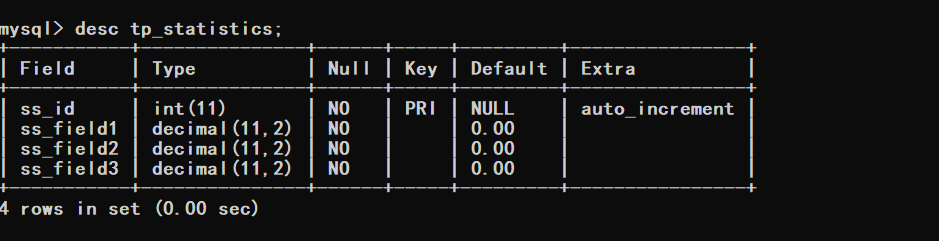
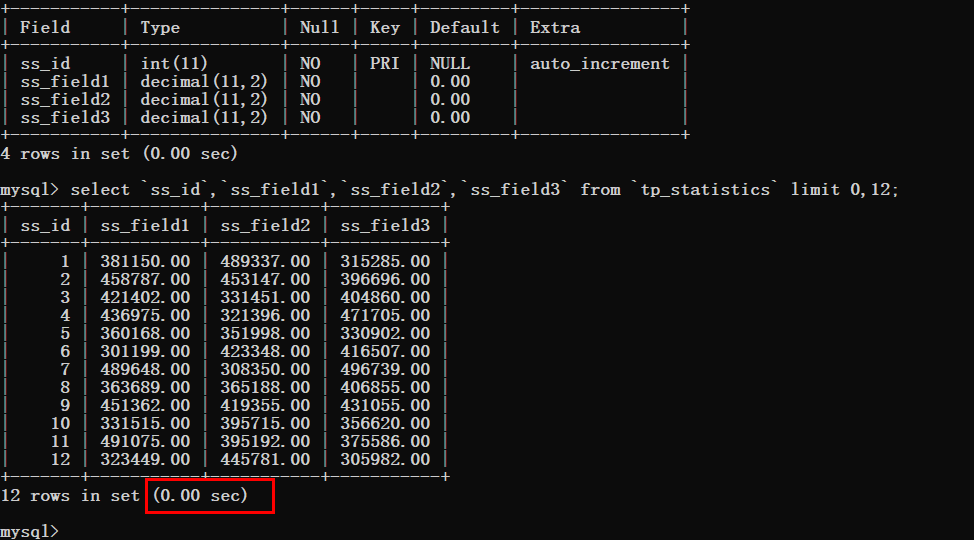
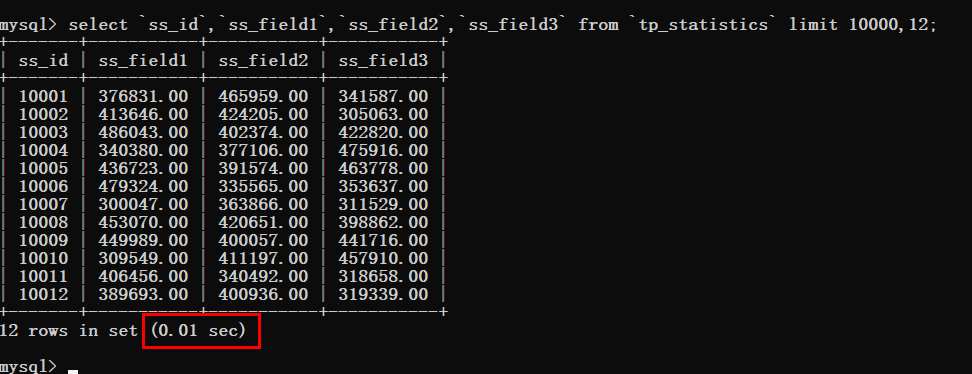
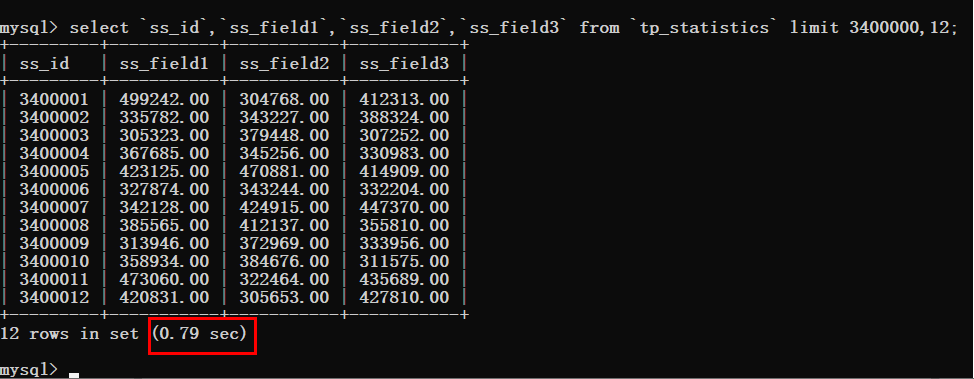
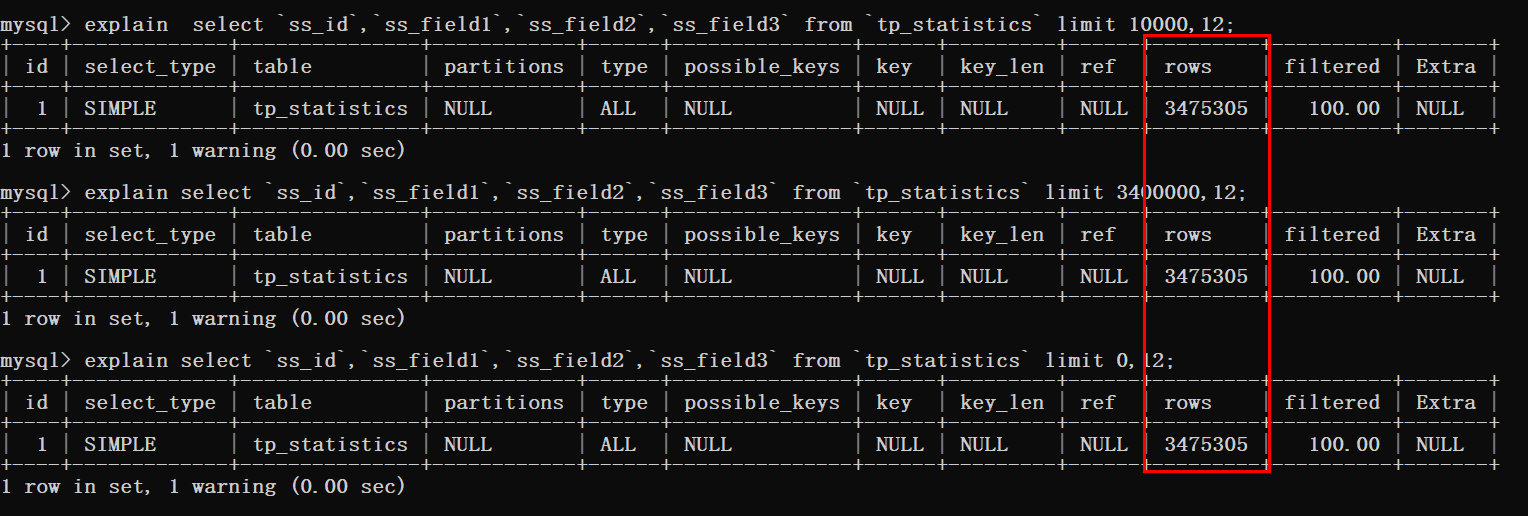
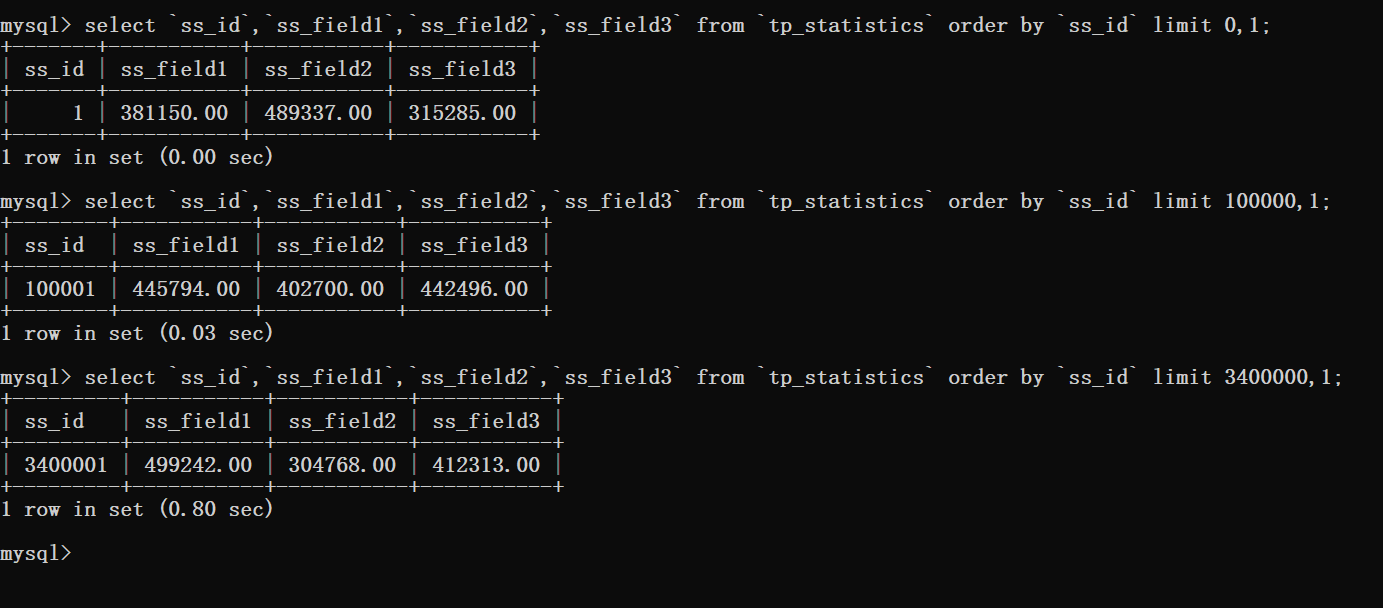
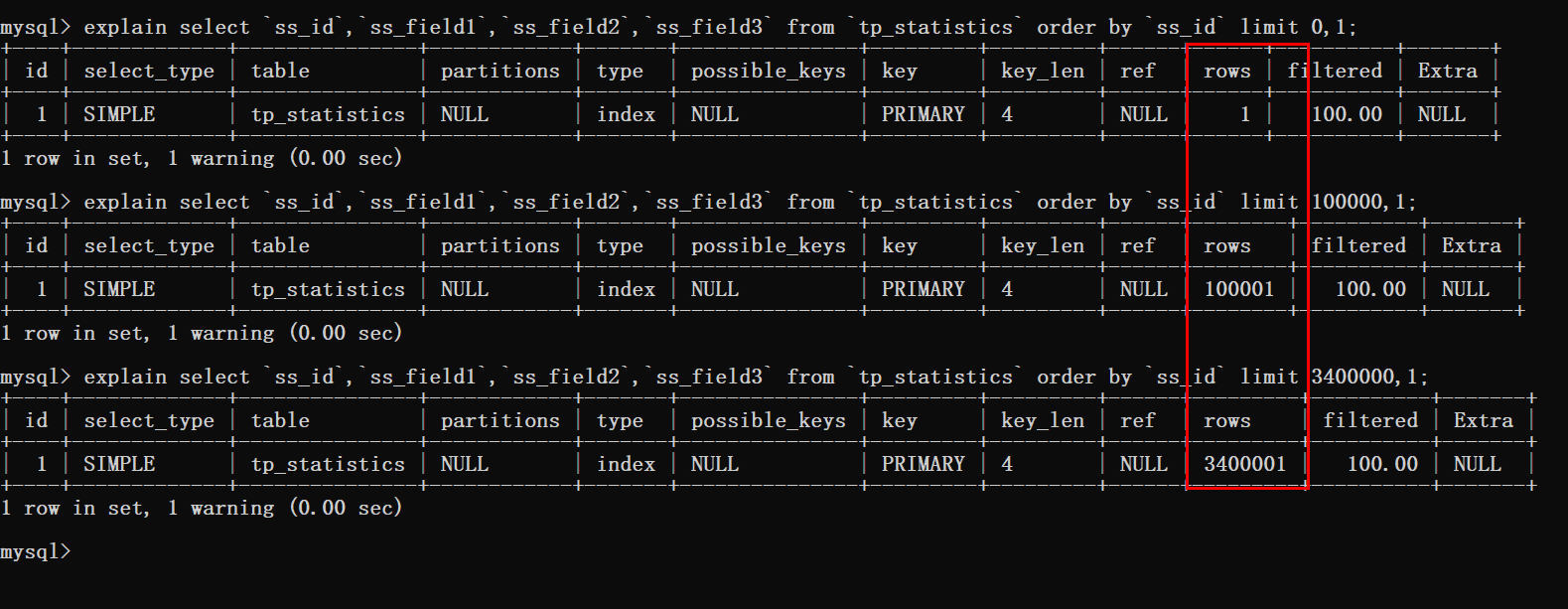
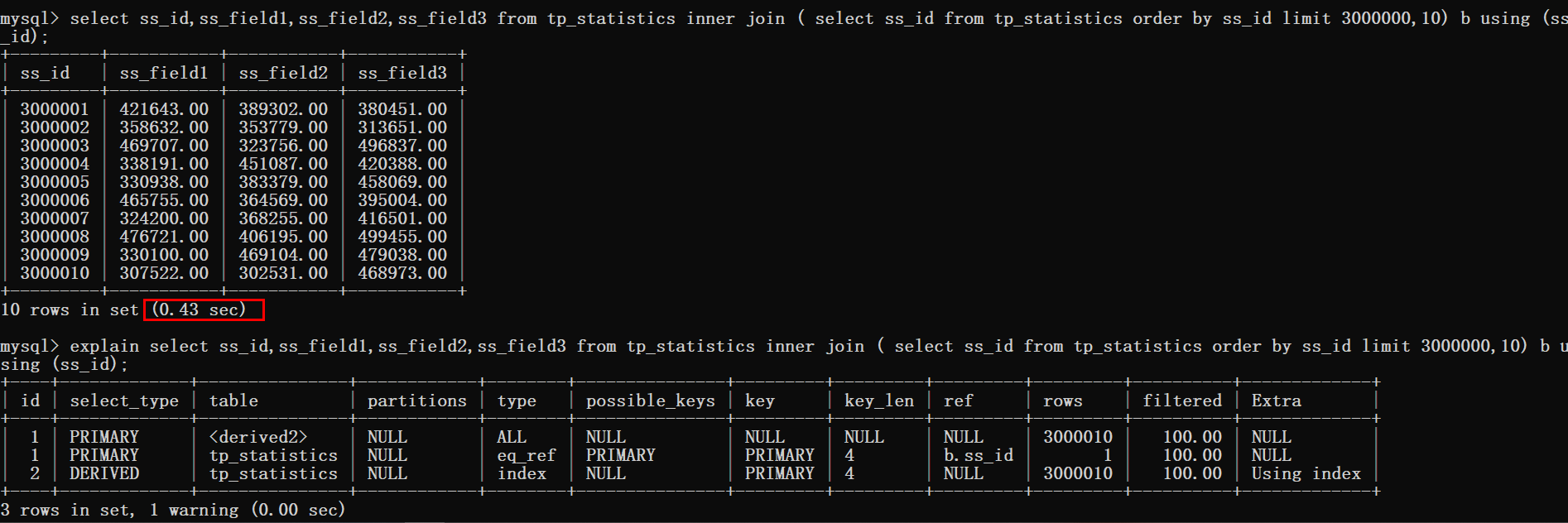
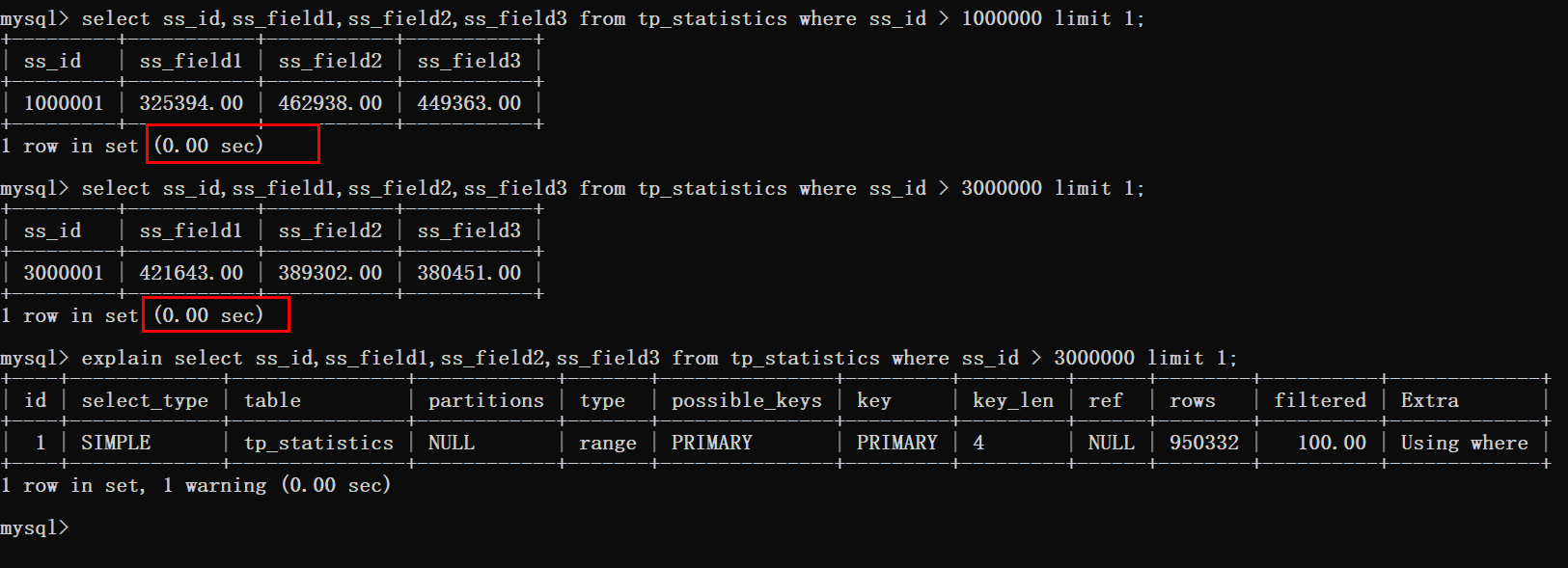
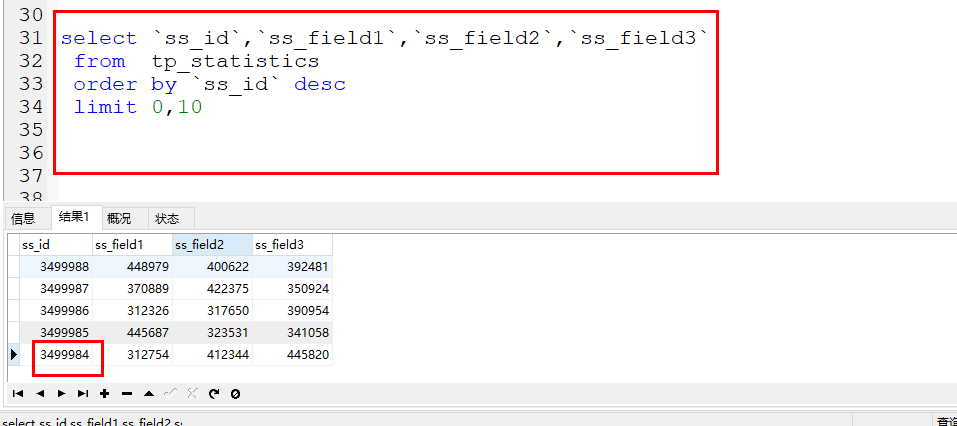
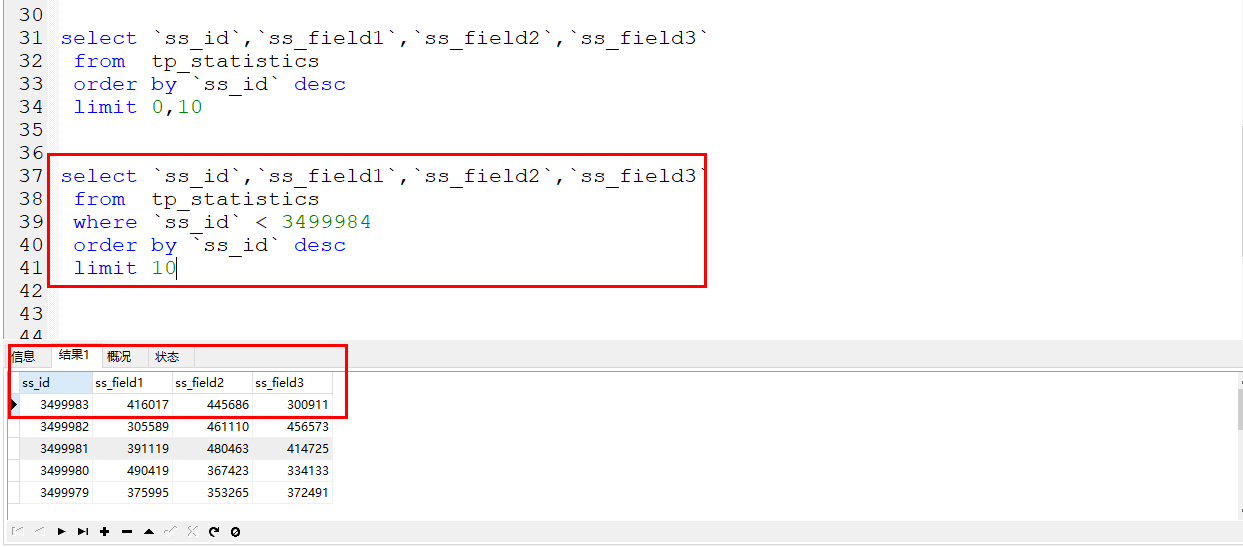
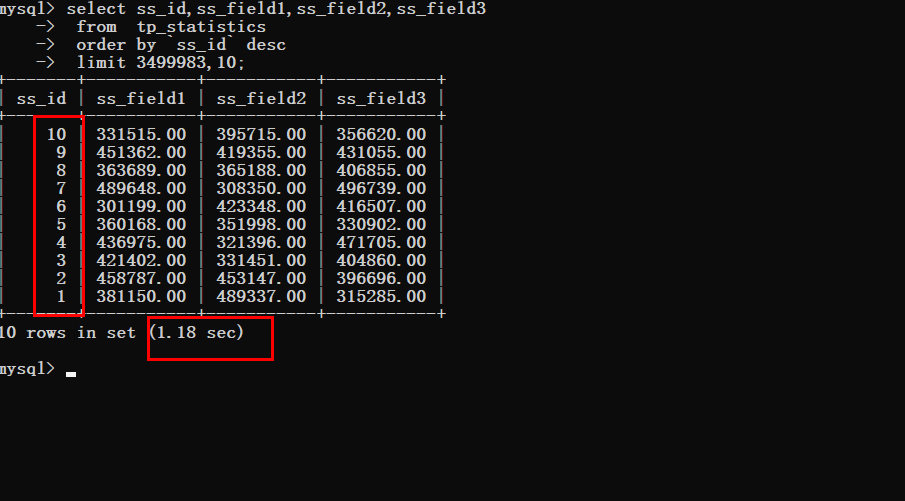
终于要对mysql优化下手了,本文将对分页进行优化说明,希望可以得到一个合适你的方案 分页这个话题已经是老生常谈了,但是有多少小伙伴一边是既希望优化的自己的系统,另一边在项目上还是保持自己独有的个性。 优化这件事是需要自己主动行动起来的,自己搞测试数据,只有在测试的路上才会发现更多你未知的事情。 本文咔咔也会针对分页优化这个话题进行解读。 这个数据库结构就是咔咔目前线上项目的表,只不过咔咔将字段名改了而已,还有将时间字段取消了。 数据库结构如下 根据以上信息可以看到目前表里边的数据有350万记录,接下来就针对这350W条记录进行查询优化。 先来写一个查询的SQL语句,先看一下查询耗费的时间。 根据下图可以看到查询时间基本忽略不计,但是要注意的是limit的偏移量值。 于是我们要一步一步的加大这个偏移量然后进行测试,先将偏移量改为10000 可以看到查询时间还是非常理想的。 为了节省时间咔咔将这个偏移量的值直接调整到340W。 这个时候就可以看到非常明显的变化了,查询时间猛增到了0.79s。 出现了这样的情况,那肯定就需要进行优化了,拿起键盘就是干。 提到分析SQL语句,必备的知识点就是explain,如果对这个工具不会使用的可以去看看MySQL的基础部分。 根据下图可以看到三条查询语句都进行了表扫描。 都知道只要有关于分页就必存在排序,那么加一个排序再来看一下查询效率。 然后在进行对排序的语句进行分析查看。 通过这里看到当使用了排序时数据库扫描的行数就是偏移量加上需要查询的数量。 此时就可以知道的是,在偏移量非常大的时候,就像上图案例中的limit 3400000,12这样的查询。 此时MySQL就需要查询3400012行数据,然后在返回最后12条数据。 前边查询的340W数据都将被抛弃,这样的执行结果可不是我们想要的。 咔咔之前看到相关文章说是解决这个问题的方案,要么直接限制分页的数量,要么就优化当偏移量非常大的时候的性能。 如果你都把本文看到了这里,那怎么会让你失望,肯定是优化大偏移量的性能问题。 既然提到了优化,无非就那么俩点,加索引,使用其它的方案来代替这个方案。 咔咔提供的这条数据表结构信息,完全可以理解为就是图书馆的借阅记录,字段的什么都不要去关心就可以了。 对于排序来说,在这种场景下是不会给时间加排序的,而是给主键加排序,并且由于添加测试数据的原因将时间字段给取消了。 接下来使用覆盖索引加inner join的方式来进行优化。 从上图可以看到查询时间从0.8s优化到了0.4s,但是这样的效果还是不尽人意。 于是只能更换一下思路再进行优化。 既然优化最大偏移量这条路有点坎坷,能不能从其它方面进行入手。 估计有很多同学已经知道咔咔将要抛出什么话题了。 没错,就是使用where > id 然后使用limit。 先来测试一波结果,在写具体实现方案。 根据上图可以看到这种方式是十分可行的,分页在300W条数据以后的查询时间也基本忽略不计。 那么这种方案要怎么实现呢! 其实这个方案真的很简单,只需要简单的转换一下思路即可。 当客户端第一次获取数据的时候就正常传递offset、limit俩个参数。 首次返回的数据就使用客户端传递过来的offset、limit进行获取。 当第一次的数据返回成功后。 客户端第二次拉取数据时这个时候参数就发生改变了,就不能再是offset、limit了。 此时应该传递的参数就是第一次获取的数据最后一条数据的id。 此时的参数就为last_id、limit。 后台获取到last_id后就可以在sql语句中使用where条件 咔咔这里给的情况是数据在倒叙的情况下,如果正序就是大于last_id即可。 接下来咔咔使用一个案例给大家直接明了的说明。 实战案例 如下就是将要实战演示的案例,例如首次使用page、limit获取到了数据。 返回结果的最后一条数据的id就是 此时如果在获取第二条记录就不是使用offset、limit了,就是传递last_id和limit了。 如下图 此时就是使用的where条件来进行直接过滤数据,条件就是id小于上次数据的最后一条id即可。 时间对比 假设现在要获取最后一条数据 没有优化之前 优化之后可以明显的看到查询时间的变化 关于limit优化简单几句话概述一下。 坚持学习、坚持写博、坚持分享是咔咔从业以来一直所秉持的信念。希望在偌大互联网中咔咔的文章能带给你一丝丝帮助。我是咔咔,下期见。
“
前言
一、表结构
<span style="display: block; background: url(https://files.mdnice.com/point.png); height: 30px; width: 100%; background-size: 40px; background-repeat: no-repeat; background-color: #282c34; margin-bottom: -7px; border-radius: 5px; background-position: 10px 10px;"></span><code class="hljs" style="overflow-x: auto; padding: 16px; color: #abb2bf; display: -webkit-box; font-family: Operator Mono, Consolas, Monaco, Menlo, monospace; font-size: 12px; -webkit-overflow-scrolling: touch; padding-top: 15px; background: #282c34; border-radius: 5px;"><span class="hljs-keyword" style="color: #c678dd; line-height: 26px;">CREATE</span> <span class="hljs-keyword" style="color: #c678dd; line-height: 26px;">TABLE</span> <span class="hljs-string" style="color: #98c379; line-height: 26px;">`tp_statistics`</span> (<br/> <span class="hljs-string" style="color: #98c379; line-height: 26px;">`ss_id`</span> <span class="hljs-built_in" style="color: #e6c07b; line-height: 26px;">int</span>(<span class="hljs-number" style="color: #d19a66; line-height: 26px;">11</span>) <span class="hljs-keyword" style="color: #c678dd; line-height: 26px;">NOT</span> <span class="hljs-literal" style="color: #56b6c2; line-height: 26px;">NULL</span> AUTO_INCREMENT,<br/> <span class="hljs-string" style="color: #98c379; line-height: 26px;">`ss_field1`</span> <span class="hljs-built_in" style="color: #e6c07b; line-height: 26px;">decimal</span>(<span class="hljs-number" style="color: #d19a66; line-height: 26px;">11</span>,<span class="hljs-number" style="color: #d19a66; line-height: 26px;">2</span>) <span class="hljs-keyword" style="color: #c678dd; line-height: 26px;">NOT</span> <span class="hljs-literal" style="color: #56b6c2; line-height: 26px;">NULL</span> <span class="hljs-keyword" style="color: #c678dd; line-height: 26px;">DEFAULT</span> <span class="hljs-string" style="color: #98c379; line-height: 26px;">'0.00'</span>,<br/> <span class="hljs-string" style="color: #98c379; line-height: 26px;">`ss_field2`</span> <span class="hljs-built_in" style="color: #e6c07b; line-height: 26px;">decimal</span>(<span class="hljs-number" style="color: #d19a66; line-height: 26px;">11</span>,<span class="hljs-number" style="color: #d19a66; line-height: 26px;">2</span>) <span class="hljs-keyword" style="color: #c678dd; line-height: 26px;">NOT</span> <span class="hljs-literal" style="color: #56b6c2; line-height: 26px;">NULL</span> <span class="hljs-keyword" style="color: #c678dd; line-height: 26px;">DEFAULT</span> <span class="hljs-string" style="color: #98c379; line-height: 26px;">'0.00'</span>,<br/> <span class="hljs-string" style="color: #98c379; line-height: 26px;">`ss_field3`</span> <span class="hljs-built_in" style="color: #e6c07b; line-height: 26px;">decimal</span>(<span class="hljs-number" style="color: #d19a66; line-height: 26px;">11</span>,<span class="hljs-number" style="color: #d19a66; line-height: 26px;">2</span>) <span class="hljs-keyword" style="color: #c678dd; line-height: 26px;">NOT</span> <span class="hljs-literal" style="color: #56b6c2; line-height: 26px;">NULL</span> <span class="hljs-keyword" style="color: #c678dd; line-height: 26px;">DEFAULT</span> <span class="hljs-string" style="color: #98c379; line-height: 26px;">'0.00'</span>,<br/> PRIMARY <span class="hljs-keyword" style="color: #c678dd; line-height: 26px;">KEY</span> (<span class="hljs-string" style="color: #98c379; line-height: 26px;">`ss_id`</span>)<br/>) <span class="hljs-keyword" style="color: #c678dd; line-height: 26px;">ENGINE</span>=<span class="hljs-keyword" style="color: #c678dd; line-height: 26px;">InnoDB</span> AUTO_INCREMENT=<span class="hljs-number" style="color: #d19a66; line-height: 26px;">3499994</span> <span class="hljs-keyword" style="color: #c678dd; line-height: 26px;">DEFAULT</span> <span class="hljs-keyword" style="color: #c678dd; line-height: 26px;">CHARSET</span>=utf8 <span class="hljs-keyword" style="color: #c678dd; line-height: 26px;">COLLATE</span>=utf8mb4_general_ci ROW_FORMAT=<span class="hljs-keyword" style="color: #c678dd; line-height: 26px;">COMPACT</span>;<br/><br/></code>
二、初探查询效率
三、分析查询耗时的原因
四、优化
<span style="display: block; background: url(https://files.mdnice.com/point.png); height: 30px; width: 100%; background-size: 40px; background-repeat: no-repeat; background-color: #282c34; margin-bottom: -7px; border-radius: 5px; background-position: 10px 10px;"></span><code class="hljs" style="overflow-x: auto; padding: 16px; color: #abb2bf; display: -webkit-box; font-family: Operator Mono, Consolas, Monaco, Menlo, monospace; font-size: 12px; -webkit-overflow-scrolling: touch; padding-top: 15px; background: #282c34; border-radius: 5px;"><span class="hljs-keyword" style="color: #c678dd; line-height: 26px;">select</span> ss_id,ss_field1,ss_field2,ss_field3 <span class="hljs-keyword" style="color: #c678dd; line-height: 26px;">from</span> tp_statistics <span class="hljs-keyword" style="color: #c678dd; line-height: 26px;">inner</span> <span class="hljs-keyword" style="color: #c678dd; line-height: 26px;">join</span> ( <span class="hljs-keyword" style="color: #c678dd; line-height: 26px;">select</span> ss_id <span class="hljs-keyword" style="color: #c678dd; line-height: 26px;">from</span> tp_statistics <span class="hljs-keyword" style="color: #c678dd; line-height: 26px;">order</span> <span class="hljs-keyword" style="color: #c678dd; line-height: 26px;">by</span> ss_id <span class="hljs-keyword" style="color: #c678dd; line-height: 26px;">limit</span> <span class="hljs-number" style="color: #d19a66; line-height: 26px;">3000000</span>,<span class="hljs-number" style="color: #d19a66; line-height: 26px;">10</span>) b <span class="hljs-keyword" style="color: #c678dd; line-height: 26px;">using</span> (ss_id);<br/></code>
五、方案落地
3499984
六、总结
“


0


0
MySQL中limit优化

咔咔
发布时间:2021-01-18 22:42:21
|2854人浏览过
|来源于php中文网
原创




相关文章
mysql如何解决Slave has more GTIDs than master_mysql从库数据超前处理
mysql如何迁移带分区的超大表_mysql交换分区技术应用
mysql如何删除数据库_mysql删除数据库命令解析
mysql如何配置IP白名单过滤_mysql访问控制列表设置
mysql执行SQL语句的顺序是什么_SQL执行阶段解析
本站声明:本文内容由网友自发贡献,版权归原作者所有,本站不承担相应法律责任。如您发现有涉嫌抄袭侵权的内容,请联系admin@php.cn
热门AI工具


相关专题

数据分析工具有Excel、SQL、Python、R、Tableau、Power BI、SAS、SPSS和MATLAB等。详细介绍:1、Excel,具有强大的计算和数据处理功能;2、SQL,可以进行数据查询、过滤、排序、聚合等操作;3、Python,拥有丰富的数据分析库;4、R,拥有丰富的统计分析库和图形库;5、Tableau,提供了直观易用的用户界面等等。
1090
2023.10.12

SQL中distinct的语法是“SELECT DISTINCT column1, column2,...,FROM table_name;”。本专题为大家提供相关的文章、下载、课程内容,供大家免费下载体验。
339
2023.10.27

在SQL中,MONTHS_BETWEEN 是一个常见的函数,用于计算两个日期之间的月份差。想了解更多SQL的相关内容,可以阅读本专题下面的文章。
380
2024.02.23

SQL Server错误5120是由于没有足够的权限来访问或操作指定的数据库或文件引起的。想了解更多sql错误的相关内容,可以阅读本专题下面的文章。
1988
2024.03.06

sql procedure语法错误解决办法:1、仔细检查错误消息;2、检查语法规则;3、检查括号和引号;4、检查变量和参数;5、检查关键字和函数;6、逐步调试;7、参考文档和示例。想了解更多语法错误的相关内容,可以阅读本专题下面的文章。
379
2024.03.06

运行sql步骤包括:打开sql plus工具并连接到数据库。在提示符下输入sql语句。按enter键运行该语句。查看结果,错误消息或退出sql plus。想了解更多oracle数据库的相关内容,可以阅读本专题下面的文章。
1540
2024.04.07


sql中用于删除表的语句是drop table。语法为drop table table_name;该语句将永久删除指定表的表和数据。想了解更多sql的相关内容,可以阅读本专题下面的文章。
438
2024.04.29

本专题聚焦 Swift 在 iOS 应用架构设计中的实践,系统讲解 MVVM 模式的核心思想、数据绑定机制、模块拆分策略以及组件化开发方法。内容涵盖网络层封装、状态管理、依赖注入与性能优化技巧。通过完整项目案例,帮助开发者构建结构清晰、可维护性强的 iOS 应用架构体系。
3
2026.03.03
热门下载
相关下载
精品课程


最新文章


