


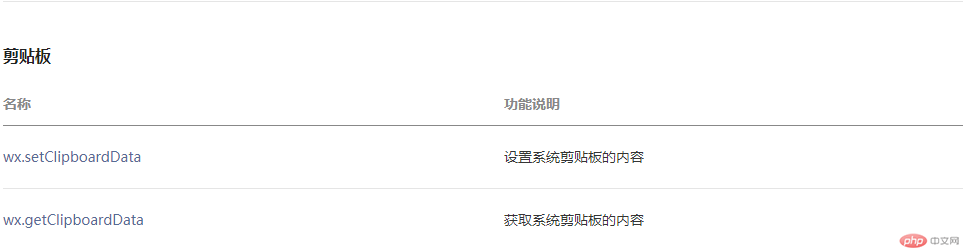
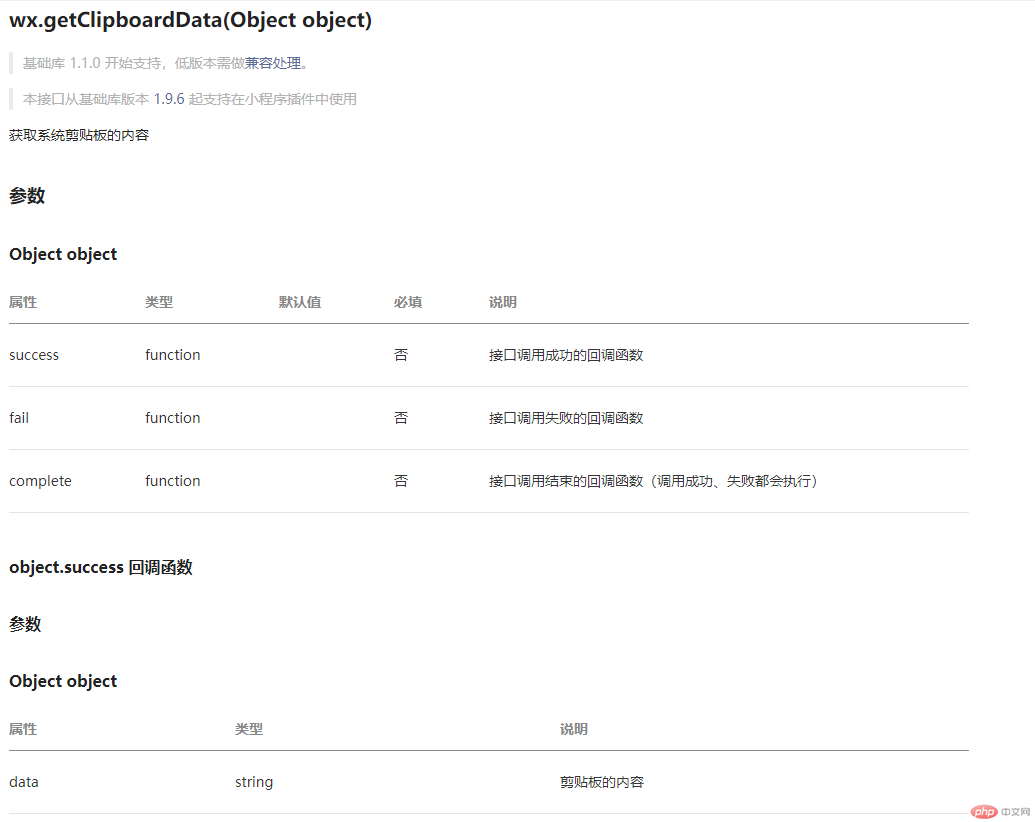
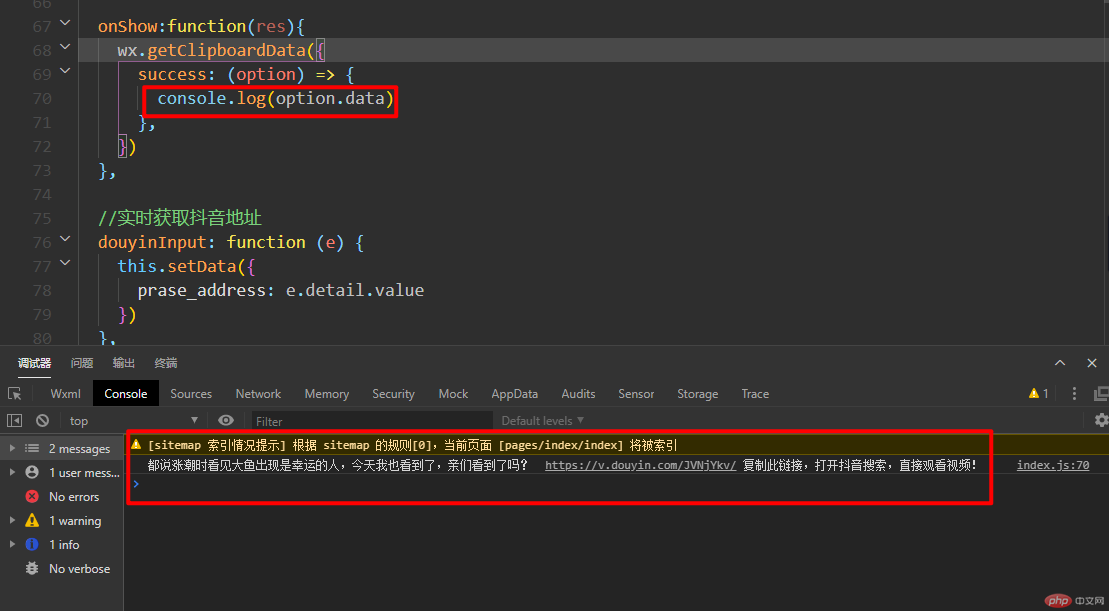
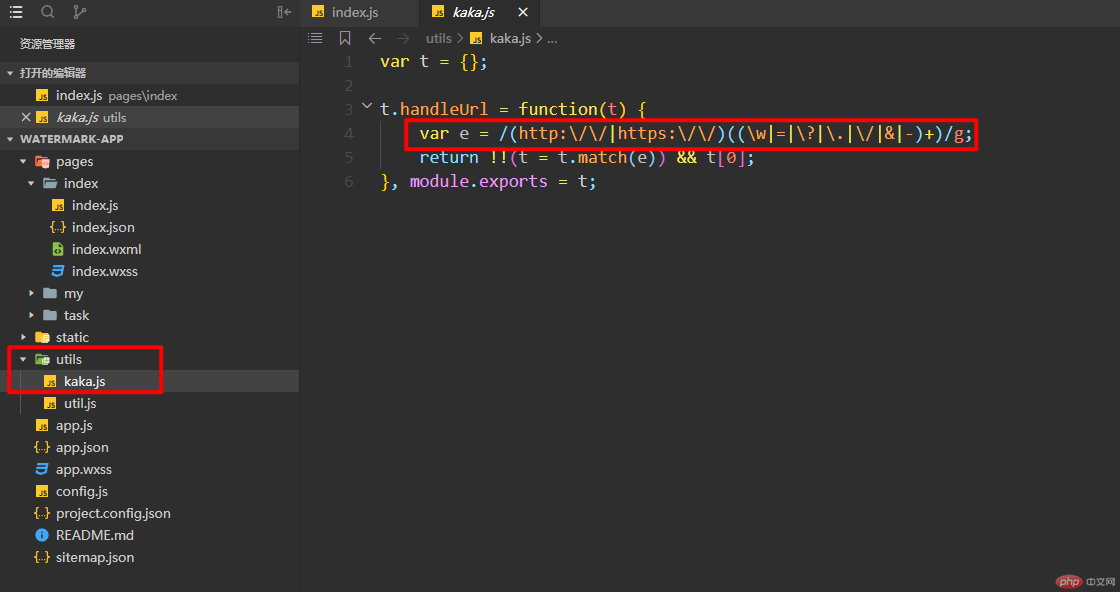
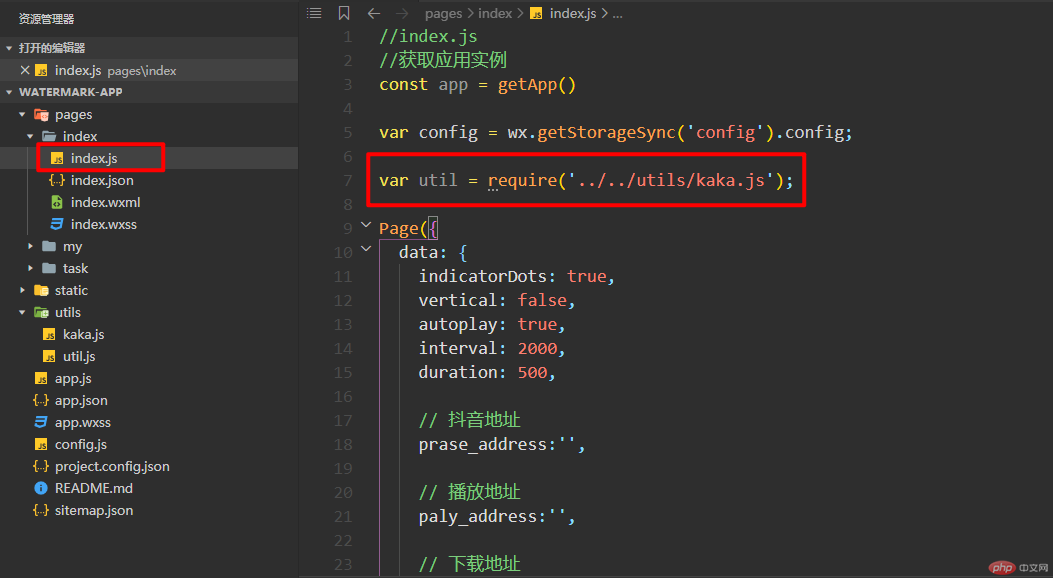
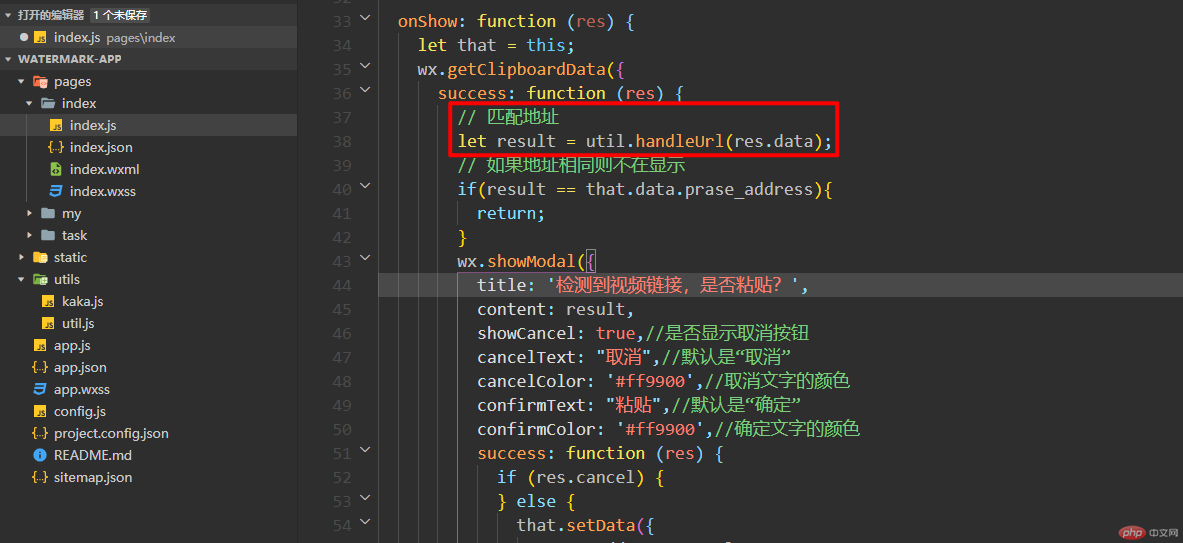
本文将会带领大家一起实现小程序的剪切板功能 这俩天在实现一个功能从微信复制的连接,当打开小程序时可以直接检测内容并且进行粘贴。 实现功能 实现效果如下 打开微信文档可以看到给提供的俩个接口,一个为设置系统剪贴板的内容,一个为获取系统剪贴板的内容 那么本文将会给大家介绍的就是获取系统剪切板的内容,接口为wx.getClipboardData 先根据文档来熟悉一下此接口的使用规则。 以上就是关于剪切板的使用规则,并且在文档中也给提供了使用方法,知道了这些内容就可以来到自己的项目进行验证了。 此处的过程只是为了给新接触小程序的伙伴一些开发经验。 下图就是非常简单的一个实现,可以看到复制的数据被直接打印在了控制台。 那么接下来要做的事情就是将复制过来的内容进行正则匹配,匹配出我们只需要的内容。 以下js代码在utils目录下新建一个文件即可。 然后在需要引入的地方进行引入文件即可使用。 调用正则匹配需要的数据,返回的值就是匹配完成的结果。 第二步做的处理就是当检测剪切板的内容跟设置后的值一致时不再弹框。 弹框的代码就是showModel这个接口,可以自行查看文档哈! 完整代码如下。 坚持学习、坚持写博、坚持分享是咔咔从业以来一直所秉持的信念。希望在偌大互联网中咔咔的文章能带给你一丝丝帮助。我是咔咔,下期见。
“
前言
一、小程序实现剪切板功能
<span style="display: block; background: url(https://files.mdnice.com/point.png); height: 30px; width: 100%; background-size: 40px; background-repeat: no-repeat; background-color: #282c34; margin-bottom: -7px; border-radius: 5px; background-position: 10px 10px;"></span><code class="hljs" style="overflow-x: auto; padding: 16px; color: #abb2bf; display: -webkit-box; font-family: Operator Mono, Consolas, Monaco, Menlo, monospace; font-size: 12px; -webkit-overflow-scrolling: touch; padding-top: 15px; background: #282c34; border-radius: 5px;">wx.getClipboardData({<br/> success (res){<br/> console.log(res.data)<br/> }<br/>})<br/></code>
二、代码实现
<span style="display: block; background: url(https://files.mdnice.com/point.png); height: 30px; width: 100%; background-size: 40px; background-repeat: no-repeat; background-color: #282c34; margin-bottom: -7px; border-radius: 5px; background-position: 10px 10px;"></span><code class="hljs" style="overflow-x: auto; padding: 16px; color: #abb2bf; display: -webkit-box; font-family: Operator Mono, Consolas, Monaco, Menlo, monospace; font-size: 12px; -webkit-overflow-scrolling: touch; padding-top: 15px; background: #282c34; border-radius: 5px;"><span class="hljs-keyword" style="color: #c678dd; line-height: 26px;">var</span> t = {};<br/><br/>t.handleUrl = <span class="hljs-function" style="line-height: 26px;"><span class="hljs-keyword" style="color: #c678dd; line-height: 26px;">function</span>(<span class="hljs-params" style="line-height: 26px;">t</span>) </span>{<br/> <span class="hljs-keyword" style="color: #c678dd; line-height: 26px;">var</span> e = <span class="hljs-regexp" style="color: #98c379; line-height: 26px;">/(http:\/\/|https:\/\/)((\w|=|\?|\.|\/|&|-)+)/g</span>;<br/> <span class="hljs-keyword" style="color: #c678dd; line-height: 26px;">return</span> !!(t = t.match(e)) && t[<span class="hljs-number" style="color: #d19a66; line-height: 26px;">0</span>];<br/>}, <span class="hljs-built_in" style="color: #e6c07b; line-height: 26px;">module</span>.exports = t;<br/></code><span style="display: block; background: url(https://files.mdnice.com/point.png); height: 30px; width: 100%; background-size: 40px; background-repeat: no-repeat; background-color: #282c34; margin-bottom: -7px; border-radius: 5px; background-position: 10px 10px;"></span><code class="hljs" style="overflow-x: auto; padding: 16px; color: #abb2bf; display: -webkit-box; font-family: Operator Mono, Consolas, Monaco, Menlo, monospace; font-size: 12px; -webkit-overflow-scrolling: touch; padding-top: 15px; background: #282c34; border-radius: 5px;"> onShow: <span class="hljs-function" style="line-height: 26px;"><span class="hljs-keyword" style="color: #c678dd; line-height: 26px;">function</span> (<span class="hljs-params" style="line-height: 26px;">res</span>) </span>{<br/> <span class="hljs-keyword" style="color: #c678dd; line-height: 26px;">let</span> that = <span class="hljs-keyword" style="color: #c678dd; line-height: 26px;">this</span>;<br/> wx.getClipboardData({<br/> <span class="hljs-attr" style="color: #d19a66; line-height: 26px;">success</span>: <span class="hljs-function" style="line-height: 26px;"><span class="hljs-keyword" style="color: #c678dd; line-height: 26px;">function</span> (<span class="hljs-params" style="line-height: 26px;">res</span>) </span>{<br/> <span class="hljs-comment" style="color: #5c6370; font-style: italic; line-height: 26px;">// 匹配地址</span><br/> <span class="hljs-keyword" style="color: #c678dd; line-height: 26px;">let</span> result = util.handleUrl(res.data);<br/> <span class="hljs-comment" style="color: #5c6370; font-style: italic; line-height: 26px;">// 如果地址相同则不在显示</span><br/> <span class="hljs-keyword" style="color: #c678dd; line-height: 26px;">if</span>(result == that.data.prase_address){<br/> <span class="hljs-keyword" style="color: #c678dd; line-height: 26px;">return</span>;<br/> }<br/> wx.showModal({<br/> <span class="hljs-attr" style="color: #d19a66; line-height: 26px;">title</span>: <span class="hljs-string" style="color: #98c379; line-height: 26px;">'检测到视频链接,是否粘贴?'</span>,<br/> <span class="hljs-attr" style="color: #d19a66; line-height: 26px;">content</span>: result,<br/> <span class="hljs-attr" style="color: #d19a66; line-height: 26px;">showCancel</span>: <span class="hljs-literal" style="color: #56b6c2; line-height: 26px;">true</span>,<span class="hljs-comment" style="color: #5c6370; font-style: italic; line-height: 26px;">//是否显示取消按钮</span><br/> <span class="hljs-attr" style="color: #d19a66; line-height: 26px;">cancelText</span>: <span class="hljs-string" style="color: #98c379; line-height: 26px;">"取消"</span>,<span class="hljs-comment" style="color: #5c6370; font-style: italic; line-height: 26px;">//默认是“取消”</span><br/> <span class="hljs-attr" style="color: #d19a66; line-height: 26px;">cancelColor</span>: <span class="hljs-string" style="color: #98c379; line-height: 26px;">'#ff9900'</span>,<span class="hljs-comment" style="color: #5c6370; font-style: italic; line-height: 26px;">//取消文字的颜色</span><br/> <span class="hljs-attr" style="color: #d19a66; line-height: 26px;">confirmText</span>: <span class="hljs-string" style="color: #98c379; line-height: 26px;">"粘贴"</span>,<span class="hljs-comment" style="color: #5c6370; font-style: italic; line-height: 26px;">//默认是“确定”</span><br/> <span class="hljs-attr" style="color: #d19a66; line-height: 26px;">confirmColor</span>: <span class="hljs-string" style="color: #98c379; line-height: 26px;">'#ff9900'</span>,<span class="hljs-comment" style="color: #5c6370; font-style: italic; line-height: 26px;">//确定文字的颜色</span><br/> <span class="hljs-attr" style="color: #d19a66; line-height: 26px;">success</span>: <span class="hljs-function" style="line-height: 26px;"><span class="hljs-keyword" style="color: #c678dd; line-height: 26px;">function</span> (<span class="hljs-params" style="line-height: 26px;">res</span>) </span>{<br/> <span class="hljs-keyword" style="color: #c678dd; line-height: 26px;">if</span> (res.cancel) {<br/> } <span class="hljs-keyword" style="color: #c678dd; line-height: 26px;">else</span> {<br/> that.setData({<br/> <span class="hljs-attr" style="color: #d19a66; line-height: 26px;">prase_address</span>: result,<br/> })<br/> }<br/> },<br/> })<br/> },<br/> <span class="hljs-attr" style="color: #d19a66; line-height: 26px;">fail</span>: <span class="hljs-function" style="line-height: 26px;"><span class="hljs-keyword" style="color: #c678dd; line-height: 26px;">function</span> (<span class="hljs-params" style="line-height: 26px;">res</span>) </span>{ },<br/> <span class="hljs-attr" style="color: #d19a66; line-height: 26px;">complete</span>: <span class="hljs-function" style="line-height: 26px;"><span class="hljs-keyword" style="color: #c678dd; line-height: 26px;">function</span> (<span class="hljs-params" style="line-height: 26px;">res</span>) </span>{<br/> },<br/> })<br/> },<br/></code>
“


0


0
小程序如何检测从微信复制的内容

咔咔
发布时间:2020-12-14 11:08:32
|3036人浏览过
|来源于php中文网
原创

相关文章
微信小程序商城互联互通,你必须知道的事!
数字人导购来了!小程序接入了实时数字人
制造业工厂,也需要小程序吗?
仓库盘点场景,用PDA扫描枪与小程序联动,效率提升300%!
为瑜伽馆设计小程序,关键不是约课,是“课后打卡社群”!

本站声明:本文内容由网友自发贡献,版权归原作者所有,本站不承担相应法律责任。如您发现有涉嫌抄袭侵权的内容,请联系admin@php.cn
热门AI工具


相关专题

硬盘接口类型有IDE、SATA、SCSI、Fibre Channel、USB、eSATA、mSATA、PCIe等等。详细介绍:1、IDE接口是一种并行接口,主要用于连接硬盘和光驱等设备,它主要有两种类型:ATA和ATAPI,IDE接口已经逐渐被SATA接口;2、SATA接口是一种串行接口,相较于IDE接口,它具有更高的传输速度、更低的功耗和更小的体积;3、SCSI接口等等。
1528
2023.10.19


PHP8.4本身不内置限流功能,需借助Redis(令牌桶)或Swoole(漏桶)实现;文件锁因I/O瓶颈、无跨机共享、秒级精度等缺陷不适用高并发场景。本专题为大家提供相关的文章、下载、课程内容,供大家免费下载体验。
2260
2025.12.29


php中文网为大家提供各种js正则表达式语法大全以及各种js正则表达式使用的方法,还有更多js正则表达式的相关文章、相关下载、相关课程,供大家免费下载体验。
523
2023.06.20

JS全称JavaScript,是一种具有函数优先的轻量级,解释型或即时编译型的编程语言;它是一种属于网络的高级脚本语言,主要用于Web,常用来为网页添加各式各样的动态功能。js怎么获取当前时间呢?php中文网给大家带来了相关的教程以及文章,欢迎大家前来学习阅读。
432
2023.07.28

js字符串转数组的方法:1、使用“split()”方法;2、使用“Array.from()”方法;3、使用for循环遍历;4、使用“Array.split()”方法。本专题为大家提供js字符串转数组的相关的文章、下载、课程内容,供大家免费下载体验。
573
2023.08.03

JS是JavaScript的缩写,它是一种广泛应用于网页开发的脚本语言。JavaScript是一种解释性的、基于对象和事件驱动的编程语言,通常用于为网页增加交互性和动态性。它可以在网页上实现复杂的功能和效果,如表单验证、页面元素操作、动画效果、数据交互等。
5668
2023.08.17

本专题系统整理pixiv网页版官网入口及登录访问方式,涵盖官网登录页面直达路径、在线阅读入口及快速进入方法说明,帮助用户高效找到pixiv官方网站,实现便捷、安全的网页端浏览与账号登录体验。
561
2026.02.13
热门下载
相关下载
精品课程




