



css实现圆环效果有多种方法,这里为大家分享五种方法:
(推荐教程:CSS教程)
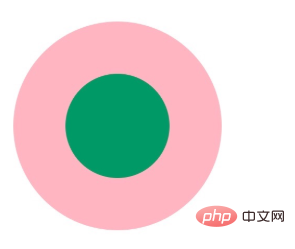
首先我们来看一下实现效果:
立即学习“前端免费学习笔记(深入)”;
接下来为大家介绍方法:
1、两个标签的嵌套
.element1{
            width: 200px;
            height: 200px;
            background-color: lightpink;
            border-radius: 50%;
        }
        .child1{
            width: 100px;
            height: 100px;
            border-radius: 50%;
            background-color: #009966;
            position: relative;
            top: 50px;
            left: 50px;
        }
2、使用伪元素,before/after
.element2{
            width: 200px;
            height: 200px;
            background-color: lightpink;
            border-radius: 50%;
        }
        .element2:after{
            content: "";
            display: block;
            width: 100px;
            height: 100px;
            border-radius: 50%;
            background-color: #009966;
            position: relative;
            top: 50px;
            left: 50px;
        }
3、使用border:
 .element3{
            width: 100px;
            height: 100px;
            background-color: #009966;
            border-radius: 50%;
            border: 50px solid lightpink ;
}(学习视频推荐:css视频教程)
4、使用border-shadow
.element4{
            width: 100px;
            height: 100px;
            background-color: #009966;
            border-radius: 50%;
            box-shadow: 0 0 0 50px lightpink ;
            margin: auto;
        }
.element5{ width: 200px; height: 200px; background-color: #009966; border-radius: 50%; box-shadow: 0 0 0 50px lightpink inset; margin: auto; }5、使用radial-gradient
.element6{ width: 200px; height: 200px; border-radius: 50%; background: -webkit-radial-gradient( circle closest-side,#009966 50%,lightpink 50%); }相关文章
css如何改变flex主轴方向_实现水平或垂直布局切换
css 初级项目导航栏不居中怎么办_通过 flex 布局实现水平垂直居中
css动画元素旋转角度不正确怎么办_检查transform-origin设置
css 盒模型 行高会影响盒子高度吗_通过理解 line height 参与计算方式
css 浮动布局中中间列自适应怎么实现_通过宽度计算方式解释
本站声明:本文内容由网友自发贡献,版权归原作者所有,本站不承担相应法律责任。如您发现有涉嫌抄袭侵权的内容,请联系admin@php.cn
更多热门AI工具




