


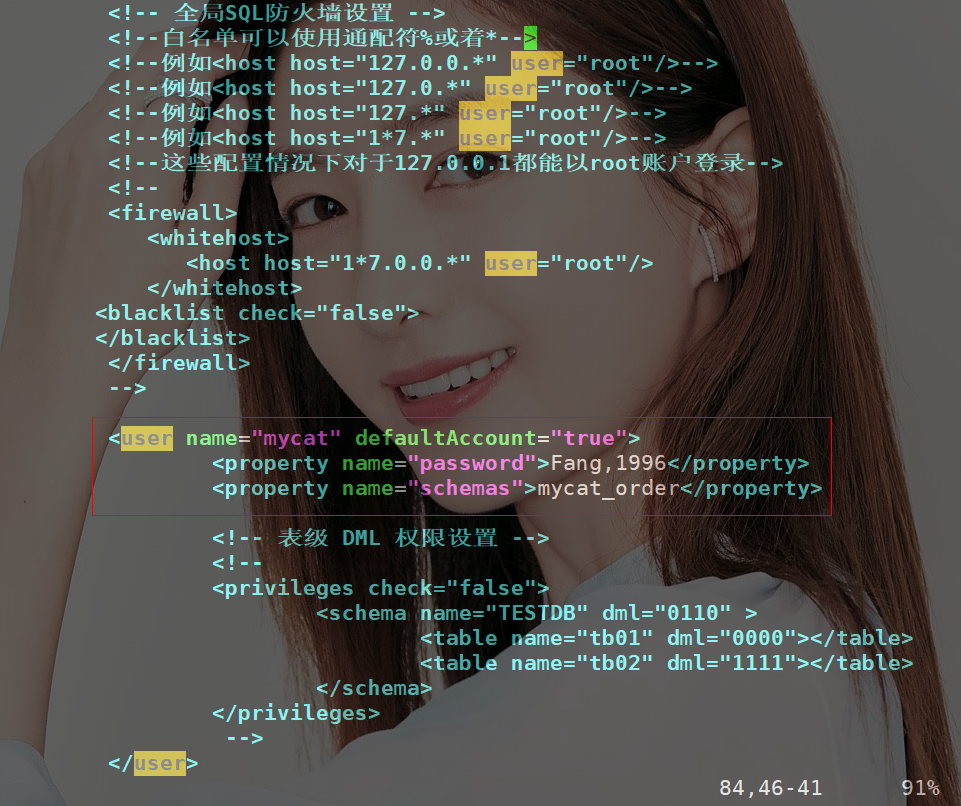
借助mycat来实现mysql的分库分表落地,没有实现过的,或者没了解过的可以看看 在之前写过一篇关于mysql分库分表的文章,那篇文章只是给大家提供了一个思路,但是回复下面有很多说是细节问题没有提到。所以咔咔就在出了这篇文章。 本文只是针对其中的一个细节而已,比如如何落地MySQL的分库分表,本文使用数据库中间件MyCat来实现。 其中还有最多的回复是分库分表后的分页查询如何操作,这个问题也会在后文继续写到。 关于MySQL分库分表这个真正落地使用中间还有很多的问题,咔咔尽量把解决方案都提供给大家,如你有更好的实现方案,评论区见哈! 避免提示广告问题,自己去打开MyCat的官方地址去复制下载地址,这里咔咔就不提供了。 咔咔使用的虚拟机是centos7.3,需要环境的jdk已经有了,就不在写教程了。如没有的话,百度搜搜就可以了哈! 下图就是安装成功的安装包 需要创建一个新的MySQL用户用来连接Mycat 以下就是创建用户的流程 配置项一:server.xml 此处使用上边创建的新的MySQL用户mycat,可以管理的逻辑库为mycat_order,对应schema.xml中的 框出的来的解读一下 第一行:name值后边是上边创建的MySQL用户
第二行:是mycat用户的密码
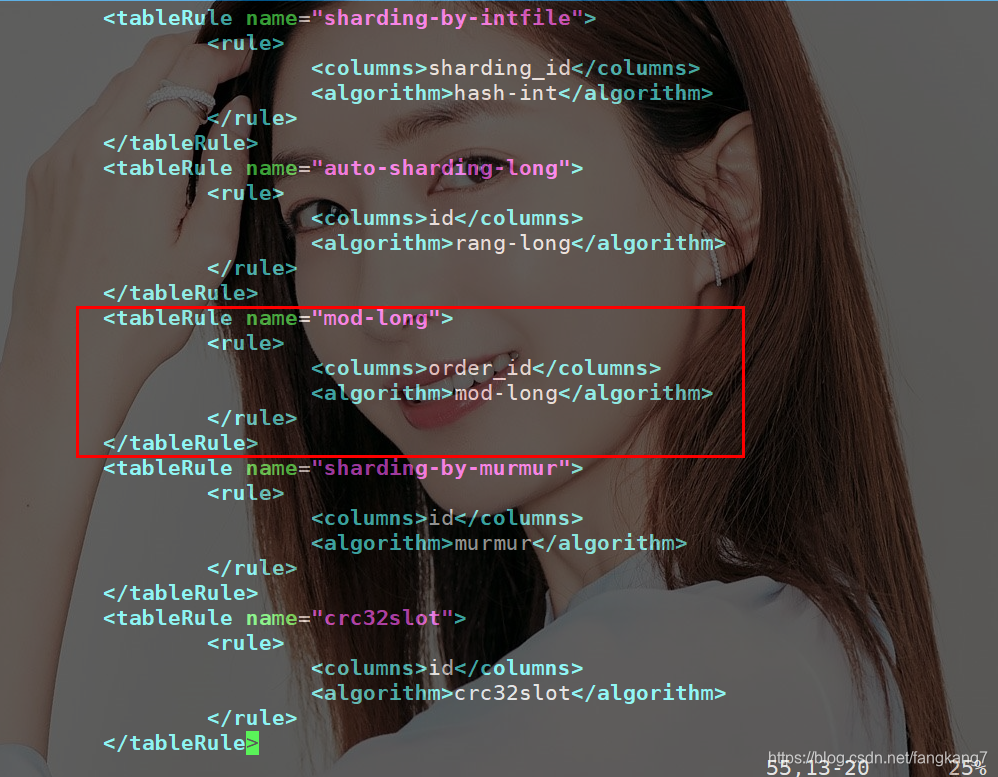
第三行:是数据库 这个文件主要修改连接其他数据库的俩个节点 使用规则是mod-long这个需要注意一下子 在这块的配置咔咔卡了很久,下面这个是咔咔已经配置好的 配置项三:rule.xml 这里是order_id使用mod-long规则 在俩台服务器114.55.103.25和192.168.253.129创建数据库kaka和kaka 分别创建t_order和t_order_detail俩张表 表结构如下 连接: 连接成功就可以看到我们的逻辑库 这个时候我们查看一下逻辑库的t_order数据,这里的order_id本应该是从1000开始的,之前咔咔做测试使用了一些。 「192.168.253.129数据库」这个可以看到进入了俩条数据 这台数据库只进入了一条数据 其实这一切mycat都已经帮你做好了 比如现在user_id为103的数据分布分俩台数据库上,我们进行查询 本文使用的mycat也是咔咔第一次接触,也有很多的东西不明白。后边咔咔也会一点点的补充这方面的知识,希望大家一起共同进步。 坚持学习、坚持写博、坚持分享是咔咔从业以来一直所秉持的信念。希望在诺大互联网中咔咔的文章能带给你一丝丝帮助。
❝
前言
本文使用环境
一、MyCat安装
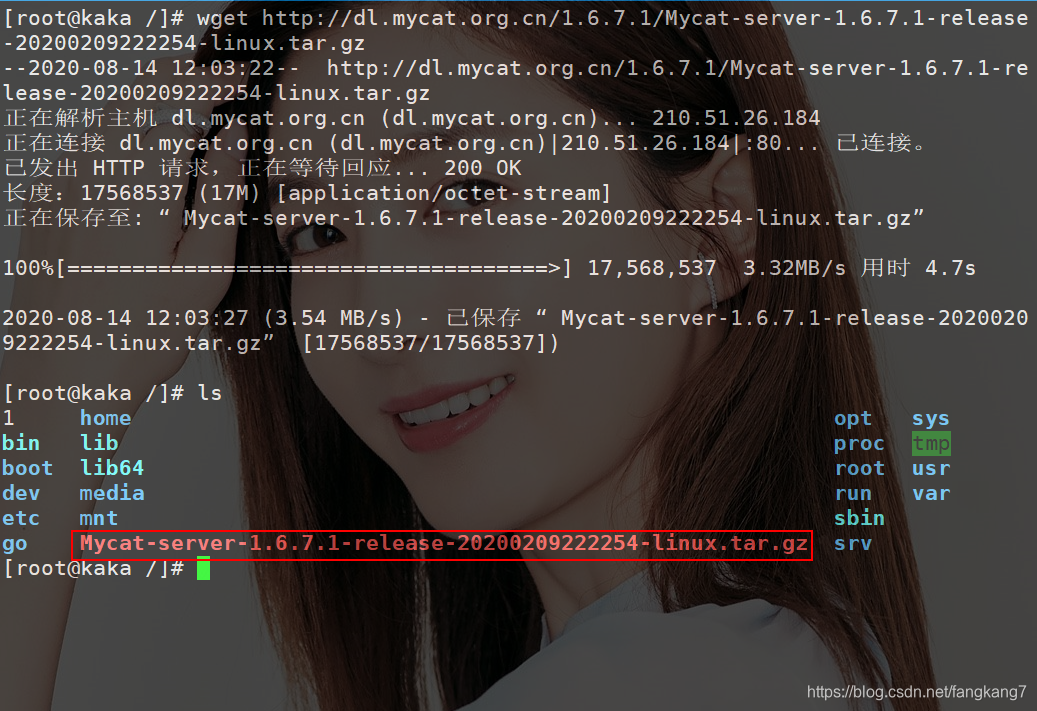 进行解压:
进行解压:tar -zxvf Mycat-server-1.6.7.1-release-20200209222254-linux.tar.gz,解压成功后会在目录下存在一个mycat目录。
二、创建一个新的MySQL用户
<span style="display: block; background: url(https://my-wechat.mdnice.com/point.png); height: 30px; width: 100%; background-size: 40px; background-repeat: no-repeat; background-color: #272822; margin-bottom: -7px; border-radius: 5px; background-position: 10px 10px;"></span><code class="hljs" style="overflow-x: auto; padding: 16px; color: #ddd; display: -webkit-box; font-family: Operator Mono, Consolas, Monaco, Menlo, monospace; font-size: 12px; -webkit-overflow-scrolling: touch; letter-spacing: 0px; padding-top: 15px; background: #272822; border-radius: 5px;">// 创建mycat用户<br/>CREATE USER <span class="hljs-string" style="color: #a6e22e; line-height: 26px;">'mycat'</span>@<span class="hljs-string" style="color: #a6e22e; line-height: 26px;">'%'</span> IDENTIFIED BY <span class="hljs-string" style="color: #a6e22e; line-height: 26px;">'mycat'</span>;<br/>// 修改密码<br/>ALTER USER <span class="hljs-string" style="color: #a6e22e; line-height: 26px;">'mycat'</span>@<span class="hljs-string" style="color: #a6e22e; line-height: 26px;">'%'</span> IDENTIFIED WITH mysql_native_password BY ’Fang,1996<span class="hljs-string" style="color: #a6e22e; line-height: 26px;">'; <br/>// 刷新权限<br/>FLUSH PRIVILEGES;<br/></span></code>
三、配置MyCat
 配置项二:schema.xml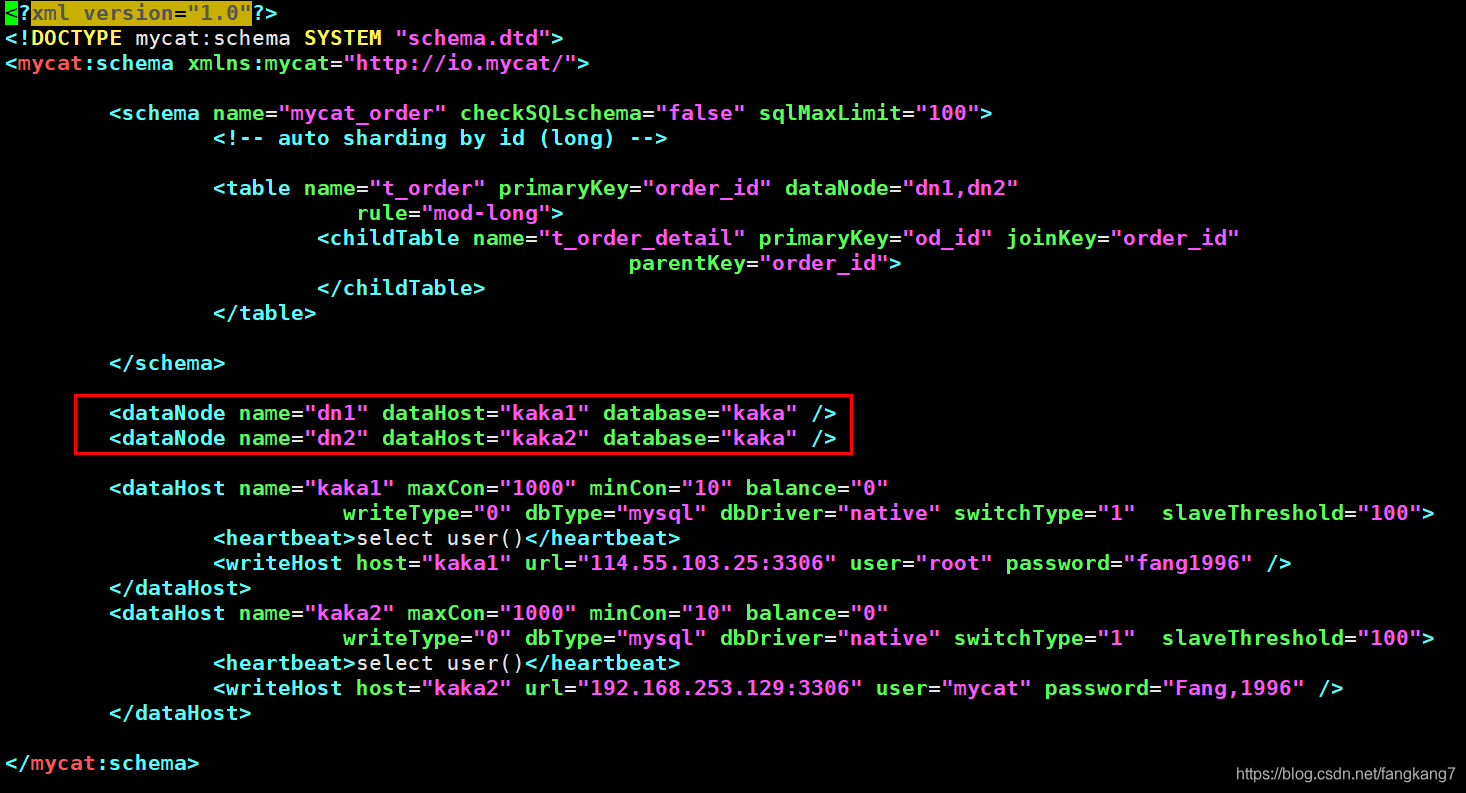
 这个修改就是你有几个节点就写多少即可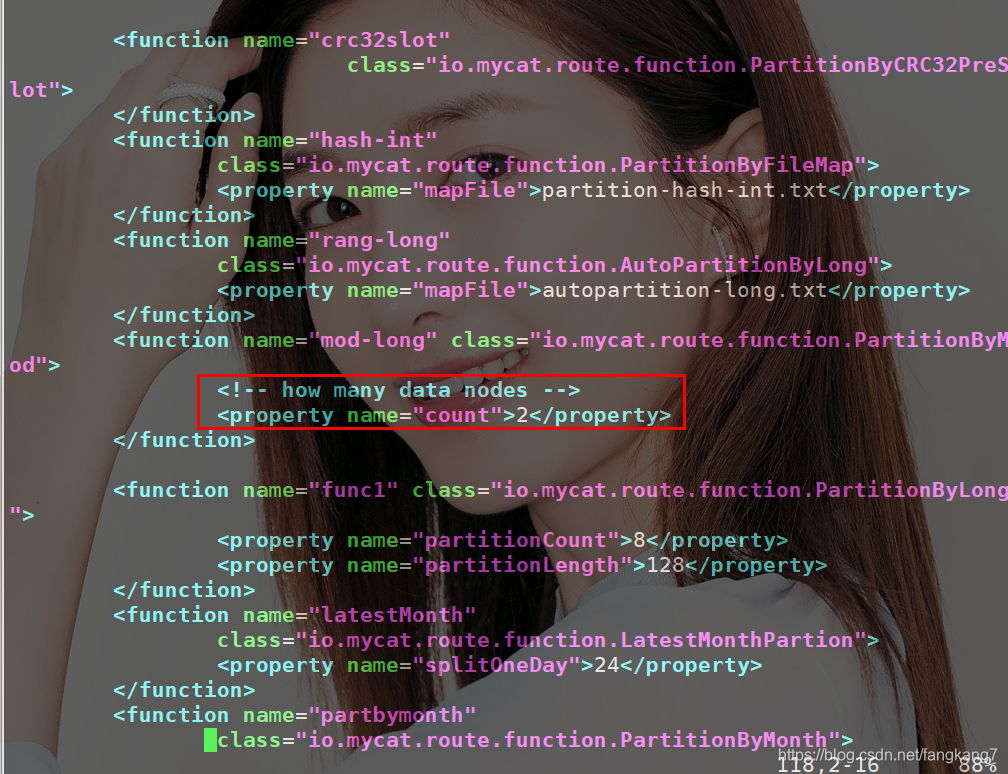
三、数据库信息准备
<span style="display: block; background: url(https://my-wechat.mdnice.com/point.png); height: 30px; width: 100%; background-size: 40px; background-repeat: no-repeat; background-color: #272822; margin-bottom: -7px; border-radius: 5px; background-position: 10px 10px;"></span><code class="hljs" style="overflow-x: auto; padding: 16px; color: #ddd; display: -webkit-box; font-family: Operator Mono, Consolas, Monaco, Menlo, monospace; font-size: 12px; -webkit-overflow-scrolling: touch; letter-spacing: 0px; padding-top: 15px; background: #272822; border-radius: 5px;"><span class="hljs-keyword" style="color: #f92672; font-weight: bold; line-height: 26px;">CREATE</span> <span class="hljs-keyword" style="color: #f92672; font-weight: bold; line-height: 26px;">TABLE</span> <span class="hljs-string" style="color: #a6e22e; line-height: 26px;">`t_order_detail`</span> (<br/> <span class="hljs-string" style="color: #a6e22e; line-height: 26px;">`od_id`</span> <span class="hljs-built_in" style="color: #a6e22e; line-height: 26px;">int</span>(<span class="hljs-number" style="line-height: 26px;">11</span>) <span class="hljs-keyword" style="color: #f92672; font-weight: bold; line-height: 26px;">NOT</span> <span class="hljs-literal" style="color: #f92672; font-weight: bold; line-height: 26px;">NULL</span>,<br/> <span class="hljs-string" style="color: #a6e22e; line-height: 26px;">`order_id`</span> <span class="hljs-built_in" style="color: #a6e22e; line-height: 26px;">int</span>(<span class="hljs-number" style="line-height: 26px;">11</span>) <span class="hljs-keyword" style="color: #f92672; font-weight: bold; line-height: 26px;">DEFAULT</span> <span class="hljs-literal" style="color: #f92672; font-weight: bold; line-height: 26px;">NULL</span>,<br/> <span class="hljs-string" style="color: #a6e22e; line-height: 26px;">`goods_id`</span> <span class="hljs-built_in" style="color: #a6e22e; line-height: 26px;">int</span>(<span class="hljs-number" style="line-height: 26px;">11</span>) <span class="hljs-keyword" style="color: #f92672; font-weight: bold; line-height: 26px;">DEFAULT</span> <span class="hljs-literal" style="color: #f92672; font-weight: bold; line-height: 26px;">NULL</span>,<br/> <span class="hljs-string" style="color: #a6e22e; line-height: 26px;">`unit_price`</span> <span class="hljs-built_in" style="color: #a6e22e; line-height: 26px;">float</span> <span class="hljs-keyword" style="color: #f92672; font-weight: bold; line-height: 26px;">DEFAULT</span> <span class="hljs-literal" style="color: #f92672; font-weight: bold; line-height: 26px;">NULL</span>,<br/> <span class="hljs-string" style="color: #a6e22e; line-height: 26px;">`qty`</span> <span class="hljs-built_in" style="color: #a6e22e; line-height: 26px;">int</span>(<span class="hljs-number" style="line-height: 26px;">11</span>) <span class="hljs-keyword" style="color: #f92672; font-weight: bold; line-height: 26px;">DEFAULT</span> <span class="hljs-literal" style="color: #f92672; font-weight: bold; line-height: 26px;">NULL</span>,<br/> PRIMARY <span class="hljs-keyword" style="color: #f92672; font-weight: bold; line-height: 26px;">KEY</span> (<span class="hljs-string" style="color: #a6e22e; line-height: 26px;">`od_id`</span>)<br/>) <span class="hljs-keyword" style="color: #f92672; font-weight: bold; line-height: 26px;">ENGINE</span>=<span class="hljs-keyword" style="color: #f92672; font-weight: bold; line-height: 26px;">InnoDB</span> <span class="hljs-keyword" style="color: #f92672; font-weight: bold; line-height: 26px;">DEFAULT</span> <span class="hljs-keyword" style="color: #f92672; font-weight: bold; line-height: 26px;">CHARSET</span>=utf8;<br/><br/><span class="hljs-keyword" style="color: #f92672; font-weight: bold; line-height: 26px;">CREATE</span> <span class="hljs-keyword" style="color: #f92672; font-weight: bold; line-height: 26px;">TABLE</span> <span class="hljs-string" style="color: #a6e22e; line-height: 26px;">`t_order`</span> (<br/> <span class="hljs-string" style="color: #a6e22e; line-height: 26px;">`order_id`</span> bagint(<span class="hljs-number" style="line-height: 26px;">20</span>) <span class="hljs-keyword" style="color: #f92672; font-weight: bold; line-height: 26px;">NOT</span> <span class="hljs-literal" style="color: #f92672; font-weight: bold; line-height: 26px;">NULL</span>,<br/> <span class="hljs-string" style="color: #a6e22e; line-height: 26px;">`user_id`</span> <span class="hljs-built_in" style="color: #a6e22e; line-height: 26px;">int</span>(<span class="hljs-number" style="line-height: 26px;">11</span>) <span class="hljs-keyword" style="color: #f92672; font-weight: bold; line-height: 26px;">DEFAULT</span> <span class="hljs-literal" style="color: #f92672; font-weight: bold; line-height: 26px;">NULL</span>,<br/> <span class="hljs-string" style="color: #a6e22e; line-height: 26px;">`pay_mode`</span> <span class="hljs-built_in" style="color: #a6e22e; line-height: 26px;">tinyint</span>(<span class="hljs-number" style="line-height: 26px;">4</span>) <span class="hljs-keyword" style="color: #f92672; font-weight: bold; line-height: 26px;">DEFAULT</span> <span class="hljs-literal" style="color: #f92672; font-weight: bold; line-height: 26px;">NULL</span>,<br/> <span class="hljs-string" style="color: #a6e22e; line-height: 26px;">`amount`</span> <span class="hljs-built_in" style="color: #a6e22e; line-height: 26px;">float</span> <span class="hljs-keyword" style="color: #f92672; font-weight: bold; line-height: 26px;">DEFAULT</span> <span class="hljs-literal" style="color: #f92672; font-weight: bold; line-height: 26px;">NULL</span>,<br/> <span class="hljs-string" style="color: #a6e22e; line-height: 26px;">`order_date`</span> datetime <span class="hljs-keyword" style="color: #f92672; font-weight: bold; line-height: 26px;">DEFAULT</span> <span class="hljs-literal" style="color: #f92672; font-weight: bold; line-height: 26px;">NULL</span>,<br/> PRIMARY <span class="hljs-keyword" style="color: #f92672; font-weight: bold; line-height: 26px;">KEY</span> (<span class="hljs-string" style="color: #a6e22e; line-height: 26px;">`order_id`</span>)<br/>) <span class="hljs-keyword" style="color: #f92672; font-weight: bold; line-height: 26px;">ENGINE</span>=<span class="hljs-keyword" style="color: #f92672; font-weight: bold; line-height: 26px;">InnoDB</span> <span class="hljs-keyword" style="color: #f92672; font-weight: bold; line-height: 26px;">DEFAULT</span> <span class="hljs-keyword" style="color: #f92672; font-weight: bold; line-height: 26px;">CHARSET</span>=utf8;<br/></code>
四、测试连接并插入数据,查看数据分布状态
mysql -umycat -p -P8066 -h192.168.253.129 --default-auth=mysql_native_password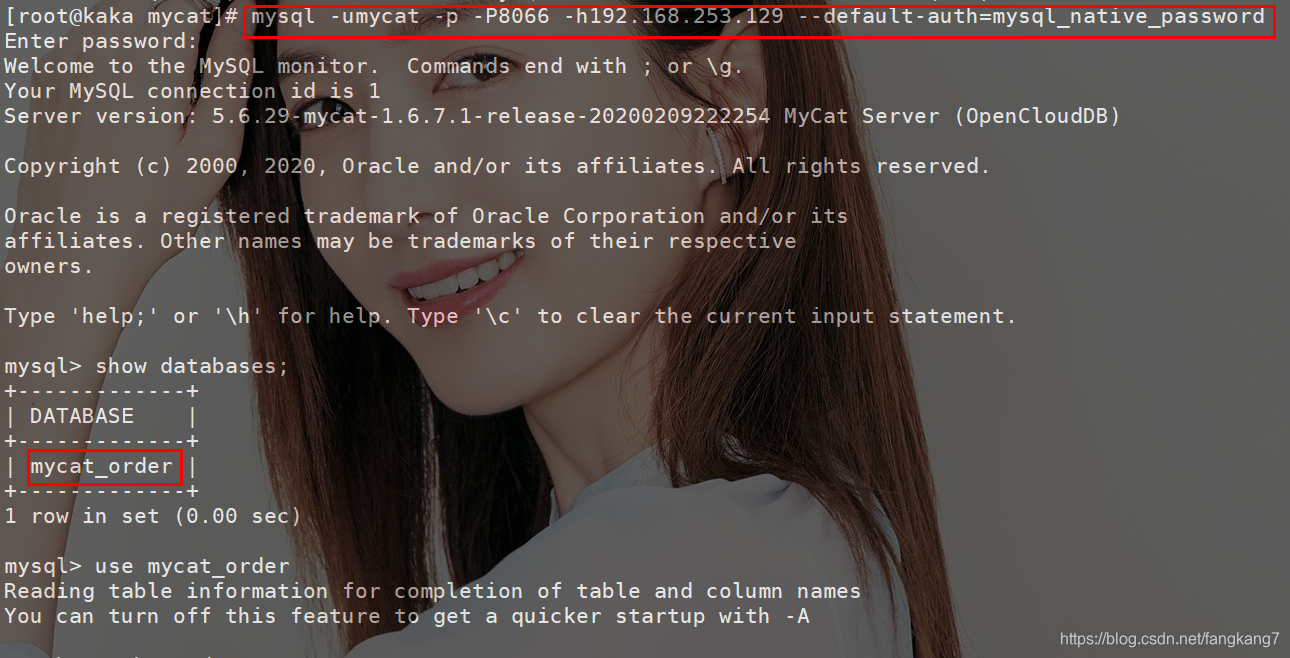 然后添加三个数据
<span style="display: block; background: url(https://my-wechat.mdnice.com/point.png); height: 30px; width: 100%; background-size: 40px; background-repeat: no-repeat; background-color: #272822; margin-bottom: -7px; border-radius: 5px; background-position: 10px 10px;"></span><code class="hljs" style="overflow-x: auto; padding: 16px; color: #ddd; display: -webkit-box; font-family: Operator Mono, Consolas, Monaco, Menlo, monospace; font-size: 12px; -webkit-overflow-scrolling: touch; letter-spacing: 0px; padding-top: 15px; background: #272822; border-radius: 5px;"><span class="hljs-keyword" style="color: #f92672; font-weight: bold; line-height: 26px;">insert</span> <span class="hljs-keyword" style="color: #f92672; font-weight: bold; line-height: 26px;">into</span> t_order (order_id,user_id,pay_mode,amount) <span class="hljs-keyword" style="color: #f92672; font-weight: bold; line-height: 26px;">values</span> (<span class="hljs-keyword" style="color: #f92672; font-weight: bold; line-height: 26px;">next</span> <span class="hljs-keyword" style="color: #f92672; font-weight: bold; line-height: 26px;">value</span> <span class="hljs-keyword" style="color: #f92672; font-weight: bold; line-height: 26px;">for</span> MYCATSEQ_ORDER,<span class="hljs-number" style="line-height: 26px;">103</span>,<span class="hljs-number" style="line-height: 26px;">1</span><br/><span class="hljs-keyword" style="color: #f92672; font-weight: bold; line-height: 26px;">Query</span> OK, <span class="hljs-number" style="line-height: 26px;">1</span> <span class="hljs-keyword" style="color: #f92672; font-weight: bold; line-height: 26px;">row</span> affected (<span class="hljs-number" style="line-height: 26px;">0.01</span> sec)<br/><br/><span class="hljs-keyword" style="color: #f92672; font-weight: bold; line-height: 26px;">insert</span> <span class="hljs-keyword" style="color: #f92672; font-weight: bold; line-height: 26px;">into</span> t_order (order_id,user_id,pay_mode,amount) <span class="hljs-keyword" style="color: #f92672; font-weight: bold; line-height: 26px;">values</span> (<span class="hljs-keyword" style="color: #f92672; font-weight: bold; line-height: 26px;">next</span> <span class="hljs-keyword" style="color: #f92672; font-weight: bold; line-height: 26px;">value</span> <span class="hljs-keyword" style="color: #f92672; font-weight: bold; line-height: 26px;">for</span> MYCATSEQ_ORDER,<span class="hljs-number" style="line-height: 26px;">103</span>,<span class="hljs-number" style="line-height: 26px;">1</span><br/><span class="hljs-keyword" style="color: #f92672; font-weight: bold; line-height: 26px;">Query</span> OK, <span class="hljs-number" style="line-height: 26px;">1</span> <span class="hljs-keyword" style="color: #f92672; font-weight: bold; line-height: 26px;">row</span> affected (<span class="hljs-number" style="line-height: 26px;">0.01</span> sec)<br/><br/><span class="hljs-keyword" style="color: #f92672; font-weight: bold; line-height: 26px;">insert</span> <span class="hljs-keyword" style="color: #f92672; font-weight: bold; line-height: 26px;">into</span> t_order (order_id,user_id,pay_mode,amount) <span class="hljs-keyword" style="color: #f92672; font-weight: bold; line-height: 26px;">values</span> (<span class="hljs-keyword" style="color: #f92672; font-weight: bold; line-height: 26px;">next</span> <span class="hljs-keyword" style="color: #f92672; font-weight: bold; line-height: 26px;">value</span> <span class="hljs-keyword" style="color: #f92672; font-weight: bold; line-height: 26px;">for</span> MYCATSEQ_ORDER,<span class="hljs-number" style="line-height: 26px;">103</span>,<span class="hljs-number" style="line-height: 26px;">1</span><br/><span class="hljs-keyword" style="color: #f92672; font-weight: bold; line-height: 26px;">Query</span> OK, <span class="hljs-number" style="line-height: 26px;">1</span> <span class="hljs-keyword" style="color: #f92672; font-weight: bold; line-height: 26px;">row</span> affected (<span class="hljs-number" style="line-height: 26px;">0.01</span> sec)<br/></code>
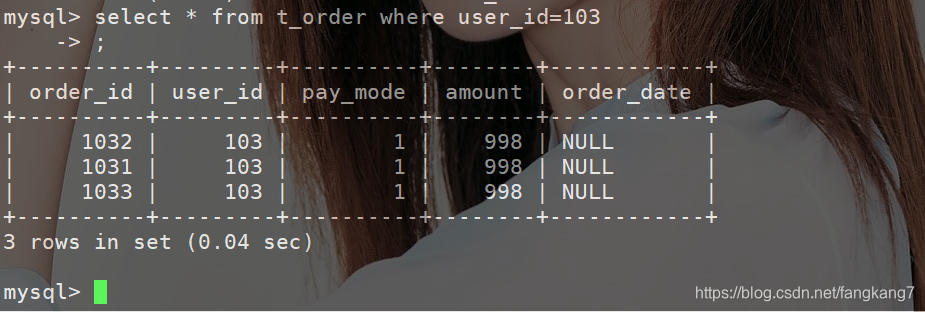 这时我们在来看192.168.253.129和114.55.103.25这俩台数据库的数据分布
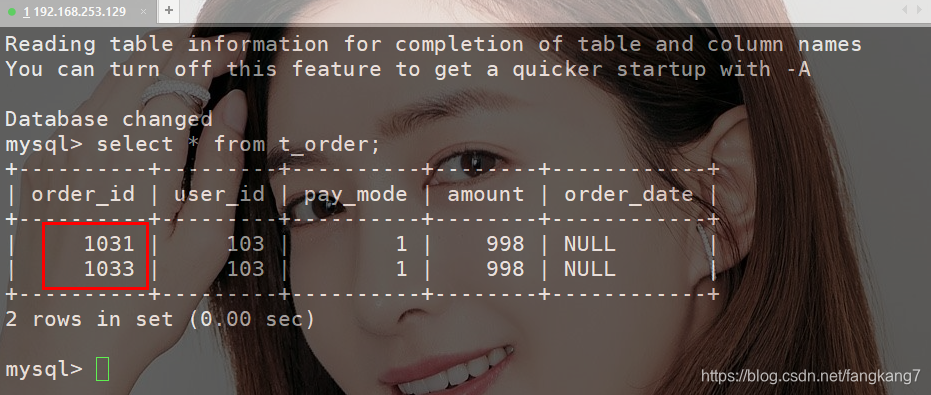 「144.55.103.25数据库」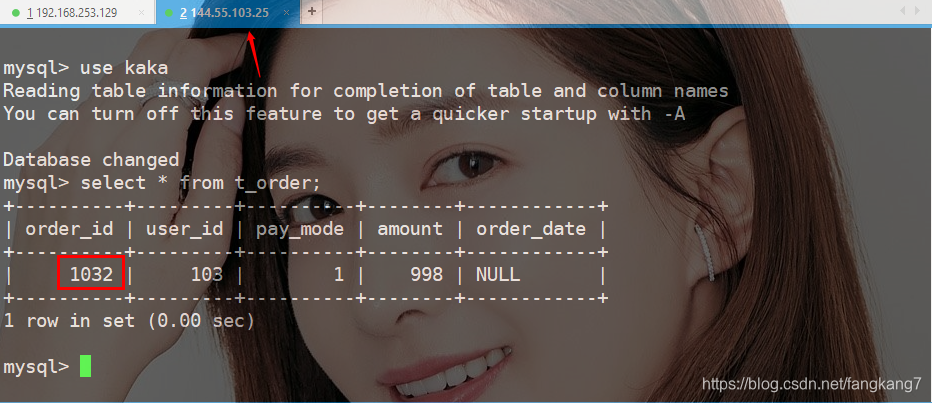
五、分页查询,需要的数据在不同表的查询
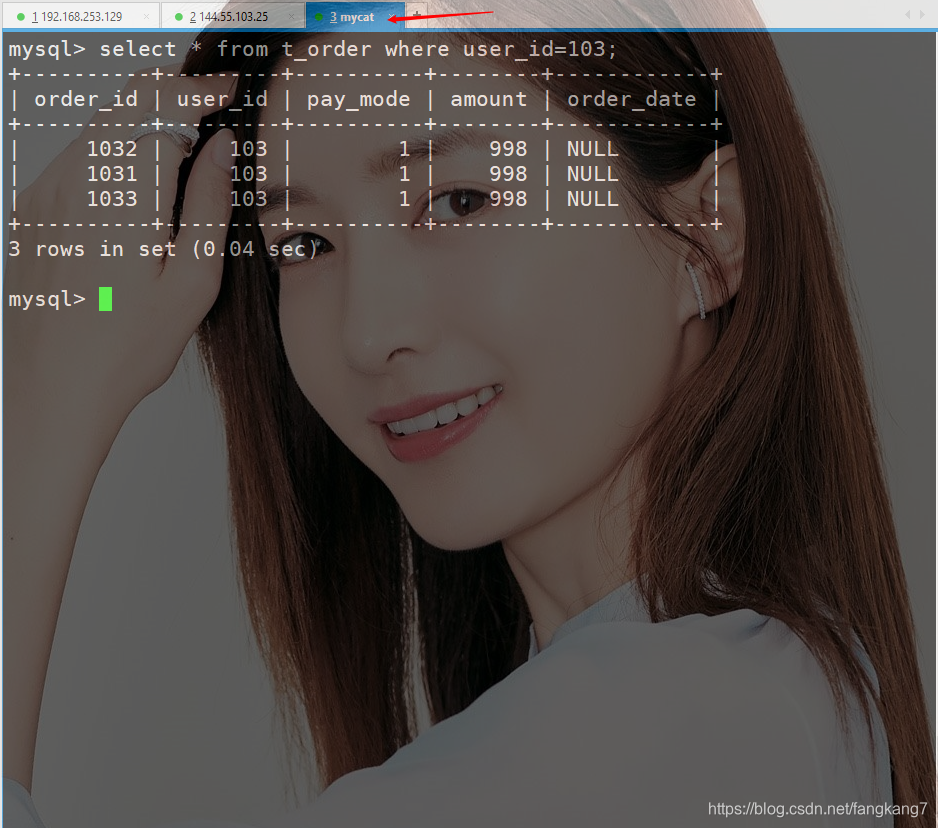 还有分页问题,都跟平时一样的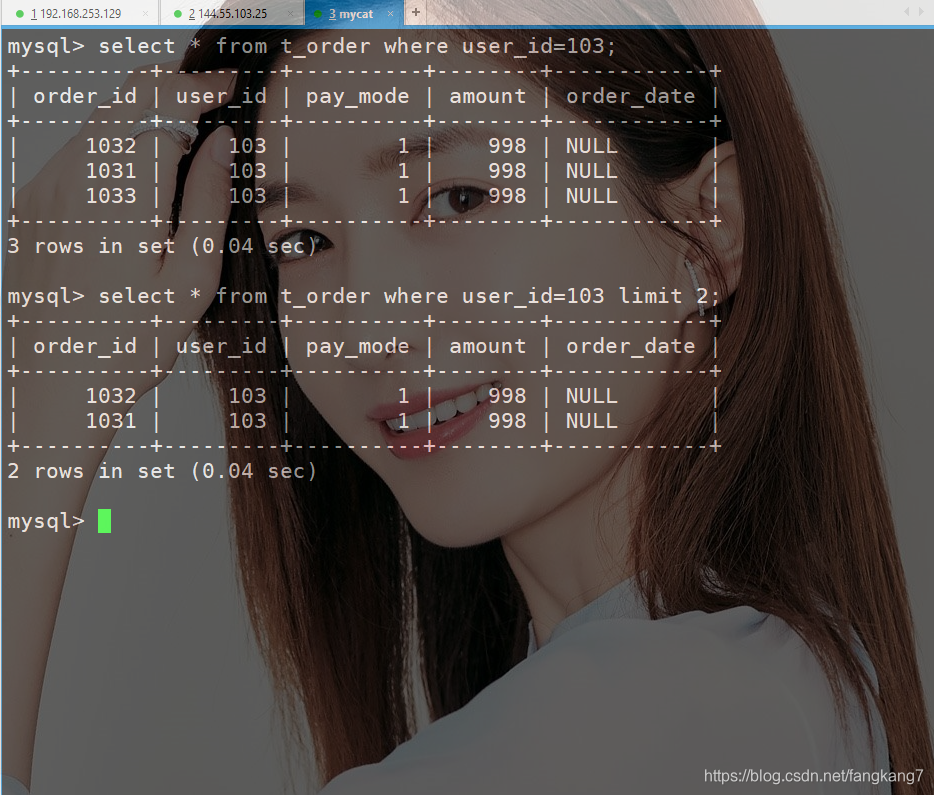
六、总结
❝


0


0
你们要的MyCat实现MySQL分库分表来了

咔咔
发布时间:2020-08-16 12:47:31
|2094人浏览过
|来源于php中文网
原创
相关文章
如何在MySQL中实现读写分离?ProxySQL配置读写分离的完整流程!
MySQL如何进行分库分表 MySQL分库分表的实现与注意事项
MySQL如何实现数据库读写分离_架构设计要点有哪些?
MySQL数据库中数据分片技术有哪些_实际应用效果如何?
MySQL怎么实现读写分离_有哪些架构设计方案?
本站声明:本文内容由网友自发贡献,版权归原作者所有,本站不承担相应法律责任。如您发现有涉嫌抄袭侵权的内容,请联系admin@php.cn
热门AI工具


相关专题

MySQL修改数据表:1、首先查看数据库中所有的表,代码为:‘SHOW TABLES;’;2、修改表名,代码为:‘ALTER TABLE 旧表名 RENAME [TO] 新表名;’。php中文网还提供MySQL的相关下载、相关课程等内容,供大家免费下载使用。
686
2023.06.20

存储程序可以分为存储过程和函数,MySQL中创建存储过程和函数使用的语句分别为CREATE PROCEDURE和CREATE FUNCTION。使用CALL语句调用存储过程智能用输出变量返回值。函数可以从语句外调用(通过引用函数名),也能返回标量值。存储过程也可以调用其他存储过程。php中文网还提供MySQL创建存储过程的相关下载、相关课程等内容,供大家免费下载使用。
513
2023.06.21

mongodb和mysql的区别:1、数据模型;2、查询语言;3、扩展性和性能;4、可靠性。本专题为大家提供mongodb和mysql的区别的相关的文章、下载、课程内容,供大家免费下载体验。
287
2023.07.18

MySQL是一个关系型数据库管理系统,由瑞典MySQL AB 公司开发,属于 Oracle 旗下产品。MySQL 是最流行的关系型数据库管理系统之一,在 WEB 应用方面,MySQL是最好的 RDBMS 应用软件之一。那么mysql密码忘了怎么办呢?php中文网给大家带来了相关的教程以及文章,欢迎大家前来阅读学习。
519
2023.07.19

MySQL是一个关系型数据库管理系统,由瑞典MySQL AB 公司开发,属于 Oracle 旗下产品。MySQL 是最流行的关系型数据库管理系统之一,在 WEB 应用方面,MySQL是最好的 RDBMS 应用软件之一。那么mysql怎么创建数据库呢?php中文网给大家带来了相关的教程以及文章,欢迎大家前来阅读学习。
267
2023.07.25

MySQL是一种广泛使用的关系型数据库管理系统,它支持事务处理。事务是一组数据库操作,它们作为一个逻辑单元被一起执行。为了保证事务的一致性和隔离性,MySQL提供了不同的事务隔离级别。php中文网给大家带来了相关的教程以及文章欢迎大家前来学习阅读。
392
2023.08.08

SQL Server和MySQL是两种广泛使用的关系型数据库管理系统。它们具有相似的功能和用途,但在某些方面存在一些显著的区别。php中文网给大家带来了相关的教程以及文章,欢迎大家前来学习阅读。
542
2023.08.11

MySQL是一种关系型数据库管理系统,关系数据库将数据保存在不同的表中,而不是将所有数据放在一个大仓库内,这样就增加了速度并提高了灵活性。那么忘记mysql密码我们该怎么解决呢?php中文网给大家带来了相关的教程以及其他关于mysql的文章,欢迎大家前来学习阅读。
668
2023.08.14

本专题围绕 C# 在现代后端架构中的微服务实践展开,系统讲解基于 ASP.NET Core 构建可扩展服务体系的核心方法。内容涵盖服务拆分策略、RESTful API 设计、服务间通信、API 网关统一入口管理以及服务治理机制。通过真实项目案例,帮助开发者掌握构建高可用微服务系统的关键技术,提高系统的可扩展性与维护效率。
3
2026.03.11
热门下载
精品课程


最新文章


