



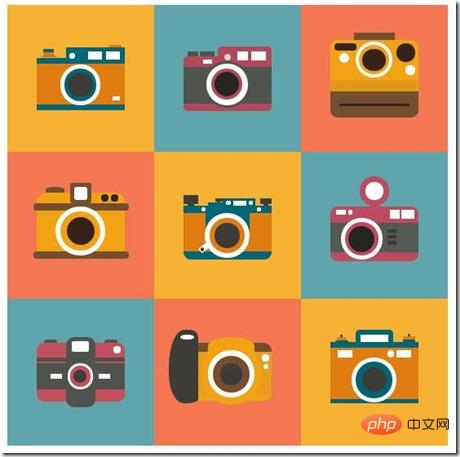
本篇文章给大家分享九款纯css3绘制的复古相机特效代码。有一定的参考价值,有需要的朋友可以参考一下,希望对大家有所帮助。
先看看制作出来的效果图:
PS:
有人会说,这些东西实用性不强,没啥用。一开始我也是这么觉得,但后来我就改变自己的看法。首先,实用性目前来说确实不强,或者说应用范围很窄。但其实它可以提高自己的创意思维,css3的综合运用以及html代码的优化。
当自己熟练使用的时候,会渐渐发现自己在重构那一块更加有想法和得心应手;其次,作为一个学生,在开发经验上略显不足,想分享一篇高质量的文章确实不易,所以我找准CSS3动画这个点,分享自己制作的一些好玩的demo,给大家带来一点点工作上或者生活上的乐趣,这就是我分享的初衷。
当然,我也希望自己以后开发经验开始丰富的时候可以给大家分享更有价值的文章,这就等时间去沉淀吧!
OK,上面的效果是我依据一张自己在网上找的设计稿使用css3还原的,接下来就一个一个分享出来:
首先需要一个容器:
<div class="container"></div>
以及一些必要的css样式:
立即学习“前端免费学习笔记(深入)”;
.container{
    width:600px;
    height:600px;
    margin:0 auto;
    overflow:hidden;
}
.style_1,.style_2,.style_3,.style_4,.style_5,.style_6,.style_7,.style_8,.style_9{
    width:200px;
    height:200px;
    float:left;
    position:relative;
}
.style_1,.style_5,.style_9{
    background-color:#f7b234;
}
.style_2,.style_6,.style_7{
    background-color:#60a4ac;
}
.style_3,.style_4,.style_8{
    background-color:#f47752;
}
第一款相机

html代码:
<div class="style_1">
    <div class="camera_style_1">
        <div class="header">
            <div class="left"></div>
            <div class="right">
                <div class="whiteBlock"></div>
            </div>
        </div>
        <div class="main">
            <div class="round"></div>
        </div>
    </div>
</div>
css代码:
.camera_style_1{
    width:120px;
    height:86px;
    margin:0 auto;
    position: absolute;
    top:50%;
    left:50%;
    margin-left:-60px;
    margin-top:-43px;
}
.camera_style_1 .header{
    width:100%;
    height:15px;
}
.camera_style_1 .main{
    width:100%;
    height:55px;
    background-color:#e17c10;
    border-top:8px solid #016675;
    border-bottom:8px solid #016675;
    border-radius:2px;
    border-top-right-radius:0;
}
.camera_style_1 .left{
    width:0;
    height:0;
    border:12px solid transparent;
    border-bottom:8px solid #cf7323;
    position: absolute;
    top:-5px;
    left:5px;
}
.camera_style_1 .left:after,.camera_style_1 .left:before{
    content:'';
    display:block;
    width:14px;
    height:4px;
    background-color:#e07b0f;
    position: absolute;
    top:1px;
    left:-7px;
}
.camera_style_1 .left:before{
    background-color:#016675;
    top:-3px;
    border-top-left-radius:1px;
    border-top-right-radius:1px;
}
.camera_style_1 .right{
    width:80px;
    height:14px;
    background-color:#016675;
    position: absolute;
    top:1px;
    right:0;
    border-top-left-radius:1px;
    border-top-right-radius:1px;
}
.camera_style_1 .right:after{
    content:'';
    display:block;
    width:8px;
    height:8px;
    border-radius:50%;
    background-color:#fff;
    position: absolute;
    top:7px;
    left:4px;
}
.camera_style_1 .right:before{
    content:'';
    display:block;
    width:16px;
    height:4px;
    background-color:#e17c10;
    position: absolute;
    top:-4px;
    right:5px;
}
.camera_style_1 .whiteBlock{
    width:5px;
    height:11px;
    border-left:19px solid #fff;
    border-right:19px solid #fff;
    position: absolute;
    top:5px;
    right:7px;
}
.camera_style_1 .round{
    width:44px;
    height:44px;
    border-radius: 50%;
    background-color:#016675;
    border:6px solid #fff;
    position: absolute;
    top:24px;
    left:32px;
}
.camera_style_1 .round:after{
    content: '';
    display:block;
    width:34px;
    height:34px;
    background-color:#3e3c38;
    border-radius:50%;
    position: absolute;
    top:5px;
    left:5px;
}
.camera_style_1 .round:before{
    content: '';
    display:block;
    width:10px;
    height:5px;
    background-color:#fff;
    position: absolute;
    top:38px;
    right:-32px;
}
第二款相机

html代码:
<div class="style_2">
    <div class="camera_style_2">
        <div class="header">
            <div class="left"></div>
            <div class="right"></div>
        </div>
        <div class="main">
            <div class="round"></div>
        </div>
    </div>
</div>
css代码:
.camera_style_2{
    width:120px;
    height:90px;
    margin:0 auto;
    position: absolute;
    top:50%;
    left:50%;
    margin-left:-60px;
    margin-top:-45px;
}
.camera_style_2 .header{
    width:100%;
    height:15px;
}
.camera_style_2 .main{
    width:100%;
    height:50px;
    background-color:#50544e;
    border-top:15px solid #b5475d;
    border-bottom:10px solid #b5475d;
    border-radius:6px;
    border-top-right-radius:0;
}
.camera_style_2 .round{
    width:56px;
    height:56px;
    background-color:#fff;
    border:4px solid #50544e;
    border-radius:50%;
    position: absolute;
    top:22px;
    left:28px;
}
.camera_style_2 .round:after{
    content:'';
    display:block;
    width:34px;
    height:34px;
    background-color:#252522;
    border-radius:50%;
    border:5px solid #b5475d;
    position: absolute;
    top:6px;
    left:6px;
}
.camera_style_2 .left{
    width:3px;
    height:7px;
    border-left:15px solid #50544e;
    border-right:20px solid #50544e;
    position: absolute;
    top:8px;
    left:5px;
}
.camera_style_2 .left:after{
    content:'';
    display:block;
    width:13px;
    height:6px;
    background-color:#fff;
    position: absolute;
    top:11px;
    left:7px;
}
.camera_style_2 .right{
    width:73px;
    height:14px;
    background-color:#b5475d;
    border-top-left-radius:6px;
    border-top-right-radius:6px;
    position: absolute;
    right:0;
    top:1px;
}
.camera_style_2 .right:after{
    content:'';
    display:block;
    width:9px;
    height:9px;
    background-color:#dbdbcc;
    border-radius:50%;
    position: absolute;
    top:10px;
    left:8px;
}
.camera_style_2 .right:before{
    content:'';
    display:block;
    width:4px;
    height:12px;
    border-left:15px solid #fff;
    border-right:20px solid #fff;
    position: absolute;
    top:7px;
    right:8px;
}
第三款相机

html代码:
<div class="style_3">
    <div class="camera_style_3">
        <div class="main">
            <div class="left"></div>
            <div class="center"></div>
            <div class="right"></div>
        </div>
        <div class="footer"></div>
    </div>
</div>
css代码:
.camera_style_3{
    width:120px;
    height:106px;
    margin:0 auto;
    position: absolute;
    top:50%;
    left:50%;
    margin-left:-60px;
    margin-top:-53px;
}
.camera_style_3 .main{
    width:100%;
    height:71px;
    background-color:#f2a313;
    border-top-left-radius:10px;
    border-top-right-radius:10px;
}
.camera_style_3 .main:before{
    content:'';
    display:block;
    width:56px;
    height:9px;
    background-color:#744f2d;
    border-top-left-radius:2px;
    border-top-right-radius:2px;
    position:absolute;
    top:-9px;
    left:32px;
}
.camera_style_3 .main:after{
    content:'';
    display:block;
    width:100%;
    height:15px;
    background-color:#e1991c;
    position: absolute;
    bottom:35px;
    left:0;
}
.camera_style_3 .footer{
    width:100%;
    height:35px;
    background-color:#744f2d;
    border-bottom-left-radius:10px;
    border-bottom-right-radius:10px;
}
.camera_style_3 .footer:after{
    content:'';
    display:block;
    width:80%;
    height:3px;
    background-color:#342316;
    border-radius:3px;
    position: absolute;
    bottom:16px;
    left:10%;
}
.camera_style_3 .left{
    width:30px;
    height:10px;
    border-radius:10px;
    background-color:#342316;
    position: absolute;
    top:5px;
    left:5px;
}
.camera_style_3 .left:after{
    content:'';
    display:block;
    width:14px;
    height:14px;
    background-color:#fff;
    border-radius:50%;
    position: absolute;
    top:13px;
    left:7px;
}
.camera_style_3 .center{
    width:42px;
    height:40px;
    border:5px solid #fff;
    border-radius:50%;
    position: absolute;
    top:3px;
    left:34px;
}
.camera_style_3 .center:after{
    content:'';
    display:block;
    width:32px;
    height:30px;
    background-color:#342316;
    border-radius:50%;
    position: absolute;
    top:5px;
    left:5px;
}
.camera_style_3 .right{
    width:25px;
    height:25px;
    background-color:#342316;
    border-radius:50%;
    position: absolute;
    top:5px;
    right:5px;
}
.camera_style_3 .right:after{
    content:'';
    display:block;
    width:13px;
    height:13px;
    background-color:#fff;
    border-radius:50%;
    position: absolute;
    top:30px;
    right:0;
}
第四款相机

html代码:
<div class="style_4">
    <div class="camera_style_4">
        <div class="header">
            <div class="left"></div>
            <div class="center"></div>
            <div class="right"></div>
        </div>
        <div class="main"></div>
    </div>
</div>
css代码:
.camera_style_4{
    width:120px;
    height:90px;
    margin:0 auto;
    position: absolute;
    top:50%;
    left:50%;
    margin-left:-60px;
    margin-top:-45px;
    background-color:#f2a313;
    border-radius:14px;
}
.camera_style_4:after,.camera_style_4:before{
    content:'';
    display:block;
    width:130px;
    height:10px;
    background-color:#744f2d;
    border-radius:10px;
    position: absolute;
    left:-5px;
    top:15px;
    z-index:3;
}
.camera_style_4:after{
    top:80px;
}
.camera_style_4 .header{
    width:100%;
    height:22px;
}
.camera_style_4 .left{
    width:26px;
    height:8px;
    background-color:#744f2d;
    border-top-left-radius:50%;
    border-top-right-radius:50%;
    position: absolute;
    top:-8px;
    left:12px;
}
.camera_style_4 .center{
    width:28px;
    height:28px;
    background-color:#744f2d;
    border-radius:4px;
    position: absolute;
    top:-13px;
    left:46px;
}
.camera_style_4 .center:after{
    content:'';
    display:block;
    width:18px;
    height:18px;
    background-color:#fff;
    border-radius:4px;
    position: absolute;
    top:5px;
    left:5px;
}
.camera_style_4 .right{
    width:10px;
    height:10px;
    background-color:#322317;
    border-radius:50%;
    position: absolute;
    top:3px;
    right:22px;
}
.camera_style_4 .right:after{
    content:'';
    display:block;
    width:10px;
    height:10px;
    background-color:#322317;
    border-radius:50%;
    position: absolute;
    top:0;
    left:13px;
}
.camera_style_4 .main{
    width:54px;
    height:54px;
    border:7px solid #fff;
    border-radius:50%;
    position: absolute;
    top:19px;
    left:26px;
    z-index:4;
}
.camera_style_4 .main:after{
    content:'';
    display:block;
    width:38px;
    height:38px;
    background-color:#342316;
    border-radius:50%;
    position: absolute;
    top:8px;
    left:8px;
}
第五款相机:


html代码:
<div class="style_5">
    <div class="camera_style_5">
        <div class="header">
            <div class="left"></div>
            <div class="center">
                <div class="center_innerLeft"></div>
                <div class="center_innerRight">
                    <div class="center_innerRight_body"></div>
                </div>
            </div>
            <div class="right"></div>
        </div>
        <div class="main">
            <div class="main_bg"></div>
            <div class="outterRound"></div>
            <div class="innerRound"></div>
        </div>
    </div>
</div>
css代码:
.camera_style_5{
    width:120px;
    height:90px;
    margin:0 auto;
    position: absolute;
    top:50%;
    left:50%;
    margin-left:-60px;
    margin-top:-43px;
}
.camera_style_5 .header{
    width:100%;
    height:16px;
}
.camera_style_5 .left{
    width:20px;
    height:12px;
    background-color:#3e3d36;
    position: absolute;
    top:2px;
}
.camera_style_5 .left:after{
    content:'';
    display:block;
    width:8px;
    height:5px;
    background-color:#3e3d36;
    position: absolute;
    top:9px;
    left:6px;
}
.camera_style_5 .center{
    width:65px;
    height:16px;
    position: absolute;
    top:0;
    left:33px;
}
.camera_style_5 .center_innerLeft{
    width:20px;
    height:4px;
    background-color:#006674;
    position: absolute;
    top:12px;
    left:0;
}
.camera_style_5 .center_innerLeft:before{
    content:'';
    display:block;
    width:10px;
    height:5px;
    background-color:#3f3d39;
    position: absolute;
    top:-6px;
    right:0;
}
.camera_style_5 .center_innerLeft:after{
    content:'';
    display:block;
    width:4px;
    height:2px;
    background-color:#3f3d39;
    position: absolute;
    top:-2px;
    right:3px;
}
.camera_style_5 .center_innerRight{
    width:45px;
    height:10px;
    background-color:#006674;
    position: absolute;
    top:6px;
    right:0;
}
.camera_style_5 .center_innerRight_body{
    width:18px;
    height:7px;
    background-color:#fff;
    position: absolute;
    top:3px;
    right:12px;
}
.camera_style_5 .center_innerRight_body:before,.camera_style_5 .center_innerRight_body:after{
    content:'';
    display:block;
    width:6px;
    height:6px;
    background-color:#fff;
    border-radius:50%;
    position: absolute;
    top:0;
    left:-10px;
}
.camera_style_5 .center_innerRight_body:after{
    left:21px;
}
.camera_style_5 .right{
    width:16px;
    height:8px;
    background-color:#3e3d36;
    position: absolute;
    top:6px;
    right:0;
}
.camera_style_5 .right:after{
    content:'';
    display:block;
    width:6px;
    height:4px;
    background-color:#3e3d36;
    position: absolute;
    top:6px;
    left:5px;
}
.camera_style_5 .main{
    width:100%;
    height:52px;
    background-color:#e17c10;
    border-top:10px solid #016675;
    border-bottom:12px solid #016675;
    border-bottom-right-radius:10px;
    border-bottom-left-radius:10px;
}
.camera_style_5 .main_bg{
    width:60px;
    height:40px;
    background-color:#006674;
    position: absolute;
    top:26px;
    left:30px;
}
.camera_style_5 .main_bg:before,.camera_style_5 .main_bg:after{
    content:'';
    display:block;
    width:6px;
    height:6px;
    background-color:#fff;
    border-radius:50%;
    position: absolute;
    top:-8px;
    left:-6px;
}
.camera_style_5 .main_bg:after{
    left:70px;
}
.camera_style_5 .outterRound{
    width:46px;
    height:46px;
    border:8px solid #fff;
    border-radius:50%;
    position: absolute;
    top:26px;
    left:29px;
}
.camera_style_5 .outterRound:before{
    content:'';
    display:block;
    width:15px;
    height:7px;
    background-color:#fff;
    -webkit-transform:rotate(-38deg);
    transform:rotate(-38deg);
    position: absolute;
    top:36px;
    left:-16px;
}
.camera_style_5 .outterRound:after{
    content:'';
    display:block;
    width:5px;
    height:5px;
    background-color:#3f3d39;
    border-radius:50%;
    position: absolute;
    top:39.5px;
    left:-14px;
}
.camera_style_5 .innerRound{
    width:34px;
    height:34px;
    background-color:#3e3c38;
    border:7px solid #e17c10;
    border-radius:50%;
    position: absolute;
    top:33px;
    left:36px;
}
第六款相机

html代码:
<div class="style_6">
    <div class="camera_style_6">
        <div class="header">
            <div class="top"></div>
        </div>
        <div class="main">
            <div class="main_left"></div>
            <div class="main_right"></div>
            <div class="main_round"></div>
            <div class="main_line"></div>
        </div>
    </div>
</div>
css代码:
.camera_style_6{
    width:120px;
    height:100px;
    margin:0 auto;
    position: absolute;
    top:50%;
    left:50%;
    margin-left:-60px;
    margin-top:-56px;
}
.camera_style_6 .header{
    width:100%;
    height:30px;
}
.camera_style_6 .top{
    width:24px;
    height:24px;
    background-color:#fff;
    border:8px solid #bc4c5f;
    border-radius:50%;
    position: absolute;
    top:-11px;
    left:40px;
}
.camera_style_6 .top:after{
    content:'';
    display:block;
    width:14px;
    height:5px;
    background-color:#bc4c5f;
    position: absolute;
    bottom:-10px;
    left:5px;
}
.camera_style_6 .main{
    width:100%;
    height:75px;
    background-color:#bd4b60;
    border-radius:10px;
}
.camera_style_6 .main:before{
    content:'';
    display:block;
    width:100%;
    height:40px;
    background-color:#555953;
    position: absolute;
    bottom:8px;
    left:0;
}
.camera_style_6 .main_left{
    width:13px;
    height:6px;
    background-color:#fff;
    position: absolute;
    top:35px;
    left:8px;
}
.camera_style_6 .main_left:after{
    content:'';
    display:block;
    width:6px;
    height:6px;
    background-color:#fff;
    border-radius:50%;
    position: absolute;
    top:0;
    right:-9px;
}
.camera_style_6 .main_right{
    width:2px;
    height:12px;
    border-left:14px solid #fff;
    border-right:18px solid #fff;
    position: absolute;
    top:35px;
    right:6px;
}
.camera_style_6 .main_round{
    width:46px;
    height:46px;
    background-color:#be4a60;
    border-radius:50%;
    border:6px solid #fff;
    position: absolute;
    bottom:-3px;
    left:14px;
}
.camera_style_6 .main_round:after{
    content:'';
    display:block;
    width:36px;
    height:36px;
    background-color:#252522;
    border-radius:50%;
    position: absolute;
    top:5px;
    left:5px;
}
.camera_style_6 .main_line,.camera_style_6 .main_line:before,.camera_style_6 .main_line:after{
    width:12px;
    height:5px;
    background-color:#3e3d36;
    position: absolute;
    top:61px;
    left:78px;
}
.camera_style_6 .main_line:before{
    content:'';
    display:block;
    top:8px;
    left:0;
}
.camera_style_6 .main_line:after{
    content:'';
    display:block;
    top:16px;
    left:0;
}
第七款相机

html代码:
<div class="style_7">
    <div class="camera_style_7">
        <div class="main">
            <div class="whiteBlock"></div>
            <div class="round"></div>
        </div>
    </div>
</div>
css代码:
.camera_style_7{
    width:120px;
    height:80px;
    background-color:#c34e5c;
    border-radius:10px;
    position: absolute;
    top:50%;
    left:50%;
    margin-top:-40px;
    margin-left:-60px;
}
.camera_style_7:before,.camera_style_7:after{
    content:'';
    display:block;
    width:18px;
    height:5px;
    background-color:#51524d;
    border-top-left-radius:4px;
    border-top-right-radius:4px;
    position: absolute;
    top:-5px;
}
.camera_style_7:before{
    left:10px;
}
.camera_style_7:after{
    right:10px;
}
.camera_style_7 .main{
    width:100%;
    height:35px;
    background-color:#4f534d;
    position: absolute;
    top:28px;
    left:0;
}
.camera_style_7 .main:before{
    content:'';
    display:block;
    width:100%;
    height:5px;
    background-color:#4f534d;
    position: absolute;
    top:-8px;
    left:0;
}
.camera_style_7 .main:after{
    content:'';
    display:block;
    width:40px;
    height:96px;
    background-color:#4f534d;
    border-radius:12px;
    position: absolute;
    top:-36px;
    left:40px;
    z-index:1;
}
.camera_style_7 .whiteBlock{
    width:50px;
    height:7px;
    border-left:16px solid #fff;
    border-right:16px solid #fff;
    position: absolute;
    top:14px;
    left:19px;
}
.camera_style_7 .whiteBlock:before{
    content:'';
    display:block;
    width:24px;
    height:14px;
    background-color:#fff;
    border-radius:3px;
    position: absolute;
    top:-44px;
    left:13px;
    z-index:2;
}
.camera_style_7 .whiteBlock:after{
    content:'';
    display:block;
    width:10px;
    height:10px;
    background-color:#fff;
    border-radius:50%;
    position: absolute;
    top:-38px;
    left:70px;
}
.camera_style_7 .round{
    width:28px;
    height:28px;
    background-color:#c34e5c;
    border:4px solid #fff;
    border-radius:50%;
    position: absolute;
    top:0;
    left:42px;
    z-index:2;
}
.camera_style_7 .round:after{
    content:'';
    display:block;
    width:18px;
    height:18px;
    background-color:#3e3c38;
    border-radius:50%;
    position: absolute;
    top:5px;
    left:5px;
}
第八款相机

html代码:
<div class="style_8">
    <div class="camera_style_8">
        <div class="round"></div>
        <div class="whiteBlock"></div>
    </div>
</div>
css代码:
.camera_style_8{
    width:120px;
    height:60px;
    background-color:#e99e1e;
    border-radius:12px;
    border-top:13px solid #744f2d;
    border-bottom:7px solid #f2a313;
    position: absolute;
    top:50%;
    left:50%;
    margin-top:-40px;
    margin-left:-60px;
}
.camera_style_8:before{
    content:'';
    display:block;
    width:40px;
    height:100px;
    background-color:#3e3c38;
    border-top-left-radius:22px 50px;
    border-top-right-radius:12px 10px;
    border-bottom-left-radius:20px 40px;
    border-bottom-right-radius:16px 6px;
    position: absolute;
    bottom:-10px;
    left:-20px;
}
.camera_style_8:after{
    content:'';
    display:block;
    width:18px;
    height:7px;
    background-color:#fff;
    border-radius:28px/10px;
    position:absolute;
    top:-24px;
    left:-4px;
}
.camera_style_8 .round{
    width:64px;
    height:64px;
    background-color:#fff;
    border:10px solid #f2a313;
    border-radius:50%;
    position: absolute;
    top:-12px;
    left:23px;
    z-index:3;
}
.camera_style_8 .round:after{
    content:'';
    display:block;
    width:30px;
    height:30px;
    background-color:#3e3c38;
    border:10px solid #764e2d;
    border-radius:50%;
    position: absolute;
    top:7px;
    left:7px;
}
.camera_style_8 .whiteBlock{
    width:64px;
    height:25px;
    background-color:#f2a313;
    border-top-left-radius:50%;
    border-top-right-radius:50%;
    position: absolute;
    top:-20px;
    left:33px;
    z-index:1;
}
.camera_style_8 .whiteBlock:before{
    content:'';
    display:block;
    width:10px;
    height:10px;
    background-color:#fff;
    border-radius:50%;
    position: absolute;
    top:23px;
    left:74px;
}
.camera_style_8 .whiteBlock:after{
    content:'';
    display:block;
    width:7px;
    height:7px;
    background-color:#fff;
    border-radius:50%;
    position: absolute;
    top:36px;
    left:76px;
}
第九款相机

html代码:
<div class="style_9">
    <div class="camera_style_9">
        <div class="header">
            <div class="left"></div>
            <div class="center"></div>
            <div class="right"></div>
        </div>
        <div class="whiteBlock"></div>
    </div>
</div>
css代码:
.camera_style_9{
    width:120px;
    height:70px;
    background-color:#e17c10;
    border-top:8px solid #016675;
    border-bottom:6px solid #016675;
    position: absolute;
    top:50%;
    left:50%;
    margin-left:-60px;
    margin-top:-41px;
}
.camera_style_9:before{
    content:'';
    display:block;
    width:50px;
    height:50px;
    background-color:#026573;
    border:6px solid #fff;
    border-radius:50%;
    position: absolute;
    bottom:-4px;
    left:29px;
}
.camera_style_9:after{
    content:'';
    display:block;
    width:34px;
    height:34px;
    background-color:#3e3c38;
    border-radius:50%;
    position:absolute;
    bottom:10px;
    left:43px;
}
.camera_style_9 .whiteBlock{
    width:60px;
    height:10px;
    border-left:20px solid #fff;
    border-right:20px solid #fff;
    position: absolute;
    top:3px;
    left:10px;
}
.camera_style_9 .whiteBlock:after{
    content:'';
    display:block;
    width:9px;
    height:9px;
    border-radius:50%;
    background-color:#fff;
    position: absolute;
    top:0.5px;
    right:3px;
}
.camera_style_9 .header{
    width:100%;
    height:20px;
    position: absolute;
    top:-28px;
    left:0;
}
.camera_style_9 .left{
    width:0;
    height:0;
    border:10px solid transparent;
    border-bottom:8px solid #00606f;
    position: absolute;
    bottom:0;
    left:5px;
}
.camera_style_9 .left:before{
    content:'';
    display:block;
    width:12px;
    height:4px;
    background-color:#e07c13;
    position: absolute;
    bottom:-5px;
    left:-6px;
}
.camera_style_9 .left:after{
    content:'';
    display:block;
    width:4px;
    height:3px;
    background-color:#016673;
    position: absolute;
    bottom:-1px;
    left:-2px;
}
.camera_style_9 .center{
    width:38px;
    height:10px;
    background-color:#fff;
    border:7px solid #016675;
    border-top-left-radius:6px;
    border-top-right-radius:6px;
    border-bottom:none;
    position: absolute;
    bottom:0;
    left:34px;
}
.camera_style_9 .right{
    width:16px;
    height:4px;
    background-color:#00606f;
    position: absolute;
    bottom:0;
    right:5px;
}
.camera_style_9 .right:before{
    content:'';
    display:block;
    width:16px;
    height:4px;
    background-color:#e17b12;
    position:absolute;
    bottom:4px;
    right:0;
}
.camera_style_9 .right:after{
    content:'';
    display:block;
    width:4px;
    height:3px;
    background-color:#006775;
    position:absolute;
    bottom:8px;
    right:6px;
}
PS: 篇幅有点长,代码都提供了,有兴趣的可以尝试一下。
更多炫酷CSS3、html5、javascript特效代码,尽在:js特效大全!




