




php如何进行微信公众号开发
1、配置相关服务器
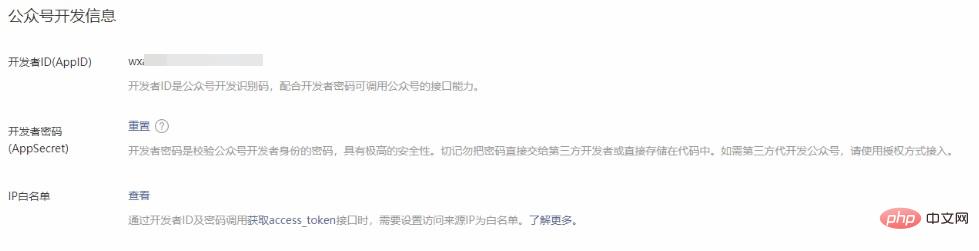
(1) 如下,把自己的服务器ip白名单配置上;
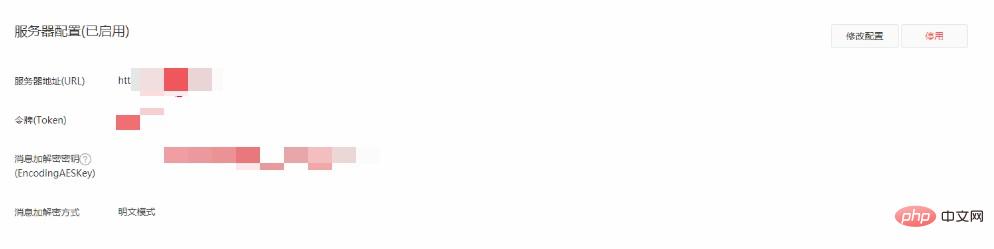
(2) 开始配置令牌,配置令牌时先需要把现成的代码放到自己的服务器上面,代码里面包含自己的设置的令牌号码,这样才可以配置成功。
注意:下面这个代码在配置好后,即可从服务器上面删除代码或者把index.php改一个名字。
立即学习“PHP免费学习笔记(深入)”;
url必须是完整的url,比如 http://118.78.176.74/weixin/index.php

<?php
/**
 * wechat php test
 * update time: 20141008
 */

//define your token
//下面的即是你设置的token令牌

define("TOKEN", "zj123456");
$wechatObj = new wechatCallbackapiTest();
$wechatObj->valid();

class wechatCallbackapiTest
{
    public function valid()
    {
        $echoStr = $_GET["echostr"];

        //valid signature , option
        if ($this->checkSignature()) {
            echo $echoStr;
            exit;
        }
    }

    public function responseMsg()
    {
        //get post data, May be due to the different environments
        $postStr = $GLOBALS["HTTP_RAW_POST_DATA"];

        //extract post data
        if (!empty($postStr)) {

            $postObj = simplexml_load_string($postStr, 'SimpleXMLElement', LIBXML_NOCDATA);
            $fromUsername = $postObj->FromUserName;
            $toUsername = $postObj->ToUserName;
            $keyword = trim($postObj->Content);
            $time = time();
            $textTpl = "<xml>
                            <ToUserName><![CDATA[%s]]></ToUserName>
                            <FromUserName><![CDATA[%s]]></FromUserName>
                            <CreateTime>%s</CreateTime>
                            <MsgType><![CDATA[%s]]></MsgType>
                            <Content><![CDATA[%s]]></Content>
                            <FuncFlag>0</FuncFlag>
                            </xml>";
            if (!empty($keyword)) {
                $msgType = "text";
                $contentStr = "Welcome to wechat world!";
                $resultStr = sprintf($textTpl, $fromUsername, $toUsername, $time, $msgType, $contentStr);
                echo $resultStr;
            } else {
                echo "Input something...";
            }

        } else {
            echo "";
            exit;
        }
    }

    private function checkSignature()
    {
        $signature = $_GET["signature"];
        $timestamp = $_GET["timestamp"];
        $nonce = $_GET["nonce"];
        $token = TOKEN;
        $tmpArr = array($token, $timestamp, $nonce);
        sort($tmpArr, SORT_STRING);
        $tmpStr = implode($tmpArr);
        $tmpStr = sha1($tmpStr);

        if ($tmpStr == $signature) {
            return true;
        } else {
            return false;
        }
    }
}
2、配置ok后,接下来就可以实现相关的微信公众号相关功能,比如说自动回复机器人。
代码包含3部分,当然,自动回复机器人,下面的代码有些用不到。
(1) 、index.php
<?php
define("APPID","xxxxxxx");
define("APPSECRET","xxxxxx");
define("TOKEN","zj123456");

require("./wechat.inc.php");
$wechat = new WeChat(APPID,APPSECRET,TOKEN);
$wechat->responseMsg();
?>
(2)、wechat.inc.php
<?php

class WeChat
{
    private $_appid;
    private $_appsecret;
    private $_token;

    public function __construct($appid, $appsecret, $token)
    {
        $this->_appid = $appid;
        $this->_appsecret = $appsecret;
        $this->_token = $token;
    }

    /**
     *_request():发出请求
     *@curl:访问的URL
     *@https:安全访问协议
     *@method:请求的方式,默认为get
     *@data:post方式请求时上传的数据
     **/
    private function _request($curl, $https = true, $method = 'get', $data = null, $headers = null)
    {
        $ch = curl_init(); //初始化
        curl_setopt($ch, CURLOPT_URL, $curl); //设置访问的URL
        // curl_setopt($ch, CURLOPT_HEADER, false); //设置不需要头信息
        curl_setopt($ch, CURLOPT_HTTPHEADER, $headers);
        curl_setopt($ch, CURLOPT_RETURNTRANSFER, true); //只获取页面内容,但不输出
        if ($https) {
            curl_setopt($ch, CURLOPT_SSL_VERIFYPEER, false); //不做服务器认证
            curl_setopt($ch, CURLOPT_SSL_VERIFYHOST, false); //不做客户端认证
        }
        if ($method == 'post') {
            curl_setopt($ch, CURLOPT_POST, true); //设置请求是POST方式
            curl_setopt($ch, CURLOPT_POSTFIELDS, $data); //设置POST请求的数据
        }
        $str = curl_exec($ch); //执行访问,返回结果
        curl_close($ch); //关闭curl,释放资源
        return $str;
    }

    /**
     *_getAccesstoken():获取access token
     **/
    private function _getAccesstoken()
    {
        $file = './accesstoken'; //用于保存access token
        if (file_exists($file)) { //判断文件是否存在
            $content = file_get_contents($file); //获取文件内容
            $content = json_decode($content); //json解码
            if (time() - filemtime($file) < $content->expires_in) //判断文件是否过期
            {
                return $content->access_token;
            }
//返回access token
        }
        $content = $this->_request("https://api.weixin.qq.com/cgi-bin/token?grant_type=client_credential&appid=" . $this->_appid . "&secret=" . $this->_appsecret); //获取access token的json对象
        file_put_contents($file, $content); //保存json对象到指定文件
        $content = json_decode($content); //进行json解码
        return $content->access_token; //返回access token
    }

    /**
     *_getTicket():获取ticket,用于以后换取二维码
     *@expires_secords:二维码有效期(秒)
     *@type :二维码类型(临时或永久)
     *@scene:场景编号
     **/
    public function _getTicket($expires_secords = 604800, $type = "temp", $scene = 1)
    {
        if ($type == "temp") { //临时二维码的处理
            $data = '{"expire_seconds":' . $expires_secords . ', "action_name": "QR_SCENE", "action_info": {"scene": {"scene_id": ' . $scene . '}}}'; //临时二维码生成所需提交数据
            return $this->_request("https://api.weixin.qq.com/cgi-bin/qrcode/create?access_token=" . $this->_getAccesstoken(), true, "post", $data, ''); //发出请求并获得ticket
        } else { //永久二维码的处理
            $data = '{"action_name": "QR_LIMIT_SCENE", "action_info": {"scene": {"scene_id": ' . $scene . '}}}'; //永久二维码生成所需提交数据
            return $this->_request("https://api.weixin.qq.com/cgi-bin/qrcode/create?access_token=" . $this->_getAccesstoken(), true, "post", $data, ''); //发出请求并获得ticket
        }
    }

    /**
     *_getQRCode():获取二维码
     *@expires_secords:二维码有效期(秒)
     *@type:二维码类型
     *@scene:场景编号
     **/
    public function _getQRCode($expires_secords, $type, $scene)
    {
        $content = json_decode($this->_getTicket($expires_secords, $type, $scene)); //发出请求并获得ticket的json对象
        $ticket = $content->ticket; //获取ticket
        $image = $this->_request("https://mp.weixin.qq.com/cgi-bin/showqrcode?ticket=" . urlencode($ticket)
        ); //发出请求获得二维码图像
        //$file = "./".$type.$scene.".jpg";// 可以将生成的二维码保存到本地,便于使用
        //file_put_contents($file, $image);//保存二维码
        return $image;
    }
    public function valid() //检查安全性

    {
        $echoStr = $_GET["echostr"];

        //valid signature , option
        if ($this->checkSignature()) {
            echo $echoStr;
            exit;
        }
    }

    public function responseMsg()
    {
        //get post data, May be due to the different environments
        $postStr = $GLOBALS["HTTP_RAW_POST_DATA"]; //获得用户发送信息
        $postObj = simplexml_load_string($postStr, 'SimpleXMLElement', LIBXML_NOCDATA);
        switch ($postObj->MsgType) {
            case 'event':
                $this->_doEvent($postObj);
                break;
            case 'text':
                $this->_doText($postObj);
                break;
            case 'image':
                $this->_doImage($postObj);
                break;
            case 'voice':
                $this->_doVoice($postObj);
                break;
            case 'video':
                $this->_doVideo($postObj);
                break;
            case 'location':
                $this->_doLocation($postObj);
                break;
            default:exit;
        }
    }

    private function _doEvent($postObj)
    { //事件处理
        switch ($postObj->Event) {
            case 'subscribe': //订阅
                $this->_doSubscribe($postObj);
                break;
            case 'unsubscribe': //取消订阅
                $this->_doUnsubscribe($postObj);
                break;
            default:;
        }
    }

    private function _doSubscribe($postObj)
    {
        $tpltext = '<xml>
<ToUserName><![CDATA[%s]]></ToUserName>
<FromUserName><![CDATA[%s]]></FromUserName>
<CreateTime>%s</CreateTime>
<MsgType><![CDATA[text]]></MsgType>
<Content><![CDATA[%s]]></Content>
</xml>';
        $access_token = $this->_getAccesstoken();
        $userInfo = $this->getUserinfo($access_token, $postObj->FromUserName);
        $str = sprintf($tpltext, $postObj->FromUserName, $postObj->ToUserName, time(), '欢迎您关注' . 'Geroge Zhang' . '的世界!');
        //还可以保存用户的信息到数据库
        echo $str;

    }

    private function _doUnsubscribe($postObj)
    {
        ; //把用户的信息从数据库中删除
    }

    private function _doText($postObj)
    {
        $fromUsername = $postObj->FromUserName;
        $toUsername = $postObj->ToUserName;
        $keyword = trim($postObj->Content);
        $time = time();
        $textTpl = "<xml>
                    <ToUserName><![CDATA[%s]]></ToUserName>
                    <FromUserName><![CDATA[%s]]></FromUserName>
                    <CreateTime>%s</CreateTime>
                    <MsgType><![CDATA[%s]]></MsgType>
                    <Content><![CDATA[%s]]></Content>
                    <FuncFlag>0</FuncFlag>
                    </xml>";
        if (!empty($keyword)) {
            // $data_add = "question=" . $keyword;
            // $appcode = "2fd264cdc7914b308e51ab986f73fb86";
            // $headers = array();
            // array_push($headers, "Authorization:APPCODE " . $appcode);
            // $contentStr = $this->_request("http://jisuznwd.market.alicloudapi.com/iqa/query?question=" . $data_add, false, "GET", '', $headers);
            $data_add = urlencode($keyword);
            $contentStr = $this->_request("http://api.qingyunke.com/api.php?key=free&appid=0&msg=" . $data_add, false, "GET", '', '');
            $contentStr = json_decode($contentStr, true);
            if ($contentStr['result'] == 0) {
                $contentStr = $contentStr['content'];
            }
            if ($keyword == "hello") {
                $contentStr = "你好";
            }

            if ($keyword == "PHP") {
                $contentStr = "最流行的网页编程语言!";
            }

            if ($keyword == "JAVA") {
                $contentStr = "较流行的网页编程语言!";
            }

            $msgType = "text";
            $resultStr = sprintf($textTpl, $fromUsername, $toUsername, $time, $msgType, $contentStr);
            echo $resultStr;
        }
        exit;
    }

    private function _doImage($postObj)
    {
        $tpltext = '<xml>
<ToUserName><![CDATA[%s]]></ToUserName>
<FromUserName><![CDATA[%s]]></FromUserName>
<CreateTime>%s</CreateTime>
<MsgType><![CDATA[text]]></MsgType>
<Content><![CDATA[%s]]></Content>
</xml>';
        $str = sprintf($tpltext, $postObj->FromUserName, $postObj->ToUserName, time(), '您发送的图片在' . $postObj->PicUrl . "。");
        echo $str;
    }

    private function checkSignature()
    {
        $signature = $_GET["signature"];
        $timestamp = $_GET["timestamp"];
        $nonce = $_GET["nonce"];
        $token = TOKEN;
        $tmpArr = array($token, $timestamp, $nonce);
        sort($tmpArr, SORT_STRING);
        $tmpStr = implode($tmpArr);
        $tmpStr = sha1($tmpStr);

        if ($tmpStr == $signature) {
            return true;
        } else {
            return false;
        }
    }

    /**
     * 获取用户昵称
     * @param access_token  前面函数_getAccesstoken已经实现
     * @param openid 即FromUserName这个参数
     * url $urlid = 'https://api.weixin.qq.com/cgi-bin/user/info?access_token='.$access_token.'&openid='.$openid.'&lang=zh_CN';
     * return userInfo
     */
    public function getUserinfo($access_token, $openid)
    {
        $urlid = 'https://api.weixin.qq.com/cgi-bin/user/info?access_token=' . $access_token . '&openid=' . $openid . '&lang=zh_CN';
        $userInfo = $this->_request($urlid);
        return $userInfo;
    }
}
注意:想要获取用户信息必须是认证过了的订阅号或者服务号!
综上,把如上三个文件,放到你的配置的服务器上面,即可实现自动回复机器人功能。
更多PHP相关知识,请访问PHP中文网!





