




使用layui点击弹出表单:
点击个人信息弹出表单:
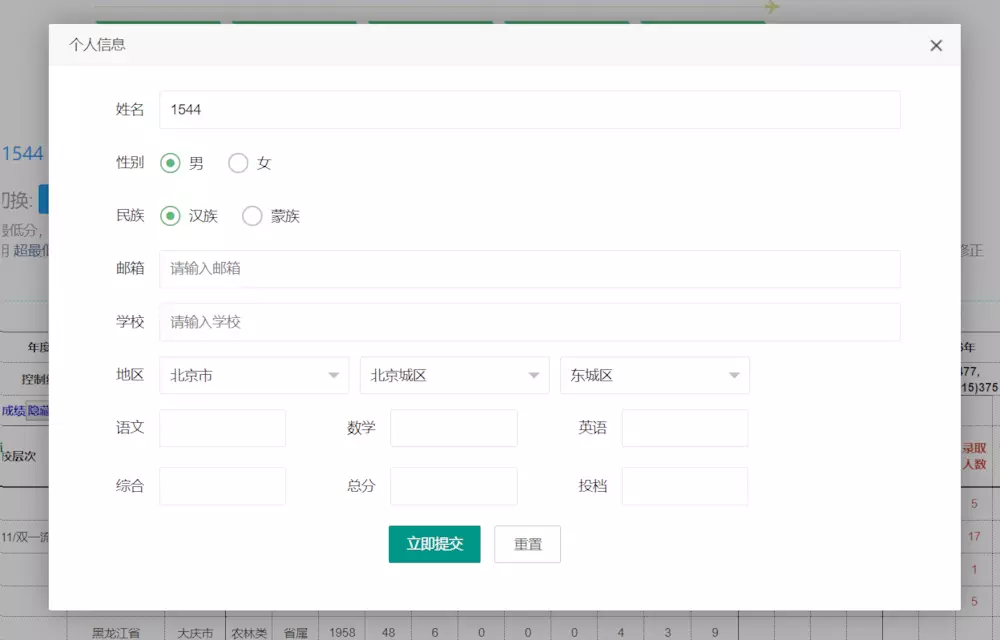
1、首先是页面的点击弹出事件。
 $(function () {        var studentId="";        if ('${zyTb.sudentId}' != null &&'${zyTb.sudentId}' != '') {
            studentId='${zyTb.sudentId}';
        }        if ('${univcollection.studentId}' != null &&'${univcollection.studentId}' != '') {
            studentId='${univcollection.studentId}';
        }        var studentName = '';
        studentName = '${gkzyUser.name}';

        $("#personaLinfoButton").click(function(){
            layer.open({
                type: 2,
                 //title: '收藏管理 (考生姓名:张无忌)',
                title: '个人信息',
                 shadeClose: true,
                 //弹出框之外的地方是否可以点击
                offset: '10%',
                area: ['60%', '80%'],
                content: '/gkzytb/franchiser/personaLinfo?gkzyUserId='+studentId
                // content: '/gkzytb/franchiser/rigthColumnJsonList'
            });
        });
    });
bee餐饮点餐外卖小程序
下载
bee餐饮点餐外卖小程序是针对餐饮行业推出的一套完整的餐饮解决方案,实现了用户在线点餐下单、外卖、叫号排队、支付、配送等功能,完美的使餐饮行业更高效便捷!功能演示:1、桌号管理登录后台,左侧菜单 “桌号管理”,添加并管理你的桌号信息,添加以后在列表你将可以看到 ID 和 密钥,这两个数据用来生成桌子的二维码2、生成桌子二维码例如上面的ID为 308,密钥为 d3PiIY,那么现在去左侧菜单微信设置
2、当点击弹出窗口之后,请求controller来渲染form表单数据。同时跳转到包含form表单的jsp页面
 @RequestMapping("personaLinfo")
 public String personaLinfo(Student student,Model model){
        Area area = new Area();
        area.setParent(new Area("0"));
        List<Area> areaList1 = areaService.findList(area);
        area.setParent(areaList1.get(0));
        List<Area> areaList2 = areaService.findList(area);
        area.setParent(areaList2.get(0));
        List<Area> areaList3 = areaService.findList(area);

        List<Student> studentList = studentService.findList(student);
        if (studentList.size()>0) {
            model.addAttribute("student",studentList.get(0));
            model.addAttribute("gkzyUser",gkzyUserService.get(studentList.get(0).getGkzyUserId()));
        }
        model.addAttribute("areaList1",areaList1);
        model.addAttribute("areaList2",areaList2);
        model.addAttribute("areaList3",areaList3);
        model.addAttribute("table","1");        return "modules/gkzytb/personal/personaLinfo";
    }
3、通过controller跳转到persionaLinfo的jsp页面。
<%@ page contentType="text/html;charset=UTF-8" %><%@ include file="/WEB-INF/views/include/taglib.jsp" %><!DOCTYPE html><html><head>
    <meta charset="UTF-8">
    <title>内蒙古高考志愿规划-鄂尔多斯市微联网络科技有限责任公司</title>
    <meta name="keywords" content="内蒙古高考志愿规划,原金钥匙高考志愿指导站,高考志愿填报,专业测评,生涯规划,高考提分,升学测评"/>
    <meta name="description" content="内蒙古最专业高考志愿填报规划平台,历时八年钻研,采用三年数据精准定位,面对面一对一指导,网站系统,手工excel系统,模拟演练系统免费开放" />
    <link rel="stylesheet" type="text/css" href="/static/layui/css/layui.css" /></head><body><div style="margin: 25px 60px 0 0;">
    <form class="layui-form" action="studentInfoF">
        <input type="hidden" name="id" value="${student.id}"/>
        <input type="hidden" name="gkzyUserId" value="${student.gkzyUserId}"/>
        <input type="hidden" name="franId" value="${student.franId}"/>
        <div class="layui-form-item">
            <label class="layui-form-label">姓名</label>
            <div class="layui-input-block">
                <input type="text" name="name" value="${student.name}" required  lay-verify="required" placeholder="请输入姓名" autocomplete="off" class="layui-input">
            </div>
        </div>
        <div class="layui-form-item">
            <label class="layui-form-label">性别</label>
            <div class="layui-input-block">
                <input type="radio" name="sex" value="1" title="男" checked>
                <input type="radio" name="sex" value="0" title="女">
            </div>
        </div>
        <div class="layui-form-item">
            <label class="layui-form-label">民族</label>
            <div class="layui-input-block">
                <input type="radio" name="nation" value="汉族" title="汉族" checked>
                <input type="radio" name="nation" value="蒙族" title="蒙族">
            </div>
        </div>
        <div class="layui-form-item">
            <label class="layui-form-label">邮箱</label>
            <div class="layui-input-block">
                <input type="text" name="email" value="${gkzyUser.email}" required  lay-verify="email" placeholder="请输入邮箱" autocomplete="off" class="layui-input">
            </div>
        </div>
        <div class="layui-form-item">
            <label class="layui-form-label">学校</label>
            <div class="layui-input-block">
                <input type="text" name="middleSchool.name" value="${student.middleSchool.name}" required  lay-verify="required" placeholder="请输入学校" autocomplete="off" class="layui-input">
            </div>
        </div>
        <div class="layui-form-item">
            <label class="layui-form-label">地区</label>
            <div class="layui-input-inline">
                <select class="w_30" name="provid" lay-filter="provid">
                    <c:forEach items="${areaList1}" var="area">
                        <option value="${area.id}">${area.name}</option>
                    </c:forEach>
                </select>
            </div>
            <div class="layui-input-inline">
                <select class="w_30" id="cityid" name="cityid" lay-filter="cityid">
                    <c:forEach items="${areaList2}" var="area">
                        <option value="${area.id}">${area.name}</option>
                    </c:forEach>
                </select>
            </div>
            <div class="layui-input-inline">
                <select class="w_30" id="area" name="area.id">
                    <c:forEach items="${areaList3}" var="area">
                        <option value="${area.id}">${area.name}</option>
                    </c:forEach>
                </select>
            </div>
        </div>
        <div class="layui-form-item">
            <div class="layui-inline">
                <label class="layui-form-label">语文</label>
                <div class="layui-input-inline" style="width: 127px">
                    <input type="text" name="chineseScore" value="${student.chineseScore}" lay-verify="required|number" autocomplete="off" class="layui-input">
                </div>
            </div>
            <div class="layui-inline">
                <label class="layui-form-label" style="width: 50px">数学</label>
                <div class="layui-input-inline" style="width: 127px">
                    <input type="text" name="englishScore" value="${student.englishScore}" lay-verify="required|number" autocomplete="off" autocomplete="off" class="layui-input">
                </div>
            </div>
            <div class="layui-inline">
                <label class="layui-form-label" style="width: 50px">英语</label>
                <div class="layui-input-inline" style="width: 127px">
                    <input type="tel" name="url" value="${student.actualScore}" lay-verify="required|number" autocomplete="off" class="layui-input">
                </div>
            </div>
        </div>
        <div class="layui-form-item">
            <div class="layui-inline">
                <label class="layui-form-label">综合</label>
                <div class="layui-input-inline" style="width: 127px">
                    <input type="text" name="colligateScore" value="${student.colligateScore}" lay-verify="required|number" autocomplete="off" class="layui-input">
                </div>
            </div>
            <div class="layui-inline">
                <label class="layui-form-label" style="width: 50px">总分</label>
                <div class="layui-input-inline" style="width: 127px">
                    <input type="text" name="actualScore" value="${student.actualScore}" lay-verify="required|number" autocomplete="off" class="layui-input">
                </div>
            </div>
            <div class="layui-inline">
                <label class="layui-form-label" style="width: 50px">投档</label>
                <div class="layui-input-inline" style="width: 127px">
                    <input type="tel" name="applyScore" value="${student.applyScore}" lay-verify="required|number" autocomplete="off" class="layui-input">
                </div>
            </div>
        </div>
        <div class="layui-form-item" style="text-align: center">
            <div class="layui-input-block" style="margin: initial">
                <button class="layui-btn" lay-submit lay-filter="formDemo">立即提交</button>
                <button type="reset" class="layui-btn layui-btn-primary">重置</button>
            </div>
        </div>
    </form></div><script type="text/javascript" language="JavaScript" src="/static/layui/layui.js" ></script><script type="text/javascript" language="JavaScript" src="/static/gkzytb/js/jquery-1.12.4.min.js" ></script></body><script>
    layui.use('form', function(){        var form = layui.form;        var $form = $('form');        //监听提交
        form.on('submit(formDemo)', function(data){

            $.post('studentInfoF',data.field,function (json) {
                layer.msg('修改成功!');
                setTimeout(function () {
                    parent.location.href=parent.location.href;
                },1000);
            })            return false;
        });
        form.on('select',function (data) {            if ($(data.elem).attr('name') == 'provid') {
                cityEvent(data.value,'cityid');
            }else if($(data.elem).attr('name') == 'cityid'){
                cityEvent(data.value,'area');
            }

        });        function cityEvent(id, name) {
            $.post('findAreaJson',{id:id},function(json){                if (json.state == 0) {
                    $form.find('select[id='+name+']').html("");
                    $.each(json.data, function (kt, vt) {
                        appendOptionTo($form.find('select[id='+name+']'), vt.name, vt.id);
                    });
                    form.render();                    if (name == 'cityid') {
                        cityEvent(json.data[0].id,'area');

                    }
                }
            });
        }        function appendOptionTo($o, k, v) {            var $opt = $("<option>").text(k).val(v);
            $opt.appendTo($o);
        }
});</script></html>推荐:layui框架教程




