0

0

bootstrap的缩略图大小能设置么

爱喝马黛茶的安东尼

爱喝马黛茶的安东尼

发布时间:2019-07-13 14:00:51

|

3756人浏览过

|

来源于php中文网

原创

bootstrap的缩略图大小能设置么

Bootstrap 创建缩略图的步骤如下:

1、在图像周围添加带有 class .thumbnail 的 标签.
2、这会添加四个像素的内边距(padding)和一个灰色的边框。

有了一个基本的缩略图,我们可以向缩略图添加各种 HTML 内容,比如标题、段落或按钮。

具体步骤如下:
1、把带有  class .thumbnail 的 标签改为


2、在该
内,您可以添加任何您想要添加的东西。由于这是一个
,我们可以使用默认的基于 span 的命名规则来调整大小。

相关推荐:《bootstrap入门教程

<!DOCTYPE html> 
<html> 
<head> 
 <title>Bootstrap 页面标题(Page Header)</title> 
 <meta charset="utf-8"> 
 <link rel="stylesheet" href="css/bootstrap.min.css" rel="external nofollow" > 
 <style> 
  h2{ 
  color: #080808; 
  font-weight:900;  
  text-shadow:1px 1px 0px #AD55C9; 
  } 
  p{ 
  color: #6A031A; 
  size: 24px; 
  } 
 </style> 
</head> 
  
<body> 
<div class="row"> 
 <div class="col-sm-6 col-md-3"> 
  <div class="thumbnail">@@##@@</div> 
  <div class="caption"> 
   <h2>漂亮的图片</h2> 
   <p>漂亮的图片.漂亮的图片.</p><div class="aritcle_card flexRow">
                                                        <div class="artcardd flexRow">
                                                                <a class="aritcle_card_img" href="/xiazai/js/3150" title="cropper封装的头像裁剪尺寸插件"><img
                                                                                src="https://img.php.cn/upload/jscode/000/000/001/5d0d9c2023ff9842.jpg" alt="cropper封装的头像裁剪尺寸插件"  onerror="this.onerror='';this.src='/static/lhimages/moren/morentu.png'" ></a>
                                                                <div class="aritcle_card_info flexColumn">
                                                                        <a href="/xiazai/js/3150" title="cropper封装的头像裁剪尺寸插件">cropper封装的头像裁剪尺寸插件</a>
                                                                        <p>cropper.js封装的图片裁剪插件。支持移动图像,裁剪图片,放大缩小图片,上下左右移动,图片翻转等重置设置功能。这是一款基于jQuery的头像尺寸设置裁剪组件。</p>
                                                                </div>
                                                                <a href="/xiazai/js/3150" title="cropper封装的头像裁剪尺寸插件" class="aritcle_card_btn flexRow flexcenter"><b></b><span>下载</span> </a>
                                                        </div>
                                                </div> 
   <p><a href="#" rel="external nofollow" rel="external nofollow" rel="external nofollow" rel="external nofollow" 
   rel="external nofollow" rel="external nofollow" rel="external nofollow" rel="external nofollow" rel="external 
   nofollow" rel="external nofollow" rel="external nofollow" rel="external nofollow" rel="external nofollow" 
   rel="external nofollow" rel="external nofollow" rel="external nofollow" class="btn btn-primary" 
   role="button">点你 </a> 
   <a href="#" rel="external nofollow" rel="external nofollow" rel="external nofollow" rel="external nofollow" 
   rel="external nofollow" rel="external nofollow" rel="external nofollow" rel="external nofollow" rel="external 
   nofollow" rel="external nofollow" rel="external nofollow" rel="external nofollow" rel="external nofollow" 
   rel="external nofollow" rel="external nofollow" rel="external nofollow" class="btn btn-default" 
   role="button">就点你 </a> 
   </p> 
  </div> 
 </div> 
   
 <div class="col-sm-6 col-md-3"> 
  <div class="thumbnail">@@##@@</div> 
  <div class="caption"> 
   <h2>漂亮的图片</h2> 
   <p>漂亮的图片.漂亮的图片.</p> 
   <p><a href="#" rel="external nofollow" rel="external nofollow" rel="external nofollow" rel="external nofollow" 
   rel="external nofollow" rel="external nofollow" rel="external nofollow" rel="external nofollow" rel="external 
   nofollow" rel="external nofollow" rel="external nofollow" rel="external nofollow" rel="external nofollow" 
   rel="external nofollow" rel="external nofollow" rel="external nofollow" class="btn btn-primary" 
   role="button">点你 </a> 
   <a href="#" rel="external nofollow" rel="external nofollow" rel="external nofollow" rel="external nofollow" 
   rel="external nofollow" rel="external nofollow" rel="external nofollow" rel="external nofollow" rel="external 
   nofollow" rel="external nofollow" rel="external nofollow" rel="external nofollow" rel="external nofollow" 
   rel="external nofollow" rel="external nofollow" rel="external nofollow" class="btn btn-default" 
   role="button">就点你 </a> 
   </p> 
  </div> 
 </div> 
 <div class="col-sm-6 col-md-3"> 
  <div class="thumbnail">@@##@@</div> 
  <div class="caption"> 
   <h2>漂亮的图片</h2> 
   <p>漂亮的图片.漂亮的图片.</p> 
   <p><a href="#" rel="external nofollow" rel="external nofollow" rel="external nofollow" rel="external nofollow" 
   rel="external nofollow" rel="external nofollow" rel="external nofollow" rel="external nofollow" rel="external 
   nofollow" rel="external nofollow" rel="external nofollow" rel="external nofollow" rel="external nofollow" 
   rel="external nofollow" rel="external nofollow" rel="external nofollow" class="btn btn-primary" 
   role="button">点你 </a> 
   <a href="#" rel="external nofollow" rel="external nofollow" rel="external nofollow" rel="external nofollow" 
   rel="external nofollow" rel="external nofollow" rel="external nofollow" rel="external nofollow" rel="external 
   nofollow" rel="external nofollow" rel="external nofollow" rel="external nofollow" rel="external nofollow" 
   rel="external nofollow" rel="external nofollow" rel="external nofollow" class="btn btn-default" 
   role="button">就点你 </a> 
   </p> 
  </div> 
 </div> 
 <div class="col-sm-6 col-md-3"> 
  <div class="thumbnail">@@##@@</div> 
  <div class="caption"> 
   <h2>漂亮的图片</h2> 
   <p>漂亮的图片.漂亮的图片.</p> 
   <p><a href="#" rel="external nofollow" rel="external nofollow" rel="external nofollow" rel="external nofollow" 
   rel="external nofollow" rel="external nofollow" rel="external nofollow" rel="external nofollow" rel="external 
   nofollow" rel="external nofollow" rel="external nofollow" rel="external nofollow" rel="external nofollow" 
   rel="external nofollow" rel="external nofollow" rel="external nofollow" class="btn btn-primary" 
   role="button">点你 </a> 
   <a href="#" rel="external nofollow" rel="external nofollow" rel="external nofollow" rel="external nofollow" 
   rel="external nofollow" rel="external nofollow" rel="external nofollow" rel="external nofollow" rel="external 
   nofollow" rel="external nofollow" rel="external nofollow" rel="external nofollow" rel="external nofollow" 
   rel="external nofollow" rel="external nofollow" rel="external nofollow" class="btn btn-default" 
   role="button">就点你 </a> 
   </p> 
  </div> 
 </div> 
 <div class="col-sm-6 col-md-3"> 
  <div class="thumbnail">@@##@@</div> 
  <div class="caption"> 
   <h2>漂亮的图片</h2> 
   <p>漂亮的图片.漂亮的图片.</p> 
   <p><a href="#" rel="external nofollow" rel="external nofollow" rel="external nofollow" rel="external nofollow" 
   rel="external nofollow" rel="external nofollow" rel="external nofollow" rel="external nofollow" rel="external 
   nofollow" rel="external nofollow" rel="external nofollow" rel="external nofollow" rel="external nofollow" 
   rel="external nofollow" rel="external nofollow" rel="external nofollow" class="btn btn-primary" 
   role="button">点你 </a> 
   <a href="#" rel="external nofollow" rel="external nofollow" rel="external nofollow" rel="external nofollow" 
   rel="external nofollow" rel="external nofollow" rel="external nofollow" rel="external nofollow" rel="external 
   nofollow" rel="external nofollow" rel="external nofollow" rel="external nofollow" rel="external nofollow" 
   rel="external nofollow" rel="external nofollow" rel="external nofollow" class="btn btn-default" 
   role="button">就点你 </a> 
   </p> 
  </div> 
 </div><div class="col-sm-6 col-md-3"> 
  <div class="thumbnail">@@##@@</div> 
  <div class="caption"> 
   <h2>漂亮的图片</h2> 
   <p>漂亮的图片.漂亮的图片.</p> 
   <p><a href="#" rel="external nofollow" rel="external nofollow" rel="external nofollow" rel="external nofollow" 
   rel="external nofollow" rel="external nofollow" rel="external nofollow" rel="external nofollow" rel="external 
   nofollow" rel="external nofollow" rel="external nofollow" rel="external nofollow" rel="external nofollow" 
   rel="external nofollow" rel="external nofollow" rel="external nofollow" class="btn btn-primary" 
   role="button">点你 </a> 
   <a href="#" rel="external nofollow" rel="external nofollow" rel="external nofollow" rel="external nofollow" 
   rel="external nofollow" rel="external nofollow" rel="external nofollow" rel="external nofollow" rel="external 
   nofollow" rel="external nofollow" rel="external nofollow" rel="external nofollow" rel="external nofollow" 
   rel="external nofollow" rel="external nofollow" rel="external nofollow" class="btn btn-default" 
   role="button">就点你 </a> 
   </p> 
  </div> 
 </div><div class="col-sm-6 col-md-3"> 
  <div class="thumbnail">@@##@@</div> 
  <div class="caption"> 
   <h2>漂亮的图片</h2> 
   <p>漂亮的图片.漂亮的图片.</p> 
   <p><a href="#" rel="external nofollow" rel="external nofollow" rel="external nofollow" rel="external nofollow" 
   rel="external nofollow" rel="external nofollow" rel="external nofollow" rel="external nofollow" rel="external 
   nofollow" rel="external nofollow" rel="external nofollow" rel="external nofollow" rel="external nofollow" 
   rel="external nofollow" rel="external nofollow" rel="external nofollow" class="btn btn-primary" 
   role="button">点你 </a> 
   <a href="#" rel="external nofollow" rel="external nofollow" rel="external nofollow" rel="external nofollow" 
   rel="external nofollow" rel="external nofollow" rel="external nofollow" rel="external nofollow" rel="external 
   nofollow" rel="external nofollow" rel="external nofollow" rel="external nofollow" rel="external nofollow" 
   rel="external nofollow" rel="external nofollow" rel="external nofollow" class="btn btn-default" 
   role="button">就点你 </a> 
   </p> 
  </div> 
 </div><div class="col-sm-6 col-md-3"> 
  <div class="thumbnail">@@##@@</div> 
  <div class="caption"> 
   <h2>漂亮的图片</h2> 
   <p>漂亮的图片.漂亮的图片.</p> 
   <p><a href="#" rel="external nofollow" rel="external nofollow" rel="external nofollow" rel="external nofollow" 
   rel="external nofollow" rel="external nofollow" rel="external nofollow" rel="external nofollow" rel="external 
   nofollow" rel="external nofollow" rel="external nofollow" rel="external nofollow" rel="external nofollow" 
   rel="external nofollow" rel="external nofollow" rel="external nofollow" class="btn btn-primary" 
   role="button">点你 </a> 
   <a href="#" rel="external nofollow" rel="external nofollow" rel="external nofollow" rel="external nofollow" 
   rel="external nofollow" rel="external nofollow" rel="external nofollow" rel="external nofollow" rel="external 
   nofollow" rel="external nofollow" rel="external nofollow" rel="external nofollow" rel="external nofollow" 
   rel="external nofollow" rel="external nofollow" rel="external nofollow" class="btn btn-default" 
   role="button">就点你 </a> 
   </p> 
  </div> 
 </div> 
</div> 
<script src="js/jquery.min.js"></script> 
<script src="js/bootstrap.min.js"></script> 
 </body> 
</html>

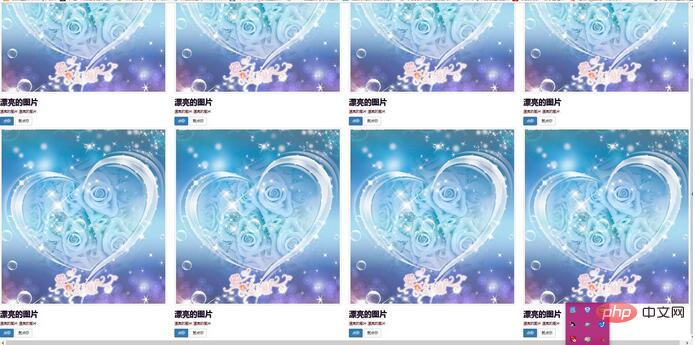
效果图:

bootstrap的缩略图大小能设置么

bootstrap的缩略图大小能设置么bootstrap的缩略图大小能设置么bootstrap的缩略图大小能设置么bootstrap的缩略图大小能设置么bootstrap的缩略图大小能设置么bootstrap的缩略图大小能设置么bootstrap的缩略图大小能设置么z.jpg

热门AI工具

更多
DeepSeek
DeepSeek

幻方量化公司旗下的开源大模型平台

豆包大模型
豆包大模型

字节跳动自主研发的一系列大型语言模型

通义千问
通义千问

阿里巴巴推出的全能AI助手

腾讯元宝
腾讯元宝

腾讯混元平台推出的AI助手

文心一言
文心一言

文心一言是百度开发的AI聊天机器人,通过对话可以生成各种形式的内容。

讯飞写作
讯飞写作

基于讯飞星火大模型的AI写作工具,可以快速生成新闻稿件、品宣文案、工作总结、心得体会等各种文文稿

即梦AI
即梦AI

一站式AI创作平台,免费AI图片和视频生成。

ChatGPT
ChatGPT

最最强大的AI聊天机器人程序,ChatGPT不单是聊天机器人,还能进行撰写邮件、视频脚本、文案、翻译、代码等任务。

相关专题

更多
class在c语言中的意思
class在c语言中的意思

在C语言中,"class" 是一个关键字,用于定义一个类。想了解更多class的相关内容,可以阅读本专题下面的文章。

870

2024.01.03

python中class的含义
python中class的含义

本专题整合了python中class的相关内容,阅读专题下面的文章了解更多详细内容。

30

2025.12.06

css中的padding属性作用
css中的padding属性作用

在CSS中,padding属性用于设置元素的内边距。想了解更多padding的相关内容,可以阅读本专题下面的文章。

175

2023.12.07

Go高并发任务调度与Goroutine池化实践

本专题围绕 Go 语言在高并发任务处理场景中的实践展开,系统讲解 Goroutine 调度模型、Channel 通信机制以及并发控制策略。内容包括任务队列设计、Goroutine 池化管理、资源限制控制以及并发任务的性能优化方法。通过实际案例演示,帮助开发者构建稳定高效的 Go 并发任务处理系统,提高系统在高负载环境下的处理能力与稳定性。

22

2026.03.10

Kotlin Android模块化架构与组件化开发实践

本专题围绕 Kotlin 在 Android 应用开发中的架构实践展开,重点讲解模块化设计与组件化开发的实现思路。内容包括项目模块拆分策略、公共组件封装、依赖管理优化、路由通信机制以及大型项目的工程化管理方法。通过真实项目案例分析,帮助开发者构建结构清晰、易扩展且维护成本低的 Android 应用架构体系,提升团队协作效率与项目迭代速度。

48

2026.03.09

JavaScript浏览器渲染机制与前端性能优化实践

本专题围绕 JavaScript 在浏览器中的执行与渲染机制展开,系统讲解 DOM 构建、CSSOM 解析、重排与重绘原理,以及关键渲染路径优化方法。内容涵盖事件循环机制、异步任务调度、资源加载优化、代码拆分与懒加载等性能优化策略。通过真实前端项目案例,帮助开发者理解浏览器底层工作原理,并掌握提升网页加载速度与交互体验的实用技巧。

93

2026.03.06

Rust内存安全机制与所有权模型深度实践

本专题围绕 Rust 语言核心特性展开,深入讲解所有权机制、借用规则、生命周期管理以及智能指针等关键概念。通过系统级开发案例,分析内存安全保障原理与零成本抽象优势,并结合并发场景讲解 Send 与 Sync 特性实现机制。帮助开发者真正理解 Rust 的设计哲学,掌握在高性能与安全性并重场景中的工程实践能力。

216

2026.03.05

PHP高性能API设计与Laravel服务架构实践

本专题围绕 PHP 在现代 Web 后端开发中的高性能实践展开,重点讲解基于 Laravel 框架构建可扩展 API 服务的核心方法。内容涵盖路由与中间件机制、服务容器与依赖注入、接口版本管理、缓存策略设计以及队列异步处理方案。同时结合高并发场景,深入分析性能瓶颈定位与优化思路,帮助开发者构建稳定、高效、易维护的 PHP 后端服务体系。

412

2026.03.04

AI安装教程大全
AI安装教程大全

2026最全AI工具安装教程专题:包含各版本AI绘图、AI视频、智能办公软件的本地化部署手册。全篇零基础友好,附带最新模型下载地址、一键安装脚本及常见报错修复方案。每日更新,收藏这一篇就够了,让AI安装不再报错!

143

2026.03.04

热门下载

更多
网站特效
/
网站源码
/
网站素材
/
前端模板

精品课程

更多
相关推荐
/
热门推荐
/
最新课程
Bootstrap 5教程
Bootstrap 5教程

共46课时 | 3.6万人学习

HTML+CSS基础与实战
HTML+CSS基础与实战

共132课时 | 12.5万人学习

JS进阶与BootStrap学习
JS进阶与BootStrap学习

共39课时 | 3.3万人学习

关于我们 免责申明 举报中心 意见反馈 讲师合作 广告合作 最新更新
php中文网:公益在线php培训,帮助PHP学习者快速成长!
关注服务号 技术交流群
PHP中文网订阅号
每天精选资源文章推送

Copyright 2014-2026 https://www.php.cn/ All Rights Reserved | php.cn | 湘ICP备2023035733号