



本篇文章主要给大家介绍如何用纯css实现折叠效果。
我们在前端页面开发过程中,折叠效果通常会用在导航栏或者下拉列表中。对于前端新手来说,可能有一定的难度。
下面我们就通过简单的css代码示例,为大家详细介绍用css实现折叠效果的具体方法。
html+css代码示例如下:
<!DOCTYPE html>
<html>
<meta charset="utf-8">
<title>纯css实现折叠效果</title>
<head>
    <style>
        * {
            margin: 0;
            padding: 0;
        }
        #parent >li> span{background: #b2ecef;display: block;width: 200px;border:1px solid #ECEEF2;}
        li {line-height: 40px;display: block;}
        li  p{
            display: inline-block;
            width: 0px;
            height: 0px;
            border-left: 5px solid transparent;
            border-right: 5px solid transparent;
            border-top: 5px solid #1094f2;
        }
        li>ul{display: none;}
        li>ul>li{border: 1px solid #DEDEDE;width: 199px;}
        #parent span:hover + ul{display: block;}
        #parent span:hover >p{
            display: inline-block;
            width: 0px;
            height: 0px;
            border-top: 5px solid transparent;
            border-bottom: 5px solid transparent;
            border-left: 5px solid#2f2f2f;}
 </style>
</head>
<body>
<ul id="parent">
    <li>
        <span><p></p><p><span>立即学习</span>“<a href="https://pan.quark.cn/s/cb6835dc7db1" style="text-decoration: underline !important; color: blue; font-weight: bolder;" rel="nofollow" target="_blank">前端免费学习笔记(深入)</a>”;</p><div class="aritcle_card flexRow">
                                                        <div class="artcardd flexRow">
                                                                <a class="aritcle_card_img" href="/ai/1210" title="妙刷AI"><img
                                                                                src="https://img.php.cn/upload/ai_manual/000/000/000/175680113794113.png" alt="妙刷AI"  onerror="this.onerror='';this.src='/static/lhimages/moren/morentu.png'" ></a>
                                                                <div class="aritcle_card_info flexColumn">
                                                                        <a href="/ai/1210" title="妙刷AI">妙刷AI</a>
                                                                        <p>美团推出的一款新奇、好玩、荒诞的AI视觉体验工具</p>
                                                                </div>
                                                                <a href="/ai/1210" title="妙刷AI" class="aritcle_card_btn flexRow flexcenter"><b></b><span>下载</span> </a>
                                                        </div>
                                                </div>主列表</span>
        <ul>
            <li>子列表1</li>
            <li>子列表2</li>
            <li>子列表3</li>
        </ul>
    </li>
</ul>

</body>
</html>
前台最终实现折叠效果如下图:
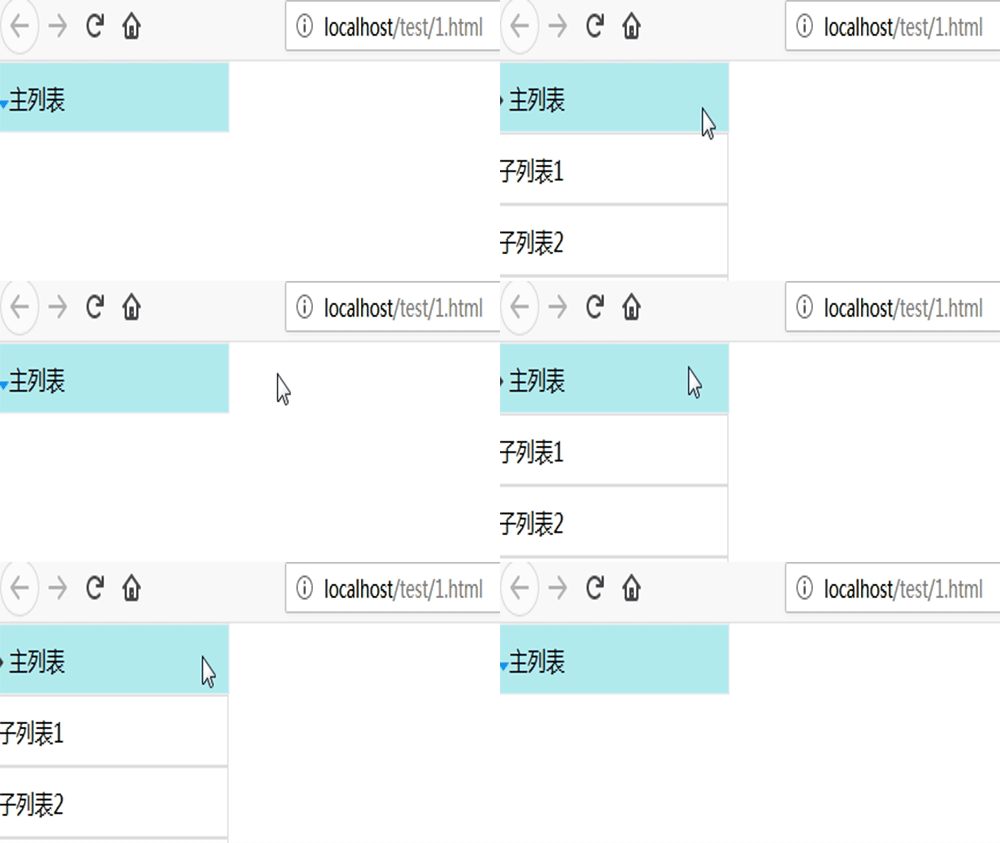
本篇文章就是关于用纯css实现折叠效果的方法介绍,也是非常简单易懂的。希望对需要的朋友有所帮助!
想要了解更多前端相关知识,可以关注PHP中文网HTML视频教程、CSS视频教程、Bootstrap视频教程等等相关前端教程,欢迎大家参考学习!




