0

0

js实现图片轮播的代码实例(详细代码)

不言

不言

发布时间:2018-08-09 17:57:15

|

6878人浏览过

|

来源于php中文网

原创

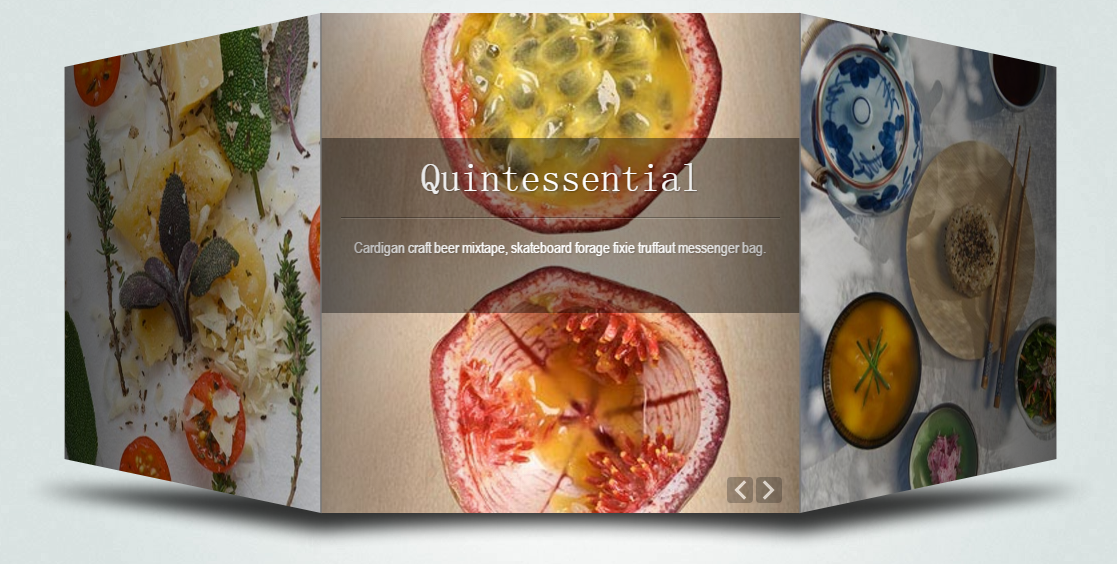
本篇文章给大家带来的内容是关于js实现图片轮播的代码实例(详细代码),有一定的参考价值,有需要的朋友可以参考一下,希望对你有所帮助。

broadcast.js

var CarouselFigure = new Object();
//轮播图初始化定义函数
CarouselFigure.init = function(tmpobj){
    //定义动画帧数(默认为:30)
    this.frameNum = tmpobj.frameNum !=undefined ?  tmpobj.frameNum : 30;
    //定义一次轮播的时间(默认为:0.2s)
    this.comsumeTime = tmpobj.comsumeTime !=undefined ?  tmpobj.comsumeTime : 200;
    //定义轮播图的宽高(默认宽高为:700px * 250px)
    this.CFWidth = tmpobj.CFWidth !=undefined ?  tmpobj.CFWidth : 700;
    this.CFHeight = tmpobj.CFHeight !=undefined ?  tmpobj.CFHeight : 250;
    //定义轮播的风格
    this.type = tmpobj.type == "small" ? 'small' : 'big';
    //轮播图的按钮大小的宽高
    this.AssowWidth = tmpobj.AssowWidth !=undefined ?  tmpobj.AssowWidth : 76;
    this.AssowHeight = tmpobj.AssowHeight !=undefined ?  tmpobj.AssowHeight : 112;
    //判断用户是否初始化
    this.initFlag = true;
    //是否允许轮播图运行
    this.applicationflag = true;
}
CarouselFigure.start = function(){
/**
    第一部分类容:初始化整个轮播图和其运行数据
*/
(function(){
    //1. 判断用户是否进行初始化
    if(CarouselFigure.initFlag == undefined){
        CarouselFigure.init({});
    }
    
    //2.1 初始化整个轮播图的div的基本大小
    $("#CarouselFigure").width(CarouselFigure.CFWidth).height(CarouselFigure.CFHeight).css("position","relative");
    
    //2.2 最中央的大图实际大小为:
    CarouselFigure.ImgWidth = CarouselFigure.CFWidth * 2/3;
    CarouselFigure.ImgHeight =  CarouselFigure.CFHeight - 6;
    
    //3. 初始化轮播图按钮数据
    CarouselFigure.setAssowdata = {
    prev:{
          top:(CarouselFigure.CFHeight - CarouselFigure.AssowHeight)/2 +"px",
          left:CarouselFigure.CFWidth/6 - CarouselFigure.AssowWidth + 6 + "px",
          originUrl:$("#CarouselFigure > img:eq(0)").attr("src"),
          hoverUrl:$("#CarouselFigure > img:eq(1)").attr("src"),
          },
    next:{
          top:(CarouselFigure.CFHeight - CarouselFigure.AssowHeight)/2 +"px",
          left:CarouselFigure.CFWidth*5/6 + "px",
          originUrl:$("#CarouselFigure > img:eq(2)").attr("src"),
          hoverUrl:$("#CarouselFigure > img:eq(3)").attr("src"),
          }
    };
    
    //4.1 初始化轮播图的url和src信息,存放到一个容器中
    CarouselFigure.imageContains = [];                        
    $("#CarouselFigure ul li img").each(function(){
        var tmpobj = {src:$(this).attr("src"),href:$(this).attr("href")}
        CarouselFigure.imageContains.push(tmpobj);
    });
    //4.2 对轮播图容器数据进行处理,当轮播图的个数3<= x  <= 5 只能使用small风格类型。当轮播图的个数 x < 3 时, 停止运行
    if(CarouselFigure.imageContains.length < 3){
        CarouselFigure.applicationflag = false;
    }else if(CarouselFigure.imageContains.length < 6){
        CarouselFigure.type = 'small';
    }
    //4.3 对轮播容器数据按顺序进行增倍,保证有足够数据进行轮播
    var objstr = JSON.stringify(CarouselFigure.imageContains);
    CarouselFigure.imageContains = CarouselFigure.imageContains.concat(JSON.parse(objstr));
    //5.1 轮播图使用big风格时,页面七张图在静态页面中的属性值
    CarouselFigure.setViewPosData = new Object;
     CarouselFigure.setViewPosData.big = [
        {
            width:CarouselFigure.ImgWidth*3/8,        height:CarouselFigure.ImgHeight*3/8,
            left:0,                                    top:0,
            zIndex:1,            opacity:0.2,        borderSize:0
        },{
            width:CarouselFigure.ImgWidth*3/8,        height:CarouselFigure.ImgHeight*3/8,
            left:0,                                    top:CarouselFigure.CFHeight*5/16,
            zIndex:2,            opacity:0.7,        borderSize:0
        },{
            width:CarouselFigure.ImgWidth*3/4,        height:CarouselFigure.ImgHeight*3/4,
            left:CarouselFigure.CFWidth/18,            top:CarouselFigure.CFHeight/8,
            zIndex:3,            opacity:0.9,        borderSize:0
        },{
            width:CarouselFigure.ImgWidth,            height:CarouselFigure.ImgHeight,
            left:CarouselFigure.CFWidth/6,            top:0,
            zIndex:4,            opacity:1,            borderSize:3
        },{
            width:CarouselFigure.ImgWidth*3/4,        height:CarouselFigure.ImgHeight*3/4,
            left:CarouselFigure.CFWidth * 4/9,        top:CarouselFigure.CFHeight/8,
            zIndex:3,            opacity:0.9,        borderSize:0
        },{
            width:CarouselFigure.ImgWidth*3/8,        height:CarouselFigure.ImgHeight*3/8,
            left:CarouselFigure.CFWidth * 3/4,        top:CarouselFigure.CFHeight*5/16,
            zIndex:2,            opacity:0.7,        borderSize:0
        },{
            width:CarouselFigure.ImgWidth*3/8,        height:CarouselFigure.ImgHeight*3/8,
            left:CarouselFigure.CFWidth * 3/4,        top:0,
            zIndex:1,            opacity:0.2,        borderSize:0
        },];
    //5.2 轮播图使用small风格时,页面5张图在静态页面中的属性值
     CarouselFigure.setViewPosData.small = [
        {
            width:CarouselFigure.ImgWidth*3/8,        height:CarouselFigure.ImgHeight*3/8,
            left:0,                                    top:0,
            zIndex:1,            opacity:0.2,        borderSize:0
        },{
            width:CarouselFigure.ImgWidth*3/4,        height:CarouselFigure.ImgHeight*3/4,
            left:0,                                    top:CarouselFigure.CFHeight/8,
            zIndex:2,            opacity:0.9,        borderSize:0
        },{
            width:CarouselFigure.ImgWidth,            height:CarouselFigure.ImgHeight,
            left:CarouselFigure.CFWidth/6,            top:0,
            zIndex:3,            opacity:1,            borderSize:3
        },{
            width:CarouselFigure.ImgWidth*3/4,        height:CarouselFigure.ImgHeight*3/4,
            left:CarouselFigure.CFWidth * 1/2,        top:CarouselFigure.CFHeight/8,
            zIndex:2,            opacity:0.9,        borderSize:0
        },{
            width:CarouselFigure.ImgWidth*3/8,        height:CarouselFigure.ImgHeight*3/8,
            left:CarouselFigure.CFWidth * 3/4,        top:0,
            zIndex:1,            opacity:0.2,        borderSize:0
        }];
}());
//验证初始化是否成功,否则全部隐藏,结束进程
if(!CarouselFigure.applicationflag){
    $("#CarouselFigure").css("display","none");
    return false;
}
/**
    第二部分:
        对轮播图的箭头进行初始化(包括页面中的静态布局,和点击事件和悬浮事件)
*/
    CarouselFigure.InitAssow = function (Assow,direction){
        //实现轮播图箭头的静态样式、悬浮事件和点击事件
        Assow.css({
            position:"absolute",
            left:this.setAssowdata[direction].left,
            top:this.setAssowdata[direction].top,
            "z-index":4
        })
        .mouseover(function(){            //鼠标悬浮切换图片
            $(this).attr("src",CarouselFigure.setAssowdata[direction].hoverUrl);
        }).mouseout(function(){
            $(this).attr("src",CarouselFigure.setAssowdata[direction].originUrl);
        }).click(function(){
            //记录点击事件的次数
            CarouselFigure.clickArrowfun(direction);    
        });
    }
    //调用初始化轮播图函数--实现左右箭头全部功能
    $("#CarouselFigure > img:odd").css("display","none");
    CarouselFigure.InitAssow($("#CarouselFigure > img:eq(0)"),"prev");
    CarouselFigure.InitAssow($("#CarouselFigure > img:eq(2)"),"next");
/**
    第三部分:
        对所有的轮播图进行页面静态布局
*/
    //初始化某张轮播图的方法
    CarouselFigure.InitImages =    function (i,setViewPosData,imageContains){
        $("#CarouselFigure ul img:eq("+i+")").css({
            position:"absolute",
            width:setViewPosData[i].width + "px",
            height:setViewPosData[i].height + "px",
            top:setViewPosData[i].top + "px",
            left:setViewPosData[i].left + "px",
            display:"block",
            "z-index":setViewPosData[i].zIndex,
            opacity:setViewPosData[i].opacity,    
        }).attr({
            src:imageContains[i].src,
            href:imageContains[i].href
        }).click(function(){
            location.href = $(this).attr("href");    //绑定图片点击跳转事件
        });
        if( (i == 0 || i == 6) && this.type == 'big'){        //第1张图片和第7张图片不可见
            $("#CarouselFigure ul img:eq("+i+")").css("display","none");
        }else if(i == 3 && this.type == 'big'){                //为正中央图片加边框
            $("#CarouselFigure ul img:eq("+i+")").css("border","3px solid #fff");
        }else if( (i == 0 || i == 4)&&this.type == 'small'){//第1张图片和第5张图片不可见
            $("#CarouselFigure ul img:eq("+i+")").css("display","none");
        }else if(i == 2 && this.type == 'small'){            //为正中央图片加边框
            $("#CarouselFigure ul img:eq("+i+")").css("border","3px solid #fff");
        }
    }
    /**
        实现七张图片的静态样式:
            清空原有的li标签,然后新建<li><img  alt="js实现图片轮播的代码实例(详细代码)" ></li>来存放每张轮播图。
    */
     $("#CarouselFigure ul").empty();
    for(var i = 0; i < CarouselFigure.setViewPosData[CarouselFigure.type].length; i++){
        $("#CarouselFigure ul").append('<li><img  src="" alt="js实现图片轮播的代码实例(详细代码)" ></li>');
        CarouselFigure.InitImages(i,CarouselFigure.setViewPosData[CarouselFigure.type],CarouselFigure.imageContains);
    } 
/**
    第四部分:
        形成轮播动画效果
*/    
    /*
    设置clickArrow变量:作为动画的标示位,让其进行队列化,必须本次动画完成,才能进行下次动画轮播。
        1. 当为负数时向前轮播,比如:-5向前轮播五次动画;
        2. 当为正数时向后轮播,同理;
        3. 当等于0时,此时没有进行轮播。
    */
    CarouselFigure.clickArrow = 0 ;
    
    // 处理动画队列方法:
    CarouselFigure.clickArrowfun = function (direction){
        if(this.clickArrow == 0){
            this.startAnimation(direction);
        }
        if(direction == "prev"){
            this.clickArrow--;
        }else if(direction == "next"){
            this.clickArrow++;
        }
    }
    /**
        开始一次轮播动画
            其中composerAnimateNum变量为:
                在一次动画中,记录每张轮播图完成的标识符;
                在big风格类型中:当其值为6时说明此次动画全部完成
                在small风格类型中:当其值为4时说明此次动画全部完成
    */ 
    CarouselFigure.startAnimation = function(direction){
        this.completeAnimationNum = 0;
        if(direction == "prev"){        //从最后一张图片到第一张轮播图片,分别向前移动,首先让最后一张图片可视    
            if(this.type == "big"){
                $("#CarouselFigure ul img:eq(6)").css("display","block");
            }else{
                $("#CarouselFigure ul img:eq(4)").css("display","block");
            }
            for(var i = this.setViewPosData[this.type].length - 1 ; i > 0; i --){
                this.startMove(i, this.setViewPosData[this.type][i],this.setViewPosData[this.type][i-1],direction);
            }
        }else if(direction == "next"){//从第一张图片到倒数第二张图片,分别向后移动,首先让第一张轮播图片可视
            $("#CarouselFigure ul img:eq(0)").css("display","block");
            for(var i = 0 ; i < this.setViewPosData[this.type].length - 1; i ++){
                this.startMove(i, this.setViewPosData[this.type][i],this.setViewPosData[this.type][i+1],direction);
            }
        }
    }
    /**
        功能:让一张轮播图从某一个状态变换到另一个状态
            (包括位子、透明度、边框等等属性)
    */
    CarouselFigure.startMove = function (index,startObj,endObj,direction){
        //所有属性的增量
        var increaseLeft = endObj.left - startObj.left;
        var increaseTop  = endObj.top - startObj.top;
        var increaseWidth = endObj.width - startObj.width;
        var increaseHeight = endObj.height - startObj.height;
        var increaseOpacity = endObj.opacity - startObj.opacity;
        var increaseBorderSize = endObj.borderSize - startObj.borderSize;
        var time = this.frameNum;            //共总帧数
        var i = 1;                            //帧数的记步标志索引
        //定义函数:一帧到下一帧的变化过程
        function moveStep(){
            setTimeout(function(){
                var tmpObj = $("#CarouselFigure ul img:eq("+index+")");
                //每一帧时图片的属性改变量
                tmpObj.css({
                    width:startObj.width + (increaseWidth/time) * i + "px",
                    height:startObj.height + (increaseHeight/time) * i + "px",
                    top:startObj.top + (increaseTop/time) * i + "px",
                    left:startObj.left + (increaseLeft/time) * i + "px",
                    border:startObj.borderSize + (increaseBorderSize/time) * i + "px solid #fff",
                    opacity:startObj.opacity + (increaseOpacity/time) * i,
                });
                //当小于30帧时,继续递归,直至调用30次完成动画效果
                if( i++ <time){
                    if(i == 15){//轮播图每张图片的层级关系处理方式
                        var zIndex = new Object;
                        zIndex.big = {prev:[null,1,2,3,4,3,2],next:[2,3,4,3,2,1]};
                        zIndex.small = {prev:[null,1,2,3,2,1],next:[2,3,2,1]}
                        tmpObj.css("z-index",zIndex[CarouselFigure.type][direction][index]);
                    }
                    moveStep();                        //递归
                }else{
                    CarouselFigure.completeAnimation(direction);    //完成一张图片的动画
                }
            },CarouselFigure.comsumeTime/time);
        }
        moveStep();                                    //开始动画
    }
/**
    第五部分:
        当每次轮播动画结束后的处理函数
        1. 首先,判断一次轮播动画是否结束;
        2. 对容器数据(imageContains)进行调整,形成队列
        3. 重新渲染整个轮播图的静态页面
        4. 通过clickArrow,处理动画队列
*/    
    CarouselFigure.completeAnimation = function(direction){
        this.completeAnimationNum++;
        //表示完成一次动画
        if(this.completeAnimationNum == (this.setViewPosData[this.type].length -1)){
            //重构用户自定义数据的顺序;
            if(direction == "prev"){
                var tmp = this.imageContains.shift();
                this.imageContains.push(tmp);
            }else if(direction == "next"){
                var tmp = this.imageContains.pop();
                this.imageContains.unshift(tmp);
            }
            //重新渲染轮播图七张图片的静态样式
            for(var i = 0; i < this.setViewPosData[this.type].length; i++){
                this.InitImages(i,this.setViewPosData[this.type],this.imageContains);
            } 
            //解决边框的bug的问题
            if(this.type == 'big'){
                $("#CarouselFigure ul li img:even").css("border","0px");
            }else{
                $("#CarouselFigure ul li img:odd").css("border","0px");
            }
            //处理动画队列
            if(direction == "prev"){
                this.clickArrow++;
            }else if(direction == "next"){
                this.clickArrow--;
            }
            if(this.clickArrow > 0){
                this.startAnimation(direction);
            }else if(this.clickArrow < 0){
                this.startAnimation(direction);
            }
        }
    }
};

broadcast.html

<!DOCTYPE html>
<html>
    <head>
        <meta charset="UTF-8">
        <title>轮播图实例</title>
    <script src="js/jquery-3.3.1.min.js"></script>
    </head>
    <style>
    *{
        padding:0px;
        margin:0px;
    }
    ul{
        list-style:none;
    }
    body{
        background:#eee;
        padding:10px;
    }
    #CarouselFigure{
        
    }
    </style>
    <body>
        <div id="CarouselFigure">
            <img  src="img/prev.png"    style="max-width:90%"  style="max-width:90%" / alt="js实现图片轮播的代码实例(详细代码)" >
            <img  src="img/prev.png" / alt="js实现图片轮播的代码实例(详细代码)" >
            <img  src="img/next.png"    style="max-width:90%"  style="max-width:90%" / alt="js实现图片轮播的代码实例(详细代码)" >
            <img  src="img/next.png" / alt="js实现图片轮播的代码实例(详细代码)" >            
            <ul>
                <li><img  src="img/1.jpg"    style="max-width:90%"  style="max-width:90%" alt="js实现图片轮播的代码实例(详细代码)" ></li>
                <li><img  src="img/2.jpg" alt="js实现图片轮播的代码实例(详细代码)" ></li>
                <li><img  src="img/3.jpg" alt="js实现图片轮播的代码实例(详细代码)" ></li>
                <li><img  src="img/4.jpg" alt="js实现图片轮播的代码实例(详细代码)" ></li>
                <li><img  src="img/5.jpg" alt="js实现图片轮播的代码实例(详细代码)" ></li>
                <li><img  src="img/6.jpg" alt="js实现图片轮播的代码实例(详细代码)" ></li>
                <li><img  src="img/7.jpg" alt="js实现图片轮播的代码实例(详细代码)" ></li>
                <li><img  src="img/8.jpg" alt="js实现图片轮播的代码实例(详细代码)" ></li>
            </ul>
        </div>
    </body>
</html>
<script src="js/broadcast.js"></script>
<script>
    $(function(){
        //对轮播图进行初始化
        CarouselFigure.init({type:'small',comsumeTime:1000});
        CarouselFigure.start();
    })
</script>

实现效果

jquery实现3D旋转轮播图片代码
jquery实现3D旋转轮播图片代码

jquery实现3D旋转轮播图片代码

下载

相关推荐:

怎么用简单的js代码实现轮播图滚动效果?

koa-router是什么?详解koa-router的大致结构与运行流程

热门AI工具

更多
DeepSeek
DeepSeek

幻方量化公司旗下的开源大模型平台

豆包大模型
豆包大模型

字节跳动自主研发的一系列大型语言模型

通义千问
通义千问

阿里巴巴推出的全能AI助手

腾讯元宝
腾讯元宝

腾讯混元平台推出的AI助手

文心一言
文心一言

文心一言是百度开发的AI聊天机器人,通过对话可以生成各种形式的内容。

讯飞写作
讯飞写作

基于讯飞星火大模型的AI写作工具,可以快速生成新闻稿件、品宣文案、工作总结、心得体会等各种文文稿

即梦AI
即梦AI

一站式AI创作平台,免费AI图片和视频生成。

ChatGPT
ChatGPT

最最强大的AI聊天机器人程序,ChatGPT不单是聊天机器人,还能进行撰写邮件、视频脚本、文案、翻译、代码等任务。

相关专题

更多
js正则表达式
js正则表达式

php中文网为大家提供各种js正则表达式语法大全以及各种js正则表达式使用的方法,还有更多js正则表达式的相关文章、相关下载、相关课程,供大家免费下载体验。

530

2023.06.20

js获取当前时间
js获取当前时间

JS全称JavaScript,是一种具有函数优先的轻量级,解释型或即时编译型的编程语言;它是一种属于网络的高级脚本语言,主要用于Web,常用来为网页添加各式各样的动态功能。js怎么获取当前时间呢?php中文网给大家带来了相关的教程以及文章,欢迎大家前来学习阅读。

576

2023.07.28

js 字符串转数组
js 字符串转数组

js字符串转数组的方法:1、使用“split()”方法;2、使用“Array.from()”方法;3、使用for循环遍历;4、使用“Array.split()”方法。本专题为大家提供js字符串转数组的相关的文章、下载、课程内容,供大家免费下载体验。

760

2023.08.03

js是什么意思
js是什么意思

JS是JavaScript的缩写,它是一种广泛应用于网页开发的脚本语言。JavaScript是一种解释性的、基于对象和事件驱动的编程语言,通常用于为网页增加交互性和动态性。它可以在网页上实现复杂的功能和效果,如表单验证、页面元素操作、动画效果、数据交互等。

6203

2023.08.17

js删除节点的方法
js删除节点的方法

js删除节点的方法有:1、removeChild()方法,用于从父节点中移除指定的子节点,它需要两个参数,第一个参数是要删除的子节点,第二个参数是父节点;2、parentNode.removeChild()方法,可以直接通过父节点调用来删除子节点;3、remove()方法,可以直接删除节点,而无需指定父节点;4、innerHTML属性,用于删除节点的内容。

492

2023.09.01

js截取字符串的方法
js截取字符串的方法

js截取字符串的方法有substring()方法、substr()方法、slice()方法、split()方法和slice()方法。本专题为大家提供字符串相关的文章、下载、课程内容,供大家免费下载体验。

221

2023.09.04

Js中concat和push的区别
Js中concat和push的区别

Js中concat和push的区别:1、concat用于将两个或多个数组合并成一个新数组,并返回这个新数组,而push用于向数组的末尾添加一个或多个元素,并返回修改后的数组的新长度;2、concat不会修改原始数组,是创建新的数组,而push会修改原数组,将新元素添加到原数组的末尾等等。本专题为大家提供concat和push相关的文章、下载、课程内容,供大家免费下载体验。

240

2023.09.14

js截取字符串的方法介绍
js截取字符串的方法介绍

JavaScript字符串截取方法,包括substring、slice、substr、charAt和split方法。这些方法可以根据具体需求,灵活地截取字符串的不同部分。在实际开发中,根据具体情况选择合适的方法进行字符串截取,能够提高代码的效率和可读性 。

303

2023.09.21

C# ASP.NET Core微服务架构与API网关实践

本专题围绕 C# 在现代后端架构中的微服务实践展开,系统讲解基于 ASP.NET Core 构建可扩展服务体系的核心方法。内容涵盖服务拆分策略、RESTful API 设计、服务间通信、API 网关统一入口管理以及服务治理机制。通过真实项目案例,帮助开发者掌握构建高可用微服务系统的关键技术,提高系统的可扩展性与维护效率。

3

2026.03.11

热门下载

更多
网站特效
/
网站源码
/
网站素材
/
前端模板

精品课程

更多
相关推荐
/
热门推荐
/
最新课程
Bootstrap 5教程
Bootstrap 5教程

共46课时 | 3.6万人学习

前端开发(基础+实战项目合集)
前端开发(基础+实战项目合集)

共60课时 | 4.3万人学习

关于我们 免责申明 举报中心 意见反馈 讲师合作 广告合作 最新更新
php中文网:公益在线php培训,帮助PHP学习者快速成长!
关注服务号 技术交流群
PHP中文网订阅号
每天精选资源文章推送

Copyright 2014-2026 https://www.php.cn/ All Rights Reserved | php.cn | 湘ICP备2023035733号