



这篇文章给大家介绍的文章内容是关于浅析html table表格的使用方法,有很好的参考价值,希望可以帮助到有需要的朋友。
定义和用法
table标签定义 HTML 表格。
创建表格的四要素:table、tr、th、td
<table>
<p>整个表格以<code><table>标记开始、<code>
标记结束。
<tr>
<p>Table row。表格的一行,有几对 tr 表格就有几行。</p>
<h3><code><td>
<p>Table data。表格的一个单元格,一行中包含几对 td ,一行中就有几列。</p>
<p><span>立即学习</span>“<a href="https://pan.quark.cn/s/cb6835dc7db1" style="text-decoration: underline !important; color: blue; font-weight: bolder;" rel="nofollow" target="_blank">前端免费学习笔记(深入)</a>”;</p>
<h3><code><th>
<p>Table head。表格的头部的一个单元格,表格表头。</p><div class="aritcle_card flexRow">
                                                        <div class="artcardd flexRow">
                                                                <a class="aritcle_card_img" href="/xiazai/code/11111" title="网奇.NET网络商城系统"><img
                                                                                src="https://img.php.cn/upload/webcode/000/000/008/176499720377066.jpg" alt="网奇.NET网络商城系统"  onerror="this.onerror='';this.src='/static/lhimages/moren/morentu.png'" ></a>
                                                                <div class="aritcle_card_info flexColumn">
                                                                        <a href="/xiazai/code/11111" title="网奇.NET网络商城系统">网奇.NET网络商城系统</a>
                                                                        <p>系统优势: 1、 使用全新ASP.Net+c#和三层结构开发. 2、 可生成各类静态页面(html,htm,shtm,shtml和.aspx) 3、 管理后台风格模板自由选择,界面精美 4、 风格模板每月更新多套,还可按需定制  5、 独具的缓存技术加快网页浏览速度 6、 智能销售统计,图表分析 7、 集成国内各大统计系统 8、 多国语言支持,内置简体繁体和英语 9、 UTF-8编码,可使用于全球</p>
                                                                </div>
                                                                <a href="/xiazai/code/11111" title="网奇.NET网络商城系统" class="aritcle_card_btn flexRow flexcenter"><b></b><span>下载</span> </a>
                                                        </div>
                                                </div>
<h2>额外元素</h2>
<h3><code><tbody>、<code><thead>、<code><tfoot><p>表格结构,如果不加<code><thead></thead>
<tbody><tfooter> , 表格将在加载完后才显示。加上这些, <code>tbody
包含行的内容优先显示,不必等待表格结束后再显示。
同时,如果表格很长,用tbody分段,可以一部分一部分地显示。
(通俗理解 table 可以按结构一块块的显示,不用等整个表格加载完后显示。)<caption></caption>
<tr>
<p>Table row。表格的一行,有几对 tr 表格就有几行。</p>
<h3><code><td>
<p>Table data。表格的一个单元格,一行中包含几对 td ,一行中就有几列。</p>
<p><span>立即学习</span>“<a href="https://pan.quark.cn/s/cb6835dc7db1" style="text-decoration: underline !important; color: blue; font-weight: bolder;" rel="nofollow" target="_blank">前端免费学习笔记(深入)</a>”;</p>
<h3><code><th>
<p>Table head。表格的头部的一个单元格,表格表头。</p><div class="aritcle_card flexRow">
<div class="artcardd flexRow">
<a class="aritcle_card_img" href="/xiazai/code/11111" title="网奇.NET网络商城系统"><img
src="https://img.php.cn/upload/webcode/000/000/008/176499720377066.jpg" alt="网奇.NET网络商城系统" onerror="this.onerror='';this.src='/static/lhimages/moren/morentu.png'" ></a>
<div class="aritcle_card_info flexColumn">
<a href="/xiazai/code/11111" title="网奇.NET网络商城系统">网奇.NET网络商城系统</a>
<p>系统优势: 1、 使用全新ASP.Net+c#和三层结构开发. 2、 可生成各类静态页面(html,htm,shtm,shtml和.aspx) 3、 管理后台风格模板自由选择,界面精美 4、 风格模板每月更新多套,还可按需定制 5、 独具的缓存技术加快网页浏览速度 6、 智能销售统计,图表分析 7、 集成国内各大统计系统 8、 多国语言支持,内置简体繁体和英语 9、 UTF-8编码,可使用于全球</p>
</div>
<a href="/xiazai/code/11111" title="网奇.NET网络商城系统" class="aritcle_card_btn flexRow flexcenter"><b></b><span>下载</span> </a>
</div>
</div>
<h2>额外元素</h2>
<h3><code><tbody>、<code><thead>、<code><tfoot><p>表格结构,如果不加<code><thead></thead>
<tbody><tfooter> , 表格将在加载完后才显示。加上这些, <code>tbody包含行的内容优先显示,不必等待表格结束后再显示。同时,如果表格很长,用
tbody分段,可以一部分一部分地显示。(通俗理解 table 可以按结构一块块的显示,不用等整个表格加载完后显示。)
<caption></caption>
表格标题
属性
border
表格边框的宽度。
建议设置为 0 后自行 CSS 添加边框样式。
cellpadding
表格单元边界与单元内容之间的间距(内边距)。
建议设置为 0 后自行 CSS 添加内边距样式。
cellspacing
单元格之间的间距。
实例
使用CSS3实现表格隔行变色
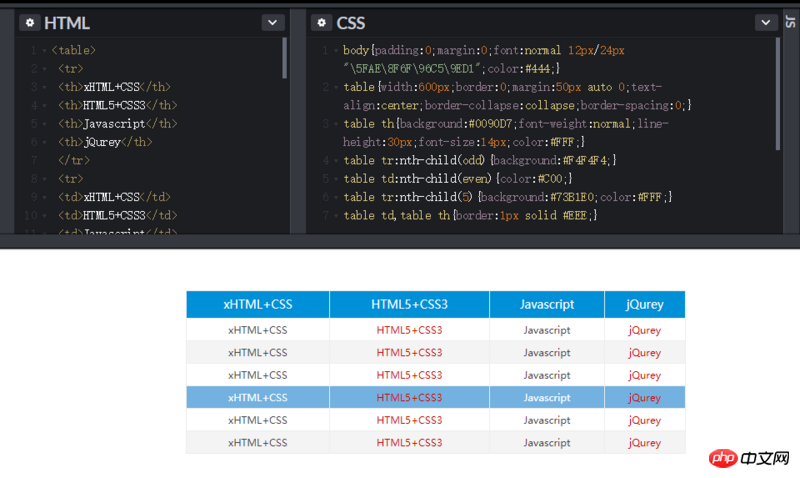
使用 CSS3的 :nth-child(n) 伪类选择器可以实现表格隔行变色的效果。
n 可填写 odd、even或任意数字,分别代表奇数行/列、偶数行/列或指定行/列
相关推荐:




