



这篇文章主要介绍了php调用ffmpeg对视频截图并拼接脚本
PHP脚本调用ffmpeg对视频截图并拼接,供大家参考,具体内容如下
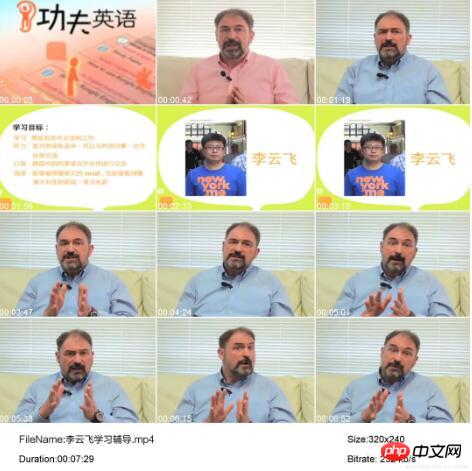
目前支持MKV,MPG,MP4等常见格式的视频,其他格式有待测试
12P 一张截图平均生成时间 1.64s 100个视频,大概需要2分半左右
9P 一张截图平均生成时间 1.13s 100个视频,大概需要2分钟左右
立即学习“PHP免费学习笔记(深入)”;
6P 一张截图平均生成时间 0.86s 100个视频,大概需要1分半左右
3P 一张截图平均生成时间 0.54s 100个视频,大概需要1分钟左右

<?php
define('DS', DIRECTORY_SEPARATOR);
date_default_timezone_set("Asia/Shanghai");
class FileLoader
{
  //路径变量
  private $rootdir    = '';
  private $tmp      = "tmp";      //tmp 目录
  private $source     = "mpg";      //source 目录
  private $destination  = "screenshoot";  //目标截图路径
  private $emptyImageName = "empty.jpg";   //合成的背景图
  //文件数组
  private $maxShoots   = 12;        //最大的截图数
  private $videoInfo   = NULL;
  private $files     = array();     //文件数
  private $fileArray   = array();
  private $extensionArray = array("mpg","mkv","mp4","avi","3gp","mov");  //支持的格式
  private $timeArray   = array("00:00:10","00:00:20","00:00:30","00:01:00","00:01:30","00:02:00","00:02:30","00:03:00","00:03:30","00:03:40","00:03:50","00:04:00");
  //统计变量
  private $timeStart   = 0;
  private $timeEnd    = 0;
  private $fileCount   = 0;
  private $successCount  = 0;
  private $failedCount  = 0;

  /**
  *  初始化信息
  */
   function __construct()
  {
    file_put_contents("log.txt","");
    $this->rootdir = dirname(__FILE__);
    $count = count($this->timeArray);

    for($i=1;$i<=$count;$i++)
    {
      $ii = $i-1;
      $this->fileArray[$ii] = $this->tmp.DS.$i.".jpg";
    }
  }

  /**
  *  当前时间,精确到小数点
  */
  private static function microtime_float()
  {
    list($usec, $sec)= explode(" ", microtime());
    return ((float)$usec + (float)$sec);
  }

  /**
  *  00:00:00 时间转秒
  */
  private static function timeToSec($time)
  {
     $p = explode(':',$time);
     $c = count($p);
     if ($c>1)
     {
        $hour  = intval($p[0]);
        $minute = intval($p[1]);
        $sec   = intval($p[2]);
     }
     else
     {
        throw new Exception('error time format');
     }
     $secs = $hour * 3600 + $minute * 60 + $sec;
     return $secs;
  }

  /**
  *  00:00:00 时间转秒
  */
  private static function secToTime($time)
  {

    $hour = floor($time/3600);
    $min = floor(($time - $hour * 3600)/60);
    $sec = $time % 60;
    $timeStr = sprintf("%02d:%02d:%02d",$hour,$min,$sec);
    return $timeStr;
  }

  /**
  *  获取全部文件
  */
   private function getFiles($dir)
  {
    $files = array();
    $dir = rtrim($dir, "/\") . DS;
    $dh = opendir($dir);
    if ($dh == false) { return $files; }

    while (($file = readdir($dh)) != false)
    {
      if ($file{0} == '.') { continue; }

      $path = $dir . $file;
      if (is_dir($path))
      {
        $files = array_merge($files, $this->getFiles($path));
      }
      elseif (is_file($path))
      {
        $files[] = $path;
      }
    }
    closedir($dh);
    return $files;
  }

  /**
  *  搜索路径
  */
  public function searchDir($sourcePath = NULL)
  {

    $this->timeStart = $this->microtime_float();

    if ($sourcePath)
    {
      $this->rootdir = $sourcePath;
    }

    if (file_exists($this->rootdir) && is_dir($this->rootdir))
    {
      $this->files = $this->getFiles($this->rootdir.DS.$this->source);
    }

    $this->fileCount = count($this->files);

    foreach ($this->files as $path)
    {
      $fi = pathinfo($path);
      $flag = array_search(strtolower($fi['extension']),$this->extensionArray);
      if (!$flag) continue;
      $this->getScreenShoot(basename($path));
    }

    $this->timeEnd = $this->microtime_float();
    $time = $this->timeEnd - $this->timeStart;

    if($this->fileCount > 0)
    {
      $str = sprintf("[TOTAL]: Cost Time:%8s | Total File:[%d] | Successed:[%d] | Failed:[%d] | Speed:%.2fs per file
",$this->secToTime($time),$this->fileCount,$this->successCount,$this->failedCount,$time/$this->fileCount);
      file_put_contents("log.txt",$str,FILE_APPEND);
    }
    else
    {
      $str = sprintf("[TOTAL]: Cost Time:%8s | Total File:[%d] | Successed:[%d] | Failed:[%d] | Speed:%.2fs per file
",$this->secToTime($time),$this->fileCount,$this->successCount,$this->failedCount,0);
      file_put_contents("log.txt",$str,FILE_APPEND);
    }

  }

  /**
  *  获取视频信息
  */
  private function getVideoInfo($file){
      $re = array();
      exec(".".DS."ffmpeg -i {$file} 2>&1", $re);
      $info = implode("
", $re);

      if(preg_match("/No such file or directory/i", $info))
      {
        return false;
      }

      if(preg_match("/Invalid data/i", $info)){
        return false;
      }

      $match = array();
      preg_match("/d{2,}xd+/", $info, $match);
      list($width, $height) = explode("x", $match[0]);

      $match = array();
      preg_match("/Duration:(.*?),/", $info, $match);
      if($match)
      {
        $duration = date("H:i:s", strtotime($match[1]));
      }else
      {
        $duration = NULL;
      }

      $match = array();
      preg_match("/bitrate:(.*kb/s)/", $info, $match);
      $bitrate = $match[1];

      if(!$width && !$height && !$duration && !$bitrate){
        return false;
      }else{
        return array(
          "file" => $file,
          "width" => $width,
          "height" => $height,
          "duration" => $duration,
          "bitrate" => $bitrate,
          "secends" => $this->timeToSec($duration)
        );
      }
    }


  /**
  *  设置截图时间
  */
  private function setShootSecends($secends,$useDefault = NO)
  {

    if($useDefault)
    {
      if($secends<18)
      {
        $time = 1;
      }else
      {
        $time = 5;
      }

      $range = floor(($secends - $time)/ ($this->maxShoots));
      if ($range < 1)
      {
        $range = 1;
      }

      $this->timeArray = array();
      for($i=0;$i<$this->maxShoots;$i++)
      {
        $this->timeArray[$i] = $this->secToTime($time);
        $time = $time + $range;
        if ($time > $secends) break;
      }
    }
  }

  /**
  *  拼接图片
  */
  private function getFixedPhoto($fileName)
  {

    $target = $this->rootdir.DS.$this->emptyImageName;//背景图片
    $target_img = Imagecreatefromjpeg($target);
    $source= array();

    foreach ($this->fileArray as $k=>$v)
    {
      $source[$k]['source'] = Imagecreatefromjpeg($v);
      $source[$k]['size'] = getimagesize($v);
    }

    $tmpx=5;
    $tmpy=5;//图片之间的间距
    for ($i=0; $i< count($this->timeArray); $i++)
    {
      imagecopy($target_img,$source[$i]['source'],$tmpx,$tmpy,0,0,$source[$i]['size'][0],$source[$i]['size'][1]);
      $target_img = $this->setTimeLabel($target_img,$tmpx,$tmpy,$source[$i]['size'][0],$source[$i]['size'][1],$this->timeArray[$i]);
      $tmpx = $tmpx+ $source[$i]['size'][0];
      $tmpx = $tmpx+5;
      if(($i+1) %3 == 0){
        $tmpy = $tmpy+$source[$i]['size'][1];
        $tmpy = $tmpy+5;
        $tmpx=5;
      }
    }

    $target_img = $this->setVideoInfoLabel($target_img,$tmpx,$tmpy,$this->videoInfo);
    Imagejpeg($target_img,$this->rootdir.DS.$this->destination.DS.$fileName.'.jpg');
  }

  /**
  *  设置时间刻度标签
  */
  private function setTimeLabel($image,$image_x,$image_y,$image_w,$image_h,$img_text)
  {
     imagealphablending($image,true);
     //设定颜色
     $color=imagecolorallocate($image,255,255,255);
     $ttf_im=imagettfbbox(30 ,0,"Arial.ttf",$this->img_text);
     $w = $ttf_im[2] - $ttf_im[6];
     $h = $ttf_im[3] - $ttf_im[7];
     unset($ttf_im);

     $txt_y   =$image_y+$image_h+$h-5;
     $txt_x   =$image_x+$w+5;

     imagettftext($image,30,0,$txt_x,$txt_y,$color,"Arial.ttf",$img_text);
     return $image;
   }

  /**
  *  设置视频信息标签
  */
   private function setVideoInfoLabel($image,$txt_x,$txt_y,$videoInfo)
   {
     imagealphablending($image,true);

     $color=imagecolorallocate($image,0,0,0);

     imagettftext($image,32,0,100,2000+30,$color,"FZLTHJW.ttf","FileName:".basename($videoInfo["file"]));
     imagettftext($image,32,0,1600,2000+30,$color,"Arial.ttf","Size:".$videoInfo["width"]."x".$videoInfo["height"]);
     imagettftext($image,32,0,100,2000+120,$color,"Arial.ttf","Duration:".$videoInfo["duration"]);
     imagettftext($image,32,0,1600,2000+120,$color,"Arial.ttf","Bitrate:".$videoInfo["bitrate"]);
     return $image;
  }

  /**
  *  屏幕截图
  */
  public function getScreenShoot($fileName)
  {
    $fi = pathinfo($fileName);
    $this->videoInfo = $this->getVideoInfo($this->rootdir.DS.$this->source.DS.$fileName);
    if($this->videoInfo)
    {
      $this->setShootSecends($this->videoInfo["secends"]);

      for ($i=0; $i< count($this->timeArray); $i++ )
      {
        $cmd=".".DS."ffmpeg -ss ". $this->timeArray[$i] ." -i ". $this->rootdir.DS.$this->source.DS.$fileName ." -y -f image2 -s 720*480 -vframes 1 ".$this->rootdir.DS.$this->fileArray[$i];
        exec($cmd,$out,$status);
      }
      $this->getFixedPhoto($fileName);

      $str = sprintf("[%s]:OK...........[%s][%2dP]%-30s
",date("y-m-d h:i:s",time()),$this->videoInfo["duration"],count($this->timeArray),$fileName);
      file_put_contents("log.txt",$str,FILE_APPEND);
      $this->successCount += 1;
    }else
    {
      $str = sprintf("[%s]:FAILED.................................[%s][%2dP]%-30s
",date("y-m-d h:i:s",time()),$this->videoInfo["duration"],count($this->timeArray),$fileName);
      file_put_contents("log.txt",$str,FILE_APPEND);
      $this->failedCount += 1;
    }
  }

  /**
  *  TODO:
  *  截取图片,
  *  需要配置ffmpeg-php,比较麻烦,
  *  但是这个类确实挺好用的。
  */
  public function getScreenShoot2($fileName)
  {
    if(extension_loaded('ffmpeg')){//判断ffmpeg是否载入
      $mov = new ffmpeg_movie($this->rootdir.DS.$this->source.DS.$fileName);//视频的路径
      $count = $mov->getFrameCount();
      $ff_frame = $mov->getFrame(floor($count/2));
      if($ff_frame)
      {
        $gd_image = $ff_frame->toGDImage();
        $img=$this->rootdir.DS."test.jpg";//要生成图片的绝对路径
        imagejpeg($gd_image, $img);//创建jpg图像
        imagedestroy($gd_image);//销毁一图像
      }
    }else{
      echo "ffmpeg没有载入";
    }
  }
}

$fileLoader = new FileLoader();
$fileLoader->searchDir();
?>
以上就是本文的全部内容,希望对大家的学习有所帮助,也希望大家多多支持php中文网。
您可能感兴趣的文章:
Yii2中的场景(scenario)和验证规则(rule)的详解
MixPHP、Yii和CodeIgniter的并发压力测试的小结
PHP基于非递归算法实现先序、中序及后序遍历二叉树操作的示例




