



这篇文章主要介绍了使用css3编写类似ios中的复选框及带开关的按钮,需要的朋友可以参考下
checkbox多选
最近写了一个适合移动端的checkbox,如图: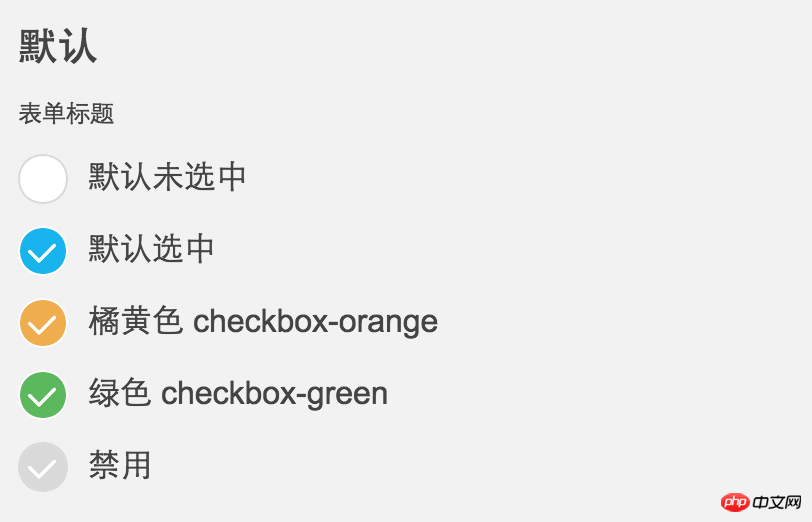
ps:中间的勾勾是iconfont,iOS风格的。
具体的HTML:
立即学习“前端免费学习笔记(深入)”;
<p class="mui-checkbox-con">
    <label>
        <input class="mui-checkbox" type="checkbox">默认未选中</label>
</p>
<p class="mui-checkbox-con">
    <label>
        <input class="mui-checkbox" type="checkbox" checked>默认选中</label>
</p>
<p class="mui-checkbox-con">
    <label>
        <input class="mui-checkbox checkbox-orange" type="checkbox" checked>橘黄色 checkbox-orange</label>
</p>
<p class="mui-checkbox-con">
    <label>
        <input class="mui-checkbox checkbox-green" type="checkbox" checked>绿色 checkbox-green</label>
</p>
<p class="mui-checkbox-con">
    <label>
        <input class="mui-checkbox" type="checkbox" disabled>禁用</label>
</p>
CSS代码(SCSS导出的,排版有些奇怪):
.mui-checkbox {
  -webkit-appearance: none;
  position: relative;
  width: 25px;
  height: 25px;
  margin-right: 10px;
  background-color: #FFFFFF;
  border: solid 1px #d9d9d9;
  border-top-left-radius: 20px;
  border-top-rightright-radius: 20px;
  border-bottom-left-radius: 20px;
  border-bottom-rightright-radius: 20px;
  background-clip: padding-box;
  display: inline-block; }
  .mui-checkbox:focus {
    outline: 0 none;
    outline-offset: -2px; }
  .mui-checkbox:checked {
    background-color: #18b4ed;
    border: solid 1px #FFFFFF; }
    .mui-checkbox:checked:before {
      display: inline-block;
      margin-top: 1px;
      margin-left: 2px;
      font-family: iconfont;
      content: "\e667";
      color: #FFFFFF;
      font-size: 18px; }
  .mui-checkbox:disabled {
    background-color: #d9d9d9;
    border: solid 1px #d9d9d9; }
    .mui-checkbox:disabled:before {
      display: inline-block;
      margin-top: 1px;
      margin-left: 2px;
      font-family: iconfont;
      content: "\e667";
      color: #FFFFFF;
      font-size: 18px; }
  .mui-checkbox.checkbox-green:checked {
    background-color: #5cb85c; }
  .mui-checkbox.checkbox-orange:checked {
    background-color: #f0ad4e; }
  .mui-checkbox.checkbox-s {
    width: 19px;
    height: 19px; }
    .mui-checkbox.checkbox-s:before {
      display: inline-block;
      margin-top: 1px;
      margin-left: 2px;
      font-family: iconfont;
      content: "\e667";
      color: #FFFFFF;
      font-size: 13px; }
.mui-checkbox-anim {
  -webkit-transition: background-color ease 0.2s;
          transition: background-color ease 0.2s; }
SCSS代码:
@mixin checkedCon($fs:18px) {
  &:before {
    display: inline-block;
    margin-top: 1px;
    margin-left: 2px;
    font-family: iconfont;
    content: "\e667";
    color: #FFFFFF;
    font-size: $fs;
  }
}
$duration: .4s;
.mui-checkbox {
  -webkit-appearance: none;
  position: relative;
  width: 25px;
  height: 25px;
  margin-right: 10px;
  background-color: #FFFFFF;
  border: solid 1px #d9d9d9;
  border-top-left-radius: 20px;
  border-top-rightright-radius: 20px;
  border-bottom-left-radius: 20px;
  border-bottom-rightright-radius: 20px;
  background-clip: padding-box;
  display: inline-block;
  &:focus {
    outline: 0 none;
    outline-offset: -2px
  }
  &:checked {
    background-color: #18b4ed;
    border: solid 1px #FFFFFF;
    @include checkedCon();
  }
  &:disabled {
    background-color: #d9d9d9;
    border: solid 1px #d9d9d9;
    @include checkedCon();
  }
  &.checkbox-green:checked {
    background-color: #5cb85c;
  }
  &.checkbox-orange:checked {
    background-color: #f0ad4e;
  }
  &.checkbox-s {
    width: 19px;
    height: 19px;
    @include checkedCon(13px);
  }
}
.mui-checkbox-anim{
  //border等其他元素不做过渡效果,增加视觉差,更有动画效果
  transition: background-color ease $duration/2;
}带switch开关
本身我做这一个ui的目的是支持移动端的页面,而webkit上也正好支持单标记的input元素是使用伪类(:before或:after),所以我没做更多的支持和优化,我只是想尽量的保持html干净,所以没用其他元素做模拟。如果你要使用在桌面应用上,或支持其他浏览器,可以自己稍微修改一下,反正我是没测试过。
今天继续分享一个iOS风格的switch开关按钮,样子也非常常见,如图:
主要是使用了<input type="checkbox">来模拟实现,具体的HTML:

<label><input class="mui-switch" type="checkbox"> 默认未选中</label>
<label><input class="mui-switch" type="checkbox" checked> 默认选中</label>
<label><input class="mui-switch mui-switch-animbg" type="checkbox"> 默认未选中,简单的背景过渡效果,加mui-switch-animbg类即可</label>
<label><input class="mui-switch mui-switch-animbg" type="checkbox" checked> 默认选中</label>
<label><input class="mui-switch mui-switch-anim" type="checkbox"> 默认未选中,过渡效果,加 mui-switch-anim
类即可</label>
<label><input class="mui-switch mui-switch-anim" type="checkbox" checked> 默认选中</label>
在实际的使用中后来又增加了两个过渡效果,分别加 mui-switch-animbg和mui-switch-anim 类即可,具体效果查看下面的demo页面。
CSS代码(SCSS导出的,排版有些奇怪):
.mui-switch {
  width: 52px;
  height: 31px;
  position: relative;
  border: 1px solid #dfdfdf;
  background-color: #fdfdfd;
  box-shadow: #dfdfdf 0 0 0 0 inset;
  border-radius: 20px;
  border-top-left-radius: 20px;
  border-top-rightright-radius: 20px;
  border-bottom-left-radius: 20px;
  border-bottom-rightright-radius: 20px;
  background-clip: content-box;
  display: inline-block;
  -webkit-appearance: none;
  user-select: none;
  outline: none; }
  .mui-switch:before {
    content: '';
    width: 29px;
    height: 29px;
    position: absolute;
    top: 0px;
    left: 0;
    border-radius: 20px;
    border-top-left-radius: 20px;
    border-top-rightright-radius: 20px;
    border-bottom-left-radius: 20px;
    border-bottom-rightright-radius: 20px;
    background-color: #fff;
    box-shadow: 0 1px 3px rgba(0, 0, 0, 0.4); }
  .mui-switch:checked {
    border-color: #64bd63;
    box-shadow: #64bd63 0 0 0 16px inset;
    background-color: #64bd63; }
    .mui-switch:checked:before {
      left: 21px; }
  .mui-switch.mui-switch-animbg {
    transition: background-color ease 0.4s; }
    .mui-switch.mui-switch-animbg:before {
      transition: left 0.3s; }
    .mui-switch.mui-switch-animbg:checked {
      box-shadow: #dfdfdf 0 0 0 0 inset;
      background-color: #64bd63;
      transition: border-color 0.4s, background-color ease 0.4s; }
      .mui-switch.mui-switch-animbg:checked:before {
        transition: left 0.3s; }
  .mui-switch.mui-switch-anim {
    transition: border cubic-bezier(0, 0, 0, 1) 0.4s, box-shadow cubic-bezier(0, 0, 0, 1) 0.4s; }
    .mui-switch.mui-switch-anim:before {
      transition: left 0.3s; }
    .mui-switch.mui-switch-anim:checked {
      box-shadow: #64bd63 0 0 0 16px inset;
      background-color: #64bd63;
      transition: border ease 0.4s, box-shadow ease 0.4s, background-color ease 1.2s; }
      .mui-switch.mui-switch-anim:checked:before {
        transition: left 0.3s; }
/*# sourceMappingURL=mui-switch.css.map */
SCSS代码:
@mixin borderRadius($radius:20px) {
  border-radius: $radius;
  border-top-left-radius: $radius;
  border-top-rightright-radius: $radius;
  border-bottom-left-radius: $radius;
  border-bottom-rightright-radius: $radius;
}
$duration: .4s;
$checkedColor: #64bd63;
.mui-switch {
  width: 52px;
  height: 31px;
  position: relative;
  border: 1px solid #dfdfdf;
  background-color: #fdfdfd;
  box-shadow: #dfdfdf 0 0 0 0 inset;
  @include borderRadius();
  background-clip: content-box;
  display: inline-block;
  -webkit-appearance: none;
  user-select: none;
  outline: none;
  &:before {
    content: '';
    width: 29px;
    height: 29px;
    position: absolute;
    top: 0px;
    left: 0;
    @include borderRadius();
    background-color: #fff;
    box-shadow: 0 1px 3px rgba(0, 0, 0, 0.4);
  }
  &:checked {
    border-color: $checkedColor;
    box-shadow: $checkedColor 0 0 0 16px inset;
    background-color: $checkedColor;
    &:before {
      left: 21px;
    }
  }
  &.mui-switch-animbg {
    transition: background-color ease $duration;
    &:before {
      transition: left 0.3s;
    }
    &:checked {
      box-shadow: #dfdfdf 0 0 0 0 inset;
      background-color: $checkedColor;
      transition: border-color $duration, background-color ease $duration;
      &:before {
        transition: left 0.3s;
      }
    }
  }
  &.mui-switch-anim {
    transition: border cubic-bezier(0, 0, 0, 1) $duration, box-shadow cubic-bezier(0, 0, 0, 1) $duration;
    &:before {
      transition: left 0.3s;
    }
    &:checked {
      box-shadow: $checkedColor 0 0 0 16px inset;
      background-color: $checkedColor;
      transition: border ease $duration, box-shadow ease $duration, background-color ease $duration*3;
      &:before {
        transition: left 0.3s;
      }
    }
  }
}
以上就是本文的全部内容,希望对大家的学习有所帮助,更多相关内容请关注PHP中文网!
相关推荐:
关于CSS中list-style修改列表属性控制li标签样式的问题




