



这篇文章主要介绍了js实现直接运行html代码的方法,涉及javascript窗口操作相关实现技巧,需要的朋友可以参考下
本文实例讲述了JS实现直接运行html代码的方法。分享给大家供大家参考,具体如下:
1、实例代码:
<!DOCTYPE html>
<html>
  <head>
    <meta charset='utf-8'/>
    <title>直接运行 html 代码</title>
  </head>
  <body>
    <textarea style='width:300px;height:200px;' id='txtCode'></textarea><br/>
    <input type='button' value='直接运行' id='btnRun'/>
    <script>
      document.getElementById('btnRun').onclick = function(){
        var runHtml = document.getElementById('txtCode').value;
        if(runHtml){
          var win = window.open('', '运行窗口');
          win.document.open();
          win.document.write(runHtml);
          win.document.close();
        }
        else{
          alert('请输入!');
        }
      }
    </script>
  </body>
</html>
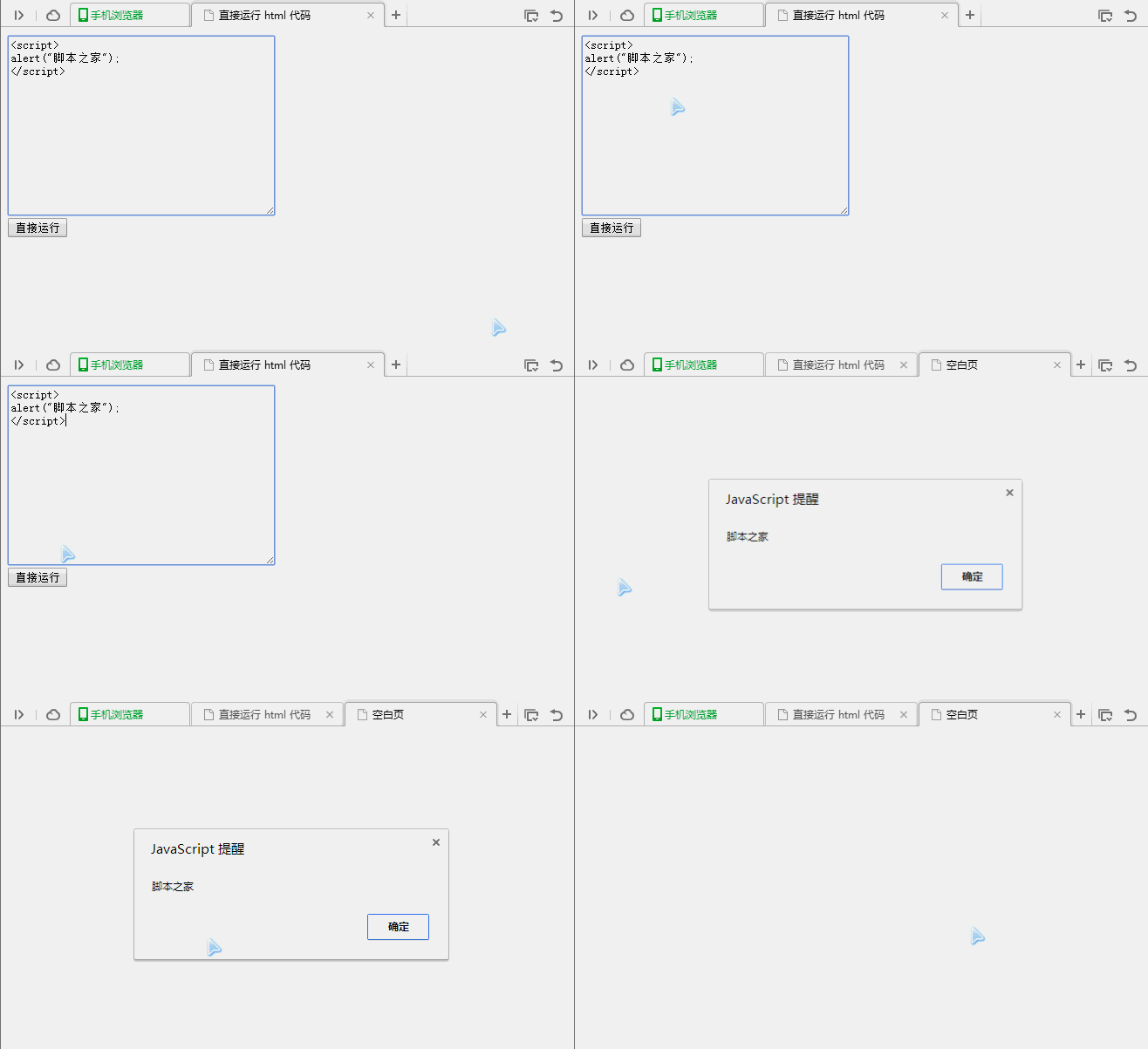
2、运行效果图如下:
立即学习“前端免费学习笔记(深入)”;

以上就是本文的全部内容,希望对大家的学习有所帮助,更多相关内容请关注PHP中文网!
相关推荐:




