



下面我就为大家分享一篇vue 多入口文件搭建 vue多页面搭建的实例讲解,具有很好的参考价值,希望对大家有所帮助。
红色为更改后的不同之处

vue 多入口文件搭建
在webpack.base.conf
立即学习“前端免费学习笔记(深入)”;
中修改
var
path = require('path')
var
config = require('../config')
var
utils = require('./utils')
var
projectRoot =
path.resolve(__dirname,'../')
var glob = require('glob');
var entries = getEntry('./src/module/*.js'); // 获得入口js文件
module.exports = {
entry: entries,
output: {
path:config.build.assetsRoot,
publicPath:process.env.NODE_ENV
 ==='production' ?
config.build.assetsPublicPath :config.dev.assetsPublicPath,
filename: '[name].js'
},
resolve: {
extensions: ['','.js',
'.vue'],
fallback: [path.join(__dirname,'../node_modules')],
alias: {
'src':path.resolve(__dirname,'../src'),
'assets':path.resolve(__dirname,'../src/assets'),
'components':path.resolve(__dirname,'../src/components')
}
},
resolveLoader: {
fallback: [path.join(__dirname,'../node_modules')]
},
module: {
loaders: [
{
test: /\.vue$/,
loader:'vue'
},
{
test: /\.js$/,
loader:'babel',
include:projectRoot,
exclude: /node_modules/
},
{
test: /\.json$/,
loader:'json'
},
{
test: /\.html$/,
loader:'vue-html'
},
{
test: /\.(png|jpe?g|gif|svg)(\?.*)?$/,
loader:'url',
query: {
limit:10000,
name:utils.assetsPath('img/[name].[hash:7].[ext]')
}
},
{
test: /\.(woff2?|eot|ttf|otf)(\?.*)?$/,
loader:'url',
query: {
limit:10000,
name:utils.assetsPath('fonts/[name].[hash:7].[ext]')
}
}
]
},
vue: {
loaders:utils.cssLoaders()
}
}
function getEntry(globPath) {
var entries = {},
basename, tmp, pathname;
glob.sync(globPath).forEach(function (entry) {
basename = path.basename(entry, path.extname(entry));
console.log(1,basename);
tmp = entry.split('/').splice(-3);
console.log(2,tmp);
pathname = basename; // 正确输出js和html的路径
console.log(3,pathname);
entries[pathname] = entry;
console.log(4,entry);
});
console.log("base-entrys:");
console.log(5,entries);
return entries;
}

这样一来的话,就在中细分,最后输出html都在dist下。
这里的字符串操作也是和路径的情况相匹配的,如果有需要进行其他方式的设定,注意在这里修改路径的识别。
vue多页面搭建


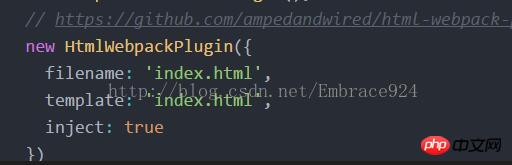
原本的webpack.dev.conf中有一个插件的设置内容
对这部分内容进行修改
var
config = require('../config')
var
webpack = require('webpack')
var
merge = require('webpack-merge')
var
utils = require('./utils')
var
baseWebpackConfig =
require('./webpack.base.conf')
var
HtmlWebpackPlugin =
require('html-webpack-plugin')
var path = require('path');
var glob = require('glob');
// add hot-reload related code to entry chunks
Object.keys(baseWebpackConfig.entry).forEach(function
 (name) {
baseWebpackConfig.entry[name] = ['./build/dev-client'].concat(baseWebpackConfig.entry[name])
})
module.exports =merge(baseWebpackConfig,
 {
module: {
loaders:
utils.styleLoaders({
sourceMap: config.dev.cssSourceMap })
},
// eval-source-map is faster for development
devtool:
'#eval-source-map',
plugins: [
new
webpack.DefinePlugin({
'process.env':config.dev.env
}),
// https://github.com/glenjamin/webpack-hot-middleware#installation--usage
new
webpack.optimize.OccurenceOrderPlugin(),
new
webpack.HotModuleReplacementPlugin(),
new
webpack.NoErrorsPlugin(),
// https://github.com/ampedandwired/html-webpack-plugin
]
})
function getEntry(globPath) {
var entries = {},
basename, tmp, pathname;
glob.sync(globPath).forEach(function(entry) {
basename = path.basename(entry, path.extname(entry));
tmp = entry.split('/').splice(-3);
pathname = basename; // 正确输出js和html的路径
entries[pathname] = entry;
});
console.log("dev-entrys:");
console.log(entries);
return entries;
}
var pages = getEntry('./pages/*.html');
console.log("dev pages----------------------");
for (var pathname in pages) {
console.log("filename:" + pathname + '.html');
console.log("template:" + pages[pathname]);
// 配置生成的html文件,定义路径等
var conf = {
filename: pathname + '.html',
template: pages[pathname], // 模板路径
minify: { //传递 html-minifier 选项给 minify 输出
removeComments: true
},
inject: 'body', // js插入位置
chunks: [pathname, "vendor", "manifest"] // 每个html引用的js模块,也可以在这里加上vendor等公用模块
};
// 需要生成几个html文件,就配置几个HtmlWebpackPlugin对象
module.exports.plugins.push(new HtmlWebpackPlugin(conf));
}
----------------------------------------------
webpack.prod.conf配置
和webpack.dev.conf.js中做类似的处理,
先注释掉原来的HtmlWebpackPlugin,然后在下面添加函数,
通过迭代插入多个HtmlWebpackPlugin。
var
path =require('path')
var
config =require('../config')
var
utils =require('./utils')
var
webpack =require('webpack')
var
merge =require('webpack-merge')
var
baseWebpackConfig =require('./webpack.base.conf')
var
ExtractTextPlugin =require('extract-text-webpack-plugin')
var
HtmlWebpackPlugin =require('html-webpack-plugin')
var
env =process.env.NODE_ENV ==='testing'
?
require('../config/test.env')
:
config.build.env
var
glob =require('glob');
module.exports =merge(baseWebpackConfig,
 {
module: {
loaders:
utils.styleLoaders({sourceMap:
config.build.productionSourceMap,extract:
true })
},
devtool:
config.build.productionSourceMap ?'#source-map' :
false,
output: {
path:
config.build.assetsRoot,
filename:
utils.assetsPath('js/[name].[chunkhash].js'),
chunkFilename:
utils.assetsPath('js/[id].[chunkhash].js')
},
vue: {
loaders:
utils.cssLoaders({
sourceMap:
config.build.productionSourceMap,
extract:
true
})
},
plugins: [
// http://vuejs.github.io/vue-loader/workflow/production.html
new
webpack.DefinePlugin({
'process.env':env
}),
new
webpack.optimize.UglifyJsPlugin({
compress: {
warnings:
false
}
}),
new
webpack.optimize.OccurenceOrderPlugin(),
// extract css into its own file
new
ExtractTextPlugin(utils.assetsPath('css/[name].[contenthash].css')),
// generate dist index.html with correct asset hash for caching.
// you can customize output by editing /index.html
// see https://github.com/ampedandwired/html-webpack-plugin
// new HtmlWebpackPlugin({
// filename: process.env.NODE_ENV === 'testing'
// ? 'index.html'
// : config.build.index,
// template: 'index.html',
// inject: true,
// minify: {
// removeComments: true,
// collapseWhitespace: true,
// removeAttributeQuotes: true
// // more options:
// // https://github.com/kangax/html-minifier#options-quick-reference
// },
// // necessary to consistently work with multiple chunks via CommonsChunkPlugin
// chunksSortMode: 'dependency'
// }),
// split vendor js into its own file
new
webpack.optimize.CommonsChunkPlugin({
name:
'vendor',
minChunks:
function (module,count) {
// any required modules inside node_modules are extracted to vendor
return (
module.resource &&
/\.js$/.test(module.resource)
 &&
module.resource.indexOf(
path.join(__dirname,'../node_modules')
) ===
0
)
}
}),
// extract webpack runtime and module manifest to its own file in order to
// prevent vendor hash from being updated whenever app bundle is updated
new
webpack.optimize.CommonsChunkPlugin({
name:
'manifest',
chunks: ['vendor']
})
]
})
if (config.build.productionGzip)
 {
var
CompressionWebpackPlugin =require('compression-webpack-plugin')
webpackConfig.plugins.push(
new
CompressionWebpackPlugin({
asset:
'[path].gz[query]',
algorithm:
'gzip',
test:
newRegExp(
'\\.(' +
config.build.productionGzipExtensions.join('|')
 +
')$'
),
threshold:
10240,
minRatio:
0.8
})
)
}
function getEntry(globPath) {
var entries = {},
basename, tmp,pathname;
glob.sync(globPath).forEach(function (entry) {
basename = path.basename(entry,path.extname(entry));
tmp = entry.split('/').splice(-3);
pathname = tmp.splice(0,1) + '/' + basename; // 正确输出js和html的路径
entries[pathname] =entry;
});
console.log("prod-entrys:");
console.log(entries);
return entries;
}
var pages =getEntry('./pages/*.html');
console.log("prod pages-----");
for (varpathname inpages) {

 console.log("filename:"+pathname +'.html');
console.log("template:"+pages[pathname]);
// 配置生成的html文件,定义路径等
var conf = {
filename: pathname +'.html',
template: pages[pathname],// 模板路径
minify:{ //
removeComments:true,
collapseWhitespace: false
},
inject: true,// js插入位置
chunks: [pathname,"vendor", "manifest"]// 每个html引用的js模块,也可以在这里加上vendor等公用模块
};
// 需要生成几个html文件,就配置几个HtmlWebpackPlugin对象
module.exports.plugins.push(newHtmlWebpackPlugin(conf));
}
上面是我整理给大家的,希望今后会对大家有帮助。
相关文章:




